
Overview
Siemens 6GK1571-0BA00-0AA0 Maintenance-Proven Spare Part for Factory Uptime
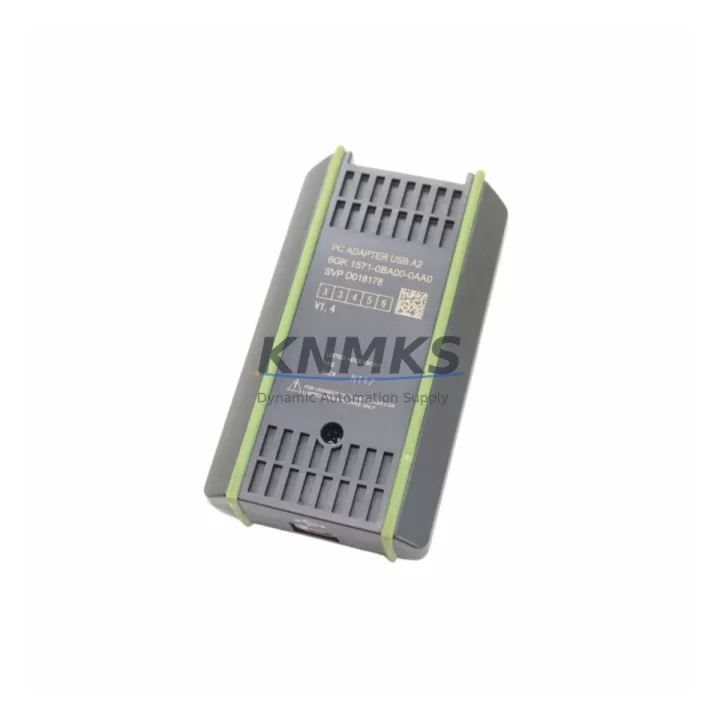
The Siemens 6GK1571-0BA00-0AA0 is a SIMATIC NET PC Adapter USB designed for PROFIBUS DP communication between a PC or programming device and a PROFIBUS network. As a critical interface component in industrial control cabinets, this adapter enables engineers to connect STEP 7, TIA Portal, and other SIMATIC software tools directly to the PROFIBUS DP bus — making it indispensable for commissioning, diagnostics, firmware updates, and emergency fault isolation on the plant floor.
In maintenance-driven environments, the 6GK1571-0BA00-0AA0 is frequently found in spare parts kits alongside S7-300, S7-400, and S7-1500 PLC systems. Its USB interface eliminates the need for a dedicated serial COM port, making it compatible with modern engineering laptops and industrial PCs without additional hardware configuration. For maintenance engineers managing aging PROFIBUS infrastructure, having a verified spare on the shelf is a direct risk mitigation strategy against unplanned downtime.
Spare Maintenance Table
| Part Number | 6GK1571-0BA00-0AA0 |
| Brand | Siemens |
| Series | SIMATIC NET |
| Product Type | PC Adapter USB / PROFIBUS DP Interface |
| Interface | USB 2.0 (PC side) / PROFIBUS DP (field side) |
| Bus Speed | 9.6 kbps – 12 Mbps (auto-detect) |
| Compatible Systems | S7-300, S7-400, S7-1500, ET 200 series, SIMATIC HMI panels |
| Software Compatibility | STEP 7 V5.x, TIA Portal V13+, SIMATIC NET software |
| Operating Temperature | 0 °C to +60 °C |
| Country of Origin | Germany |
| Installation | Plug-and-play USB; driver installation via SIMATIC NET CD or TIA Portal |
| Application Environment | Control cabinet, engineering station, field diagnostics |
| Maintenance Role | PROFIBUS diagnostics, PLC programming, firmware update, fault isolation |
| Support terms | 12 Months — pre-shipment tested, functional verification included |
Maintenance Planning for Continuous Operation
When replacing or stocking the 6GK1571-0BA00-0AA0, a thorough control cabinet inspection is strongly recommended to prevent secondary failures and ensure system-wide communication integrity. Maintenance engineers should verify the condition of the PROFIBUS DP cable termination resistors and bus connectors — particularly the 6ES7972-0BB52-0XA0 bus connector with integrated termination — as degraded connectors are a leading cause of intermittent PROFIBUS faults that are often misdiagnosed as adapter failures.
The PROFIBUS network’s power supply rail should also be checked. Siemens PS 307 or PS 305 power supply modules powering the S7-300 rack should be inspected for output voltage stability, especially in high-cycle environments. A failing power supply can cause erratic USB enumeration and communication timeouts that mimic a defective PC adapter.
For sites running ET 200M or ET 200S distributed I/O on the same PROFIBUS segment, the IM 153-2 or IM 151-3 interface modules should be confirmed as operational. A faulty interface module on a remote I/O station can corrupt the entire PROFIBUS segment, making the 6GK1571-0BA00-0AA0 appear non-functional during diagnostics.
If the engineering station connects to an S7-400 rack, inspect the CP 443-5 Extended communication processor for firmware currency and slot integrity. In multi-master PROFIBUS configurations, token-passing conflicts between the CP 443-5 and the PC adapter can cause bus access errors — a scenario that requires careful network configuration review rather than hardware replacement.
Annual maintenance schedules should also include inspection of the SIMATIC HMI panel (e.g., TP700 Comfort or KTP900 Basic) connected to the same PROFIBUS segment. HMI communication faults frequently surface during the same diagnostic session as PC adapter issues, and addressing both in a single maintenance window reduces total downtime. Additionally, fuse protection on the 24 VDC rail feeding the PROFIBUS segment should be verified — a blown fuse on the field power circuit is a common root cause of complete segment loss.
Site Replacement Workflow
Step 1 — Verify compatibility: Confirm the replacement 6GK1571-0BA00-0AA0 matches the installed SIMATIC NET software version on the engineering PC. TIA Portal V15 and above require the corresponding SIMATIC NET PC Software version for correct USB driver binding.
Step 2 — Safe disconnection: Before removing the existing adapter, set the PLC CPU to STOP mode and document the current PROFIBUS network configuration using STEP 7 or TIA Portal’s hardware configuration export. This ensures rapid restoration if the replacement requires re-parameterization.
Step 3 — Physical installation: Connect the 6GK1571-0BA00-0AA0 to a USB 2.0 port on the engineering station. Avoid USB hubs — direct connection to the PC motherboard port ensures stable enumeration. Connect the PROFIBUS DP sub-D9 connector to the bus.
Step 4 — Driver and interface verification: Allow Windows to complete driver installation via the SIMATIC NET software. Open the PG/PC interface settings in STEP 7 or TIA Portal and select the PC Adapter USB as the active interface. Run a bus diagnostic to confirm all PROFIBUS nodes are visible.
Step 5 — Functional test: Upload the PLC program or run a diagnostic scan to confirm full communication. Verify all I/O modules, HMI panels, and distributed I/O stations respond correctly before returning the system to RUN mode.
This workflow minimizes mean time to repair (MTTR) and ensures the replacement does not introduce new configuration errors into the PROFIBUS network.
Spare Parts Support FAQ
Q1: Is the 6GK1571-0BA00-0AA0 compatible with TIA Portal V17 and V18?
Yes. The 6GK1571-0BA00-0AA0 is compatible with TIA Portal V13 through V18 when the corresponding SIMATIC NET PC Software is installed. Always verify the SIMATIC NET software version matches your TIA Portal version to ensure correct USB driver support and interface recognition.
Q2: What is included in the support terms confirmed by quotation and pre-shipment testing?
Every unit shipped by KNMKS undergoes functional verification prior to dispatch, including USB enumeration testing and PROFIBUS communication confirmation. The support terms confirmed by quotation cover manufacturing defects and functional failures under normal operating conditions. Units showing physical damage from incorrect installation or overvoltage are excluded.
Q3: Can this adapter replace the older 6GK1571-0BA00-0AA0 revisions or the RS-232 PC Adapter (6ES7972-0CA23-0XA0)?
The 6GK1571-0BA00-0AA0 USB adapter is the direct replacement for earlier USB revisions of the same part number. It is not a direct drop-in for the RS-232 PC Adapter (6ES7972-0CA23-0XA0), as the interface type differs. For sites migrating from RS-232 to USB, the engineering PC’s PG/PC interface settings must be updated accordingly.
Q4: Do you support long-term supply for end-of-life SIMATIC NET components?
Yes. KNMKS maintains stock of SIMATIC NET communication components including PC adapters, CP modules, and PROFIBUS accessories to support long-term maintenance programs. For volume procurement, annual blanket orders, or EOL supply agreements, contact admin@knmks.com with your BOM and required delivery schedule.
© 2026 KNMKS. All rights reserved.
Original Source: https://knmks.com
Contact: admin@knmks.com | +86 18359268345
Product Identification
- Brand / Ecosystem
-
Siemens
Siemens - Model / Series
-
6GK1571-0BA00-0AA0
SIMATIC Series - Product Family
- PLCs & Controllers
- Availability Status
- Available on request after model and quantity confirmation
- Inquiry Type
- B2B RFQ, replacement inquiry and project spare-part request
- Pre-Quote Check
- Exact SKU, brand, series, quantity, nameplate photos and destination country are checked before quotation
System Path
Where this product fits in the KNMKS automation structure.
Specification & Inquiry Focus
- Control platform
- PLC, PAC and modular controllers
- Common needs
- CPU, rack, power and I/O expansion
- Project support
- Replacement, cabinet build and maintenance
Buyer Confirmation
Information KNMKS checks before replying.
- Exact model
- 6GK1571-0BA00-0AA0
- Brand / ecosystem
- Siemens
- Product family
- PLCs & Controllers
- Application note
- Replacement, maintenance, project build or spare-part list
- Useful photos
- Nameplate, installed unit, cabinet layout or connector side
- Delivery details
- Quantity, destination country and target schedule
Document Support
Files and notes can be confirmed during quotation.
- Product photos or nameplate confirmation when available
- Packing and delivery notes before quotation confirmation
- Support scope and delivery terms confirmed per inquiry
- Export document coordination for qualified B2B requests
Inquiry Support
- Model cross-checking before quotation
- CPU, power, rack and expansion module matching
- Support for replacement and project inquiry
What to Send Us
- Brand and exact model number: Siemens 6GK1571-0BA00-0AA0
- Quantity and required delivery time
- Application, replacement requirement or nameplate photo
- Destination country and shipping preference
RFQ Preparation
This is a product inquiry page built for RFQ communication.
Fast Model Check
Send this model to KNMKS for confirmation.
Include quantity, destination country and photos if this is a maintenance replacement. The inquiry will be saved with a reference number after submission.
Brand & Compatibility Note
KNMKS displays automation product information for well-known industrial brand ecosystems and compatible replacement references. Brand names are used for product identification and compatibility reference only; final availability and commercial terms are confirmed per quotation.
 Manufacturing
 Machine Tools
 Packaging
 Energy & Power



 HMI & Displays
 Servo Systems
 Variable Frequency Drives
 Sensors