
Overview
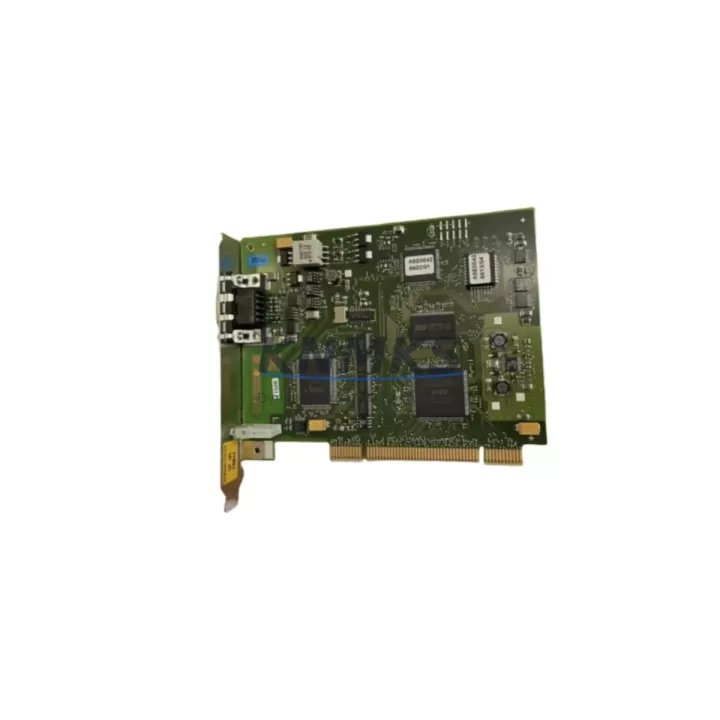
Siemens 6GK1561-1AA01 Migration-Ready PROFIBUS Card: Legacy System Migration and Compatible Upgrade
The Siemens 6GK1561-1AA01 — commercially designated as the CP 5611 A2 — is a PCI-slot PROFIBUS/MPI communication card engineered for STEP 7 programming environments and SIMATIC S7-300/S7-400 control platforms. As legacy automation infrastructure ages and OEM support windows close, the 6GK1561-1AA01 has become a critical spare-part and migration component for engineers tasked with keeping older production lines operational, extending the service life of existing control cabinets, or executing a phased transition toward modern SIMATIC S7-1500 or TIA Portal-based architectures.
Whether you are replacing a failed CP 5611 in a SCADA workstation, restoring PROFIBUS DP communication to a distributed I/O rack, or bridging an MPI link between a legacy S7-315 CPU and an HMI panel, the 6GK1561-1AA01 provides a verified, tested drop-in solution with a support terms confirmed by quotation and confirmed in-stock availability for immediate dispatch.
Migration Compatibility Table
| Parameter | Details |
|---|---|
| SKU / Part Number | 6GK1561-1AA01 (CP 5611 A2) |
| Interface | PCI slot (32-bit, 3.3 V / 5 V universal) |
| Communication Protocols | PROFIBUS DP (Master/Slave), MPI, PG/OP |
| Compatible Controllers | SIMATIC S7-300, S7-400, S7-1200 (via MPI adapter), WinCC/SCADA workstations |
| Replaces / Supersedes | 6GK1561-1AA00 (CP 5611), 6GK1561-2AA00 (CP 5612) in PCI environments |
| Installation Requirement | Standard PCI slot in IPC or engineering workstation; STEP 7 V5.x or TIA Portal driver required |
| Firmware Compatibility | Compatible with STEP 7 V5.4 and above; TIA Portal V13 SP1 and above with CP 5611 A2 driver package |
| Backplane / Rack | Not rack-mounted; installed in PC/IPC PCI slot; communicates to S7 rack via PROFIBUS cable |
| Commissioning Notes | Set PROFIBUS node address via STEP 7 HW Config; verify baud rate matches existing network (typically 1.5 Mbps); confirm termination resistors on cable ends |
| Support terms | 12 months from date of shipment; full functional test performed prior to dispatch |
Retrofit Planning for Existing Automation Systems
A successful retrofit using the 6GK1561-1AA01 begins well before the card is physically installed. Engineers should audit the existing PROFIBUS network topology — segment lengths, node counts, baud rate settings, and termination status — before removing the failed or obsolete communication card. In many legacy S7-300 installations, the PROFIBUS DP network connects the central CPU rack to remote ET 200M or ET 200S distributed I/O stations. Disrupting this link without a verified replacement on hand can halt the entire production cell.
When planning the retrofit, confirm that the host IPC or engineering workstation has an available PCI slot. Many older Siemens IPCs — such as the SIMATIC IPC427C or IPC547D — ship with a limited number of PCI slots, some of which may already be occupied by a CP 5512 PCMCIA adapter or a legacy graphics card. Slot availability must be physically verified before ordering.
On the software side, the 6GK1561-1AA01 requires the correct driver package for the operating system in use. Windows 7 (32/64-bit) and Windows 10 environments are both supported, but the driver installation sequence differs between STEP 7 Classic and TIA Portal projects. If the existing project was created in STEP 7 V5.5 and the replacement workstation runs TIA Portal V16, a project migration step using the TIA Portal Migration Tool is necessary before the CP 5611 A2 can be fully commissioned as the active PG/PC interface.
For installations where the 6GK1561-1AA01 is being used to restore MPI communication to a SIMATIC S7-315-2 DP CPU, engineers should also verify the MPI address assignment in the CPU properties. Duplicate MPI addresses on the same segment — a common issue after hardware swaps — will prevent the programming connection from establishing. The STEP 7 Accessible Nodes function can be used to scan the MPI bus and confirm address uniqueness before going online.
In control cabinet upgrade projects where the S7-300 rack is being retained but the SCADA workstation is being replaced, the 6GK1561-1AA01 is frequently paired with a SIMATIC S7-300 SM 321 digital input module or SM 322 digital output module to verify I/O signal integrity after the communication link is restored. Similarly, if the retrofit involves adding new distributed I/O nodes to an existing PROFIBUS segment, a CP 342-5 DP communication processor on the S7-300 rack may be required to handle the expanded node count without overloading the CPU’s integrated DP port.
For projects involving protocol migration — for example, transitioning from PROFIBUS DP to PROFINET IO — the 6GK1561-1AA01 serves as a bridging component during the transition period, maintaining PROFIBUS communication to legacy field devices while the new PROFINET infrastructure is being commissioned in parallel. In this scenario, a SIMATIC PN/DP coupler or IE/PB Link PN IO module is typically installed alongside the CP 5611 A2 to enable coexistence of both networks during the cutover phase.
Downtime Control During System Migration
Minimizing unplanned downtime is the primary concern in any legacy system migration. For the 6GK1561-1AA01, the recommended approach is a pre-staged swap: install and configure the replacement card in a parallel workstation or test bench before the scheduled maintenance window, verify the PROFIBUS connection to a representative S7-300 CPU, and confirm that the STEP 7 project uploads and downloads correctly. This pre-validation step eliminates the most common source of extended downtime — driver conflicts or address mismatches discovered only after the production system has been taken offline.
Before removing the existing CP 5611 card, back up the complete STEP 7 project — including all hardware configuration, symbol tables, and program blocks — to a secure network location. If the project includes WinCC HMI screens linked to PROFIBUS DP tags, export the WinCC project archive as well. This ensures that if the migration encounters an unexpected issue, the original program logic and HMI configuration can be restored without data loss.
During the physical swap, label all PROFIBUS cable connectors before disconnecting them. PROFIBUS DP connectors are keyed but not labeled from the factory, and in dense control cabinets with multiple DP segments, incorrect reconnection is a frequent cause of post-maintenance communication faults. After reinstalling the 6GK1561-1AA01 and reconnecting the PROFIBUS cable, power up the system and use the STEP 7 Hardware Diagnostics function to confirm that all DP slaves are reporting online before releasing the line back to production.
For sites with strict change-management requirements, the 6GK1561-1AA01 ships with a full functional test report, confirming that the card has been verified against PROFIBUS DP and MPI communication protocols prior to dispatch. This documentation supports the site acceptance test (SAT) process and reduces the validation burden on the commissioning engineer.
Retrofit Support FAQ
Q1: Is the 6GK1561-1AA01 a direct replacement for the 6GK1561-1AA00 (CP 5611)?
Yes. The 6GK1561-1AA01 (CP 5611 A2) is the direct hardware successor to the 6GK1561-1AA00 (CP 5611). It uses the same PCI form factor, supports the same PROFIBUS DP and MPI protocols, and is compatible with the same STEP 7 driver package. No hardware configuration changes are required in the STEP 7 HW Config when substituting the A2 revision for the original CP 5611.
Q2: What commissioning steps are required after installing the 6GK1561-1AA01 in a STEP 7 environment?
After physical installation, install the CP 5611 A2 driver package from the Siemens SIMATIC NET CD or download portal. Open STEP 7 and navigate to Set PG/PC Interface — select the CP 5611 A2 (PROFIBUS) or CP 5611 A2 (MPI) access point as appropriate. Confirm the PROFIBUS address and baud rate match the existing network configuration. Use the Accessible Nodes function to verify communication to the target CPU before attempting a program download.
Q3: Can the 6GK1561-1AA01 be used with TIA Portal and S7-1500 projects?
The 6GK1561-1AA01 supports TIA Portal V13 SP1 and above with the appropriate CP 5611 A2 driver. It can be used as the PG/PC interface for programming S7-1500 CPUs via MPI (where supported) or for maintaining PROFIBUS DP communication to legacy field devices in mixed S7-300/S7-1500 installations. For pure PROFINET environments, a CP 1612 A2 or CP 1616 card is recommended as the long-term replacement.
Q4: What support terms and stock availability does KNMKS provide for the 6GK1561-1AA01?
KNMKS maintains verified in-stock inventory of the 6GK1561-1AA01 with a support terms confirmed by quotation from the date of shipment. Each unit undergoes a full functional test — covering PROFIBUS DP and MPI communication verification — before dispatch. Same-day shipping is available for orders confirmed before the daily cut-off. For bulk or blanket orders supporting long-term maintenance programs, contact the sales team directly to discuss volume pricing and reserved stock arrangements.
© 2026 KNMKS. All rights reserved.
Original Source: https://knmks.com
Contact: admin@knmks.com | +86 18359268345
Product Identification
- Brand / Ecosystem
-
Siemens
Siemens - Model / Series
-
6GK1561-1AA01
SIMATIC Series - Product Family
- Communication Modules
- Availability Status
- Available on request after model and quantity confirmation
- Inquiry Type
- B2B RFQ, replacement inquiry and project spare-part request
- Pre-Quote Check
- Exact SKU, brand, series, quantity, nameplate photos and destination country are checked before quotation
System Path
Where this product fits in the KNMKS automation structure.
Specification & Inquiry Focus
- Network range
- Ethernet, fieldbus and gateway modules
- Common needs
- Protocol, port and controller family
- Project support
- Machine networking and data integration
Buyer Confirmation
Information KNMKS checks before replying.
- Exact model
- 6GK1561-1AA01
- Brand / ecosystem
- Siemens
- Product family
- Communication Modules
- Application note
- Replacement, maintenance, project build or spare-part list
- Useful photos
- Nameplate, installed unit, cabinet layout or connector side
- Delivery details
- Quantity, destination country and target schedule
Document Support
Files and notes can be confirmed during quotation.
- Product photos or nameplate confirmation when available
- Packing and delivery notes before quotation confirmation
- Support scope and delivery terms confirmed per inquiry
- Export document coordination for qualified B2B requests
Inquiry Support
- Industrial Ethernet and fieldbus module inquiry
- Protocol compatibility review
- Integration project inquiry support
What to Send Us
- Brand and exact model number: Siemens 6GK1561-1AA01
- Quantity and required delivery time
- Application, replacement requirement or nameplate photo
- Destination country and shipping preference
RFQ Preparation
This is a product inquiry page built for RFQ communication.
Fast Model Check
Send this model to KNMKS for confirmation.
Include quantity, destination country and photos if this is a maintenance replacement. The inquiry will be saved with a reference number after submission.
Brand & Compatibility Note
KNMKS displays automation product information for well-known industrial brand ecosystems and compatible replacement references. Brand names are used for product identification and compatibility reference only; final availability and commercial terms are confirmed per quotation.
 Manufacturing
 Machine Tools
 Packaging
 Energy & Power
 PLCs & Controllers
 HMI & Displays
 Servo Systems
 Variable Frequency Drives