
Overview
Siemens 6GK1561-1AA00 Maintenance-Proven Spare Part for Factory Uptime
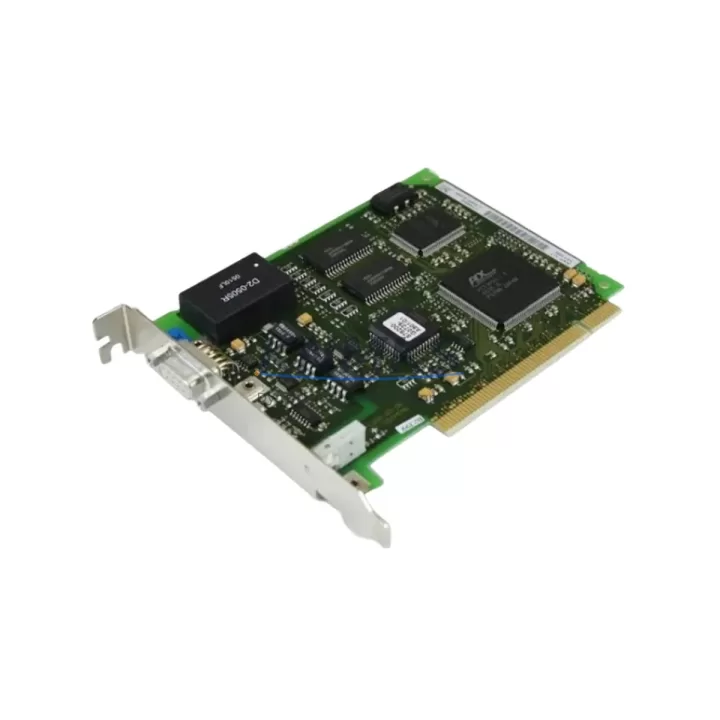
The Siemens 6GK1561-1AA00 is an original CP 5611 PROFIBUS DP communication card designed for PCI-slot integration in industrial PC platforms. As a critical interface between the host PC and PROFIBUS DP field networks, this card enables real-time communication with SIMATIC S7-300 and S7-400 PLCs, distributed I/O stations, drives, and process instrumentation. For maintenance engineers managing aging automation systems, securing a verified spare of the 6GK1561-1AA00 is a foundational step in any uptime protection strategy.
Whether you are responding to an unplanned communication fault, executing a scheduled annual overhaul, or building a forward stock buffer for a multi-line facility, the 6GK1561-1AA00 delivers the compatibility and reliability required to restore PROFIBUS DP connectivity without system reconfiguration. Each unit is pre-shipment tested and dispatched with a support terms confirmed by quotation, supporting both emergency replacement and long-term supply planning.
Spare Maintenance Table
| Parameter | Specification |
|---|---|
| Part Number / SKU | 6GK1561-1AA00 |
| Product Series | CP 5611 / SIMATIC NET |
| Interface Type | PROFIBUS DP, MPI |
| Host Interface | PCI (32-bit, 33 MHz) |
| Compatible PLC Families | SIMATIC S7-300, S7-400, WinCC, Step 7 |
| Operating Voltage | 3.3 V / 5 V (PCI bus supplied) |
| Max PROFIBUS Baud Rate | 12 Mbit/s |
| Operating Temperature | 0 °C to +60 °C |
| Country of Origin | Germany |
| Installation Environment | Industrial PC, SIMATIC IPC, PG/PC |
| Software Compatibility | STEP 7, TIA Portal, WinCC, SIMATIC NET |
| Support terms | 12 Months – Pre-shipment tested, original OEM part |
Maintenance Planning for Continuous Operation
When a PROFIBUS DP communication fault is traced to the 6GK1561-1AA00, experienced maintenance engineers know that the card itself is rarely the only component requiring attention. A thorough site inspection should accompany any CP 5611 replacement to prevent repeat failures and reduce the risk of secondary downtime.
Begin by verifying the integrity of the PROFIBUS cable and connectors at both the PC end and the field device termination points. Degraded shielding or loose 9-pin D-sub connectors on the PROFIBUS segment are a common root cause of intermittent communication errors that are incorrectly attributed to the card. Inspect the bus termination resistors at both ends of the PROFIBUS segment — incorrect termination is a frequent source of signal reflection and CRC errors.
Next, assess the industrial PC power supply unit. A PSU delivering marginal 5 V or 3.3 V rail voltage under load can cause PCI card instability and communication timeouts. If the IPC is also running a SIMATIC S7-300 CP 343-1 Ethernet module or a CP 340 serial communication module in the same rack, verify that the S7 rack power supply — typically a PS 307 or PS 305 — is within its rated output capacity. Overloaded rack power supplies are a leading cause of intermittent module faults in mixed-communication control cabinets.
For facilities running SIMATIC WinCC SCADA on the same IPC, confirm that the WinCC project’s PROFIBUS channel driver is correctly mapped to the new card after replacement. Driver re-assignment is required when the PCI slot position changes. Additionally, if the control cabinet houses a CP 5512 PCMCIA adapter or a CP 5711 USB-to-PROFIBUS adapter as a backup diagnostic interface, verify these remain functional and are not sharing IRQ resources with the newly installed 6GK1561-1AA00.
Procurement engineers should note that the 6GK1561-1AA00 is a long-lifecycle Siemens SIMATIC NET component. Maintaining one to two units in forward stock — alongside compatible PROFIBUS connectors such as the 6ES7972-0BB52-0XA0 and a spare PS 307 power supply module — provides a complete rapid-response kit for PROFIBUS DP communication recovery without waiting on OEM lead times.
Site Replacement Workflow
Step 1 – Isolate and document: Before removing the existing CP 5611 card, record the PROFIBUS node address, baud rate, and network topology from STEP 7 or TIA Portal. Export the hardware configuration as a backup.
Step 2 – Power down safely: Shut down the IPC via the operating system, then disconnect mains power. Ground yourself with an ESD wrist strap before handling the PCI card.
Step 3 – Physical swap: Remove the faulty 6GK1561-1AA00 from its PCI slot. Install the replacement unit in the same slot where possible to avoid driver re-mapping. Secure the card bracket and reconnect the PROFIBUS cable.
Step 4 – Software verification: Power on the IPC and confirm the card is recognized in Device Manager. Open STEP 7 or TIA Portal, verify the hardware configuration matches, and download to the PLC if required. Confirm PROFIBUS DP communication is restored by checking the diagnostic buffer for active faults.
Step 5 – System handover: Document the replacement date, new card serial number, and test results in the maintenance log. Update the spare parts inventory to trigger reorder of a replacement buffer unit.
This workflow supports a target recovery time of under two hours for a trained maintenance technician, minimizing production impact and ensuring full system compatibility is maintained without firmware or configuration changes.
Spare Parts Support FAQ
Q1: Is the 6GK1561-1AA00 compatible with both STEP 7 Classic and TIA Portal environments?
Yes. The CP 5611 card is supported under SIMATIC NET software for both STEP 7 V5.x and TIA Portal V13 and above. Ensure the correct SIMATIC NET PC Software version is installed for your operating system before replacement.
Q2: What is the recommended spare parts holding quantity for a facility with multiple PROFIBUS DP networks?
For facilities operating three or more PROFIBUS DP segments via IPC-hosted CP 5611 cards, a minimum buffer of two units is recommended. This covers both an immediate emergency replacement and a secondary unit while the first is returned to stock after testing.
Q3: How is each unit tested before shipment?
Every 6GK1561-1AA00 unit undergoes functional verification prior to dispatch, including PCI interface continuity checks and PROFIBUS DP communication validation. Units are shipped with original packaging where available and are covered by a support terms confirmed by quotation from the date of delivery.
Q4: Can this card replace older CP 5611 A2 or CP 5611 A3 variants?
The 6GK1561-1AA00 is the standard CP 5611 variant. Compatibility with A2 and A3 hardware revisions depends on the SIMATIC NET software version and PCI slot availability. Contact our technical team with your IPC model and current SIMATIC NET version to confirm direct interchangeability before ordering.
© 2026 KNMKS. All rights reserved.
Original Source: https://knmks.com
Contact: admin@knmks.com | +86 18359268345
Product Identification
- Brand / Ecosystem
-
Siemens
Siemens - Model / Series
-
6GK1561-1AA00
SIMATIC Series - Product Family
- Communication Modules
- Availability Status
- Available on request after model and quantity confirmation
- Inquiry Type
- B2B RFQ, replacement inquiry and project spare-part request
- Pre-Quote Check
- Exact SKU, brand, series, quantity, nameplate photos and destination country are checked before quotation
System Path
Where this product fits in the KNMKS automation structure.
Specification & Inquiry Focus
- Network range
- Ethernet, fieldbus and gateway modules
- Common needs
- Protocol, port and controller family
- Project support
- Machine networking and data integration
Buyer Confirmation
Information KNMKS checks before replying.
- Exact model
- 6GK1561-1AA00
- Brand / ecosystem
- Siemens
- Product family
- Communication Modules
- Application note
- Replacement, maintenance, project build or spare-part list
- Useful photos
- Nameplate, installed unit, cabinet layout or connector side
- Delivery details
- Quantity, destination country and target schedule
Document Support
Files and notes can be confirmed during quotation.
- Product photos or nameplate confirmation when available
- Packing and delivery notes before quotation confirmation
- Support scope and delivery terms confirmed per inquiry
- Export document coordination for qualified B2B requests
Inquiry Support
- Industrial Ethernet and fieldbus module inquiry
- Protocol compatibility review
- Integration project inquiry support
What to Send Us
- Brand and exact model number: Siemens 6GK1561-1AA00
- Quantity and required delivery time
- Application, replacement requirement or nameplate photo
- Destination country and shipping preference
RFQ Preparation
This is a product inquiry page built for RFQ communication.
Fast Model Check
Send this model to KNMKS for confirmation.
Include quantity, destination country and photos if this is a maintenance replacement. The inquiry will be saved with a reference number after submission.
Brand & Compatibility Note
KNMKS displays automation product information for well-known industrial brand ecosystems and compatible replacement references. Brand names are used for product identification and compatibility reference only; final availability and commercial terms are confirmed per quotation.
 Manufacturing
 Machine Tools
 Packaging
 Energy & Power
 PLCs & Controllers
 HMI & Displays
 Servo Systems
 Variable Frequency Drives