
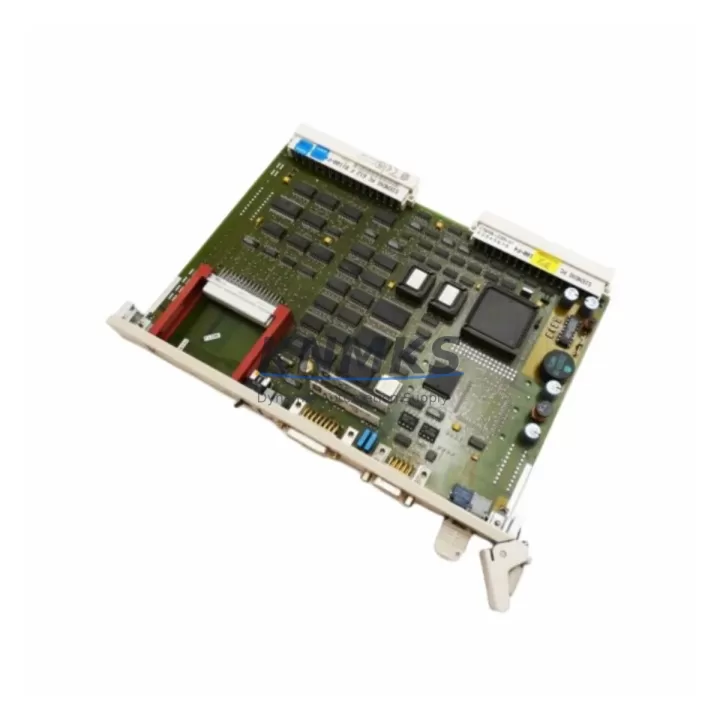
Overview
Siemens 6GK1543-1AA01 Maintenance-Proven Spare Part for Factory Uptime
The Siemens 6GK1543-1AA01 (CP5431) is a PROFIBUS DP/FMS communications processor designed for integration into Siemens S5 programmable logic controller systems. In industrial environments where legacy S5 platforms continue to anchor critical production lines, maintaining a verified stock of the 6GK1543-1AA01 is a fundamental element of any responsible spare parts strategy. This module enables reliable data exchange between S5 CPUs and PROFIBUS DP/FMS field devices, and its failure — whether from age, electrical surge, or connector wear — can result in immediate line stoppage.
At KNMKS, every 6GK1543-1AA01 unit is sourced through verified supply channels, inspected upon receipt, and tested prior to shipment. Our inventory supports maintenance engineers and procurement teams who require fast, dependable access to original-compatible S5 communication spares — without the lead times associated with OEM ordering or the risk of uncertified substitutes.
Spare Maintenance Table
| Part Number | 6GK1543-1AA01 |
| Module Designation | CP5431 Communications Processor |
| Brand | Siemens |
| Series | SIMATIC S5 / SINEC L2 |
| Protocol Support | PROFIBUS DP, PROFIBUS FMS |
| Compatible Systems | S5-115U, S5-135U, S5-155U (with appropriate backplane slot) |
| Interface | 9-pin Sub-D PROFIBUS connector |
| Supply Voltage | 5 VDC (via S5 backplane) |
| Operating Temperature | 0 °C to +60 °C |
| Mounting | S5 subrack slot (module format) |
| Country of Origin | Germany |
| Product Type | PLC Communication Module |
| Condition | Original-compatible; tested before shipment |
| Support terms | 12 Months |
| Shipping | Global express; DHL / FedEx / TNT available |
Maintenance Planning for Continuous Operation
When a 6GK1543-1AA01 CP5431 module is flagged for replacement during a scheduled inspection or emergency fault isolation, the scope of the maintenance task should extend beyond the module itself. Experienced maintenance engineers understand that a communication failure in an S5 system is rarely isolated — it often reflects broader stress on the control cabinet’s electrical environment.
Before reinstalling a replacement CP5431, verify the integrity of the PROFIBUS cable termination resistors and the 9-pin Sub-D connector at both ends of the segment. Degraded cable shielding or improper bus termination is a leading cause of repeat CP failures. Inspect the S5 backplane power rails for voltage stability; the 6ES7 405-series or equivalent S5 power supply modules should be checked for output ripple and load capacity, particularly in cabinets that have been in service for more than ten years.
In the same maintenance window, review the S5 CPU module — such as the 6ES5 944 or 6ES5 928 series — for battery backup status and memory module condition. A CP5431 replacement that is paired with a CPU running on a depleted backup battery introduces unnecessary risk of program loss during the next power cycle. Similarly, inspect any installed 6ES5 316 or 6ES5 318 interface modules that share the same subrack, as backplane connector wear can cause intermittent communication errors that are misdiagnosed as CP faults.
For sites running mixed PROFIBUS DP and FMS topologies, confirm that the replacement 6GK1543-1AA01 firmware version is compatible with the existing GSD files and master configuration. Where PROFIBUS segments connect to third-party drives, valve positioners, or remote I/O stations, a brief bus scan after module swap will confirm that all slaves are responding before production resumes. If the site uses a PROFIBUS diagnostic repeater or bus monitor, connect it during commissioning to verify signal quality on the segment.
Procurement engineers managing multi-site S5 installations should consider holding at least one 6GK1543-1AA01 per active PROFIBUS segment as a cold standby. Given the age of the S5 platform and the declining availability of new-old-stock units on the open market, early procurement reduces both cost and lead-time risk. KNMKS maintains ongoing inventory of this reference and can support blanket order arrangements for facilities with multiple S5 systems.
Site Replacement Workflow
Step 1 — Preparation: Download and archive the existing CP5431 configuration using STEP 5 COM PROFIBUS software before powering down. Confirm the replacement 6GK1543-1AA01 part number and firmware revision match the outgoing unit’s configuration requirements.
Step 2 — Safe Isolation: Follow site LOTO procedures. Power down the S5 subrack. Discharge any residual voltage on the backplane before handling the module. Label all PROFIBUS cable connections before disconnection.
Step 3 — Module Swap: Remove the faulty CP5431 from its subrack slot. Inspect the backplane connector pins for damage or oxidation. Seat the replacement 6GK1543-1AA01 firmly and reconnect the PROFIBUS cable with correct termination at the segment endpoints.
Step 4 — Configuration Restore: Power up the subrack. Use COM PROFIBUS to reload the saved CP configuration. Verify that the module initializes correctly and that all configured PROFIBUS slaves appear online in the diagnostic view.
Step 5 — Functional Verification: Confirm I/O data exchange is active between the CP5431 and all field devices on the segment. Check for any bus fault LEDs or error codes on the CP module front panel. Run a short production cycle under supervision before returning the line to full operation.
This workflow minimizes downtime and ensures that the replacement module is fully validated before the maintenance team clears the work order. For sites without on-site STEP 5 capability, KNMKS can provide pre-configured units upon request.
Spare Parts Support FAQ
Q1: Is the 6GK1543-1AA01 still available as a new unit, or is it end-of-life?
The CP5431 has been discontinued by Siemens as part of the broader S5 platform phase-out. However, original-compatible units remain available through specialist industrial spare parts suppliers. KNMKS sources verified stock and tests each unit before shipment to ensure functional reliability equivalent to new production.
Q2: How do I confirm compatibility between the replacement CP5431 and my existing S5 system?
Compatibility depends on the S5 CPU type, subrack model, and PROFIBUS configuration (DP vs. FMS, baud rate, number of slaves). Provide your CPU part number and COM PROFIBUS project file details to our technical team at admin@knmks.com, and we will confirm compatibility before order confirmation.
Q3: What testing is performed before the unit is shipped?
Each 6GK1543-1AA01 unit undergoes functional verification including power-on initialization, PROFIBUS interface continuity, and backplane connector inspection. Units that do not pass testing are not shipped. A test report is available upon request for quality-critical procurement processes.
Q4: What support terms and long-term supply support does KNMKS provide?
All units carry a support terms confirmed by quotation covering functional defects under normal operating conditions. KNMKS maintains ongoing inventory of S5-era communication modules and can support long-term supply agreements for facilities managing extended S5 platform lifecycles. Contact admin@knmks.com for volume pricing and blanket order terms.
© 2026 KNMKS. All rights reserved.
Original Source: https://knmks.com
Contact: admin@knmks.com | +86 18359268345
Product Identification
- Brand / Ecosystem
-
Siemens
Siemens - Model / Series
-
6GK1543-1AA01
SIMATIC Series - Product Family
- PLCs & Controllers
- Availability Status
- Available on request after model and quantity confirmation
- Inquiry Type
- B2B RFQ, replacement inquiry and project spare-part request
- Pre-Quote Check
- Exact SKU, brand, series, quantity, nameplate photos and destination country are checked before quotation
System Path
Where this product fits in the KNMKS automation structure.
Specification & Inquiry Focus
- Control platform
- PLC, PAC and modular controllers
- Common needs
- CPU, rack, power and I/O expansion
- Project support
- Replacement, cabinet build and maintenance
Buyer Confirmation
Information KNMKS checks before replying.
- Exact model
- 6GK1543-1AA01
- Brand / ecosystem
- Siemens
- Product family
- PLCs & Controllers
- Application note
- Replacement, maintenance, project build or spare-part list
- Useful photos
- Nameplate, installed unit, cabinet layout or connector side
- Delivery details
- Quantity, destination country and target schedule
Document Support
Files and notes can be confirmed during quotation.
- Product photos or nameplate confirmation when available
- Packing and delivery notes before quotation confirmation
- Support scope and delivery terms confirmed per inquiry
- Export document coordination for qualified B2B requests
Inquiry Support
- Model cross-checking before quotation
- CPU, power, rack and expansion module matching
- Support for replacement and project inquiry
What to Send Us
- Brand and exact model number: Siemens 6GK1543-1AA01
- Quantity and required delivery time
- Application, replacement requirement or nameplate photo
- Destination country and shipping preference
RFQ Preparation
This is a product inquiry page built for RFQ communication.
Fast Model Check
Send this model to KNMKS for confirmation.
Include quantity, destination country and photos if this is a maintenance replacement. The inquiry will be saved with a reference number after submission.
Brand & Compatibility Note
KNMKS displays automation product information for well-known industrial brand ecosystems and compatible replacement references. Brand names are used for product identification and compatibility reference only; final availability and commercial terms are confirmed per quotation.
 Manufacturing
 Machine Tools
 Packaging
 Energy & Power



 HMI & Displays
 Servo Systems
 Variable Frequency Drives
 Sensors