
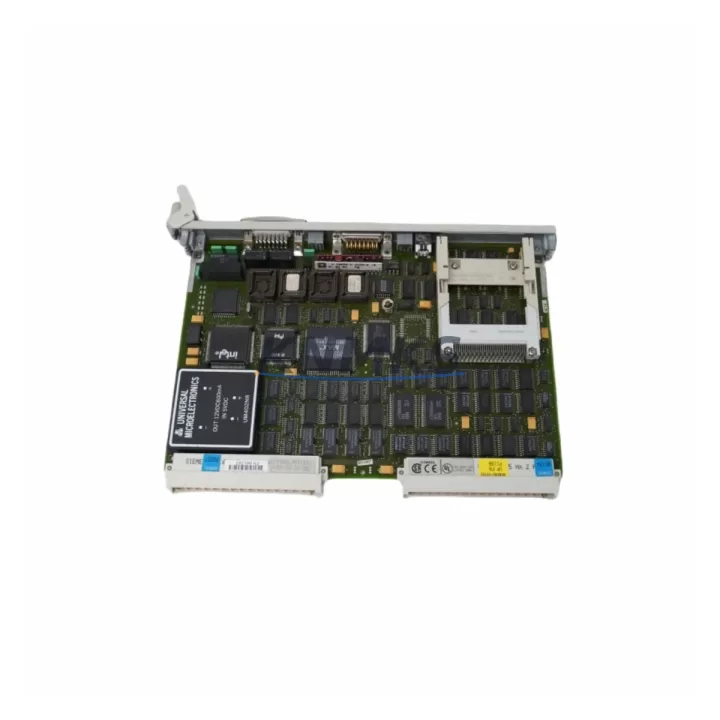
Overview
Siemens 6GK1503-3CD00 Migration-Ready Optical Link Module: Legacy System Migration and Compatible Upgrade
The Siemens 6GK1503-3CD00 is a fiber-optic link module designed for SINEC L2 FO (Fiber Optic) networks operating under the PROFIBUS protocol standard. As industrial automation systems age and original equipment manufacturers discontinue legacy components, the 6GK1503-3CD00 has become a critical spare part and drop-in replacement for facilities running older Siemens S5 and early S7 control architectures. Whether you are managing a planned retrofit, responding to an unplanned component failure, or executing a phased migration from a legacy SINEC L2 network to a modern PROFIBUS DP or PROFINET infrastructure, this module provides the optical signal conversion and network bridging capability required to maintain control continuity during the transition period.
Engineers undertaking a retrofit or replacement project involving the 6GK1503-3CD00 should begin by confirming several key parameters before installation. Power supply compatibility is the first checkpoint: the module operates on 24 VDC and must be verified against the existing cabinet power budget, particularly when the control panel also houses a Siemens PS 307 or PS 405 power supply module that may already be near capacity after years of incremental I/O expansion. Terminal wiring must be inspected against the original network topology diagram, as fiber connector types (BFOC/2.5, also known as ST connectors) must match the installed fiber patch cables and OLM port configuration. If the existing installation uses a ring topology for fault tolerance, the replacement module must be configured to match the original redundancy mode to avoid network segmentation during commissioning.
Backplane interface and rack slot compatibility should also be confirmed. In S5-based systems, the 6GK1503-3CD00 is typically installed in a dedicated communications slot within the S5-115U, S5-135U, or S5-155U rack. When migrating toward an S7-300 or S7-400 platform, engineers often introduce a CP 342-5 or CP 443-5 communications processor alongside the OLM to bridge the PROFIBUS DP segment, allowing the optical link module to continue serving legacy field devices — such as ET 200M distributed I/O stations or older Siemens OP 7 and OP 17 HMI panels — while the new controller takes over supervisory functions. Module addressing must be re-verified after any rack change, as PROFIBUS station addresses assigned to the OLM and downstream devices must remain consistent with the existing GSD file configuration loaded in STEP 7 or TIA Portal.
Migration Compatibility Table
| Parameter | Specification / Retrofit Note |
|---|---|
| SKU / Part Number | 6GK1503-3CD00 |
| Brand / Series | Siemens SINEC L2 FO / PROFIBUS OLM Series |
| Communication Protocol | PROFIBUS DP / FMS, SINEC L2 FO fiber optic |
| Fiber Connector Type | BFOC/2.5 (ST) — verify existing cable termination before installation |
| Supply Voltage | 24 VDC — confirm cabinet power budget prior to retrofit |
| Compatible Racks | Siemens S5-115U / S5-135U / S5-155U; verify slot assignment |
| Replacement Compatibility | Direct replacement for 6GK1503-3CB00, 6GK1503-3CA00 (confirm firmware revision) |
| Protocol Migration Path | SINEC L2 FO → PROFIBUS DP → PROFINET (phased migration supported) |
| HMI Compatibility | Compatible with OP 7, OP 17, TP 270 panels via PROFIBUS MPI/DP |
| Installation Space | Standard DIN rail / rack slot — confirm physical clearance in existing cabinet |
| Firmware Compatibility | Verify OLM firmware version against STEP 7 v5.x / TIA Portal project requirements |
| Support terms | support terms confirmed by quotation — covered from date of shipment |
| Outgoing Test | Function-tested prior to shipment; test report available on request |
| Stock Status | availability confirmed by RFQ — ready for immediate dispatch |
Retrofit Planning for Existing Automation Systems
A successful retrofit involving the 6GK1503-3CD00 requires a structured approach to component selection and sequencing. In most legacy SINEC L2 FO installations, the optical link module operates as the physical layer bridge between the copper-based PROFIBUS segment at the controller side and the fiber optic ring or star topology connecting remote I/O stations. When planning the replacement, engineers should map the full network segment: identify all connected nodes, confirm their PROFIBUS addresses, and document the fiber run lengths and connector types before ordering replacement hardware.
In practice, the 6GK1503-3CD00 is frequently replaced or upgraded alongside related components in the same control cabinet. A Siemens SITOP PSU100S or PSU300S power supply module is often evaluated at the same time, since aging power supplies in legacy panels can cause intermittent voltage drops that mimic OLM faults. Similarly, if the retrofit involves expanding the I/O count, engineers may add an ET 200S or ET 200M distributed I/O station to the PROFIBUS segment served by the replacement OLM, taking advantage of the fiber backbone’s noise immunity in environments with heavy motor drives or welding equipment.
For systems where the controller is also being upgraded, a Siemens CP 5611 or CP 5613 PROFIBUS communication card installed in the engineering workstation allows STEP 7 or TIA Portal to maintain a live connection to the PROFIBUS segment during commissioning, enabling online monitoring of the OLM’s port status and network diagnostics without interrupting production. If the migration path includes a transition to PROFINET, a Siemens IE/PB Link PN IO module can be introduced to bridge the existing PROFIBUS segment — including the 6GK1503-3CD00 fiber ring — into the new Ethernet-based network, preserving the investment in existing field wiring and fiber infrastructure while the controller platform is modernized.
HMI screen updates are another consideration during OLM replacement. Older Siemens OP 17 or TP 270 panels connected via PROFIBUS MPI may require tag address verification after any network reconfiguration, particularly if the OLM replacement changes the segment’s bus parameters or baud rate settings. Ensuring that the HMI project file in WinCC flexible or ProTool matches the updated network configuration prevents communication timeouts after restart.
Downtime Control During System Migration
Minimizing unplanned downtime is the primary concern when replacing a communications module in an active production environment. For the 6GK1503-3CD00, the recommended approach is to pre-configure the replacement module offline — setting the correct PROFIBUS address, baud rate, and port mode — before the scheduled maintenance window begins. This reduces the in-cabinet swap time to a physical replacement and fiber reconnection, typically achievable within 15 to 30 minutes for a trained technician familiar with the existing network topology.
Where the production process permits, a hot-standby approach can be implemented by temporarily introducing a second PROFIBUS segment with a parallel OLM, allowing the controller to switch communication paths while the primary module is replaced. This approach is particularly effective in S7-400H redundant controller configurations, where the standby CPU can maintain process control while the active CPU’s communication path is briefly interrupted.
Before powering down the existing OLM, engineers should export the current STEP 7 or TIA Portal project, including the hardware configuration and network topology, and store a backup on a local engineering workstation. This ensures that if the replacement module requires a firmware update or parameter adjustment, the original program logic and I/O mapping can be restored without relying on the live controller. After the replacement is installed and fiber connections are verified, a controlled restart of the PROFIBUS segment — monitoring each node’s diagnostic LED and the OLM’s port status indicators — confirms network integrity before returning the system to automatic mode.
Field commissioning should include a loop test of all critical I/O signals routed through the fiber segment, verification of the HMI communication link, and a timed response check of any safety-relevant interlocks that depend on the PROFIBUS network. Documenting the post-retrofit network diagnostics provides a baseline for future maintenance and supports the support terms confirmed by quotation claim process if any issues arise after installation.
Retrofit Support FAQ
Q: Is the 6GK1503-3CD00 a direct replacement for the 6GK1503-3CB00 or 6GK1503-3CA00?
A: The 6GK1503-3CD00 is functionally compatible with earlier revisions in the SINEC L2 FO OLM family, including the 6GK1503-3CB00 and 6GK1503-3CA00. However, engineers should confirm the firmware revision and port configuration of the existing installation, as later hardware revisions may include updated bus parameter defaults. We recommend comparing the order data and product information sheets before installation.
Q: What pre-shipment testing is performed on the 6GK1503-3CD00?
A: Each unit undergoes functional testing prior to shipment, including power-on verification, port status confirmation, and optical signal integrity checks. A test report is available on request. All units are covered by a support terms confirmed by quotation from the date of shipment.
Q: How do I verify wiring and fiber connector compatibility before installation?
A: The 6GK1503-3CD00 uses BFOC/2.5 (ST-type) fiber connectors. Confirm that the existing fiber patch cables in your installation use the same connector type and that the fiber core diameter (62.5/125 µm multimode) matches the module’s optical specifications. For copper-side terminal wiring, refer to the original network topology diagram and verify the 24 VDC supply connection and PROFIBUS bus connector pinout against the module’s installation manual.
Q: What is the typical lead time and stock availability?
A: The 6GK1503-3CD00 is held availability confirmed by RFQ and available for immediate dispatch. Standard delivery is 3–7 business days depending on destination. For urgent replacement requirements, expedited shipping options are available — contact our sales team to confirm current inventory levels and arrange priority dispatch.
© 2026 KNMKS. All rights reserved.
Original Source: https://knmks.com
Contact: admin@knmks.com | +86 18359268345
Product Identification
- Brand / Ecosystem
-
Siemens
Siemens - Model / Series
-
6GK1503-3CD00
SIMATIC Series - Product Family
- PLCs & Controllers
- Availability Status
- Available on request after model and quantity confirmation
- Inquiry Type
- B2B RFQ, replacement inquiry and project spare-part request
- Pre-Quote Check
- Exact SKU, brand, series, quantity, nameplate photos and destination country are checked before quotation
System Path
Where this product fits in the KNMKS automation structure.
Specification & Inquiry Focus
- Control platform
- PLC, PAC and modular controllers
- Common needs
- CPU, rack, power and I/O expansion
- Project support
- Replacement, cabinet build and maintenance
Buyer Confirmation
Information KNMKS checks before replying.
- Exact model
- 6GK1503-3CD00
- Brand / ecosystem
- Siemens
- Product family
- PLCs & Controllers
- Application note
- Replacement, maintenance, project build or spare-part list
- Useful photos
- Nameplate, installed unit, cabinet layout or connector side
- Delivery details
- Quantity, destination country and target schedule
Document Support
Files and notes can be confirmed during quotation.
- Product photos or nameplate confirmation when available
- Packing and delivery notes before quotation confirmation
- Support scope and delivery terms confirmed per inquiry
- Export document coordination for qualified B2B requests
Inquiry Support
- Model cross-checking before quotation
- CPU, power, rack and expansion module matching
- Support for replacement and project inquiry
What to Send Us
- Brand and exact model number: Siemens 6GK1503-3CD00
- Quantity and required delivery time
- Application, replacement requirement or nameplate photo
- Destination country and shipping preference
RFQ Preparation
This is a product inquiry page built for RFQ communication.
Fast Model Check
Send this model to KNMKS for confirmation.
Include quantity, destination country and photos if this is a maintenance replacement. The inquiry will be saved with a reference number after submission.
Brand & Compatibility Note
KNMKS displays automation product information for well-known industrial brand ecosystems and compatible replacement references. Brand names are used for product identification and compatibility reference only; final availability and commercial terms are confirmed per quotation.
 Manufacturing
 Machine Tools
 Packaging
 Energy & Power



 HMI & Displays
 Servo Systems
 Variable Frequency Drives
 Sensors