
Overview
Siemens 6GK1503-3CB00 Migration-Ready OLM for Legacy PROFIBUS Systems
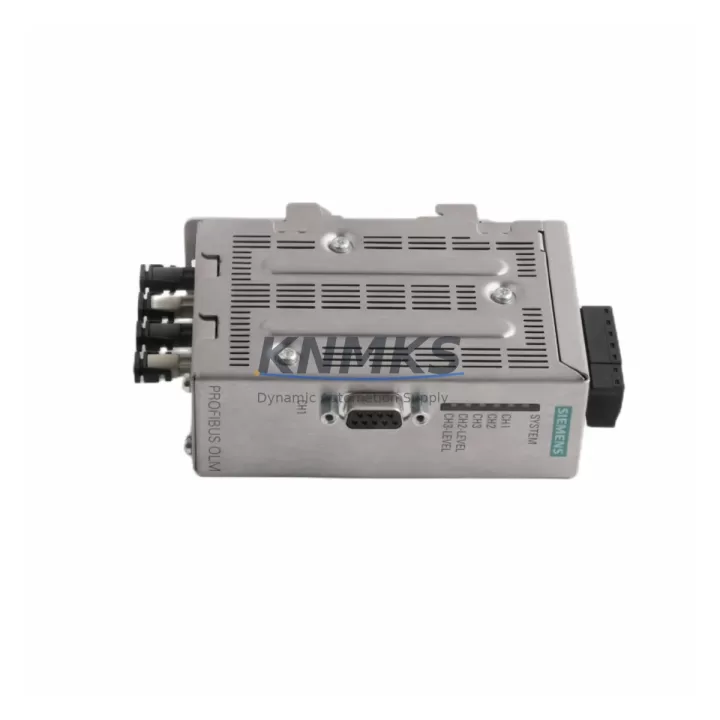
The Siemens 6GK1503-3CB00 (OLM/G12 V4.0) is a PROFIBUS Optical Link Module designed for glass fiber optic networks operating at up to 12 Mbit/s. As legacy PROFIBUS infrastructure ages and original OLM variants approach or pass end-of-life, the 6GK1503-3CB00 has become a critical retrofit component for engineers tasked with sustaining, modernizing, or partially migrating existing automation networks without full system replacement.
This module supports two glass fiber optic ports and one RS-485 electrical port, making it a direct functional successor to earlier single-port OLM variants such as the OLM/G11 (6GK1503-2CB00) and OLM/P11 (6GK1503-1CB00). When planning a retrofit, engineers must verify that the existing fiber cable type (62.5/125 µm or 50/125 µm multimode) matches the optical interface specification of the 6GK1503-3CB00, and that the segment length does not exceed the module’s rated optical budget. Mismatched fiber grades are a common source of intermittent communication faults during changeover.
Power supply compatibility is a mandatory pre-installation check. The 6GK1503-3CB00 operates on 24 V DC (18–32 V), and the existing control cabinet power rail must be confirmed to supply adequate current — typically sourced from a SITOP PSU100S or equivalent 24 V regulated supply already present in the panel. If the cabinet uses an older unregulated supply, voltage ripple under load may cause the OLM to reset intermittently, which is often misdiagnosed as a network fault rather than a power quality issue.
Migration Compatibility Table
| Parameter | 6GK1503-3CB00 (OLM/G12 V4.0) | Legacy OLM/G11 (6GK1503-2CB00) | Notes |
|---|---|---|---|
| Fiber Ports | 2 × Glass Fiber (ST connector) | 1 × Glass Fiber (ST connector) | Topology upgrade: ring or redundant line possible with G12 |
| RS-485 Port | 1 × Sub-D 9-pin | 1 × Sub-D 9-pin | Direct terminal-compatible; verify bus termination resistors |
| Supply Voltage | 24 V DC (18–32 V) | 24 V DC (18–32 V) | Same power rail; verify current capacity ≥ 200 mA |
| Max Baud Rate | 12 Mbit/s | 12 Mbit/s | No baud rate reconfiguration required |
| Mounting | DIN rail or wall mount | DIN rail or wall mount | Same footprint; confirm DIN rail space for second fiber port clearance |
| Optical Fiber Type | 62.5/125 µm or 50/125 µm multimode | 62.5/125 µm multimode | Verify installed cable grade before replacement |
| Redundancy Support | Yes (optical ring) | No | Upgrade opportunity: enable ring redundancy without new cabling |
| Commissioning Tool | STEP 7 / TIA Portal / SIMATIC NET | STEP 7 / SIMATIC NET | No GSD file change required for drop-in replacement |
| Support terms | support terms confirmed by quotation | Tested before shipment | Certificate available on request | ||
Retrofit Planning for Existing Automation Systems
A successful retrofit using the 6GK1503-3CB00 begins well before the module arrives on site. The first step is a full audit of the existing PROFIBUS segment: document every slave address, verify the GSD files loaded in STEP 7 or TIA Portal, and export the current hardware configuration as a backup. If the network includes a CP 342-5 or CP 443-5 communications processor on the PLC rack, confirm that the DP master parameters — particularly the bus parameters and watchdog time — are compatible with the new optical segment length introduced by the G12 module.
In cabinets where the OLM is mounted alongside a SIMATIC S7-300 or S7-400 rack, physical space must be re-evaluated. The OLM/G12 requires clearance on both fiber port sides for ST connector insertion and cable bend radius. If the cabinet also houses a DP/PA coupler for PROFIBUS PA field instruments, the optical segment must be correctly terminated at both ends to prevent signal reflection errors that can cause spurious diagnostics on the PA side.
For systems that include an HMI — such as a SIMATIC TP or MP panel connected via PROFIBUS — the HMI project must be checked for any hardcoded network addresses or communication timeout settings that may need adjustment after the optical segment is extended or reconfigured. In most cases, the HMI connection survives a drop-in OLM replacement without modification, but this must be verified during the commissioning window rather than assumed.
Where the retrofit involves adding ring redundancy (a key advantage of the G12 over the G11), the second fiber port must be connected to close the ring before the module is powered. Powering the module with only one fiber port connected in a ring topology will cause the module to enter a fault state and may generate a bus fault alarm at the DP master. The ring closure sequence should be documented in the site-specific retrofit procedure and confirmed with the control room operator before execution.
Spare components that should be staged on-site during the retrofit window include: a replacement 24 V DC fuse for the OLM power feed, a spare ST fiber patch cord of the correct grade, and a PROFIBUS bus connector with integrated termination resistor for the RS-485 port. Having a PROFIBUS tester or a laptop with SIMATIC NET diagnostics available during commissioning significantly reduces the risk of extended downtime if a wiring or addressing issue is discovered after the new module is installed.
Downtime Control During System Migration
Minimizing downtime during an OLM replacement requires a structured changeover plan. The recommended approach is to perform the replacement during a scheduled maintenance window, with the PLC placed in STOP mode only for the duration of the physical swap — typically under 15 minutes for an experienced technician. Before entering STOP, the current program and hardware configuration should be uploaded from the CPU (S7-300, S7-400, or equivalent) and saved to a project backup, ensuring that the original logic can be restored immediately if the replacement introduces an unexpected fault.
If the system cannot tolerate a full STOP, a partial migration strategy can be used: the new OLM/G12 is pre-wired and powered in parallel with the existing OLM, and the fiber connections are transferred one port at a time while monitoring the PROFIBUS diagnostic buffer in STEP 7 or TIA Portal online mode. This approach is particularly effective in systems where the PROFIBUS segment serves both critical I/O and non-critical devices, allowing the critical devices to remain online during the transition.
After the replacement, the first commissioning check should be a full PROFIBUS network scan to confirm that all slave addresses are responding and that no devices are reporting diagnostic alarms. The optical signal level indicators on the OLM/G12 front panel provide an immediate visual confirmation of fiber link quality and should be checked before the PLC is returned to RUN mode. Any device that does not respond within the expected watchdog time should be investigated before resuming normal production, as a missing slave in RUN mode will trigger a CPU STOP on most S7 configurations unless the DP master is configured for deactivated slaves mode.
Retrofit Support FAQ
Q1: Is the 6GK1503-3CB00 a direct drop-in replacement for the 6GK1503-2CB00 (OLM/G11)?
Yes, for the RS-485 port and power connections. The G12 adds a second fiber port, which can be left unconnected for a simple drop-in replacement or used to enable ring redundancy. No GSD file change or DP master reconfiguration is required for a basic substitution.
Q2: What commissioning steps are required after installation?
After physical installation and power-up, verify the optical link LEDs on both fiber ports, perform a PROFIBUS network scan in STEP 7 or TIA Portal, and confirm all slave addresses are responding. If ring redundancy is enabled, test the redundancy switchover by temporarily disconnecting one fiber port and confirming that the network remains operational.
Q3: Does the unit ship tested, and what support terms is provided?
Yes. Every 6GK1503-3CB00 unit is powered-on and functionally tested before shipment. A support terms confirmed by quotation is provided from the date of delivery. A test certificate is available on request. Units are shipped in anti-static packaging with original or equivalent protective covers on all connectors.
Q4: What if my existing fiber cable is not compatible with the OLM/G12 optical interface?
The 6GK1503-3CB00 supports both 62.5/125 µm and 50/125 µm multimode glass fiber. If your installed cable is plastic optical fiber (POF), you will need an OLM/P-series module instead (e.g., 6GK1503-3CA00 for dual-port POF). If you are unsure of your cable type, provide the cable markings or installation records and our technical team can advise on compatibility before you order.
© 2026 KNMKS. All rights reserved.
Original Source: https://knmks.com
Contact: admin@knmks.com | +86 18359268345
Product Identification
- Brand / Ecosystem
-
Siemens
Siemens - Model / Series
-
6GK1503-3CB00
SIMATIC Series - Product Family
- PLCs & Controllers
- Availability Status
- Available on request after model and quantity confirmation
- Inquiry Type
- B2B RFQ, replacement inquiry and project spare-part request
- Pre-Quote Check
- Exact SKU, brand, series, quantity, nameplate photos and destination country are checked before quotation
System Path
Where this product fits in the KNMKS automation structure.
Specification & Inquiry Focus
- Control platform
- PLC, PAC and modular controllers
- Common needs
- CPU, rack, power and I/O expansion
- Project support
- Replacement, cabinet build and maintenance
Buyer Confirmation
Information KNMKS checks before replying.
- Exact model
- 6GK1503-3CB00
- Brand / ecosystem
- Siemens
- Product family
- PLCs & Controllers
- Application note
- Replacement, maintenance, project build or spare-part list
- Useful photos
- Nameplate, installed unit, cabinet layout or connector side
- Delivery details
- Quantity, destination country and target schedule
Document Support
Files and notes can be confirmed during quotation.
- Product photos or nameplate confirmation when available
- Packing and delivery notes before quotation confirmation
- Support scope and delivery terms confirmed per inquiry
- Export document coordination for qualified B2B requests
Inquiry Support
- Model cross-checking before quotation
- CPU, power, rack and expansion module matching
- Support for replacement and project inquiry
What to Send Us
- Brand and exact model number: Siemens 6GK1503-3CB00
- Quantity and required delivery time
- Application, replacement requirement or nameplate photo
- Destination country and shipping preference
RFQ Preparation
This is a product inquiry page built for RFQ communication.
Fast Model Check
Send this model to KNMKS for confirmation.
Include quantity, destination country and photos if this is a maintenance replacement. The inquiry will be saved with a reference number after submission.
Brand & Compatibility Note
KNMKS displays automation product information for well-known industrial brand ecosystems and compatible replacement references. Brand names are used for product identification and compatibility reference only; final availability and commercial terms are confirmed per quotation.
 Manufacturing
 Machine Tools
 Packaging
 Energy & Power



 HMI & Displays
 Servo Systems
 Variable Frequency Drives
 Sensors