
Overview
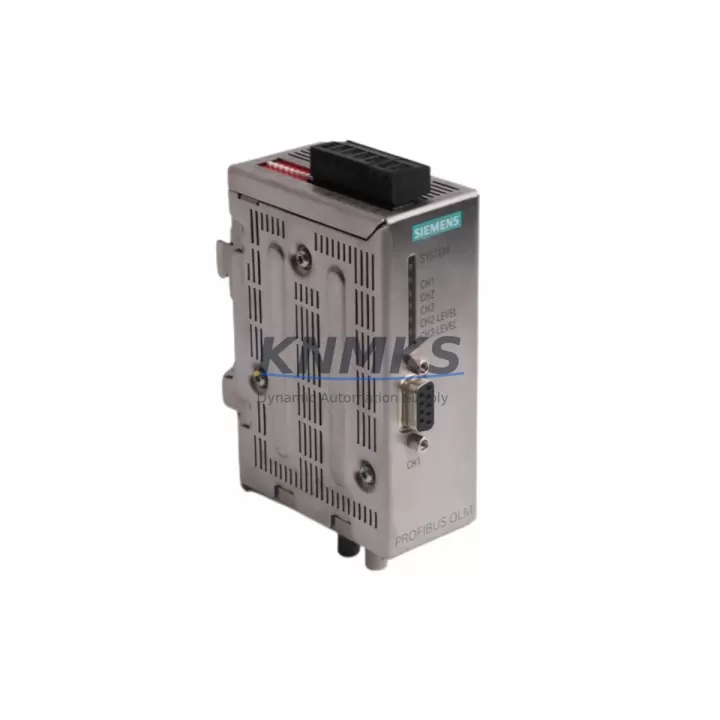
Siemens 6GK1503-2CB00 Migration-Ready PROFIBUS OLM for Legacy Control Systems
The Siemens 6GK1503-2CB00 OLM/G11 V4.0 (Optical Link Module) is a proven, migration-ready solution for engineers and maintenance teams tasked with replacing discontinued PROFIBUS optical link modules in aging automation infrastructure. Whether you are modernizing a legacy S7-300 or S7-400 control cabinet, extending the service life of an existing PROFIBUS DP network, or executing a phased migration away from end-of-life communication hardware, the 6GK1503-2CB00 delivers the electrical and protocol compatibility required to minimize engineering risk and reduce unplanned downtime.
This module is a direct functional replacement for earlier OLM/G11 variants including V1.x, V2.x, and V3.x generations. It supports glass fiber optic transmission on two optical ports and one RS-485 electrical port, enabling flexible ring, line, and star topologies within existing PROFIBUS DP segment architectures. The 6GK1503-2CB00 operates at baud rates from 9.6 kbit/s up to 12 Mbit/s, covering the full PROFIBUS DP speed range required by legacy field devices, drives, and remote I/O stations.
Every unit supplied by KNMKS is sourced from verified channels, function-tested prior to dispatch, and covered by a support terms confirmed by quotation. Stock is maintained on-hand to support urgent retrofit and emergency replacement requirements.
Migration Compatibility Table
| Parameter | Detail |
|---|---|
| SKU / Order Number | 6GK1503-2CB00 |
| Module Designation | OLM/G11 V4.0 |
| Replaces (Legacy Models) | 6GK1503-2CB00 V1.x, V2.x, V3.x; OLM/G11 earlier firmware revisions |
| Compatible Controllers | Siemens S7-300, S7-400, S7-400H (redundant), ET 200M, ET 200S remote I/O |
| Communication Protocol | PROFIBUS DP (IEC 61158 / EN 50170) |
| Optical Ports | 2 × Glass fiber (ST connector), 820 nm wavelength |
| Electrical Port | 1 × RS-485 (9-pin Sub-D), PROFIBUS DP |
| Supported Baud Rates | 9.6 kbit/s – 12 Mbit/s (auto-detection) |
| Supply Voltage | 24 V DC (18–32 V DC operating range) |
| Power Consumption | ≤ 5 W typical |
| Operating Temperature | 0 °C to +60 °C |
| Mounting | DIN rail (35 mm), same footprint as V1.x–V3.x |
| Topology Support | Line, ring, star (redundant ring supported) |
| Firmware Compatibility | V4.0 firmware; backward-compatible configuration via STEP 7 / TIA Portal |
| Retrofit Wiring Change Required | None for standard RS-485 port; fiber connectors are ST-type (same as V1.x–V3.x) |
| GSD File Update Required | Not required for standard DP slave operation; recommended for diagnostic features |
| Support terms | 12 months from date of dispatch |
| Availability | availability confirmed by RFQ — ready for immediate dispatch |
Retrofit Planning for Existing Automation Systems
Successful integration of the 6GK1503-2CB00 into a legacy control system requires a structured pre-retrofit assessment. Engineers should begin by auditing the existing PROFIBUS segment topology — confirming whether the network operates in line, ring, or star configuration — and documenting the current baud rate setting, which is typically locked to the slowest device on the segment. Because the OLM/G11 V4.0 performs automatic baud rate detection, no manual DIP switch reconfiguration is required when replacing an earlier V1.x or V2.x unit operating at the same speed.
Power supply capacity in the control cabinet must be verified before installation. The 6GK1503-2CB00 draws up to 5 W at 24 V DC. In cabinets where the existing 24 V DC rail is shared with a Siemens PS 307 or PS 405 power supply module, the additional load is typically negligible; however, in older installations where the rail is already loaded near capacity, a supplementary power supply or load audit is advisable. Terminal wiring on the RS-485 port follows the standard PROFIBUS Sub-D 9-pin pinout (pin 3: RxD/TxD-P, pin 8: RxD/TxD-N, pin 5: DGND), which is identical across all OLM/G11 generations — no rewiring is required at the electrical port.
For fiber optic connections, the ST-type connectors on the 6GK1503-2CB00 are mechanically identical to those used on earlier OLM variants. Existing fiber patch cables can be reused provided they are inspected for end-face contamination and physical damage. Optical budget should be verified against the installed fiber run length; the OLM/G11 V4.0 supports glass fiber spans up to 3,000 m per segment at 1.5 Mbit/s.
In systems where the PROFIBUS network connects to a Siemens CP 342-5 or CP 443-5 communications processor, or where field devices include Siemens ET 200M distributed I/O racks with IM 153-x interface modules, the replacement of the OLM does not require any changes to the hardware configuration in STEP 7 or TIA Portal — the OLM is a transparent physical layer device and is not addressed in the PLC program. However, if the existing installation uses the OLM’s diagnostic functions (monitored via PROFIBUS DP diagnostic frames or SNMP), the GSD file for the V4.0 should be imported and the hardware configuration updated accordingly.
Where the retrofit scope extends beyond the OLM itself — for example, when a full control cabinet modernization is underway — related components that are commonly replaced in the same project include the Siemens IM 153-2 interface module for ET 200M remote I/O expansion, the Siemens CP 342-5 PROFIBUS DP communications processor for S7-300 systems, and the Siemens DP/PA coupler (6ES7157-0AC83-0XA0) for segments that include PROFIBUS PA field instruments. In redundant S7-400H architectures, the OLM replacement is typically coordinated with inspection of the Y-Link coupler and the fiber patch panel to ensure the redundant ring remains intact during the switchover.
Downtime Control During System Migration
Minimizing production downtime during an OLM replacement is the primary operational concern for most maintenance teams. The 6GK1503-2CB00 is designed to support a hot-swap replacement procedure in non-redundant line topologies: the PROFIBUS segment is taken offline, the failed or end-of-life OLM is removed from the DIN rail, the replacement unit is installed and fiber/RS-485 connections are restored, and the segment is brought back online. In a well-prepared retrofit, the physical swap can be completed in under 15 minutes.
For redundant ring topologies — common in S7-400H high-availability systems — the OLM replacement can be performed without a full network shutdown. The ring is temporarily broken at the replacement point, the segment degrades to line mode (which the OLM/G11 V4.0 handles automatically via its redundancy manager function), the failed unit is replaced, and the ring is restored. Throughout this process, the PLC program continues to execute and field devices remain in communication via the surviving ring path. This approach eliminates the need for a planned production stop in most S7-400H installations.
Prior to any OLM replacement, the existing PLC program should be backed up from the CPU using STEP 7 or TIA Portal, and the current hardware configuration should be saved and archived. This ensures that if any unexpected issue arises during the retrofit — such as a fiber connector fault or a downstream device that fails to re-establish communication — the system can be restored to its previous state without data loss. HMI screens connected via the PROFIBUS network (for example, Siemens TP or MP series panels communicating through a CP 5611 or CP 5621 adapter) will temporarily lose communication during the segment outage but will reconnect automatically once the OLM is back online, without requiring any operator intervention at the HMI.
KNMKS recommends that all replacement units be function-tested on a bench setup prior to installation in the live system. Each 6GK1503-2CB00 dispatched by KNMKS has been powered on and verified for optical port activity and RS-485 continuity before shipment, reducing the risk of a DOA unit causing extended downtime on site.
Retrofit Support FAQ
Q1: Is the 6GK1503-2CB00 V4.0 a direct drop-in replacement for the V1.x and V2.x OLM/G11 units?
Yes. The V4.0 uses the same DIN rail footprint, identical ST-type fiber connectors, and the same Sub-D 9-pin RS-485 electrical port as all earlier OLM/G11 generations. No mechanical modifications or rewiring are required. The module performs automatic baud rate detection, so the existing PROFIBUS segment speed setting is preserved without manual adjustment.
Q2: Does replacing the OLM require any changes to the STEP 7 or TIA Portal hardware configuration?
For standard PROFIBUS DP transparent operation, no hardware configuration changes are required — the OLM is not a programmable node and does not appear in the PLC’s device table. If you wish to enable V4.0 diagnostic features (optical power monitoring, redundancy status), the updated GSD file should be imported and the configuration updated. KNMKS can supply the GSD file on request.
Q3: What pre-shipment testing is performed on each unit, and what support terms is provided?
Every 6GK1503-2CB00 supplied by KNMKS is powered on and tested for 24 V DC input, optical port TX/RX activity on both fiber channels, and RS-485 electrical port continuity before dispatch. Units are shipped with a support terms confirmed by quotation covering manufacturing defects and functional failures under normal operating conditions. Support requests are processed directly through KNMKS — contact admin@knmks.com for support.
Q4: What is the typical lead time, and can KNMKS support urgent or emergency replacement orders?
Stock is maintained on-hand for the 6GK1503-2CB00. Standard orders are dispatched within 1–2 business days. For emergency replacement requirements — including same-day dispatch for critical production line failures — please contact KNMKS directly at +86 18359268345 or admin@knmks.com to confirm availability and arrange expedited shipping.
© 2026 KNMKS. All rights reserved. Original Source: https://knmks.com | Contact: admin@knmks.com | +86 18359268345
Product Identification
- Brand / Ecosystem
-
Siemens
Siemens - Model / Series
-
6GK1503-2CB00
SIMATIC Series - Product Family
- PLCs & Controllers
- Availability Status
- Available on request after model and quantity confirmation
- Inquiry Type
- B2B RFQ, replacement inquiry and project spare-part request
- Pre-Quote Check
- Exact SKU, brand, series, quantity, nameplate photos and destination country are checked before quotation
System Path
Where this product fits in the KNMKS automation structure.
Specification & Inquiry Focus
- Control platform
- PLC, PAC and modular controllers
- Common needs
- CPU, rack, power and I/O expansion
- Project support
- Replacement, cabinet build and maintenance
Buyer Confirmation
Information KNMKS checks before replying.
- Exact model
- 6GK1503-2CB00
- Brand / ecosystem
- Siemens
- Product family
- PLCs & Controllers
- Application note
- Replacement, maintenance, project build or spare-part list
- Useful photos
- Nameplate, installed unit, cabinet layout or connector side
- Delivery details
- Quantity, destination country and target schedule
Document Support
Files and notes can be confirmed during quotation.
- Product photos or nameplate confirmation when available
- Packing and delivery notes before quotation confirmation
- Support scope and delivery terms confirmed per inquiry
- Export document coordination for qualified B2B requests
Inquiry Support
- Model cross-checking before quotation
- CPU, power, rack and expansion module matching
- Support for replacement and project inquiry
What to Send Us
- Brand and exact model number: Siemens 6GK1503-2CB00
- Quantity and required delivery time
- Application, replacement requirement or nameplate photo
- Destination country and shipping preference
RFQ Preparation
This is a product inquiry page built for RFQ communication.
Fast Model Check
Send this model to KNMKS for confirmation.
Include quantity, destination country and photos if this is a maintenance replacement. The inquiry will be saved with a reference number after submission.
Brand & Compatibility Note
KNMKS displays automation product information for well-known industrial brand ecosystems and compatible replacement references. Brand names are used for product identification and compatibility reference only; final availability and commercial terms are confirmed per quotation.
 Manufacturing
 Machine Tools
 Packaging
 Energy & Power



 HMI & Displays
 Servo Systems
 Variable Frequency Drives
 Sensors