
Overview
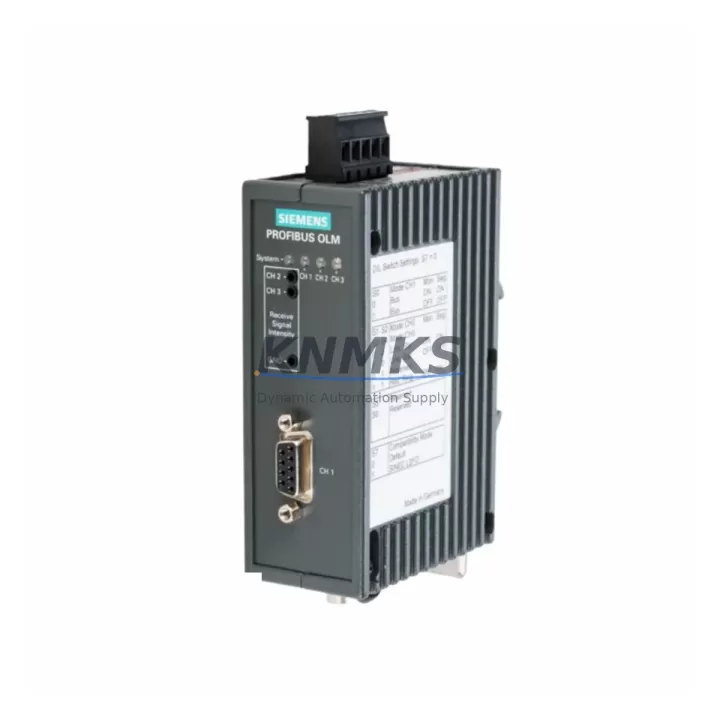
Siemens 6GK1502-2CB10 Maintenance Spare OLM Uptime
The Siemens 6GK1502-2CB10 OLM/G11 V3.1 is a PROFIBUS optical link module engineered for continuous industrial operation in demanding factory environments. As a maintenance-proven spare part, it enables rapid field replacement of degraded or failed optical link modules without requiring system reconfiguration or extended downtime. Sourced as an original Siemens SIMATIC NET component, the 6GK1502-2CB10 is fully compatible with PROFIBUS DP networks operating at speeds up to 12 Mbit/s, making it a critical inventory item for maintenance engineers managing legacy and active automation systems alike.
For procurement engineers, stocking the 6GK1502-2CB10 as a designated spare eliminates the risk of extended lead times during unplanned failures. PROFIBUS optical link modules are frequently single points of failure in ring or line topologies — a failed OLM can isolate entire segments of a control network, halting production lines and triggering cascading alarms across SCADA and DCS platforms. Having a verified, tested replacement on the shelf reduces mean time to repair (MTTR) from days to under an hour.
Every unit shipped from KNMKS undergoes pre-shipment functional testing and is backed by a support terms confirmed by quotation, giving maintenance teams confidence in both immediate deployment and long-term supply continuity. Our inventory supports long-term procurement planning for facilities running Siemens S7-300, S7-400, and compatible SIMATIC NET architectures.
Spare Maintenance Table
| SKU / Part Number | 6GK1502-2CB10 |
| Product Series | OLM/G11 V3.1 (SIMATIC NET) |
| Brand | Siemens |
| Product Type | PROFIBUS Optical Link Module |
| Network Protocol | PROFIBUS DP |
| Max. Transmission Rate | Up to 12 Mbit/s |
| Optical Ports | 2 × Glass Fiber (ST connector) |
| Electrical PROFIBUS Port | 1 × RS-485 (9-pin Sub-D) |
| Supply Voltage | 24 V DC (19.2 – 28.8 V) |
| Power Consumption | Approx. 4 W |
| Operating Temperature | 0 °C to +60 °C |
| Protection Class | IP20 |
| Country of Origin | Germany |
| Compatibility | Siemens S7-300, S7-400, SIMATIC NET PROFIBUS DP systems |
| Installation | DIN rail mount; plug-and-play replacement |
| Support terms | 12 Months — tested before shipment |
Maintenance Planning for Continuous Operation
When replacing the 6GK1502-2CB10 in the field, a thorough inspection of the surrounding electrical and communication infrastructure is essential to prevent repeat failures and ensure full network restoration. Maintenance engineers should verify the 24 V DC power supply feeding the OLM — a degraded or noisy supply rail is a common root cause of optical module faults. Check the power supply unit (PSU) output voltage under load and inspect terminal blocks and wiring connections for corrosion or loose contacts.
The PROFIBUS RS-485 segment connected to the OLM’s electrical port should be tested for correct bus termination at both ends. Faulty or missing termination resistors on the PROFIBUS DP cable can cause intermittent communication errors that mimic OLM hardware failure. Inspect the 9-pin Sub-D connectors and shielded PROFIBUS cables for physical damage, especially in high-vibration environments.
On the optical side, clean the ST fiber connectors and inspect the glass fiber runs for bends tighter than the minimum bend radius. Contaminated or damaged fiber ends are a leading cause of signal attenuation and link errors. If the OLM is part of a redundant ring topology, verify that the redundancy manager function (if enabled on an adjacent OLM such as the 6GK1502-3CB10 or 6GK1502-4CB10) is correctly configured after replacement.
For cabinet-level inspection, review the SIMATIC NET CP communication processor cards (e.g., CP 342-5 or CP 443-5) connected to the same PROFIBUS segment. Check the S7-300 or S7-400 backplane bus connectors and I/O module seating. If the system includes PROFIBUS DP slaves such as ET 200S or ET 200M distributed I/O stations, confirm that all slave addresses are correctly recognized after the OLM is restored. Signal isolators or repeaters on long cable runs should also be inspected for proper grounding and signal integrity.
Annual maintenance schedules should include the 6GK1502-2CB10 as a mandatory inspection item — log the optical power levels at each port using a fiber optic power meter and compare against baseline values recorded during commissioning. Proactive replacement before optical power degrades below threshold prevents unplanned outages and supports a predictive maintenance strategy.
Site Replacement Workflow
Step 1 — Preparation: Confirm the replacement unit SKU (6GK1502-2CB10) matches the installed module label. Gather the PROFIBUS network topology diagram and note the OLM’s position (line, star, or ring segment).
Step 2 — Safe Isolation: Coordinate with the control room to place the affected PROFIBUS segment in a safe state. Do not power down the entire cabinet if redundant paths exist — isolate only the affected OLM supply circuit using the dedicated 24 V DC fuse or circuit breaker.
Step 3 — Module Removal: Disconnect the fiber ST connectors and the RS-485 Sub-D plug. Release the DIN rail locking tab and slide the module out. Note the DIP switch settings for baud rate and redundancy configuration before removal.
Step 4 — Replacement Installation: Set the DIP switches on the new 6GK1502-2CB10 to match the removed unit. Seat the module on the DIN rail, reconnect the Sub-D plug and fiber connectors. Restore 24 V DC power.
Step 5 — Verification: Confirm the green PROFIBUS and optical link LEDs illuminate. Check the SIMATIC NET diagnostic tool or STEP 7 / TIA Portal hardware configuration for segment status. Verify all slave devices on the segment return to cyclic data exchange.
Step 6 — Documentation: Record the replacement date, new module serial number, and optical power readings in the maintenance log. Update the spare parts inventory and initiate a reorder to maintain minimum stock levels.
Spare Parts Support FAQ
Q1: Is the 6GK1502-2CB10 a direct drop-in replacement for older OLM/G11 versions?
Yes. The V3.1 revision maintains backward compatibility with earlier OLM/G11 hardware revisions. DIP switch positions and fiber/electrical port assignments are identical, allowing plug-and-play replacement without software changes in most PROFIBUS DP configurations.
Q2: How do you verify compatibility before shipment?
Each 6GK1502-2CB10 unit is functionally tested on a PROFIBUS DP test bench prior to dispatch. We verify optical port output power, RS-485 signal integrity, and power supply acceptance across the full 19.2–28.8 V DC input range. A test report is available on request.
Q3: What is the support terms coverage and what does it include?
All units carry a support terms confirmed by quotation from the date of shipment. Coverage includes hardware defects, optical port failure, and power supply faults under normal operating conditions. DOA (dead on arrival) units are replaced or refunded within 5 business days of confirmed fault report.
Q4: Can KNMKS support long-term supply for multi-site maintenance programs?
Yes. KNMKS maintains standing inventory of the 6GK1502-2CB10 and related SIMATIC NET PROFIBUS components to support annual maintenance contracts, multi-site procurement frameworks, and emergency replenishment orders. Contact our team to discuss volume pricing and reserved stock arrangements.
© 2026 KNMKS. All rights reserved.
Original Source: https://knmks.com
Contact: admin@knmks.com | +86 18359268345
Product Identification
- Brand / Ecosystem
-
Siemens
Siemens - Model / Series
-
6GK1502-2CB10
SIMATIC Series - Product Family
- PLCs & Controllers
- Availability Status
- Available on request after model and quantity confirmation
- Inquiry Type
- B2B RFQ, replacement inquiry and project spare-part request
- Pre-Quote Check
- Exact SKU, brand, series, quantity, nameplate photos and destination country are checked before quotation
System Path
Where this product fits in the KNMKS automation structure.
Specification & Inquiry Focus
- Control platform
- PLC, PAC and modular controllers
- Common needs
- CPU, rack, power and I/O expansion
- Project support
- Replacement, cabinet build and maintenance
Buyer Confirmation
Information KNMKS checks before replying.
- Exact model
- 6GK1502-2CB10
- Brand / ecosystem
- Siemens
- Product family
- PLCs & Controllers
- Application note
- Replacement, maintenance, project build or spare-part list
- Useful photos
- Nameplate, installed unit, cabinet layout or connector side
- Delivery details
- Quantity, destination country and target schedule
Document Support
Files and notes can be confirmed during quotation.
- Product photos or nameplate confirmation when available
- Packing and delivery notes before quotation confirmation
- Support scope and delivery terms confirmed per inquiry
- Export document coordination for qualified B2B requests
Inquiry Support
- Model cross-checking before quotation
- CPU, power, rack and expansion module matching
- Support for replacement and project inquiry
What to Send Us
- Brand and exact model number: Siemens 6GK1502-2CB10
- Quantity and required delivery time
- Application, replacement requirement or nameplate photo
- Destination country and shipping preference
RFQ Preparation
This is a product inquiry page built for RFQ communication.
Fast Model Check
Send this model to KNMKS for confirmation.
Include quantity, destination country and photos if this is a maintenance replacement. The inquiry will be saved with a reference number after submission.
Brand & Compatibility Note
KNMKS displays automation product information for well-known industrial brand ecosystems and compatible replacement references. Brand names are used for product identification and compatibility reference only; final availability and commercial terms are confirmed per quotation.
 Manufacturing
 Machine Tools
 Packaging
 Energy & Power



 HMI & Displays
 Servo Systems
 Variable Frequency Drives
 Sensors