
Overview
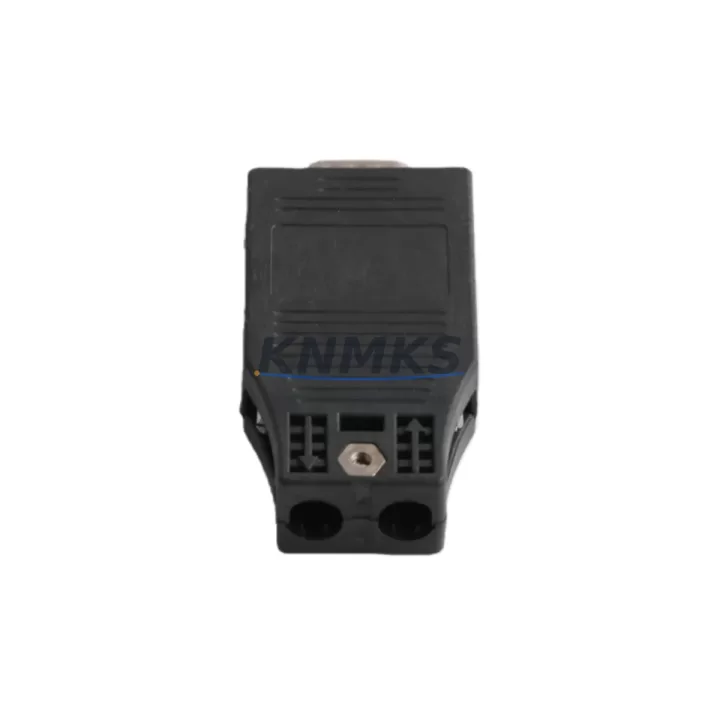
Siemens 6GK1500-0FC10 Maintenance-Proven Spare Part for Factory Uptime
The Siemens 6GK1500-0FC10 is an original PROFIBUS DP bus connector engineered for continuous industrial operation in SIMATIC NET automation networks. Designed with a 90° cable outlet and integrated termination resistor, this connector is a critical field-replaceable unit in S7-300, S7-400, and distributed I/O architectures. For maintenance engineers managing aging control systems, the 6GK1500-0FC10 represents a zero-compromise spare: same form factor, same electrical specification, same network timing — ensuring that a connector swap does not introduce bus timing errors, signal reflections, or segment instability.
In high-availability production environments — petrochemical plants, automotive assembly lines, power generation facilities, and water treatment infrastructure — PROFIBUS DP segment failures caused by degraded connectors are among the most common and most preventable causes of unplanned downtime. Stocking the 6GK1500-0FC10 as a certified spare eliminates the lead-time risk associated with sourcing connectors during an active fault condition. Every unit shipped by KNMKS undergoes pre-shipment electrical continuity and termination resistance verification, and is covered by a support terms confirmed by quotation from the date of delivery.
Procurement engineers sourcing for annual maintenance budgets or emergency replenishment will find that the 6GK1500-0FC10 integrates directly into existing SIMATIC NET segment topologies without firmware changes, configuration updates, or bus parameter recalculation — making it the lowest-risk replacement component in the PROFIBUS field device layer.
Spare Maintenance Table
| Parameter | Specification |
|---|---|
| Part Number / SKU | 6GK1500-0FC10 |
| Brand | Siemens |
| Series | SIMATIC NET PROFIBUS |
| Product Type | PROFIBUS DP Bus Connector |
| Cable Outlet Angle | 90° |
| Max. Transmission Rate | 12 Mbps |
| Termination Resistor | Integrated (switchable) |
| Connector Type | Sub-D 9-pin (male) |
| Compatible Systems | S7-300, S7-400, ET 200M, ET 200S, DP/PA Coupler, CP 342-5, CP 443-5 |
| Origin | Germany (DE) |
| Operating Temperature | -40 °C to +85 °C |
| Protection Class | IP20 |
| Installation Environment | Control cabinet, field panel, DIN rail system |
| Maintenance Recommendation | Inspect annually; replace immediately on physical damage or bus error codes |
| Support terms | 12 Months from delivery date |
| Pre-Shipment Test | Electrical continuity + termination resistance verification |
Maintenance Planning for Continuous Operation
When replacing the 6GK1500-0FC10 in a PROFIBUS DP segment, a disciplined maintenance engineer does not stop at the connector itself. The replacement event is an opportunity to audit the surrounding electrical environment and prevent secondary failures that could cause a repeat outage within weeks.
Begin with the PROFIBUS cable (e.g., Siemens 6XV1830-0EH10 or equivalent shielded twisted-pair) entering and exiting the connector. Inspect for insulation damage, tight bend radii near the connector body, and shield continuity at both ends. A degraded cable is frequently the root cause of the connector failure in the first place.
Next, verify the CP 342-5 or CP 443-5 communications processor on the S7-300 or S7-400 rack. Bus connector failures that persist over weeks can stress the DP master port on the CP module; check for diagnostic buffer entries indicating repeated bus restarts or slave address conflicts. If the CP module shows elevated error counts, add a CP 342-5 or CP 443-5 to the spare parts list alongside the connector.
For segments that include ET 200M or ET 200S distributed I/O stations, confirm that the bus connector at each slave station is also within its service life. A single degraded connector at a slave node can corrupt the entire segment. Replace connectors at all nodes in the same maintenance window to avoid a second call-out.
Inspect the 24 VDC power supply feeding the DP slaves — typically a SITOP PSU100S or equivalent — for output voltage stability. Voltage sag under load can cause DP slaves to drop off the bus intermittently, symptoms that are easily misdiagnosed as connector or cable faults. A calibrated multimeter check at the slave terminal block takes under two minutes and eliminates this variable.
Where the PROFIBUS segment crosses a DP/PA coupler into a HART or PA instrument loop, verify coupler firmware version and check for segment load against the coupler’s rated current. Overloaded PA segments exhibit bus errors that propagate upstream and can be misattributed to the DP connector layer.
Finally, review the termination resistor status on both the first and last connector in the segment. Only the two physical endpoints should have termination enabled. A connector with an incorrectly set termination switch — common after ad-hoc field repairs — introduces signal reflections that degrade bus integrity at higher baud rates. Confirm switch positions on all connectors in the segment during the replacement visit.
Site Replacement Workflow
Step 1 — Pre-work verification: Download the current PROFIBUS segment topology from STEP 7 or TIA Portal. Note the bus address of the affected slave, the baud rate of the segment, and the termination status of the connector being replaced. Photograph the existing cable routing and connector orientation before disconnection.
Step 2 — Safe isolation: Place the affected DP slave in maintenance mode via the CPU or CP diagnostic interface if the process permits. For safety-critical loops, coordinate with the control room before disconnecting any field device. Do not remove a terminating connector from an active segment without first switching termination to the adjacent connector.
Step 3 — Physical replacement: Disconnect the Sub-D connector from the slave device. Loosen the cable clamp on the 6GK1500-0FC10 body, extract the existing cable, and re-terminate into the new connector following the PROFIBUS standard pin assignment (A-line to pin 3, B-line to pin 8, shield to connector body). Set the termination switch to match the original connector’s position. Torque the Sub-D screws to the specified value to ensure contact reliability.
Step 4 — Bus restoration and verification: Reconnect the slave device. Monitor the PROFIBUS diagnostic interface on the CP module or via a PROFIBUS tester for bus cycle time normalization and zero diagnostic alarms. Confirm the slave returns to cyclic data exchange within the expected timeout period.
Step 5 — Documentation: Record the replacement in the maintenance log with the date, technician ID, segment ID, slave address, and new connector serial number. Update the spare parts inventory to trigger replenishment of the consumed 6GK1500-0FC10 unit.
This workflow minimizes mean time to repair (MTTR) and ensures that the replacement does not introduce new faults. The 6GK1500-0FC10’s drop-in compatibility with all SIMATIC NET PROFIBUS DP architectures means no bus parameter reconfiguration is required after installation.
Spare Parts Support FAQ
Q1: Is the 6GK1500-0FC10 a direct replacement for older Siemens PROFIBUS connectors such as the 6GK1500-0EA02?
A: The 6GK1500-0FC10 (90° outlet) and the 6GK1500-0EA02 (35° outlet) share the same electrical specification and Sub-D 9-pin interface but differ in cable outlet angle. Confirm the cable routing in your cabinet before ordering — if the existing cable exits at 90° to the device face, the 6GK1500-0FC10 is the correct replacement. Mixing outlet angles in a tight cabinet can stress the cable and reduce connector service life.
Q2: How does KNMKS verify authenticity and electrical integrity before shipment?
A: Every 6GK1500-0FC10 unit is sourced from authorized distribution channels and undergoes pre-shipment inspection including visual examination of the Sub-D contact pins, termination resistor switch function test, and cable clamp integrity check. Units that fail any inspection criterion are quarantined and not shipped. A support terms confirmed by quotation cover all units against manufacturing defects and electrical failure under normal operating conditions.
Q3: What is the recommended stocking quantity for a facility running multiple PROFIBUS DP segments?
A: Industry best practice for facilities with 5 or more PROFIBUS DP segments is to maintain a minimum of 2 connectors per segment as on-site spares, with an additional buffer of 10–20% of total installed connectors held in the central stores. For facilities with legacy S7-300 or S7-400 systems where Siemens has announced end-of-life timelines, increasing the buffer to 30–50% of installed quantity is advisable to hedge against future supply constraints.
Q4: Can KNMKS support long-term supply agreements for the 6GK1500-0FC10?
A: Yes. KNMKS offers long-term supply commitments for maintenance-critical spare parts including the 6GK1500-0FC10. Contact our sales team to discuss annual volume agreements, consignment stock arrangements, and priority allocation for emergency orders. All long-term supply agreements include the standard support terms confirmed by quotation per shipment and dedicated account support for order tracking and technical queries.
© 2026 KNMKS. All rights reserved.
Original Source: https://knmks.com
Contact: admin@knmks.com | +86 18359268345
Product Identification
- Brand / Ecosystem
-
Siemens
Siemens - Model / Series
-
6GK1500-0FC10
SIMATIC Series - Product Family
- PLCs & Controllers
- Availability Status
- Available on request after model and quantity confirmation
- Inquiry Type
- B2B RFQ, replacement inquiry and project spare-part request
- Pre-Quote Check
- Exact SKU, brand, series, quantity, nameplate photos and destination country are checked before quotation
System Path
Where this product fits in the KNMKS automation structure.
Specification & Inquiry Focus
- Control platform
- PLC, PAC and modular controllers
- Common needs
- CPU, rack, power and I/O expansion
- Project support
- Replacement, cabinet build and maintenance
Buyer Confirmation
Information KNMKS checks before replying.
- Exact model
- 6GK1500-0FC10
- Brand / ecosystem
- Siemens
- Product family
- PLCs & Controllers
- Application note
- Replacement, maintenance, project build or spare-part list
- Useful photos
- Nameplate, installed unit, cabinet layout or connector side
- Delivery details
- Quantity, destination country and target schedule
Document Support
Files and notes can be confirmed during quotation.
- Product photos or nameplate confirmation when available
- Packing and delivery notes before quotation confirmation
- Support scope and delivery terms confirmed per inquiry
- Export document coordination for qualified B2B requests
Inquiry Support
- Model cross-checking before quotation
- CPU, power, rack and expansion module matching
- Support for replacement and project inquiry
What to Send Us
- Brand and exact model number: Siemens 6GK1500-0FC10
- Quantity and required delivery time
- Application, replacement requirement or nameplate photo
- Destination country and shipping preference
RFQ Preparation
This is a product inquiry page built for RFQ communication.
Fast Model Check
Send this model to KNMKS for confirmation.
Include quantity, destination country and photos if this is a maintenance replacement. The inquiry will be saved with a reference number after submission.
Brand & Compatibility Note
KNMKS displays automation product information for well-known industrial brand ecosystems and compatible replacement references. Brand names are used for product identification and compatibility reference only; final availability and commercial terms are confirmed per quotation.
 Manufacturing
 Machine Tools
 Packaging
 Energy & Power



 HMI & Displays
 Servo Systems
 Variable Frequency Drives
 Sensors