
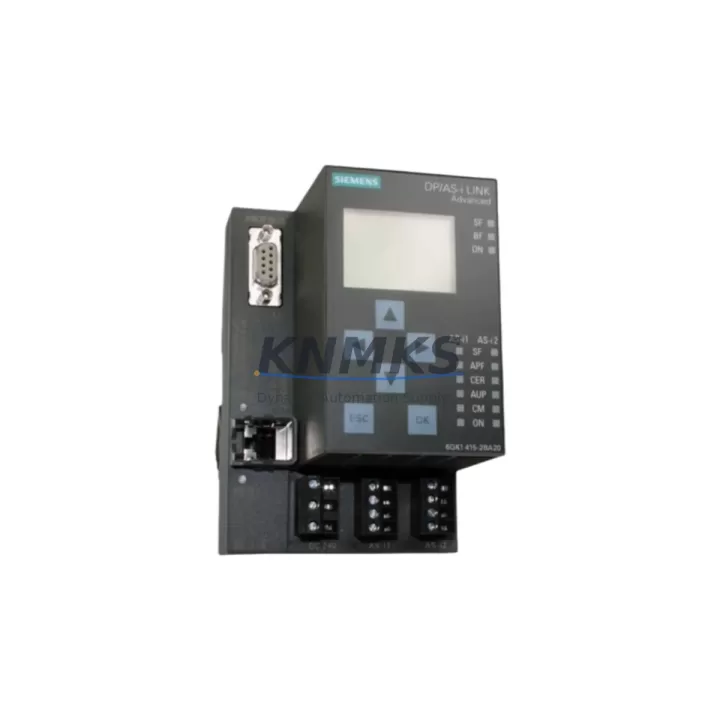
Overview
Siemens 6GK1415-2BA20 Maintenance-Proven Spare Part for Factory Uptime
The Siemens 6GK1415-2BA20 IE/PB Link PN IO is a critical PROFIBUS-to-PROFINET gateway widely deployed in S7-300 and S7-400 automation architectures across discrete manufacturing, process plants, and utility control systems. As legacy PROFIBUS field devices remain deeply embedded in production lines worldwide, this gateway module serves as the essential communication bridge that keeps older instrumentation — pressure transmitters, variable frequency drives, valve positioners, and remote I/O stations — fully integrated within modern PROFINET-based control networks. Sourced as an original Siemens spare, the 6GK1415-2BA20 is pre-tested, serialized, and shipped with a support terms confirmed by quotation, making it the preferred choice for maintenance engineers who cannot afford unplanned downtime during a gateway failure event.
For procurement engineers managing MRO budgets and critical spare inventories, the 6GK1415-2BA20 represents a high-priority stocking item. Gateway failures in PROFIBUS-to-PROFINET segments are rarely isolated events — they cascade into full segment outages, triggering CPU STOP conditions on the associated S7-300 or S7-400 PLC rack. Maintaining at least one verified spare on the shelf eliminates the lead-time risk that accompanies emergency sourcing from distribution channels, particularly for a module that may no longer be in active production. Our stock is continuously replenished to support long-term supply commitments, and each unit undergoes functional verification prior to dispatch.
Spare Maintenance Table
| Parameter | Specification |
|---|---|
| Part Number / SKU | 6GK1415-2BA20 |
| Product Series | SCALANCE / IE/PB Link PN IO |
| Function | PROFIBUS DP to PROFINET IO Gateway |
| PROFINET Interface | 2 × RJ45 (10/100 Mbit/s, integrated switch) |
| PROFIBUS Interface | 1 × RS-485 (9-pin Sub-D), up to 12 Mbit/s |
| Max. PROFIBUS Slaves | Up to 64 DP slaves per gateway |
| Supply Voltage | 24 V DC (20.4 – 28.8 V DC) |
| Power Consumption | Approx. 3.5 W typical |
| Operating Temperature | 0 °C to +60 °C |
| Protection Class | IP20 |
| Mounting | DIN rail (35 mm) |
| Compatible Controllers | S7-300, S7-400, S7-1500 (via PROFINET IO controller) |
| Configuration Tool | STEP 7 (V5.x), TIA Portal (V13+) |
| Country of Origin | Germany |
| Condition | Original, New / Tested Surplus |
| Support terms | 12 Months |
| Pre-shipment Test | Power-on functional verification |
Maintenance Planning for Continuous Operation
When a 6GK1415-2BA20 gateway fails or is flagged during a scheduled control cabinet inspection, the replacement workflow should extend beyond the gateway module itself. Maintenance engineers should treat the event as a full segment health audit. Begin by verifying the 24 V DC supply rail feeding the gateway — a dedicated Siemens SITOP PSU100S 24 V power supply module or equivalent DIN-rail PSU should be checked for output voltage stability and ripple, as undervoltage conditions are a common root cause of intermittent gateway resets and PROFIBUS segment dropouts.
On the PROFIBUS side, inspect the bus termination resistors at both ends of the DP segment. Faulty or missing termination is frequently misdiagnosed as a gateway hardware fault. If the segment includes Siemens ET 200S or ET 200M remote I/O stations, verify that each IM interface module is communicating correctly after the gateway swap — these distributed I/O nodes are often the first to report diagnostic alarms when bus integrity degrades. For segments running at 1.5 Mbit/s or higher, cable quality and connector seating on the 6ES7972-0BA52-0XA0 PROFIBUS connector (or equivalent) should be confirmed before commissioning the replacement gateway.
On the PROFINET side, check the Ethernet switch port assignments and verify that the replacement 6GK1415-2BA20 has been assigned the correct device name and IP address using the Primary Setup Tool or TIA Portal. If the control cabinet houses a Siemens CP 343-1 or CP 443-1 communications processor, confirm that the PROFINET IO controller configuration in STEP 7 or TIA Portal references the correct device name for the new gateway. Mismatched device names are the leading cause of post-replacement startup failures in PROFINET segments.
For cabinets that also contain Siemens SIRIUS 3RV or 3RT motor starters and contactors, verify that any AS-Interface or PROFIBUS-connected motor management modules are still reporting correctly after the gateway replacement — these devices share the same DP segment in many machine tool and conveyor applications. Additionally, inspect the cabinet’s fuse protection on the 24 V DC bus (typically 6.3 A or 10 A miniature circuit breakers) and replace any that show signs of thermal stress. A complete cabinet inspection at the time of gateway replacement is best practice for annual maintenance cycles and significantly reduces the probability of a secondary failure within the same maintenance window.
Site Replacement Workflow
Step 1 — Isolate and document. Before removing the failed 6GK1415-2BA20, record the current device name, IP address, and PROFIBUS DP address assignments from the engineering station or the module’s front panel display. Take a photograph of the wiring and connector positions for reference.
Step 2 — Power down safely. De-energize the 24 V DC supply to the gateway using the dedicated circuit breaker. Do not remove the module under power — the PROFIBUS and PROFINET connectors are not hot-swap rated on this model.
Step 3 — Physical replacement. Remove the failed unit from the DIN rail. Mount the replacement 6GK1415-2BA20, reconnect the PROFIBUS Sub-D connector and both PROFINET RJ45 cables. Restore 24 V DC power.
Step 4 — Device name assignment. Using TIA Portal or the Primary Setup Tool, assign the correct PROFINET device name to the replacement module. The device name must exactly match the configuration in the IO controller project — case-sensitive.
Step 5 — Download and verify. If a full project download is required, perform it from the engineering station. Monitor the PROFIBUS diagnostic buffer for any slave communication errors. Confirm that all DP slaves return to RUN state and that the PROFINET IO controller reports the gateway as “OK” in the device diagnostics view.
Step 6 — Functional test. Cycle the controlled process through a test sequence to verify I/O signal integrity across the PROFIBUS segment. Document the replacement in the maintenance log with the new module serial number and date.
This workflow is compatible with both S7-300/400 legacy systems and S7-1500 architectures where the 6GK1415-2BA20 is retained as a PROFIBUS proxy. The replacement process typically requires 30–60 minutes for an experienced maintenance technician, minimizing production downtime to a single shift window.
Spare Parts Support FAQ
Q1: Is the 6GK1415-2BA20 still available as a new original spare, and what is the expected supply continuity?
Yes. We maintain dedicated stock of the 6GK1415-2BA20 to support customers operating legacy PROFIBUS-PROFINET architectures. Each unit is sourced as original Siemens product, serialized, and stored under controlled conditions. We offer long-term supply commitments and can accommodate blanket purchase orders for customers who require guaranteed availability over a 12–36 month horizon. Contact our sales team to discuss volume pricing and reserved stock arrangements.
Q2: How is each unit tested before shipment, and what does the support terms confirmed by quotation cover?
Every 6GK1415-2BA20 undergoes a power-on functional verification test prior to dispatch. The test confirms that the module initializes correctly, that both PROFINET ports are active, and that the PROFIBUS interface responds to DP master polling. The support terms confirmed by quotation cover hardware defects and functional failures under normal operating conditions. Units that fail within the confirmed support period are replaced or refunded — no repair delays.
Q3: Can the 6GK1415-2BA20 be used as a direct replacement for the earlier 6GK1415-2BA10 revision?
In most applications, yes. The -2BA20 revision is functionally compatible with the -2BA10 and supports the same PROFIBUS DP slave count and PROFINET IO proxy functionality. However, customers should verify firmware compatibility with their STEP 7 or TIA Portal project version, particularly if the original configuration was created with an older GSD file. We recommend downloading the current GSD/GSDML file from the Siemens support portal and updating the hardware catalog before commissioning the replacement.
Q4: What is the recommended spare parts stocking strategy for facilities running multiple PROFIBUS segments?
For facilities with three or more active PROFIBUS-PROFINET gateway segments, we recommend maintaining a minimum of two 6GK1415-2BA20 units in the on-site spare parts store. This provides immediate swap capability for the most critical segment while the second unit serves as a backup during the replenishment cycle. Pair the gateway spares with a stocked PROFIBUS connector set and a verified 24 V DC power supply module to ensure a complete segment recovery kit is always available without waiting for external procurement.
© 2026 KNMKS. All rights reserved.
Original Source: https://knmks.com
Contact: admin@knmks.com | +86 18359268345
Product Identification
- Brand / Ecosystem
-
Siemens
Siemens - Model / Series
-
6GK1415-2BA20
SIMATIC Series - Product Family
- Communication Modules
- Availability Status
- Available on request after model and quantity confirmation
- Inquiry Type
- B2B RFQ, replacement inquiry and project spare-part request
- Pre-Quote Check
- Exact SKU, brand, series, quantity, nameplate photos and destination country are checked before quotation
System Path
Where this product fits in the KNMKS automation structure.
Specification & Inquiry Focus
- Network range
- Ethernet, fieldbus and gateway modules
- Common needs
- Protocol, port and controller family
- Project support
- Machine networking and data integration
Buyer Confirmation
Information KNMKS checks before replying.
- Exact model
- 6GK1415-2BA20
- Brand / ecosystem
- Siemens
- Product family
- Communication Modules
- Application note
- Replacement, maintenance, project build or spare-part list
- Useful photos
- Nameplate, installed unit, cabinet layout or connector side
- Delivery details
- Quantity, destination country and target schedule
Document Support
Files and notes can be confirmed during quotation.
- Product photos or nameplate confirmation when available
- Packing and delivery notes before quotation confirmation
- Support scope and delivery terms confirmed per inquiry
- Export document coordination for qualified B2B requests
Inquiry Support
- Industrial Ethernet and fieldbus module inquiry
- Protocol compatibility review
- Integration project inquiry support
What to Send Us
- Brand and exact model number: Siemens 6GK1415-2BA20
- Quantity and required delivery time
- Application, replacement requirement or nameplate photo
- Destination country and shipping preference
RFQ Preparation
This is a product inquiry page built for RFQ communication.
Fast Model Check
Send this model to KNMKS for confirmation.
Include quantity, destination country and photos if this is a maintenance replacement. The inquiry will be saved with a reference number after submission.
Brand & Compatibility Note
KNMKS displays automation product information for well-known industrial brand ecosystems and compatible replacement references. Brand names are used for product identification and compatibility reference only; final availability and commercial terms are confirmed per quotation.
 Manufacturing
 Machine Tools
 Packaging
 Energy & Power
 PLCs & Controllers
 HMI & Displays
 Servo Systems
 Variable Frequency Drives