
Overview
Siemens 6GK1411-5AB10 Migration-Ready PROFIBUS-PROFINET Gateway: Legacy System Upgrade & Retrofit Solution
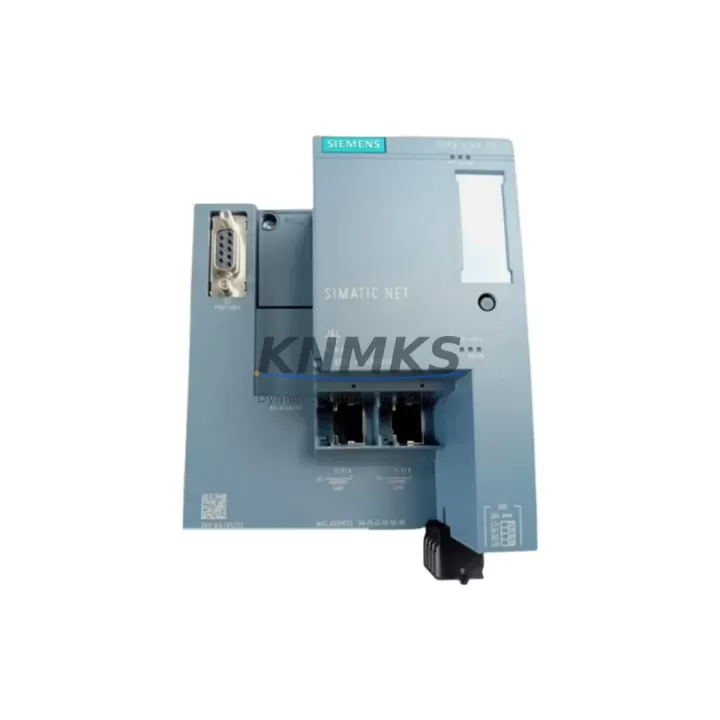
The Siemens 6GK1411-5AB10 IE/PB Link PN IO is a critical communication gateway designed to bridge PROFIBUS DP field devices with PROFINET IO controller networks. As industrial facilities accelerate the migration of aging S7-300 and S7-400 control architectures toward modern S7-1500 and TIA Portal-based platforms, the 6GK1411-5AB10 serves as a proven, drop-in protocol conversion module that preserves existing PROFIBUS field wiring investments while enabling full PROFINET IO integration at the controller level. This unit is stocked, tested, and shipped with a support terms confirmed by quotation.
Migration Compatibility Table
| Parameter | Specification / Retrofit Note |
|---|---|
| SKU / Order Number | 6GK1411-5AB10 |
| Series | IE/PB Link PN IO |
| Protocol Conversion | PROFIBUS DP (Master/Slave) ↔ PROFINET IO |
| PROFIBUS Interface | RS-485, 9-pin Sub-D connector, up to 12 Mbit/s |
| PROFINET Interface | 2× RJ45 (integrated switch), 100 Mbit/s |
| Power Supply | 24 V DC (20.4–28.8 V), via terminal block — verify existing 24 V rail capacity before installation |
| Compatible Controllers | S7-300 (CP 343-1), S7-400 (CP 443-1), S7-1200, S7-1500, ET 200SP IM 155-6 PN |
| Max PROFIBUS Slaves | Up to 64 DP slaves per gateway |
| Configuration Tool | STEP 7 V5.x / TIA Portal V13 SP1 and above |
| Mounting | DIN rail (35 mm), standard control cabinet installation — confirm available rail space |
| Firmware Compatibility | Verify firmware version against TIA Portal release; update via PRONETA or SIMATIC NET CD |
| Replacement Recommendation | Direct replacement for legacy IE/PB Link (6GK1411-2AB10) in PROFINET-upgraded systems |
| Commissioning Focus | PROFINET device name assignment, PROFIBUS baud rate matching, GSD/GSDML file import, I/O address mapping |
| Support terms | 12 months from shipment date — all units tested prior to dispatch |
Retrofit Planning for Existing Automation Systems
Retrofitting a legacy PROFIBUS network to PROFINET requires careful pre-engineering to avoid configuration conflicts and unplanned downtime. When integrating the 6GK1411-5AB10 into an existing control cabinet, engineers must first audit the 24 V DC power rail to confirm sufficient current capacity for the gateway alongside existing I/O modules, relay outputs, and signal isolators already drawing from the same supply. In many S7-300 rack installations, the PS 307 power supply module is already operating near its rated output; adding the IE/PB Link PN IO without a load calculation risks nuisance tripping or voltage sag on the PROFIBUS segment.
On the PROFINET side, the 6GK1411-5AB10 connects directly to the plant Ethernet switch or to the integrated switch port of an S7-1500 CPU or ET 200SP IM 155-6 PN interface module. The gateway must be assigned a unique PROFINET device name using PRONETA or TIA Portal’s online device tools before the controller can establish a cyclic IO relationship. Engineers migrating from a STEP 7 Classic project should export the existing hardware configuration and re-import the GSDML file for the 6GK1411-5AB10 into TIA Portal to regenerate the I/O address mapping — this step is critical to preserving the process image layout that existing PLC program blocks depend on.
For facilities running mixed PROFIBUS segments that include legacy Siemens ET 200M distributed I/O stations, Siemens DP/PA couplers for HART field instruments, or third-party PROFIBUS drives such as Sinamics G120 or Micromaster 440 frequency inverters, the 6GK1411-5AB10 acts as the transparent DP master proxy, forwarding cyclic data from all downstream slaves to the PROFINET IO controller without requiring re-parameterization of the field devices themselves. This dramatically reduces the scope of the retrofit: field wiring, terminal blocks, and device parameters remain unchanged, while the controller-side communication is fully modernized.
Cabinet space planning is equally important. The 6GK1411-5AB10 occupies approximately 60 mm of DIN rail width. In congested control panels where existing CP 343-1 communication processors, 24 V power supplies, and I/O terminal modules leave limited rail space, a physical layout review must precede procurement. Where space is constrained, relocating the gateway to an adjacent sub-panel or using a dedicated DIN rail section for network infrastructure components is a practical solution that also improves cable management for the PROFIBUS Sub-D connector and the dual RJ45 PROFINET ports.
Downtime Control During System Migration
Minimizing production interruption during a PROFIBUS-to-PROFINET migration is the primary concern for maintenance engineers and plant managers. The 6GK1411-5AB10 supports a phased migration strategy: the gateway can be pre-configured, named, and tested on a bench setup using a laptop running TIA Portal and a PROFINET-capable switch before the planned maintenance window begins. Pre-staging the device with the correct PROFINET device name, PROFIBUS baud rate, and GSD/GSDML configuration eliminates the most time-consuming commissioning steps from the live cutover window.
During the cutover, the recommended sequence is to power down the existing CP 343-1 or CP 443-1 communication processor, install the 6GK1411-5AB10 on the DIN rail, connect the PROFIBUS Sub-D cable from the existing segment, connect the PROFINET RJ45 cable to the plant network, and restore 24 V DC power. The S7-1500 or modernized S7-300 controller will automatically establish the PROFINET IO connection and begin cyclic data exchange with all downstream PROFIBUS slaves within seconds of the gateway coming online — provided the PROFINET device name and I/O configuration match the TIA Portal project exactly.
To protect existing PLC program logic during the migration, engineers should perform a full program backup of the S7-300 or S7-400 CPU using STEP 7 or TIA Portal before any hardware changes. The process image addresses assigned to PROFIBUS slave I/O modules must be preserved in the new PROFINET configuration to avoid requiring changes to existing function blocks, data blocks, or HMI screen tag assignments. Where HMI panels — such as Siemens TP700 Comfort or MP377 — reference process tags linked to PROFIBUS I/O addresses, verifying tag consistency before the cutover prevents HMI communication faults from masking the successful completion of the network migration.
Post-cutover, a structured commissioning checklist should confirm: PROFINET IO connection status (green LED on gateway), cyclic data exchange active for all DP slaves, no diagnostic alarms in the CPU or TIA Portal online view, HMI tag values updating correctly, and PROFIBUS segment bus termination resistors properly set at both physical ends of the cable. All units supplied by KNMKS are pre-tested against these parameters before shipment, reducing on-site commissioning time and the risk of discovering hardware defects during a live maintenance window.
Retrofit Support FAQ
Q1: Can the 6GK1411-5AB10 directly replace the older 6GK1411-2AB10 IE/PB Link in an existing S7-300 PROFINET system?
Yes. The 6GK1411-5AB10 is the current-generation replacement for the 6GK1411-2AB10. The GSDML file must be updated in the TIA Portal or STEP 7 project, and the PROFINET device name must be reassigned to the new unit. All downstream PROFIBUS DP slaves and their parameterization remain unchanged.
Q2: What firmware version is required for compatibility with TIA Portal V16 and above?
Siemens recommends firmware V2.0 or higher for full TIA Portal V16 compatibility. Firmware can be updated via PRONETA (free Siemens tool) or through the SIMATIC NET software package. KNMKS supplies units with the latest available firmware; confirm the version on the device label upon receipt.
Q3: Does the gateway support acyclic PROFIBUS communication (e.g., for HART pass-through or drive parameterization)?
The 6GK1411-5AB10 supports acyclic DP communication (Class 1 and Class 2 master services), enabling parameter access to PROFIBUS devices such as Sinamics drives or HART-enabled field instruments via the PROFINET IO controller. This capability must be enabled in the TIA Portal hardware configuration.
Q4: What is the support terms coverage and how are units tested before shipment?
All 6GK1411-5AB10 units supplied by KNMKS carry a support terms confirmed by quotation from the date of shipment. Each unit undergoes functional testing including power-on verification, PROFINET port link confirmation, and PROFIBUS interface continuity check before dispatch. In-stock units are available for same-week shipment. Contact admin@knmks.com or +86 18359268345 for availability and lead time confirmation.
© 2026 KNMKS. All rights reserved.
Original Source: https://knmks.com
Contact: admin@knmks.com | +86 18359268345
Product Identification
- Brand / Ecosystem
-
Siemens
Siemens - Model / Series
-
6GK1411-5AB10
SIMATIC Series - Product Family
- Communication Modules
- Availability Status
- Available on request after model and quantity confirmation
- Inquiry Type
- B2B RFQ, replacement inquiry and project spare-part request
- Pre-Quote Check
- Exact SKU, brand, series, quantity, nameplate photos and destination country are checked before quotation
System Path
Where this product fits in the KNMKS automation structure.
Specification & Inquiry Focus
- Network range
- Ethernet, fieldbus and gateway modules
- Common needs
- Protocol, port and controller family
- Project support
- Machine networking and data integration
Buyer Confirmation
Information KNMKS checks before replying.
- Exact model
- 6GK1411-5AB10
- Brand / ecosystem
- Siemens
- Product family
- Communication Modules
- Application note
- Replacement, maintenance, project build or spare-part list
- Useful photos
- Nameplate, installed unit, cabinet layout or connector side
- Delivery details
- Quantity, destination country and target schedule
Document Support
Files and notes can be confirmed during quotation.
- Product photos or nameplate confirmation when available
- Packing and delivery notes before quotation confirmation
- Support scope and delivery terms confirmed per inquiry
- Export document coordination for qualified B2B requests
Inquiry Support
- Industrial Ethernet and fieldbus module inquiry
- Protocol compatibility review
- Integration project inquiry support
What to Send Us
- Brand and exact model number: Siemens 6GK1411-5AB10
- Quantity and required delivery time
- Application, replacement requirement or nameplate photo
- Destination country and shipping preference
RFQ Preparation
This is a product inquiry page built for RFQ communication.
Fast Model Check
Send this model to KNMKS for confirmation.
Include quantity, destination country and photos if this is a maintenance replacement. The inquiry will be saved with a reference number after submission.
Brand & Compatibility Note
KNMKS displays automation product information for well-known industrial brand ecosystems and compatible replacement references. Brand names are used for product identification and compatibility reference only; final availability and commercial terms are confirmed per quotation.
 Manufacturing
 Machine Tools
 Packaging
 Energy & Power
 PLCs & Controllers
 HMI & Displays
 Servo Systems
 Variable Frequency Drives