
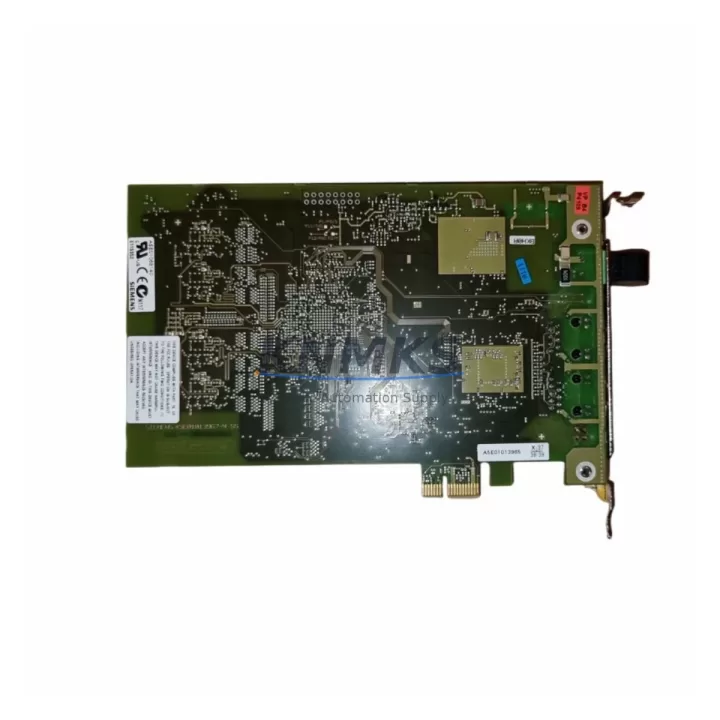
Overview
Siemens 6GK1162-3AA00 Migration-Ready PROFIBUS/MPI Processor: Legacy Control System Retrofit & Upgrade
The Siemens 6GK1162-3AA00 (CP 1623) is a PCIe-based communications processor designed for PROFIBUS DP and MPI connectivity in SIMATIC NET environments. As a direct migration-ready replacement for the discontinued CP 5613 A2 and CP 5614 A2 cards, the 6GK1162-3AA00 enables engineering teams to modernize aging PC-based SCADA stations, operator panels, and S7 programming interfaces without redesigning the underlying control architecture. Whether you are upgrading a legacy WinCC visualization server, migrating a Step 7 programming workstation, or restoring a failed communications link in a distributed control cabinet, this module provides a validated, drop-in upgrade path with minimal downtime risk.
Migration Compatibility Table
| Parameter | CP 5613 A2 (Legacy) | 6GK1162-3AA00 CP 1623 (Replacement) |
|---|---|---|
| Bus Interface | PCI 32-bit | PCIe x1 (PCIe 1.1) |
| Protocol Support | PROFIBUS DP, MPI, FMS | PROFIBUS DP, MPI (FMS not supported) |
| Max. PROFIBUS Speed | 12 Mbit/s | 12 Mbit/s |
| OS Compatibility | Windows XP/7 (32-bit) | Windows 7/10/11 (32 & 64-bit) |
| SIMATIC NET Driver | V8.x and earlier | V14 SP1 and later (STEP 7 / TIA Portal) |
| Connector | DB9 PROFIBUS female | DB9 PROFIBUS female (same pinout) |
| Installation Space | Full-height PCI slot | Full-height PCIe x1 slot (low-profile bracket included) |
| Retrofit Recommendation | Direct replacement; update SIMATIC NET software and re-assign logical device name in NCM PC | |
| Commissioning Focus | Verify logical device name, S7ONLINE access point, and OPC server channel mapping post-swap | |
| Support terms | — | support terms confirmed by quotation included |
Retrofit Planning for Existing Automation Systems
Successful integration of the 6GK1162-3AA00 into a running plant requires a structured pre-migration checklist. Before pulling the legacy CP 5613 A2 or CP 5614 A2, engineers should document the current logical device name assigned in NCM PC Wizard and the S7ONLINE access point configuration used by Step 7 or TIA Portal. These settings must be replicated exactly on the new card to avoid breaking existing OPC DA/UA server channel definitions and WinCC tag connections.
On the hardware side, confirm that the target PC motherboard has a free PCIe x1 (or wider) slot. The CP 1623 ships with both full-height and low-profile brackets, making it compatible with industrial rack-mount PCs and compact panel PCs commonly found in control cabinets. If the existing cabinet uses a SIMATIC IPC427E or IPC547G, slot availability should be verified against the IPC’s backplane layout before ordering.
For systems where the legacy PC also hosts a CP 5611 A2 MPI adapter for direct S7-300 or S7-400 programming access, the 6GK1162-3AA00 consolidates both PROFIBUS DP and MPI functions onto a single card, potentially freeing a slot for other expansions such as a CP 1616 PROFINET card or an additional storage controller. In multi-drop PROFIBUS segments, verify that the bus termination resistors on the PROFIBUS connector are correctly set — the CP 1623 does not provide active termination and relies on the physical cable termination at each segment end.
Where the control system includes a SIMATIC S7-300 CPU with a CP 343-1 Ethernet module or a CP 342-5 PROFIBUS DP master, the migration of the PC-side communications card does not affect the PLC-side configuration. The S7-300 rack, power supply module (PS 307), and I/O modules continue operating normally during the PC-side card swap, which significantly reduces the scope of the change and limits required downtime to the PC reboot cycle only.
For plants running SIMATIC WinCC flexible or WinCC V7 with PROFIBUS-connected HMI panels such as the TP700 Comfort or MP377, the communications path from the SCADA server through the CP 1623 to the HMI panel’s MPI/PROFIBUS port must be re-validated after the card swap. Check that the HMI panel address and the WinCC channel driver (SIMATIC S7 Protocol Suite) are correctly mapped to the new logical device name before resuming production.
Downtime Control During System Migration
Minimizing unplanned downtime is the primary concern in any legacy communications card replacement. The recommended approach for the 6GK1162-3AA00 retrofit is a cold-swap procedure performed during a scheduled maintenance window. Before powering down the PC, export the full NCM PC configuration and back up the SIMATIC NET station configuration file (*.ncs). This backup allows rapid restoration if the new card encounters a driver conflict or if the PCIe slot assignment changes the Windows device enumeration order.
After physical installation, install the SIMATIC NET PC Software matching the target OS version (V14 SP1 or later for Windows 10/11 environments). During driver installation, the system will prompt for the logical device name — enter the same name previously used by the CP 5613 A2 to preserve all upstream software references. Once the driver is active, use the SIMATIC NET Diagnostics tool to verify that the card is visible on the PROFIBUS segment and that the bus address is correctly assigned.
For critical production lines where even a brief communications interruption is unacceptable, consider preparing a pre-configured spare PC with the CP 1623 already installed and the SIMATIC NET software pre-licensed. This hot-standby approach allows the entire PC to be swapped rather than performing an in-situ card replacement, reducing the active changeover window to under 15 minutes in most cases. All program logic in the connected S7-300 or S7-400 PLCs remains intact throughout this process, as the PLC CPUs continue executing their loaded programs independently of the PC communications link.
After commissioning, conduct a full I/O scan and verify all PROFIBUS DP slave diagnostics are clear before handing the system back to operations. Document the firmware version of the CP 1623 and the SIMATIC NET software version for future reference and spare parts lifecycle planning.
Retrofit Support FAQ
Q1: Is the 6GK1162-3AA00 a direct replacement for the CP 5613 A2 and CP 5614 A2?
Yes. The CP 1623 (6GK1162-3AA00) is Siemens’ designated successor for both the CP 5613 A2 and CP 5614 A2. The primary hardware difference is the bus interface — PCI on the legacy cards versus PCIe on the CP 1623. The PROFIBUS DB9 connector pinout and protocol support (PROFIBUS DP and MPI) are functionally equivalent. A SIMATIC NET software update and logical device name reassignment in NCM PC are required after installation.
Q2: What wiring or terminal changes are needed during the swap?
No wiring changes are required on the PROFIBUS cable side. The DB9 female connector on the CP 1623 uses the same pinout as the CP 5613 A2 and CP 5614 A2. Simply disconnect the existing PROFIBUS cable from the old card and reconnect it to the CP 1623. Verify bus termination settings on the connector before powering up.
Q3: Has the unit been tested before shipment?
Yes. Every 6GK1162-3AA00 unit we supply undergoes pre-shipment functional testing to verify PCIe interface integrity and PROFIBUS port operation. Units are shipped with original or equivalent packaging to prevent transit damage. A support terms confirmed by quotation is included with every order, covering manufacturing defects and functional failures under normal operating conditions.
Q4: What is your stock availability and lead time?
We maintain in-stock inventory of the 6GK1162-3AA00 to support urgent retrofit and breakdown replacement requirements. Standard orders ship within 1–3 business days. For large-quantity orders or project-based procurement, contact our sales team to confirm availability and arrange priority allocation. All units are covered by a support terms confirmed by quotation from the date of shipment.
© 2026 KNMKS. All rights reserved.
Original Source: https://knmks.com
Contact: admin@knmks.com | +86 18359268345
Product Identification
- Brand / Ecosystem
-
Siemens
Siemens - Model / Series
-
6GK1162-3AA00
SIMATIC Series - Product Family
- PLCs & Controllers
- Availability Status
- Available on request after model and quantity confirmation
- Inquiry Type
- B2B RFQ, replacement inquiry and project spare-part request
- Pre-Quote Check
- Exact SKU, brand, series, quantity, nameplate photos and destination country are checked before quotation
System Path
Where this product fits in the KNMKS automation structure.
Specification & Inquiry Focus
- Control platform
- PLC, PAC and modular controllers
- Common needs
- CPU, rack, power and I/O expansion
- Project support
- Replacement, cabinet build and maintenance
Buyer Confirmation
Information KNMKS checks before replying.
- Exact model
- 6GK1162-3AA00
- Brand / ecosystem
- Siemens
- Product family
- PLCs & Controllers
- Application note
- Replacement, maintenance, project build or spare-part list
- Useful photos
- Nameplate, installed unit, cabinet layout or connector side
- Delivery details
- Quantity, destination country and target schedule
Document Support
Files and notes can be confirmed during quotation.
- Product photos or nameplate confirmation when available
- Packing and delivery notes before quotation confirmation
- Support scope and delivery terms confirmed per inquiry
- Export document coordination for qualified B2B requests
Inquiry Support
- Model cross-checking before quotation
- CPU, power, rack and expansion module matching
- Support for replacement and project inquiry
What to Send Us
- Brand and exact model number: Siemens 6GK1162-3AA00
- Quantity and required delivery time
- Application, replacement requirement or nameplate photo
- Destination country and shipping preference
RFQ Preparation
This is a product inquiry page built for RFQ communication.
Fast Model Check
Send this model to KNMKS for confirmation.
Include quantity, destination country and photos if this is a maintenance replacement. The inquiry will be saved with a reference number after submission.
Brand & Compatibility Note
KNMKS displays automation product information for well-known industrial brand ecosystems and compatible replacement references. Brand names are used for product identification and compatibility reference only; final availability and commercial terms are confirmed per quotation.
 Manufacturing
 Machine Tools
 Packaging
 Energy & Power



 HMI & Displays
 Servo Systems
 Variable Frequency Drives
 Sensors