
Overview
Siemens 6GK1161-3AA01 Maintenance-Proven Spare Part for Factory Uptime
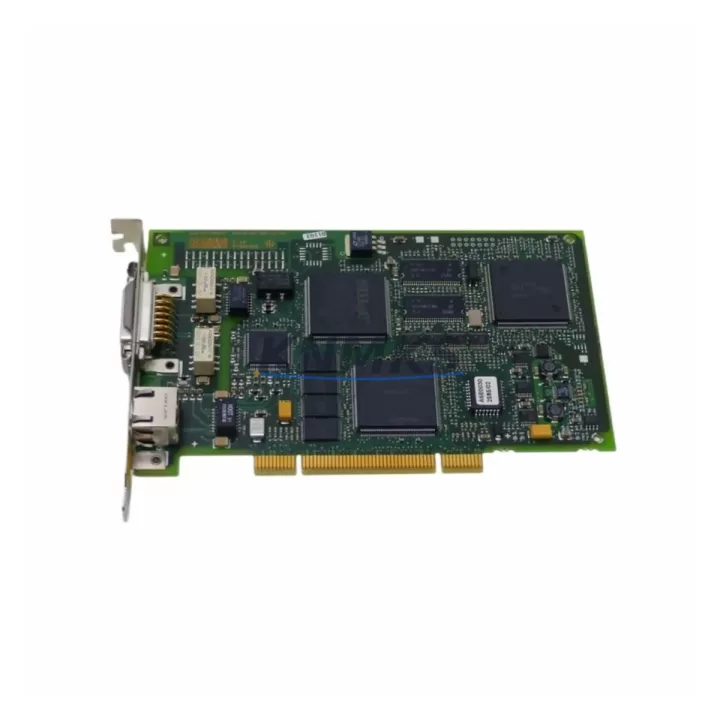
The Siemens 6GK1161-3AA01 is an original SIMATIC NET CP1613 Industrial Ethernet PCI communication card designed for seamless integration into SIMATIC S7-300 and S7-400 control systems. As a maintenance-proven spare part, it enables rapid restoration of Ethernet communication links in production environments where network continuity is critical to factory uptime. Whether you are managing a scheduled annual overhaul, responding to an unplanned communication fault, or building a strategic spare parts inventory for aging SIMATIC NET infrastructure, the 6GK1161-3AA01 delivers the compatibility, reliability, and traceability that industrial maintenance engineers and procurement teams require.
In modern industrial facilities, the CP1613 card serves as the backbone of PC-based SIMATIC communication — connecting engineering workstations, SCADA servers, and HMI panels to the S7 controller network via standard 10/100 Mbps Industrial Ethernet. A failed or degraded 6GK1161-3AA01 can isolate an entire control segment, halting production and triggering costly unplanned downtime. Stocking a verified original spare eliminates the diagnostic delay caused by sourcing uncertainty and allows maintenance teams to execute a clean card swap within a single maintenance window.
For procurement engineers managing multi-site automation assets, the 6GK1161-3AA01 is a high-priority line item on any SIMATIC NET spare parts list. Its compatibility with STEP 7, TIA Portal, and SIMATIC NET software stacks means no additional licensing or configuration overhead during replacement — the card is recognized immediately upon installation, reducing mean time to repair (MTTR) and protecting production schedules.
Spare Maintenance Table
| Parameter | Specification |
|---|---|
| Part Number / SKU | 6GK1161-3AA01 |
| Series | CP1613 / SIMATIC NET |
| Brand | Siemens |
| Product Type | Industrial Ethernet PCI Communication Card |
| Interface | 10/100 Mbps Industrial Ethernet (RJ45) |
| Bus Interface | PCI (32-bit, 33 MHz) |
| Compatible Systems | SIMATIC S7-300, S7-400, PC-based SIMATIC stations |
| Software Compatibility | STEP 7, TIA Portal, SIMATIC NET, WinCC, SCADA |
| Operating Voltage | 3.3 V / 5 V PCI bus supply |
| Operating Temperature | 0 °C to +60 °C |
| Country of Origin | Germany |
| Installation Environment | Control cabinet, engineering workstation, SCADA server |
| Maintenance Recommendation | Inspect annually; replace on communication fault or degraded throughput |
| Support terms | 12 Months |
| Shipment | Tested before dispatch; original packaging where available |
Maintenance Planning for Continuous Operation
When replacing the 6GK1161-3AA01 in a SIMATIC NET environment, a thorough maintenance inspection should extend beyond the card itself. Maintenance engineers should simultaneously verify the condition of the Industrial Ethernet switch ports and patch cables connecting the CP1613 to the plant network — degraded RJ45 connectors or faulty Cat5e/Cat6 cabling are a common secondary cause of recurring communication faults that a card replacement alone will not resolve.
The PC-based SIMATIC station housing the CP1613 typically also contains a SIMATIC S7-400 CPU or a CP443-1 Advanced Ethernet module on the rack side. Inspecting the rack backplane connectors and the 24 VDC power supply module (such as the PS 407 or PS 405 series) during the same maintenance window prevents repeat callouts. If the station runs WinCC or a third-party SCADA platform, the OPC server configuration and network adapter binding settings should be validated after card replacement to confirm that the new 6GK1161-3AA01 is correctly mapped to the communication driver.
For facilities running mixed SIMATIC NET topologies, it is also advisable to inspect the CP5611 or CP5613 PROFIBUS communication cards installed in the same workstation. A simultaneous failure of both Ethernet and PROFIBUS communication cards — often caused by a power surge or electrostatic discharge event — is not uncommon in older control cabinets lacking adequate surge protection. Checking the cabinet’s 24 VDC bus fuses, terminal block integrity, and DIN rail grounding during the same inspection cycle significantly reduces the risk of a secondary fault after the primary repair is completed.
Procurement teams should also consider stocking the SIMATIC NET PC software license alongside the 6GK1161-3AA01 spare, as software re-activation is sometimes required when the card is replaced in a licensed SIMATIC NET configuration. Maintaining a documented spare parts register that includes the card’s firmware version and associated software release ensures that replacement units are always compatible with the installed system baseline.
Site Replacement Workflow
Step 1 — Isolate and document: Before removing the 6GK1161-3AA01, record the existing network configuration including IP address, subnet mask, MAC address, and SIMATIC NET station name. Export the STEP 7 or TIA Portal hardware configuration for reference.
Step 2 — Power down safely: Shut down the SIMATIC NET software stack and the host PC in the correct sequence. Disconnect the Industrial Ethernet cable from the CP1613 before removing the card to avoid network disruption to other nodes.
Step 3 — Physical replacement: Remove the faulty 6GK1161-3AA01 from the PCI slot. Install the replacement card in the same slot. Secure the bracket and reconnect the Ethernet cable. The PCI bus will auto-detect the new card on next boot.
Step 4 — Software configuration: Boot the host PC and allow the operating system to detect the new CP1613 card. Install or confirm the SIMATIC NET driver version. Restore the previously documented IP and station configuration using SIMATIC NET Configuration Console or TIA Portal.
Step 5 — Communication test: Ping the S7 controller from the engineering station. Verify that STEP 7 or TIA Portal can establish an online connection to the target CPU. Confirm that WinCC or SCADA tags are updating correctly before returning the system to production.
Step 6 — Document and close: Update the maintenance log with the replacement date, new card serial number, and firmware version. Flag the old card for failure analysis if required by your maintenance management system.
Spare Parts Support FAQ
Q1: Is the 6GK1161-3AA01 still available as a new original spare?
A: Yes. KNMKS maintains stock of original Siemens 6GK1161-3AA01 units sourced from authorized distribution channels. Each unit is inspected and tested before shipment. For long-term supply requirements or multi-unit orders, contact our sales team to discuss scheduled delivery and volume pricing.
Q2: How do I verify compatibility with my existing SIMATIC NET installation?
A: The 6GK1161-3AA01 is compatible with all SIMATIC NET software versions that support the CP1613 product family, including SIMATIC NET V8.x and later. Confirm your installed SIMATIC NET software version and cross-reference with the Siemens compatibility matrix. Our technical team can assist with compatibility verification prior to purchase.
Q3: What does the support terms confirmed by quotation cover?
A: The support terms confirmed by quotation cover manufacturing defects and functional failures under normal operating conditions. Each unit is tested before dispatch. Support requests are processed through KNMKS directly — contact admin@knmks.com with your order reference and fault description for rapid resolution.
Q4: Can KNMKS support long-term supply for obsolete or discontinued SIMATIC NET components?
A: Yes. KNMKS specializes in long-term supply of industrial automation spare parts including discontinued and hard-to-source SIMATIC NET components. We maintain safety stock for high-demand SKUs and can establish scheduled supply agreements to support your planned maintenance cycles and inventory strategy.
© 2026 KNMKS. All rights reserved.
Original Source: https://knmks.com
Contact: admin@knmks.com | +86 18359268345
Product Identification
- Brand / Ecosystem
-
SIEMENS
Siemens - Model / Series
-
6GK1161-3AA01
SIMATIC Series - Product Family
- Communication Modules
- Availability Status
- Available on request after model and quantity confirmation
- Inquiry Type
- B2B RFQ, replacement inquiry and project spare-part request
- Pre-Quote Check
- Exact SKU, brand, series, quantity, nameplate photos and destination country are checked before quotation
System Path
Where this product fits in the KNMKS automation structure.
Specification & Inquiry Focus
- Network range
- Ethernet, fieldbus and gateway modules
- Common needs
- Protocol, port and controller family
- Project support
- Machine networking and data integration
Buyer Confirmation
Information KNMKS checks before replying.
- Exact model
- 6GK1161-3AA01
- Brand / ecosystem
- SIEMENS
- Product family
- Communication Modules
- Application note
- Replacement, maintenance, project build or spare-part list
- Useful photos
- Nameplate, installed unit, cabinet layout or connector side
- Delivery details
- Quantity, destination country and target schedule
Document Support
Files and notes can be confirmed during quotation.
- Product photos or nameplate confirmation when available
- Packing and delivery notes before quotation confirmation
- Support scope and delivery terms confirmed per inquiry
- Export document coordination for qualified B2B requests
Inquiry Support
- Industrial Ethernet and fieldbus module inquiry
- Protocol compatibility review
- Integration project inquiry support
What to Send Us
- Brand and exact model number: SIEMENS 6GK1161-3AA01
- Quantity and required delivery time
- Application, replacement requirement or nameplate photo
- Destination country and shipping preference
RFQ Preparation
This is a product inquiry page built for RFQ communication.
Fast Model Check
Send this model to KNMKS for confirmation.
Include quantity, destination country and photos if this is a maintenance replacement. The inquiry will be saved with a reference number after submission.
Brand & Compatibility Note
KNMKS displays automation product information for well-known industrial brand ecosystems and compatible replacement references. Brand names are used for product identification and compatibility reference only; final availability and commercial terms are confirmed per quotation.
 Manufacturing
 Machine Tools
 Packaging
 Energy & Power
 PLCs & Controllers
 HMI & Displays
 Servo Systems
 Variable Frequency Drives