
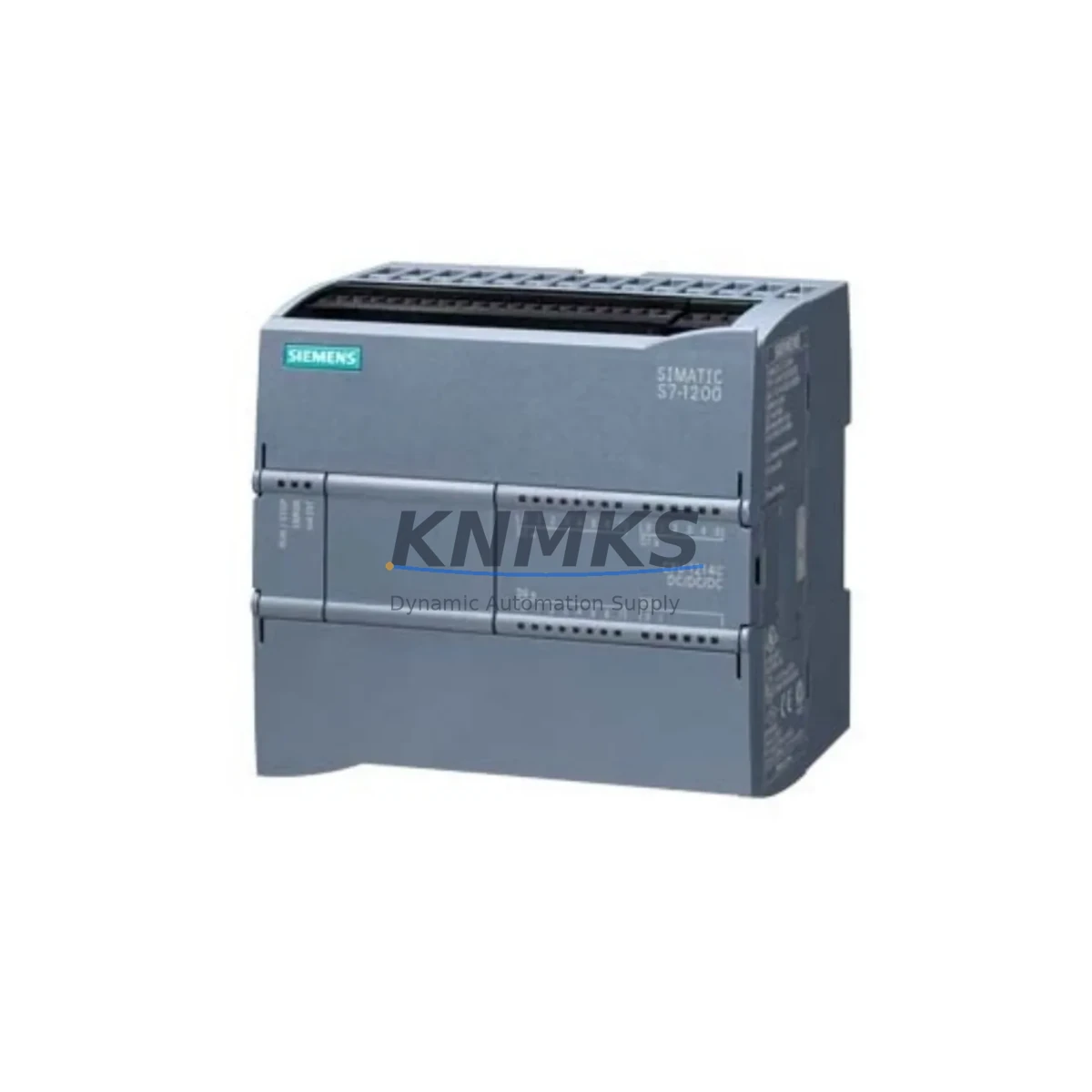
Overview
Siemens 6FL7820-8BA10 Migration-Ready Module for Legacy Control Systems
The Siemens 6FL7820-8BA10 is a migration-ready communication module designed for engineers and maintenance teams managing the transition from legacy AC5100 control architectures to modern SIMATIC NET-based automation platforms. As industrial facilities face increasing pressure to replace discontinued components and extend the operational life of aging control cabinets, the 6FL7820-8BA10 provides a reliable, drop-in-compatible solution that minimizes retrofit risk and reduces unplanned downtime.
This module is engineered for direct integration into existing AC5100 rack assemblies, preserving original backplane slot assignments and terminal wiring configurations wherever possible. Engineers undertaking a control system upgrade should verify power supply capacity — the 6FL7820-8BA10 draws from the 24 VDC bus rail and must be confirmed against the existing Siemens PS 307 or equivalent power module’s available headroom before installation. Terminal block compatibility with existing field wiring should be validated against the original I/O mapping documentation to avoid signal reassignment errors during commissioning.
For facilities running SIMATIC S5 or early S7-300 series controllers, the 6FL7820-8BA10 supports a structured migration path toward PROFINET-based communication without requiring a full controller replacement in the first phase. This is particularly valuable in multi-cabinet installations where the CP 343-1 or CP 443-1 communication processors are already in service — the 6FL7820-8BA10 can be introduced into the network topology incrementally, allowing phased cutover rather than a single high-risk shutdown event.
Backplane interface compatibility should be confirmed against the rack generation in use. The module is designed for standard S7-300 rail mounting and is compatible with the IM 360/361 interface module pair used in distributed rack configurations. Module addressing follows standard STEP 7 or TIA Portal slot-based assignment rules; no hardware DIP switch reconfiguration is required, which simplifies the commissioning workflow and reduces the risk of address conflicts in multi-rack systems.
Program logic compatibility is a critical checkpoint in any retrofit project. Before cutover, the existing ladder or function block program should be exported and archived. Where the 6FL7820-8BA10 replaces a legacy communication module with different data block structures, the associated DB and FB references in the PLC program must be reviewed and updated accordingly. HMI screen tag bindings — particularly those referencing communication status bits or diagnostic buffers — should be re-validated in WinCC or the applicable SCADA platform to ensure alarm and status displays remain accurate post-migration.
Communication link integrity is another key consideration. If the existing installation uses MPI or PROFIBUS DP as the primary fieldbus, the introduction of the 6FL7820-8BA10 into a PROFINET segment requires careful attention to network segmentation, switch port configuration, and IP address assignment. The module’s MAC address and device name must be assigned via TIA Portal’s online device configuration tool prior to first power-on in the live network. Firmware version compatibility between the 6FL7820-8BA10 and the CPU firmware should be confirmed in the Siemens compatibility matrix before deployment.
Installation space within the control cabinet should be measured before ordering. The 6FL7820-8BA10 occupies a standard S7-300 module footprint; however, in densely populated cabinets where legacy wiring harnesses have not been rerouted, physical clearance for the front connector and cable management channel must be confirmed. Thermal derating in high-ambient-temperature enclosures should also be assessed if the cabinet operates above 40°C continuously.
All units supplied by KNMKS are sourced from verified distribution channels, pre-tested for functional integrity, and shipped with a support terms confirmed by quotation covering manufacturing defects and operational failures under normal industrial service conditions. Global shipping is available with standard export documentation to support cross-border procurement for international plant maintenance programs.
Migration Compatibility Table
| Parameter | Details |
|---|---|
| SKU / Part Number | 6FL7820-8BA10 |
| Series / Platform | Siemens AC5100 / SIMATIC NET |
| Replaces / Compatible With | Legacy AC5100 communication modules; compatible migration path from S5 and early S7-300 systems |
| Backplane Interface | Standard S7-300 rail; compatible with IM 360/361 distributed rack interface |
| Communication Protocol | PROFINET; backward-compatible integration with PROFIBUS DP and MPI network segments |
| Power Supply Requirement | 24 VDC bus rail; verify available capacity against PS 307 or equivalent power module |
| Module Addressing | Slot-based (STEP 7 / TIA Portal); no DIP switch configuration required |
| Firmware Compatibility | Confirm CPU firmware version via Siemens compatibility matrix before deployment |
| Installation Footprint | Standard S7-300 module width; verify cabinet clearance for front connector and cable channel |
| Commissioning Tool | TIA Portal (device name and IP assignment required before first power-on) |
| Support terms | 12 months — manufacturing defects and operational failures under normal industrial service |
| Origin | Germany (DE) |
| Availability | availability confirmed by RFQ — global shipping with export documentation |
Retrofit Planning for Existing Automation Systems
A successful retrofit using the 6FL7820-8BA10 typically begins with a full audit of the existing control cabinet inventory. Engineers should document all installed modules — including the CPU (e.g., CPU 315-2 DP or CPU 317-2 PN/DP), the active power supply module, any installed CP 343-1 Advanced communication processors, and the I/O modules occupying adjacent rack slots. This baseline inventory ensures that the replacement module’s slot assignment does not conflict with existing hardware and that the rack’s total current draw remains within the power module’s rated output.
Terminal wiring from field devices — sensors, actuators, and signal isolators — should be labeled and photographed before any module is removed. Where the existing installation uses a Siemens SM 321 or SM 331 analog/digital input module in adjacent slots, the wiring harness routing must be preserved to avoid signal interruption during the swap. If the cabinet includes a TP 700 Comfort or similar HMI panel connected via PROFINET, the panel’s communication configuration should be exported before the network is modified.
For systems where the existing communication backbone relies on PROFIBUS DP, the introduction of the 6FL7820-8BA10 into a PROFINET segment may require an IE/PB Link PN IO gateway to bridge the two network segments during the transition period. This approach allows the legacy PROFIBUS field devices to remain operational while the new PROFINET infrastructure is commissioned in parallel, significantly reducing the risk of a full production shutdown.
Programming cable access is another practical consideration. If the CPU requires firmware updates or program modifications during the retrofit, a standard USB-MPI or PC Adapter USB A2 programming cable should be available on-site. Ensuring that the STEP 7 or TIA Portal project file is current and backed up before any hardware change is a non-negotiable step in responsible retrofit planning.
Downtime Control During System Migration
Minimizing production downtime during a control system migration requires a structured pre-cutover preparation process. For installations using the 6FL7820-8BA10 as a replacement for a failed or end-of-life communication module, the following approach is recommended to protect program logic integrity and maintain field control continuity.
First, perform a full online backup of the CPU program, including all data blocks, function blocks, and system data. Archive the hardware configuration from STEP 7 or TIA Portal, including the exact slot assignments and module parameters. If the system uses a memory card (e.g., a Siemens SIMATIC Micro Memory Card), verify that the card contains the most recent program version before the module swap begins.
During the physical swap, ensure that the 24 VDC power supply is isolated before removing the legacy module. After installing the 6FL7820-8BA10, restore power and allow the CPU to complete its startup diagnostic cycle before attempting to go online. If the CPU enters STOP mode after the swap, check the diagnostic buffer in TIA Portal for module configuration mismatches — this is typically resolved by downloading the updated hardware configuration to the CPU.
For systems where continuous field control is required during the migration window, consider using a hot-standby or redundant CPU configuration if the existing platform supports it. Where redundancy is not available, scheduling the cutover during a planned maintenance window and pre-staging the replacement module with its device name and IP address already configured will reduce the live commissioning time to under 30 minutes in most standard installations.
Post-cutover, verify all communication links, I/O signal states, and HMI alarm displays before returning the system to automatic mode. A structured commissioning checklist — covering power-on sequence, CPU RUN state confirmation, PROFINET device status, and field device response verification — should be completed and signed off before the maintenance window is closed.
Retrofit Support FAQ
Q: Is the 6FL7820-8BA10 a direct drop-in replacement for the legacy AC5100 communication module?
A: The 6FL7820-8BA10 is designed as a migration-ready replacement for AC5100 series communication modules. While the backplane interface and slot assignment are compatible, engineers should verify terminal wiring, module addressing, and firmware version compatibility before installation. KNMKS provides pre-shipment functional testing on all units to confirm operational integrity.
Q: What commissioning steps are required after installing the 6FL7820-8BA10?
A: After physical installation, the module’s device name and IP address must be assigned via TIA Portal’s online device configuration function. The updated hardware configuration must then be downloaded to the CPU. Verify PROFINET device status in the network diagnostics view and confirm all I/O signal states before returning the system to RUN mode. Total commissioning time for a standard single-rack installation is typically under 30 minutes.
Q: Can the 6FL7820-8BA10 operate in a mixed PROFIBUS DP and PROFINET network?
A: Yes, with appropriate network bridging. For installations where legacy PROFIBUS DP field devices must remain operational during the transition, an IE/PB Link PN IO gateway can be used to bridge the two network segments. This allows the 6FL7820-8BA10 to operate on the PROFINET backbone while maintaining communication with existing PROFIBUS DP devices without requiring their immediate replacement.
Q: What support terms and stock availability does KNMKS provide for the 6FL7820-8BA10?
A: All 6FL7820-8BA10 units supplied by KNMKS carry a support terms confirmed by quotation covering manufacturing defects and operational failures under normal industrial service conditions. Units are availability confirmed by RFQ and available for immediate dispatch with global shipping and standard export documentation. For volume procurement or urgent replacement requirements, contact the KNMKS sales team directly.
© 2026 KNMKS. All rights reserved.
Original Source: https://knmks.com
Contact: admin@knmks.com | +86 18359268345
Product Identification
- Brand / Ecosystem
-
Siemens
Siemens - Model / Series
-
6FL7820-8BA10 AC5100
Legacy Control Series - Product Family
- PLCs & Controllers
- Availability Status
- Available on request after model and quantity confirmation
- Inquiry Type
- B2B RFQ, replacement inquiry and project spare-part request
- Pre-Quote Check
- Exact SKU, brand, series, quantity, nameplate photos and destination country are checked before quotation
System Path
Where this product fits in the KNMKS automation structure.
Specification & Inquiry Focus
- Control platform
- PLC, PAC and modular controllers
- Common needs
- CPU, rack, power and I/O expansion
- Project support
- Replacement, cabinet build and maintenance
Buyer Confirmation
Information KNMKS checks before replying.
- Exact model
- 6FL7820-8BA10 AC5100
- Brand / ecosystem
- Siemens
- Product family
- PLCs & Controllers
- Application note
- Replacement, maintenance, project build or spare-part list
- Useful photos
- Nameplate, installed unit, cabinet layout or connector side
- Delivery details
- Quantity, destination country and target schedule
Document Support
Files and notes can be confirmed during quotation.
- Product photos or nameplate confirmation when available
- Packing and delivery notes before quotation confirmation
- Support scope and delivery terms confirmed per inquiry
- Export document coordination for qualified B2B requests
Inquiry Support
- Model cross-checking before quotation
- CPU, power, rack and expansion module matching
- Support for replacement and project inquiry
What to Send Us
- Brand and exact model number: Siemens 6FL7820-8BA10 AC5100
- Quantity and required delivery time
- Application, replacement requirement or nameplate photo
- Destination country and shipping preference
RFQ Preparation
This is a product inquiry page built for RFQ communication.
Fast Model Check
Send this model to KNMKS for confirmation.
Include quantity, destination country and photos if this is a maintenance replacement. The inquiry will be saved with a reference number after submission.
Brand & Compatibility Note
KNMKS displays automation product information for well-known industrial brand ecosystems and compatible replacement references. Brand names are used for product identification and compatibility reference only; final availability and commercial terms are confirmed per quotation.
 Manufacturing
 Machine Tools
 Packaging
 Energy & Power
 HMI & Displays
 Servo Systems
 Variable Frequency Drives
 Sensors