
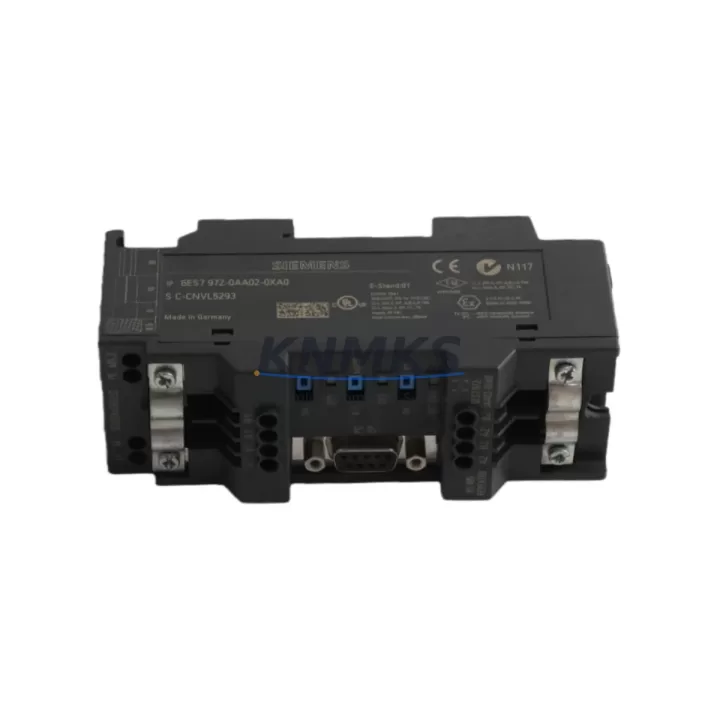
Overview
Siemens 6ES7972-4AA02-0XA0 Migration-Ready PROFIBUS Booster for Legacy Control Systems
The Siemens 6ES7972-4AA02-0XA0 is a PROFIBUS DP Bus Booster module designed for the S7-300 series, engineered to extend PROFIBUS segment length and restore signal integrity in aging automation networks. As industrial facilities accelerate the transition away from end-of-life control architectures, this module plays a critical role in sustaining PROFIBUS DP communication across legacy control cabinets without requiring a full system overhaul. Whether you are replacing a failed unit in a running production line or planning a phased migration from an older Siemens S5 or early S7-300 platform, the 6ES7972-4AA02-0XA0 provides a verified, drop-in compatible solution that minimizes engineering risk and downtime exposure.
Before installing this module into an existing PROFIBUS segment, engineers should confirm the total cable length of the active bus segment, the number of nodes currently connected, and whether the existing DP master — typically a CPU 315-2 DP, CPU 317-2 DP, or a CP 342-5 communications processor — is operating within its rated node count. The 6ES7972-4AA02-0XA0 regenerates the PROFIBUS signal and allows the segment to be extended beyond the standard 1,200-meter limit, which is particularly valuable in large-footprint plants such as petrochemical facilities, water treatment stations, and power generation sites where field devices are distributed across long cable runs.
Migration Compatibility Table
| Parameter | Details |
|---|---|
| Compatible Platform | Siemens S7-300 series (all CPU variants with PROFIBUS DP interface) |
| Bus Standard | PROFIBUS DP (EN 50170), up to 12 Mbit/s |
| Segment Extension | Extends PROFIBUS segment beyond 1,200 m; supports up to 32 nodes per segment |
| Power Supply | 24 V DC (external); verify rail capacity before installation |
| Connector Interface | 9-pin Sub-D (DB9) PROFIBUS connectors; compatible with standard Siemens bus connectors |
| Installation | DIN rail mount; fits standard S7-300 control cabinet layout |
| Replacement For | 6ES7972-4AA01-0XA0 (previous revision); direct hardware substitute |
| Communication Compatibility | Transparent to PROFIBUS DP protocol; no address configuration required |
| Firmware | No firmware update required; hardware-level signal regeneration |
| Commissioning | Verify bus termination resistors at both segment ends after installation |
| Support terms | support terms confirmed by quotation — functional test completed prior to shipment |
Retrofit Planning for Existing Automation Systems
Integrating the 6ES7972-4AA02-0XA0 into a live automation environment requires a structured approach to avoid disrupting ongoing production. In most S7-300 retrofit scenarios, the bus booster is installed between two PROFIBUS DP segments within the same control cabinet or between a cabinet and a remote I/O station. Engineers should begin by auditing the existing PROFIBUS topology using STEP 7 or TIA Portal’s hardware configuration view to identify current segment boundaries, node addresses, and baud rate settings.
During the retrofit, it is common to encounter associated components that also require attention. The CP 342-5 PROFIBUS communications processor, frequently used in S7-300 systems for master-slave configurations, should be checked for firmware compatibility with the current STEP 7 project version. ET 200M distributed I/O stations connected downstream of the bus booster must have their IM 153-x interface modules verified for address conflicts before the new segment is activated. In control cabinets where the PS 307 power supply module is already loaded near capacity, the additional 24 V DC draw of the bus booster must be factored into the power budget — a PS 307 10A unit is typically sufficient for most expanded configurations.
For systems that include OP 7 or OP 17 HMI panels communicating over PROFIBUS MPI/DP, the panel’s communication parameters should be reviewed to confirm that the extended segment does not introduce latency beyond the panel’s polling timeout threshold. Where signal isolation is a concern — particularly in environments with heavy motor drives or high-frequency switching equipment — the addition of a PROFIBUS signal isolator upstream of the booster is recommended to protect the regenerated segment from conducted interference. Programming cables such as the PC Adapter USB A2 should be on hand during commissioning to allow direct CPU access for online diagnostics without interrupting the PROFIBUS network.
Downtime Control During System Migration
Minimizing unplanned downtime is the primary concern when replacing or extending PROFIBUS infrastructure in a running plant. The 6ES7972-4AA02-0XA0 supports a hot-swap-friendly installation process when the PROFIBUS segment is taken offline in a controlled manner. The recommended procedure is to schedule the changeover during a planned maintenance window, export the current STEP 7 or TIA Portal project as a backup, and document all node addresses and GSD file assignments before disconnecting any bus connectors.
Because the bus booster operates transparently at the physical layer, no changes to the PLC program logic, symbol tables, or HMI screen variable mappings are required after installation. The CPU retains its existing program in load memory, and the PROFIBUS DP master configuration in the hardware catalog remains unchanged. After the booster is installed and bus termination is confirmed at both segment ends, the CPU can be restarted in RUN mode and the PROFIBUS diagnostic buffer should be checked for any OB86 rack failure or OB122 I/O access errors that would indicate a node has not re-established communication. In most cases, a clean installation resolves within one bus cycle, and normal production can resume within minutes of the maintenance window opening.
For facilities operating continuous processes where even a brief stop is costly, a parallel wiring approach can be used: the new segment with the installed booster is pre-wired and tested offline, then switched in during a brief process hold. This approach is particularly effective in petrochemical and power generation environments where the S7-300 CPU controls critical loop controllers and the PROFIBUS network carries analog I/O data from field transmitters.
Retrofit Support FAQ
Q: Is the 6ES7972-4AA02-0XA0 a direct replacement for the 6ES7972-4AA01-0XA0?
A: Yes. The -0XA0 suffix indicates the base hardware revision. The 4AA02 is the current production revision and is a direct functional substitute for the 4AA01. No configuration changes are required in STEP 7 or TIA Portal when swapping revisions.
Q: Does installing this bus booster require changes to the PLC program or PROFIBUS node addresses?
A: No. The 6ES7972-4AA02-0XA0 is transparent to the PROFIBUS DP protocol. It regenerates the physical signal without altering data frames, node addresses, or timing parameters. Existing GSD files and hardware configurations remain valid.
Q: What pre-shipment testing is performed on this unit?
A: Each unit undergoes a functional power-on test and signal integrity verification before dispatch. Units are supplied with a support terms confirmed by quotation covering manufacturing defects and functional failure under normal operating conditions. Test records are available upon request for quality-critical applications.
Q: What is the typical lead time and stock availability?
A: Stock is maintained for immediate dispatch. Standard orders ship within 1–3 business days. For urgent replacement requirements in critical infrastructure applications, expedited shipping options are available. Contact our team to confirm current inventory levels and delivery timelines for your region.
© 2026 KNMKS. All rights reserved.
Original Source: https://knmks.com
Contact: admin@knmks.com | +86 18359268345
Product Identification
- Brand / Ecosystem
-
Siemens
Siemens - Model / Series
-
6ES7972-4AA02-0XA0
SIMATIC Series - Product Family
- PLCs & Controllers
- Availability Status
- Available on request after model and quantity confirmation
- Inquiry Type
- B2B RFQ, replacement inquiry and project spare-part request
- Pre-Quote Check
- Exact SKU, brand, series, quantity, nameplate photos and destination country are checked before quotation
System Path
Where this product fits in the KNMKS automation structure.
Specification & Inquiry Focus
- Control platform
- PLC, PAC and modular controllers
- Common needs
- CPU, rack, power and I/O expansion
- Project support
- Replacement, cabinet build and maintenance
Buyer Confirmation
Information KNMKS checks before replying.
- Exact model
- 6ES7972-4AA02-0XA0
- Brand / ecosystem
- Siemens
- Product family
- PLCs & Controllers
- Application note
- Replacement, maintenance, project build or spare-part list
- Useful photos
- Nameplate, installed unit, cabinet layout or connector side
- Delivery details
- Quantity, destination country and target schedule
Document Support
Files and notes can be confirmed during quotation.
- Product photos or nameplate confirmation when available
- Packing and delivery notes before quotation confirmation
- Support scope and delivery terms confirmed per inquiry
- Export document coordination for qualified B2B requests
Inquiry Support
- Model cross-checking before quotation
- CPU, power, rack and expansion module matching
- Support for replacement and project inquiry
What to Send Us
- Brand and exact model number: Siemens 6ES7972-4AA02-0XA0
- Quantity and required delivery time
- Application, replacement requirement or nameplate photo
- Destination country and shipping preference
RFQ Preparation
This is a product inquiry page built for RFQ communication.
Fast Model Check
Send this model to KNMKS for confirmation.
Include quantity, destination country and photos if this is a maintenance replacement. The inquiry will be saved with a reference number after submission.
Brand & Compatibility Note
KNMKS displays automation product information for well-known industrial brand ecosystems and compatible replacement references. Brand names are used for product identification and compatibility reference only; final availability and commercial terms are confirmed per quotation.
 Manufacturing
 Machine Tools
 Packaging
 Energy & Power



 HMI & Displays
 Servo Systems
 Variable Frequency Drives
 Sensors