
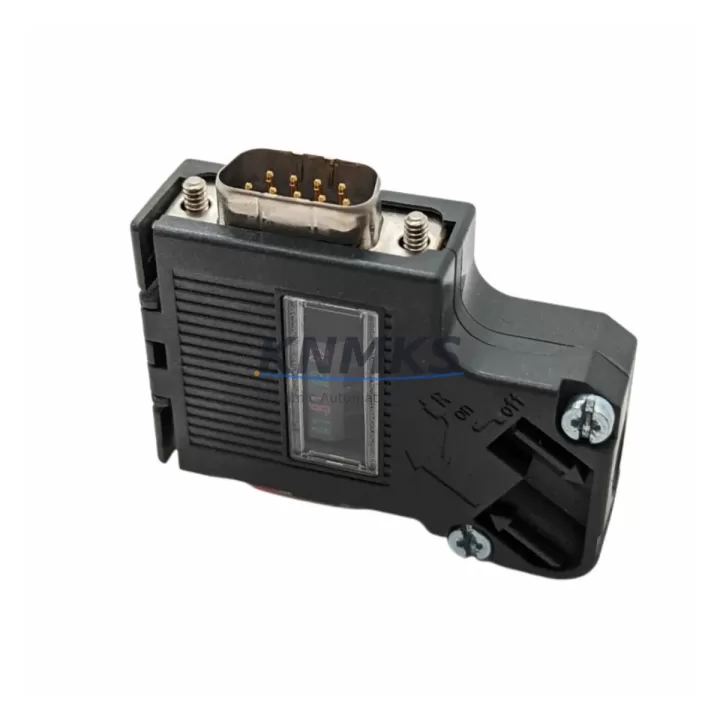
Overview
Siemens 6ES7972-0BB42-0XA0 Maintenance-Proven Spare Part for Factory Uptime
The Siemens 6ES7972-0BB42-0XA0 is a 90-degree PROFIBUS DP bus connector designed for SIMATIC S7-300, S7-400, and compatible Siemens automation platforms. As a critical field-bus termination and daisy-chain component, this connector enables reliable RS-485 communication across distributed I/O nodes, drives, and remote stations in process and discrete manufacturing environments. Maintaining an in-stock supply of the 6ES7972-0BB42-0XA0 is a foundational element of any PROFIBUS DP network maintenance strategy — connector failures are among the most common causes of segment-wide communication faults, and a single degraded termination can bring down an entire DP segment.
For maintenance engineers managing aging SIMATIC S7 control cabinets, the 6ES7972-0BB42-0XA0 represents a low-cost, high-impact spare. Its 90-degree cable exit angle is optimized for tight cabinet installations where straight connectors would create excessive cable stress or routing conflicts. The integrated termination resistor switch allows the connector to serve as a bus terminator at either end of a PROFIBUS segment without requiring additional hardware. Pre-shipment electrical continuity and impedance verification ensures each unit arrives ready for immediate installation, minimizing unplanned downtime during emergency replacement scenarios.
Procurement engineers sourcing PROFIBUS DP spares for multi-site facilities should consider stocking the 6ES7972-0BB42-0XA0 alongside complementary network components. When a PROFIBUS segment experiences intermittent communication errors or complete loss of DP master-slave communication, the diagnostic workflow typically involves inspecting the bus connector termination, cable shielding continuity, and the PROFIBUS DP cable itself — commonly the Siemens 6XV1830-0EH10 or equivalent 2-core shielded cable. Faulty connectors are frequently misdiagnosed as CPU or IM module faults; replacing the 6ES7972-0BB42-0XA0 at the suspect node is a low-risk first step before escalating to module-level replacement.
In annual maintenance cycles and control cabinet inspections, the 6ES7972-0BB42-0XA0 should be checked for mechanical integrity, pin oxidation, and cable clamp torque. Connectors installed in high-vibration environments — such as near variable frequency drives like the Siemens SINAMICS G120 or Micromaster 440 — are subject to accelerated wear and should be prioritized for proactive replacement. Maintaining a minimum buffer stock of 5–10 units per PROFIBUS segment is recommended for facilities with zero-tolerance downtime requirements.
Spare Maintenance Table
| SKU / Part Number | 6ES7972-0BB42-0XA0 |
| Brand / Manufacturer | Siemens |
| Series | SIMATIC S7 / PROFIBUS DP |
| Product Type | PROFIBUS DP Bus Connector, 90° Cable Exit |
| Communication Standard | PROFIBUS DP (RS-485), EN 50170 |
| Cable Exit Angle | 90 degrees |
| Max. Transmission Rate | Up to 12 Mbit/s |
| Integrated Termination | Yes — switchable on/off |
| Connector Type | Sub-D 9-pin female (DP port) |
| Compatible Systems | SIMATIC S7-300, S7-400, ET 200M, ET 200S, SINAMICS, Micromaster, DP-capable third-party devices |
| Origin | Germany |
| Weight | Approx. 40 g |
| Application Environment | Industrial control cabinets, field bus networks, process automation, discrete manufacturing |
| Maintenance Recommendation | Inspect annually; replace proactively in high-vibration or high-humidity environments |
| Pre-Shipment Testing | Electrical continuity and impedance verified before dispatch |
| Support terms | 12 Months |
| Stock Status | availability confirmed by RFQ — Ready for Global Dispatch |
Maintenance Planning for Continuous Operation
A robust PROFIBUS DP network maintenance plan extends well beyond the bus connector itself. When replacing the 6ES7972-0BB42-0XA0, maintenance engineers should simultaneously inspect the following components to prevent repeat faults and ensure full segment integrity:
PROFIBUS DP Cable (e.g., Siemens 6XV1830-0EH10): Inspect for insulation damage, kinking near connector entry points, and shield continuity. A degraded cable is the most common root cause of intermittent DP communication errors that appear to originate from the connector.
DP Master Interface Module (e.g., Siemens CP 342-5 or IM 153-2): Verify the DP master is correctly recognizing all slave addresses after connector replacement. Persistent GSD configuration mismatches may indicate a failing interface module rather than a wiring fault.
SIMATIC S7-300/400 CPU or IM Module: Check the CPU diagnostic buffer for DP slave station errors. If multiple slaves report faults simultaneously, the issue may be upstream at the CPU or IM level rather than at the connector.
SINAMICS G120 / Micromaster 440 Drive DP Interface: Drives connected to the PROFIBUS segment should be verified for correct baud rate configuration and termination status. Drive-side connector wear is frequently overlooked during network fault diagnosis.
ET 200M / ET 200S Remote I/O Stations: Inspect bus connectors at all remote I/O drop points. A single faulty connector in a daisy-chain segment can cause all downstream stations to drop off the network.
Fuses and Power Supply (e.g., Siemens SITOP PSU100S): Verify 24 VDC supply integrity to all DP slave stations. Power fluctuations can cause DP communication resets that mimic connector faults.
Site Replacement Workflow
Step 1 — Fault Isolation: Use the SIMATIC S7 CPU diagnostic buffer or a PROFIBUS DP analyzer to identify the faulting slave address. Isolate the affected segment if possible to avoid cascading faults.
Step 2 — Safe De-energization: Follow LOTO (Lockout/Tagout) procedures. De-energize the affected cabinet section before disconnecting the bus connector. Note the termination switch position (ON/OFF) before removal.
Step 3 — Connector Removal and Inspection: Disconnect the 6ES7972-0BB42-0XA0 from the DP port. Inspect the Sub-D pins for oxidation, mechanical damage, or contamination. Inspect the cable clamp and cable entry for insulation damage.
Step 4 — Install Replacement Unit: Insert the new 6ES7972-0BB42-0XA0. Set the termination switch to match the original configuration (ON only at segment endpoints). Torque the cable clamp to manufacturer specification. Reconnect to the DP port and secure the locking screws.
Step 5 — Network Verification: Re-energize the segment and monitor the CPU diagnostic buffer for DP slave status. Confirm all slave stations return to active communication. Perform a full I/O scan to verify signal integrity before returning the line to production.
Step 6 — Documentation: Record the replacement in the maintenance log, including the date, technician, segment address, and cable condition observations. Update the spare parts inventory to trigger reorder if buffer stock falls below minimum threshold.
Spare Parts Support FAQ
Q1: Is the 6ES7972-0BB42-0XA0 compatible with third-party PROFIBUS DP devices, not just Siemens equipment?
Yes. The 6ES7972-0BB42-0XA0 conforms to the PROFIBUS DP standard (EN 50170 / IEC 61158) and is electrically compatible with any DP-compliant device using a standard Sub-D 9-pin DP port, including drives, remote I/O, and instrumentation from non-Siemens vendors. Always verify the cable exit angle and termination requirements for your specific installation.
Q2: How many units should I stock for a facility with multiple PROFIBUS DP segments?
A general guideline is to maintain a minimum of 2–3 spare connectors per active PROFIBUS segment, with additional buffer stock for high-criticality lines. Facilities running 24/7 continuous processes or with long lead times from local distributors should consider stocking 5–10 units per site to cover emergency replacement scenarios without waiting for resupply.
Q3: What pre-shipment testing is performed on each 6ES7972-0BB42-0XA0 unit?
Each unit undergoes electrical continuity verification across all Sub-D pins and impedance checks to confirm the integrated termination resistor network is within specification. Units that fail any electrical parameter are rejected before dispatch. A support terms confirmed by quotation cover manufacturing defects and electrical failures under normal operating conditions.
Q4: Can this connector be used as a long-term replacement for older PROFIBUS connector variants in legacy S7-300 systems?
Yes. The 6ES7972-0BB42-0XA0 is a current-production Siemens part and is backward compatible with legacy SIMATIC S7-300 and S7-400 DP ports. It is suitable as a direct replacement for earlier 6ES7972-0BB4x-0XA0 series connectors in most applications. For systems approaching end-of-life, maintaining a multi-year stock of this connector is a cost-effective strategy to extend operational life without requiring a full network migration.
© 2026 KNMKS. All rights reserved.
Original Source: https://knmks.com
Contact: admin@knmks.com | +86 18359268345
Product Identification
- Brand / Ecosystem
-
Siemens
Siemens - Model / Series
-
6ES7972-0BB42-0XA0
SIMATIC Series - Product Family
- Communication Modules
- Availability Status
- Available on request after model and quantity confirmation
- Inquiry Type
- B2B RFQ, replacement inquiry and project spare-part request
- Pre-Quote Check
- Exact SKU, brand, series, quantity, nameplate photos and destination country are checked before quotation
System Path
Where this product fits in the KNMKS automation structure.
Specification & Inquiry Focus
- Network range
- Ethernet, fieldbus and gateway modules
- Common needs
- Protocol, port and controller family
- Project support
- Machine networking and data integration
Buyer Confirmation
Information KNMKS checks before replying.
- Exact model
- 6ES7972-0BB42-0XA0
- Brand / ecosystem
- Siemens
- Product family
- Communication Modules
- Application note
- Replacement, maintenance, project build or spare-part list
- Useful photos
- Nameplate, installed unit, cabinet layout or connector side
- Delivery details
- Quantity, destination country and target schedule
Document Support
Files and notes can be confirmed during quotation.
- Product photos or nameplate confirmation when available
- Packing and delivery notes before quotation confirmation
- Support scope and delivery terms confirmed per inquiry
- Export document coordination for qualified B2B requests
Inquiry Support
- Industrial Ethernet and fieldbus module inquiry
- Protocol compatibility review
- Integration project inquiry support
What to Send Us
- Brand and exact model number: Siemens 6ES7972-0BB42-0XA0
- Quantity and required delivery time
- Application, replacement requirement or nameplate photo
- Destination country and shipping preference
RFQ Preparation
This is a product inquiry page built for RFQ communication.
Fast Model Check
Send this model to KNMKS for confirmation.
Include quantity, destination country and photos if this is a maintenance replacement. The inquiry will be saved with a reference number after submission.
Brand & Compatibility Note
KNMKS displays automation product information for well-known industrial brand ecosystems and compatible replacement references. Brand names are used for product identification and compatibility reference only; final availability and commercial terms are confirmed per quotation.
 Manufacturing
 Machine Tools
 Packaging
 Energy & Power
 PLCs & Controllers
 HMI & Displays
 Servo Systems
 Variable Frequency Drives