
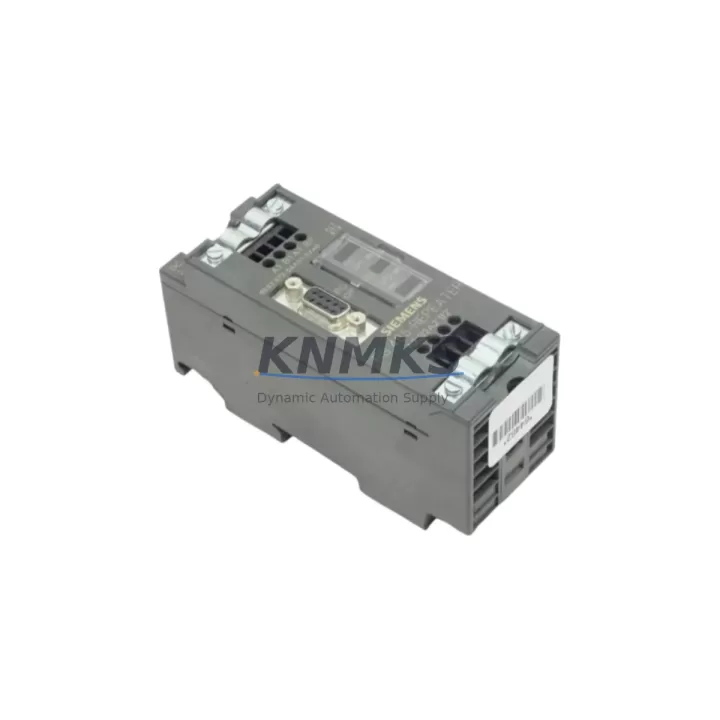
Overview
Siemens 6ES7972-0AA01-0AX0 Migration-Ready Interface for S7-300: Legacy Control System Upgrade & Retrofit
The Siemens 6ES7972-0AA01-0AX0 is a PROFIBUS DP slave interface module (IM306) designed for the S7-300 programmable logic controller platform. As Siemens progressively phases out older S7-300 series components, the 6ES7972-0AA01-0AX0 has become a critical spare part and retrofit solution for engineers managing aging distributed control systems, legacy production lines, and control cabinet upgrades across manufacturing, process automation, and infrastructure sectors.
Whether you are replacing a failed IM306 in an existing S7-300 rack, migrating a distributed I/O network from an older PROFIBUS master, or consolidating multiple control stations into a modernized cabinet layout, the 6ES7972-0AA01-0AX0 provides a verified drop-in replacement path with minimal disruption to existing wiring, program logic, and HMI configurations.
Migration Compatibility Table
| Parameter | Details |
|---|---|
| SKU / Part Number | 6ES7972-0AA01-0AX0 |
| Module Type | IM306 PROFIBUS DP Slave Interface Module |
| Compatible Platform | Siemens S7-300 Series (ET 200M distributed I/O) |
| Communication Protocol | PROFIBUS DP (up to 12 Mbit/s) |
| Backplane Interface | S7-300 standard rack bus connector (P-bus) |
| Power Supply Requirement | 24 VDC via PS307 or equivalent S7-300 power supply module |
| Max I/O Modules per Station | Up to 8 signal modules (SM) per ET 200M station |
| Replacement for | 6ES7972-0AA00-0XA0 and earlier IM306 variants |
| Installation Footprint | Standard S7-300 DIN rail mounting; verify rack slot availability before installation |
| Firmware Compatibility | Compatible with STEP 7 V5.x and TIA Portal (via legacy mode); verify GSD file version |
| Commissioning Requirement | PROFIBUS address assignment via DIP switch; no software license required for basic operation |
| Support terms | support terms confirmed by quotation — all units ship after functional verification and outgoing inspection |
Retrofit Planning for Existing Automation Systems
Successful integration of the 6ES7972-0AA01-0AX0 into a legacy control environment requires a structured pre-installation review. Engineers should begin by auditing the existing S7-300 rack configuration, confirming available backplane slots and verifying that the installed PS307 24 VDC power supply module can support the additional current draw of the replacement IM306 alongside existing SM321 digital input modules, SM322 digital output modules, and any analog signal modules already installed in the station.
Terminal wiring on the PROFIBUS DP bus segment must be inspected before replacement. Confirm that bus termination resistors are correctly positioned at both ends of the PROFIBUS segment, and that the cable shielding is properly grounded at the DP connector. If the existing installation uses older 9-pin Sub-D PROFIBUS connectors with integrated termination, these can typically be reused without modification when replacing the IM306.
For systems where the PROFIBUS master is a CPU315-2 DP, CPU317-2 DP, or a CP342-5 communications processor, the GSD (General Station Description) file for the 6ES7972-0AA01-0AX0 must be loaded into the STEP 7 hardware configuration or TIA Portal project before the new module is recognized. Verify that the PROFIBUS station address set on the IM306 DIP switches matches the address configured in the master’s hardware configuration to avoid address conflicts during startup.
Where the retrofit involves expanding I/O capacity — for example, adding SM331 analog input modules or SM334 analog I/O combination modules to an existing ET 200M station — confirm that the total module count does not exceed the eight-slot limit per IM306 station. If additional I/O is required beyond this limit, a second ET 200M station with its own 6ES7972-0AA01-0AX0 interface module may be added to the PROFIBUS segment, provided the master’s configuration is updated accordingly.
Control cabinet space should be measured before ordering. The 6ES7972-0AA01-0AX0 occupies a standard S7-300 module width on a 35 mm DIN rail. If the existing cabinet uses a UR2 or UR1 universal rack, confirm that the rack has sufficient free slots and that the DIN rail mounting depth is compatible with the cabinet door clearance.
Downtime Control During System Migration
Minimizing unplanned downtime is the primary concern when replacing an IM306 in a live production environment. Before beginning the physical swap, export and archive the complete STEP 7 or TIA Portal project, including the hardware configuration, symbol table, and all program blocks (OB, FB, FC, DB). This ensures that the original program logic can be restored immediately if the replacement module does not initialize correctly.
Where the process allows, schedule the IM306 replacement during a planned maintenance window. If the ET 200M station supports hot-swap operation (available on certain S7-300 configurations with the appropriate CPU firmware version), the module can be replaced without powering down the entire rack — however, this must be confirmed against the specific CPU and firmware version in use before attempting a live swap.
After physical installation, power up the station and monitor the PROFIBUS diagnostic LEDs on the IM306. The BF (Bus Fault) LED should extinguish within a few seconds of the master recognizing the station. If the BF LED remains active, verify the PROFIBUS address, check the GSD file version in the master configuration, and confirm that the bus cable termination is correct at both segment ends.
HMI screens connected to the PROFIBUS network — whether running on a TP700 Comfort Panel, MP277 Multi Panel, or a SCADA system via OPC server — should be tested after the replacement to confirm that all process variable tags are updating correctly. Pay particular attention to analog input scaling and alarm setpoints, which may require re-verification if the replacement module has a different firmware revision than the original.
All units supplied are subject to outgoing functional testing prior to shipment. Stock is maintained to support urgent replacement requirements, and orders are processed with priority dispatch to minimize field downtime. A support terms confirmed by quotation cover all supplied modules against manufacturing defects and functional failure under normal operating conditions.
Retrofit Support FAQ
Q1: Is the 6ES7972-0AA01-0AX0 a direct replacement for the 6ES7972-0AA00-0XA0?
Yes. The 6ES7972-0AA01-0AX0 (IM306) is the current production revision and is functionally compatible with earlier IM306 variants including the 6ES7972-0AA00-0XA0. The PROFIBUS DP interface, backplane connector, and DIP switch address configuration are identical. No program changes are required in the STEP 7 or TIA Portal project when performing a like-for-like replacement.
Q2: What commissioning steps are required after installing the replacement module?
After physical installation, set the PROFIBUS station address on the IM306 DIP switches to match the address in the master’s hardware configuration. Power up the rack and confirm that the BF LED on the IM306 extinguishes, indicating successful PROFIBUS communication. If using STEP 7, perform an online comparison between the configured and actual hardware to verify module recognition. For TIA Portal projects, use the device diagnostics view to confirm the ET 200M station status.
Q3: Can the 6ES7972-0AA01-0AX0 be used with a PROFIBUS master other than a Siemens S7-300 CPU?
Yes. The 6ES7972-0AA01-0AX0 operates as a standard PROFIBUS DP slave and is compatible with any PROFIBUS DP master that supports the module’s GSD file. This includes third-party PROFIBUS masters, CP342-5 communications processors, and PROFIBUS-capable drives or controllers from other manufacturers. Load the GSD file into the master’s configuration tool and assign the correct station address before commissioning.
Q4: What support terms and stock availability can I expect?
All 6ES7972-0AA01-0AX0 modules are covered by a support terms confirmed by quotation from the date of shipment. Units are inspected and functionally tested before dispatch. Stock is maintained for immediate availability to support urgent replacement and planned maintenance requirements. Contact our sales team to confirm current inventory levels and lead times for your project schedule.
© 2026 KNMKS. All rights reserved.
Original Source: https://knmks.com
Contact: admin@knmks.com | +86 18359268345
Product Identification
- Brand / Ecosystem
-
Siemens
Siemens - Model / Series
-
6ES7972-0AA01-0AX0
SIMATIC Series - Product Family
- PLCs & Controllers
- Availability Status
- Available on request after model and quantity confirmation
- Inquiry Type
- B2B RFQ, replacement inquiry and project spare-part request
- Pre-Quote Check
- Exact SKU, brand, series, quantity, nameplate photos and destination country are checked before quotation
System Path
Where this product fits in the KNMKS automation structure.
Specification & Inquiry Focus
- Control platform
- PLC, PAC and modular controllers
- Common needs
- CPU, rack, power and I/O expansion
- Project support
- Replacement, cabinet build and maintenance
Buyer Confirmation
Information KNMKS checks before replying.
- Exact model
- 6ES7972-0AA01-0AX0
- Brand / ecosystem
- Siemens
- Product family
- PLCs & Controllers
- Application note
- Replacement, maintenance, project build or spare-part list
- Useful photos
- Nameplate, installed unit, cabinet layout or connector side
- Delivery details
- Quantity, destination country and target schedule
Document Support
Files and notes can be confirmed during quotation.
- Product photos or nameplate confirmation when available
- Packing and delivery notes before quotation confirmation
- Support scope and delivery terms confirmed per inquiry
- Export document coordination for qualified B2B requests
Inquiry Support
- Model cross-checking before quotation
- CPU, power, rack and expansion module matching
- Support for replacement and project inquiry
What to Send Us
- Brand and exact model number: Siemens 6ES7972-0AA01-0AX0
- Quantity and required delivery time
- Application, replacement requirement or nameplate photo
- Destination country and shipping preference
RFQ Preparation
This is a product inquiry page built for RFQ communication.
Fast Model Check
Send this model to KNMKS for confirmation.
Include quantity, destination country and photos if this is a maintenance replacement. The inquiry will be saved with a reference number after submission.
Brand & Compatibility Note
KNMKS displays automation product information for well-known industrial brand ecosystems and compatible replacement references. Brand names are used for product identification and compatibility reference only; final availability and commercial terms are confirmed per quotation.
 Manufacturing
 Machine Tools
 Packaging
 Energy & Power



 HMI & Displays
 Servo Systems
 Variable Frequency Drives
 Sensors