
Overview
Siemens 6ES7963-1AA10-0AA0 Maintenance-Proven Spare Part for Factory Uptime
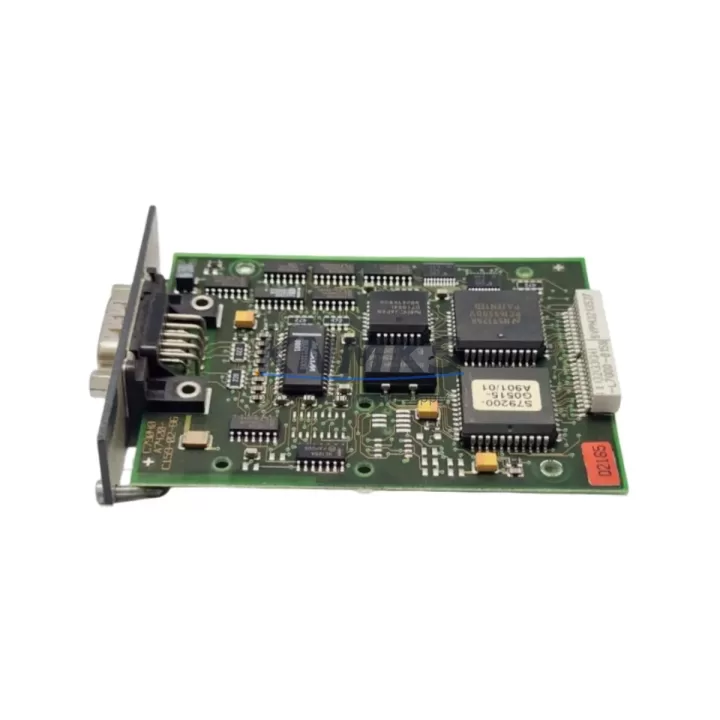
The Siemens 6ES7963-1AA10-0AA0 (IF963-RS232) is a serial interface module designed for use with the Siemens S7-400 CP 443 communication processor. In industrial automation environments where legacy SIMATIC S7-400 systems remain the backbone of process control, this interface module plays a critical role in maintaining RS-232 serial communication links between PLCs, HMIs, barcode readers, drives, and third-party field devices. Sourced as an original Siemens spare part, the 6ES7963-1AA10-0AA0 is stocked and tested to support rapid field replacement, minimizing unplanned downtime and protecting production continuity.
Maintenance engineers managing aging S7-400 racks understand that communication module failures are among the most disruptive fault types — they can silently degrade data exchange, trigger cascading alarms, or halt entire production lines. Keeping a verified spare of the IF963-RS232 on the shelf is a proven strategy for reducing mean time to repair (MTTR) and avoiding emergency procurement delays. Procurement engineers sourcing this module should confirm compatibility with their installed CP 443 variant and S7-400 rack configuration before deployment.
KNMKS supplies the 6ES7963-1AA10-0AA0 with a support terms confirmed by quotation, pre-shipment functional testing, and long-term stock availability to support both immediate replacement needs and planned annual maintenance programs.
Spare Maintenance Table
| Parameter | Specification |
|---|---|
| Part Number | 6ES7963-1AA10-0AA0 |
| Module Designation | IF963-RS232 |
| Interface Type | RS-232 Serial (V.24/V.28) |
| Compatible System | Siemens SIMATIC S7-400, CP 443 series |
| Series | SIMATIC S7-400 |
| Communication Standard | RS-232C, point-to-point serial |
| Connector Type | 9-pin D-Sub (DB9) |
| Operating Voltage | 5 VDC (supplied via CP 443 backplane) |
| Operating Temperature | 0 °C to +60 °C |
| Storage Temperature | -40 °C to +70 °C |
| Degree of Protection | IP20 |
| Origin | Germany |
| Product Type | PLC Interface Module / Communication Spare |
| Support terms | 12 Months |
| Pre-Shipment Test | Yes — functional verification before dispatch |
| Stock Status | Available — long-term supply supported |
Maintenance Planning for Continuous Operation
When replacing the 6ES7963-1AA10-0AA0 IF963-RS232 interface module during a scheduled or emergency maintenance event, a thorough inspection of the surrounding electrical environment is essential to prevent repeat failures and ensure stable communication restoration.
Begin by verifying the condition of the CP 443 communication processor itself — the IF963-RS232 plugs directly into the CP 443 module, and a degraded CP 443 can cause premature failure of a new interface module. Inspect the S7-400 backplane bus connector for oxidation, bent pins, or mechanical damage, as poor backplane contact is a common root cause of intermittent communication faults in aging S7-400 racks.
Check the PS 407 or PS 405 power supply module supplying the S7-400 rack — voltage ripple or insufficient current capacity can destabilize communication modules. Inspect the RS-232 cable assembly and DB9 connector for broken conductors, incorrect pinout, or missing shielding, particularly in environments with high electromagnetic interference from variable frequency drives or motor starters.
For systems where the IF963-RS232 interfaces with an HMI panel (e.g., Siemens TP or OP series), verify the HMI communication parameters (baud rate, parity, stop bits) match the CP 443 configuration after module replacement. If the S7-400 system also uses CP 443-1 Ethernet modules for PROFINET or industrial Ethernet communication, confirm those modules are unaffected and that the rack’s total current draw remains within the power supply’s rated capacity.
In control cabinets with mixed I/O, also inspect SM 321/SM 322 digital I/O modules and any signal isolators or terminal blocks connected to the serial communication loop. Fuse protection on the 24 VDC control circuit feeding the cabinet should be verified, and any surge protection devices on the RS-232 line should be tested for proper clamping function. Procurement engineers should consider stocking the CP 443 module alongside the IF963-RS232 as a paired spare to eliminate single-point-of-failure risk in critical communication paths.
Site Replacement Workflow
Step 1 — Isolate and document: Before removal, record the current CP 443 configuration using STEP 7 or TIA Portal (if applicable). Note the RS-232 communication parameters: baud rate, data bits, parity, stop bits, and flow control settings. Photograph the cable routing and connector orientation.
Step 2 — Power down safely: Follow your site’s lockout/tagout (LOTO) procedure. The IF963-RS232 is a hot-swap-capable interface in some configurations, but field replacement under power is not recommended without explicit engineering authorization.
Step 3 — Remove the old module: Disconnect the DB9 RS-232 cable. Release the IF963-RS232 from the CP 443 module by pressing the release tab and sliding the interface module out of its slot.
Step 4 — Install the 6ES7963-1AA10-0AA0: Align the new IF963-RS232 with the CP 443 interface slot and press firmly until the locking tab engages. Reconnect the RS-232 cable, ensuring correct pinout (especially if using a null-modem configuration).
Step 5 — Restore power and verify: Power up the rack and monitor the CP 443 diagnostic LEDs. Use STEP 7 hardware diagnostics or the CP 443’s built-in diagnostic buffer to confirm the interface module is recognized and communication is re-established. Verify data exchange with the connected device (HMI, drive, barcode reader, or third-party controller).
Step 6 — Update maintenance records: Log the replacement date, module serial number, and post-replacement test results. Update your spare parts inventory to trigger reorder of a replacement IF963-RS232 for the next maintenance cycle.
This workflow supports a typical replacement time of under 30 minutes for experienced maintenance engineers, minimizing production downtime and ensuring system compatibility is maintained without requiring PLC program changes.
Spare Parts Support FAQ
Q1: Is the 6ES7963-1AA10-0AA0 compatible with all CP 443 variants in the S7-400 system?
The IF963-RS232 interface module is designed for use with CP 443 communication processors in the SIMATIC S7-400 family. Compatibility depends on the specific CP 443 variant installed in your rack. We recommend confirming your CP 443 order number before ordering to ensure the IF963-RS232 interface slot matches. Our technical team can assist with compatibility verification based on your system configuration.
Q2: What testing is performed before shipment?
Every 6ES7963-1AA10-0AA0 unit supplied by KNMKS undergoes pre-shipment functional verification to confirm module integrity and communication interface operation. Units are inspected for physical condition, connector integrity, and electrical function. A support terms confirmed by quotation is provided from the date of shipment, covering manufacturing defects and functional failures under normal operating conditions.
Q3: Can KNMKS support long-term or blanket order supply for this module?
Yes. KNMKS maintains stock of the 6ES7963-1AA10-0AA0 to support both immediate replacement orders and long-term supply agreements. For facilities managing multiple S7-400 systems or planning annual maintenance shutdowns, blanket purchase orders can be arranged to secure pricing and guaranteed availability. Contact our sales team to discuss your annual consumption requirements.
Q4: What should I do if the replacement module does not restore communication after installation?
If communication is not restored after installing the new IF963-RS232, the fault is likely in the CP 443 module, the RS-232 cable, the connected device’s communication settings, or the S7-400 backplane. Use STEP 7 hardware diagnostics to read the CP 443 diagnostic buffer and identify the fault code. Check cable pinout, baud rate settings, and power supply voltage at the rack. If the issue persists, contact KNMKS technical support — our team can assist with fault isolation and, if required, arrange a replacement CP 443 module from stock.
© 2026 KNMKS. All rights reserved.
Original Source: https://knmks.com
Contact: admin@knmks.com | +86 18359268345
Product Identification
- Brand / Ecosystem
-
Siemens
Siemens - Model / Series
-
6ES7963-1AA10-0AA0 IF963-RS232
SIMATIC Series - Product Family
- PLCs & Controllers
- Availability Status
- Available on request after model and quantity confirmation
- Inquiry Type
- B2B RFQ, replacement inquiry and project spare-part request
- Pre-Quote Check
- Exact SKU, brand, series, quantity, nameplate photos and destination country are checked before quotation
System Path
Where this product fits in the KNMKS automation structure.
Specification & Inquiry Focus
- Control platform
- PLC, PAC and modular controllers
- Common needs
- CPU, rack, power and I/O expansion
- Project support
- Replacement, cabinet build and maintenance
Buyer Confirmation
Information KNMKS checks before replying.
- Exact model
- 6ES7963-1AA10-0AA0 IF963-RS232
- Brand / ecosystem
- Siemens
- Product family
- PLCs & Controllers
- Application note
- Replacement, maintenance, project build or spare-part list
- Useful photos
- Nameplate, installed unit, cabinet layout or connector side
- Delivery details
- Quantity, destination country and target schedule
Document Support
Files and notes can be confirmed during quotation.
- Product photos or nameplate confirmation when available
- Packing and delivery notes before quotation confirmation
- Support scope and delivery terms confirmed per inquiry
- Export document coordination for qualified B2B requests
Inquiry Support
- Model cross-checking before quotation
- CPU, power, rack and expansion module matching
- Support for replacement and project inquiry
What to Send Us
- Brand and exact model number: Siemens 6ES7963-1AA10-0AA0 IF963-RS232
- Quantity and required delivery time
- Application, replacement requirement or nameplate photo
- Destination country and shipping preference
RFQ Preparation
This is a product inquiry page built for RFQ communication.
Fast Model Check
Send this model to KNMKS for confirmation.
Include quantity, destination country and photos if this is a maintenance replacement. The inquiry will be saved with a reference number after submission.
Brand & Compatibility Note
KNMKS displays automation product information for well-known industrial brand ecosystems and compatible replacement references. Brand names are used for product identification and compatibility reference only; final availability and commercial terms are confirmed per quotation.
 Manufacturing
 Machine Tools
 Packaging
 Energy & Power



 HMI & Displays
 Servo Systems
 Variable Frequency Drives
 Sensors