
Overview
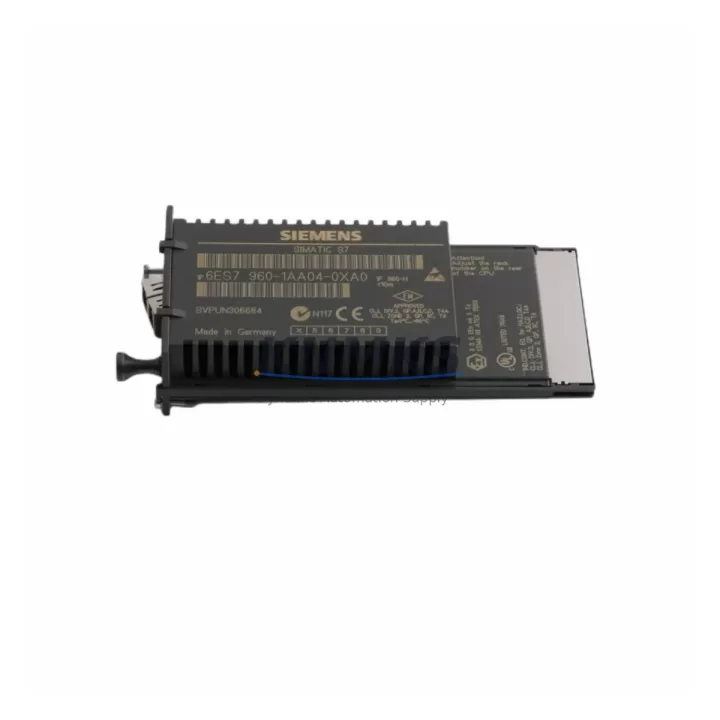
Siemens 6ES7960-1AA04-0XA0 Migration-Ready Sync Module for Legacy S7-400H Systems
The Siemens 6ES7960-1AA04-0XA0 is a synchronization submodule designed for SIMATIC S7-400H redundant controller systems. In legacy automation environments where the S7-400H platform continues to serve as the backbone of critical process control — including chemical plants, power generation facilities, water treatment stations, and continuous manufacturing lines — this sync module plays a decisive role in maintaining CPU-to-CPU redundancy across fiber-optic links. As original Siemens production of certain S7-400H components reaches end-of-life, sourcing a verified replacement 6ES7960-1AA04-0XA0 becomes a priority for maintenance engineers managing long-cycle asset lifecycles.
This module connects the two CPUs in an H-system via fiber-optic cable, enabling real-time synchronization of program data, I/O states, and communication statuses between the active and standby controllers. When planning a retrofit or spare parts replenishment, engineers must confirm the fiber-optic cable type and length compatibility, the CPU firmware version on both racks, and whether the existing 6ES7400-1TA01-0AA0 rack backplane supports the submodule slot assignment. Mismatched firmware between the active CPU — such as a 6ES7414-4HM14-0AB0 or 6ES7417-4HT14-0AB0 — and the sync submodule can prevent the H-system from achieving redundancy mode, resulting in single-CPU operation and elevated risk during process upsets.
Before installation, verify that the control cabinet has adequate clearance for the submodule insertion and that the existing fiber-optic patch panel routing does not introduce excessive bend radius. The 6ES7960-1AA04-0XA0 uses a dedicated slot on the CPU module face; no additional rack slot is consumed. Power draw is supplied directly through the CPU interface, so no separate 24 VDC feed is required. However, the overall power budget of the PS 407 power supply module — typically a 6ES7407-0DA02-0AA0 or 6ES7407-0KA02-0AA0 — should be reviewed to confirm headroom when adding or replacing sync submodules in an existing redundant rack configuration.
Migration Compatibility Table
| Parameter | Details |
|---|---|
| Compatible CPU Series | SIMATIC S7-400H (H-CPU pairs: 414-4H, 417-4H) |
| Interface Type | Fiber-optic synchronization link (direct CPU face mount) |
| Slot Requirement | Dedicated sync submodule slot on CPU — no rack slot consumed |
| Power Supply | Powered via CPU interface; no external 24 VDC required |
| Firmware Compatibility | Must match CPU firmware version on both H-system racks |
| Fiber Cable Compatibility | Standard S7-400H fiber-optic sync cable (verify length and connector type) |
| Replaces / Upgrades From | 6ES7960-1AA00-0XA0, 6ES7960-1AA02-0XA0 (earlier revisions) |
| Installation Space | Mounts directly to CPU front face; confirm cabinet depth clearance |
| Communication Protocol | Proprietary Siemens H-sync protocol over fiber |
| Pre-Shipment Testing | Function-tested before dispatch |
| Support terms | 12 months from date of shipment |
Retrofit Planning for Existing Automation Systems
A successful retrofit of the 6ES7960-1AA04-0XA0 into an operating S7-400H system requires a structured pre-migration checklist. Begin by exporting the current project from STEP 7 or TIA Portal and archiving a verified backup of both CPU program blocks, including OB, FB, FC, DB, and SFC elements. Confirm that the HMI screens — whether running on a SIMATIC Panel or a WinCC SCADA station — reference the correct CPU connection parameters and that no hardcoded rack/slot addressing will be disrupted by the submodule swap.
During the physical replacement, the H-system should be placed into single-CPU mode with the standby rack isolated. This prevents an uncontrolled switchover during the submodule exchange. After seating the new 6ES7960-1AA04-0XA0, reconnect the fiber-optic sync cable and power up the standby CPU. Monitor the H-system diagnostics in STEP 7 or TIA Portal to confirm that the SYNCUP state is achieved and that both CPUs report RUN-Redundant status. If the system uses a CP 443-1 or CP 443-5 communication processor for PROFIBUS DP or Industrial Ethernet connectivity, verify that the communication links re-establish correctly after the standby CPU rejoins the H-system.
For sites managing I/O expansion through ET 200M distributed I/O stations connected via PROFIBUS DP, confirm that the DP master configuration in the CPU matches the physical rack layout. Any mismatch in module slot assignments — particularly for SM 321 digital input modules or SM 331 analog input modules — will generate configuration faults that must be cleared before the system returns to full redundant operation. Signal isolators installed between field instruments and the I/O modules should also be verified for loop continuity after the retrofit is complete.
Downtime Control During System Migration
Minimizing unplanned downtime during a sync submodule replacement is achievable with disciplined preparation. The key advantage of the S7-400H architecture is that the submodule swap can be performed on the standby CPU without interrupting the active process — provided the H-system is healthy before the maintenance window begins. Schedule the replacement during a planned low-production period and confirm with the control room that the process can tolerate single-CPU operation for the duration of the swap.
Prepare a rollback plan: retain the original 6ES7960-1AA04-0XA0 (or its predecessor revision) in a labeled anti-static bag at the worksite. If the replacement module does not achieve SYNCUP within the expected timeframe, the original can be reinstalled to restore redundancy while the fault is investigated. Document the fiber-optic cable routing before disconnection using photographs, as incorrect reconnection is a common source of sync failure during field retrofits.
After the replacement is confirmed successful and both CPUs are in RUN-Redundant mode, perform a controlled switchover test to verify that the newly installed sync submodule supports a clean active/standby transition without process interruption. Log the switchover event and confirm with the DCS or SCADA historian that no spurious alarms were generated. This validation step is essential before closing the maintenance work order and returning the system to normal operations.
Retrofit Support FAQ
Q1: Is the 6ES7960-1AA04-0XA0 a direct replacement for earlier sync submodule revisions such as 6ES7960-1AA00-0XA0 or 6ES7960-1AA02-0XA0?
In most cases, yes. The -0XA0 suffix indicates a hardware revision that is generally backward-compatible within the S7-400H CPU family. However, always verify the CPU firmware version requirements documented in the Siemens product changelog for the specific revision pair. Our team can assist with compatibility confirmation prior to order placement.
Q2: What pre-shipment testing is performed on this module?
Each 6ES7960-1AA04-0XA0 unit is function-tested before dispatch to verify electrical integrity and interface operation. Units are shipped in anti-static packaging with inspection documentation. A support terms confirmed by quotation from the date of shipment covers manufacturing defects and functional failures under normal operating conditions.
Q3: Can this module be installed without taking the entire S7-400H system offline?
Yes, in a healthy H-system the sync submodule replacement can be performed on the standby CPU while the active CPU continues process control. The system must be in single-CPU mode during the swap. Full redundancy is restored after the standby CPU rejoins and SYNCUP is confirmed. Detailed commissioning steps should follow the Siemens S7-400H installation and operating manual for your specific CPU variant.
Q4: What is the lead time and stock availability?
We maintain inventory of the 6ES7960-1AA04-0XA0 to support urgent maintenance and planned retrofit projects. Contact our team for current stock status and lead time. For critical spares programs, we can discuss reserved inventory arrangements to support your long-term maintenance schedule.
© 2026 KNMKS. All rights reserved.
Original Source: https://knmks.com
Contact: admin@knmks.com | +86 18359268345
Product Identification
- Brand / Ecosystem
-
Siemens
Siemens - Model / Series
-
6ES7960-1AA04-0XA0
SIMATIC Series - Product Family
- PLCs & Controllers
- Availability Status
- Available on request after model and quantity confirmation
- Inquiry Type
- B2B RFQ, replacement inquiry and project spare-part request
- Pre-Quote Check
- Exact SKU, brand, series, quantity, nameplate photos and destination country are checked before quotation
System Path
Where this product fits in the KNMKS automation structure.
Specification & Inquiry Focus
- Control platform
- PLC, PAC and modular controllers
- Common needs
- CPU, rack, power and I/O expansion
- Project support
- Replacement, cabinet build and maintenance
Buyer Confirmation
Information KNMKS checks before replying.
- Exact model
- 6ES7960-1AA04-0XA0
- Brand / ecosystem
- Siemens
- Product family
- PLCs & Controllers
- Application note
- Replacement, maintenance, project build or spare-part list
- Useful photos
- Nameplate, installed unit, cabinet layout or connector side
- Delivery details
- Quantity, destination country and target schedule
Document Support
Files and notes can be confirmed during quotation.
- Product photos or nameplate confirmation when available
- Packing and delivery notes before quotation confirmation
- Support scope and delivery terms confirmed per inquiry
- Export document coordination for qualified B2B requests
Inquiry Support
- Model cross-checking before quotation
- CPU, power, rack and expansion module matching
- Support for replacement and project inquiry
What to Send Us
- Brand and exact model number: Siemens 6ES7960-1AA04-0XA0
- Quantity and required delivery time
- Application, replacement requirement or nameplate photo
- Destination country and shipping preference
RFQ Preparation
This is a product inquiry page built for RFQ communication.
Fast Model Check
Send this model to KNMKS for confirmation.
Include quantity, destination country and photos if this is a maintenance replacement. The inquiry will be saved with a reference number after submission.
Brand & Compatibility Note
KNMKS displays automation product information for well-known industrial brand ecosystems and compatible replacement references. Brand names are used for product identification and compatibility reference only; final availability and commercial terms are confirmed per quotation.
 Manufacturing
 Machine Tools
 Packaging
 Energy & Power



 HMI & Displays
 Servo Systems
 Variable Frequency Drives
 Sensors