
Overview
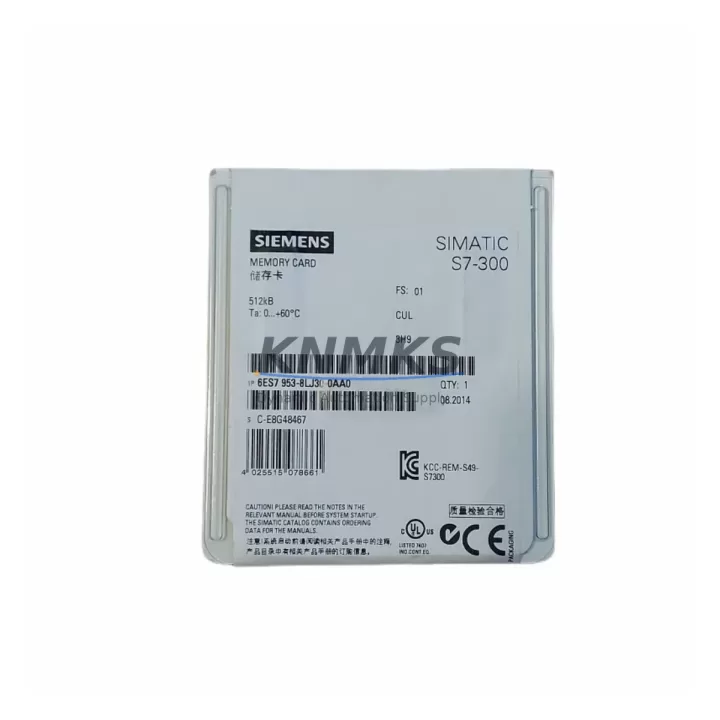
Siemens 6ES7953-8LJ30-0AA0 MMC 512KB Spare Part S7-300: Maintenance-Proven Component for Factory Uptime
The Siemens 6ES7953-8LJ30-0AA0 is a 512 KB Micro Memory Card (MMC) designed for SIMATIC S7-300 programmable logic controllers. As a non-volatile flash memory module, it stores the user program, data blocks, and system parameters independently of the CPU’s internal RAM — making it a mission-critical spare part for any facility running S7-300-based control systems. Whether you are managing a scheduled annual overhaul, responding to an unplanned CPU fault, or building a preventive spare parts inventory, having a verified replacement MMC on hand is essential to minimizing production downtime.
This module is sourced as an original Siemens component, fully tested before shipment, and backed by a support terms confirmed by quotation. It is compatible with a wide range of S7-300 CPU variants including the CPU 313C, CPU 314, CPU 315-2 DP, CPU 317-2 PN/DP, and other MMC-dependent processors in the S7-300 family. The card is plug-and-play upon insertion — no additional configuration hardware is required for program restore operations when the CPU is set to load from MMC on startup.
For maintenance engineers managing aging SIMATIC S7-300 installations, the 6ES7953-8LJ30-0AA0 represents a low-risk, high-reliability spare that directly supports system continuity, rapid fault recovery, and long-term lifecycle extension of existing control infrastructure.
Spare Maintenance Table
| SKU / Part Number | 6ES7953-8LJ30-0AA0 |
| Brand | Siemens |
| Series | SIMATIC S7-300 |
| Module Type | Micro Memory Card (MMC) |
| Memory Capacity | 512 KB |
| Memory Technology | Non-volatile Flash (retains data without backup battery) |
| Interface | MMC slot on S7-300 CPU front panel |
| Compatible CPUs | CPU 312, 313C, 314, 315-2 DP, 316-2 DP, 317-2 PN/DP, 319-3 PN/DP and other MMC-based S7-300 CPUs |
| Operating Temperature | 0 °C to +60 °C (storage: -20 °C to +85 °C) |
| Origin | Germany |
| Installation | Hot-swap capable (CPU powered off recommended for safe insertion) |
| Maintenance Role | Program backup, CPU replacement, system restore, lifecycle extension |
| Support terms | 12 Months |
| Pre-shipment Testing | Yes — electrically tested and verified before dispatch |
Maintenance Planning for Continuous Operation
When replacing or inspecting the 6ES7953-8LJ30-0AA0 MMC in an S7-300 control cabinet, a thorough maintenance engineer will not stop at the memory card alone. The MMC interfaces directly with the CPU module — if the CPU itself shows fault indicators (SF LED active, STOP mode, or repeated memory errors), the CPU 315-2 DP or CPU 317-2 PN/DP should be evaluated alongside the MMC replacement. A faulty CPU slot or corrupted internal RAM can cause repeated MMC read failures even with a new card installed.
Power integrity is equally critical. The S7-300 rack is powered by a dedicated PS 307 power supply module (such as the 6ES7307-1EA01-0AA0 or 6ES7307-1KA02-0AA0). Voltage fluctuations or an aging power supply can corrupt MMC write cycles during program saves or CPU restarts. Always verify the 24 VDC rail with a calibrated meter before concluding that the MMC is at fault.
For systems with distributed I/O, the PROFIBUS DP interface on the CPU communicates with remote ET 200M or ET 200S I/O stations. After an MMC replacement and program reload, verify that all DP slave addresses are correctly recognized and that the GSD configuration matches the physical rack. Similarly, if the system uses PROFINET, confirm that the IP address assignments stored in the MMC are consistent with the network topology.
In cabinets where the S7-300 CPU shares a DIN rail with relay output modules (such as the SM 322 digital output module) or analog signal modules (SM 331/SM 332), inspect the backplane bus connector integrity. A damaged bus connector between modules can cause intermittent I/O faults that are incorrectly attributed to memory card errors. The IM 360/IM 361 interface modules used in multi-rack S7-300 configurations should also be checked for secure seating and clean bus contacts.
For facilities maintaining older S7-300 systems beyond their standard lifecycle, stocking the 6ES7953-8LJ30-0AA0 alongside a spare CPU module, a PS 307 power supply, and at least one set of bus connectors (6ES7390-1AB60-0AA0) constitutes a practical minimum spare parts kit that covers the majority of unplanned downtime scenarios.
Site Replacement Workflow
Step 1 — Backup verification: Before removing the existing MMC, confirm whether a current program backup exists on a PG/PC via STEP 7 or TIA Portal. If the MMC is the only copy of the user program, do not remove it until a backup is secured.
Step 2 — CPU power-down: Switch the CPU to STOP mode using the mode selector switch. Power down the PS 307 supply to eliminate any risk of write corruption during card removal.
Step 3 — MMC removal and inspection: Remove the existing 6ES7953-8LJ30-0AA0 (or predecessor variant) from the CPU MMC slot. Inspect the slot contacts for oxidation or mechanical damage. Clean with isopropyl alcohol if necessary.
Step 4 — New MMC insertion: Insert the replacement 6ES7953-8LJ30-0AA0. Ensure it is fully seated. The card is keyed and can only be inserted in the correct orientation.
Step 5 — Program download: Power up the CPU. If the MMC is blank, the CPU will enter STOP with a memory error. Download the user program from the PG/PC via MPI or PROFIBUS. The CPU will store the program to the MMC automatically.
Step 6 — Functional verification: Switch the CPU to RUN mode. Verify all I/O modules are recognized, all DP/PN slaves are online, and the process is operating within normal parameters. Document the replacement in the maintenance log with the new MMC serial reference.
This workflow applies equally to planned CPU swaps, emergency fault recovery, and system commissioning after long-term storage. The 6ES7953-8LJ30-0AA0 is a direct replacement for earlier 128 KB and 256 KB MMC variants in most S7-300 CPU types, providing additional program storage headroom for expanded or updated control logic.
Spare Parts Support FAQ
Q1: Is the 6ES7953-8LJ30-0AA0 compatible with all S7-300 CPUs?
The 512 KB MMC is compatible with all S7-300 CPU variants that use the standard MMC slot format, including CPU 312 through CPU 319 series. CPUs that use the older Flash EPROM (FEPROM) memory format are not compatible — verify your CPU order number before ordering. If in doubt, share your CPU part number with our sales team for confirmation.
Q2: What is included in the support terms confirmed by quotation?
Every 6ES7953-8LJ30-0AA0 shipped from KNMKS is covered by a support terms confirmed by quotation from the date of delivery. This covers manufacturing defects and functional failures under normal operating conditions. Each unit is electrically tested before dispatch. Support requests are processed with priority to minimize your downtime exposure.
Q3: Can you supply this part long-term for ongoing maintenance contracts?
Yes. KNMKS maintains stock of the 6ES7953-8LJ30-0AA0 and can support blanket purchase orders, annual maintenance contracts, and scheduled delivery programs. For facilities managing multiple S7-300 installations, we recommend establishing a standing order to ensure availability without lead-time risk.
Q4: How do I verify the MMC is functioning correctly after installation?
After insertion and program download, the CPU RUN LED should illuminate without fault indicators. In STEP 7 or TIA Portal, use the online diagnostics view to confirm the MMC is recognized and the loaded program checksum matches the source. If the SF LED remains active after a successful download, check the CPU hardware configuration for rack or module assignment mismatches.
© 2026 KNMKS. All rights reserved.
Original Source: https://knmks.com
Contact: admin@knmks.com | +86 18359268345
Product Identification
- Brand / Ecosystem
-
Siemens
Siemens - Model / Series
-
6ES7953-8LJ30-0AA0
SIMATIC Series - Product Family
- PLCs & Controllers
- Availability Status
- Available on request after model and quantity confirmation
- Inquiry Type
- B2B RFQ, replacement inquiry and project spare-part request
- Pre-Quote Check
- Exact SKU, brand, series, quantity, nameplate photos and destination country are checked before quotation
System Path
Where this product fits in the KNMKS automation structure.
Specification & Inquiry Focus
- Control platform
- PLC, PAC and modular controllers
- Common needs
- CPU, rack, power and I/O expansion
- Project support
- Replacement, cabinet build and maintenance
Buyer Confirmation
Information KNMKS checks before replying.
- Exact model
- 6ES7953-8LJ30-0AA0
- Brand / ecosystem
- Siemens
- Product family
- PLCs & Controllers
- Application note
- Replacement, maintenance, project build or spare-part list
- Useful photos
- Nameplate, installed unit, cabinet layout or connector side
- Delivery details
- Quantity, destination country and target schedule
Document Support
Files and notes can be confirmed during quotation.
- Product photos or nameplate confirmation when available
- Packing and delivery notes before quotation confirmation
- Support scope and delivery terms confirmed per inquiry
- Export document coordination for qualified B2B requests
Inquiry Support
- Model cross-checking before quotation
- CPU, power, rack and expansion module matching
- Support for replacement and project inquiry
What to Send Us
- Brand and exact model number: Siemens 6ES7953-8LJ30-0AA0
- Quantity and required delivery time
- Application, replacement requirement or nameplate photo
- Destination country and shipping preference
RFQ Preparation
This is a product inquiry page built for RFQ communication.
Fast Model Check
Send this model to KNMKS for confirmation.
Include quantity, destination country and photos if this is a maintenance replacement. The inquiry will be saved with a reference number after submission.
Brand & Compatibility Note
KNMKS displays automation product information for well-known industrial brand ecosystems and compatible replacement references. Brand names are used for product identification and compatibility reference only; final availability and commercial terms are confirmed per quotation.
 Manufacturing
 Machine Tools
 Packaging
 Energy & Power



 HMI & Displays
 Servo Systems
 Variable Frequency Drives
 Sensors