
Overview
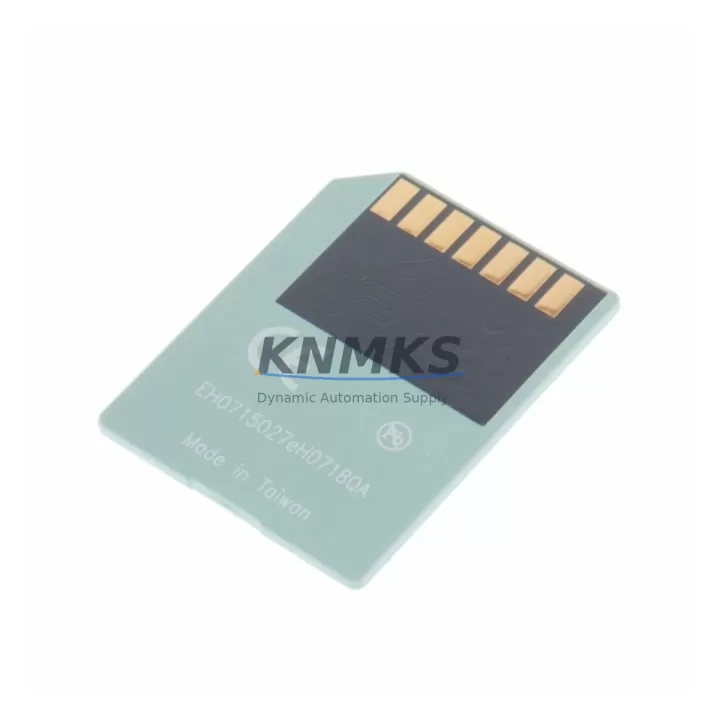
Siemens 6ES7953-8LJ20-0AA0 Migration-Ready MMC for Legacy S7-300
The Siemens 6ES7953-8LJ20-0AA0 is a 512KB Micro Memory Card (MMC) designed for the SIMATIC S7-300 programmable logic controller platform. As legacy S7-300 systems approach end-of-life and original Siemens MMC stock becomes increasingly scarce, this migration-ready replacement module provides a direct, protocol-compatible solution for engineers managing retrofit projects, control cabinet upgrades, and discontinued spare part replacements across active production lines.
The 6ES7953-8LJ20-0AA0 stores the user program, data blocks, and system parameters for S7-300 CPUs including the CPU 313C, CPU 314, CPU 315-2 DP, CPU 317-2 PN/DP, and related variants. Its compact MMC form factor slots directly into the CPU front panel card slot without requiring any hardware modification, making it the preferred choice for maintenance teams that need to restore a failed system with minimal downtime and zero rewiring.
For facilities running mixed-generation control architectures — where S7-300 racks share a control cabinet with ET 200M distributed I/O stations, CP 343-1 Ethernet communication processors, or IM 360/361 interface modules for multi-rack expansion — the 6ES7953-8LJ20-0AA0 integrates without disrupting existing backplane addressing or PROFIBUS DP network topology. Engineers migrating from older S5 platforms to S7-300 will find that program transfer via STEP 7 v5.x or TIA Portal in S7-300 compatibility mode is fully supported, preserving original ladder logic and function block structures.
When planning a retrofit around this MMC, the following system parameters must be verified before installation: CPU firmware version compatibility (the 6ES7953-8LJ20-0AA0 is qualified for use with CPUs running firmware V2.0 and above), available slot depth in the CPU housing, and whether the existing program size falls within the 512KB addressable range. For larger programs exceeding this capacity, the 6ES7953-8LM20-0AA0 (2MB MMC) or 6ES7953-8LP20-0AA0 (4MB MMC) should be evaluated as upgrade paths within the same S7-300 MMC family.
In control cabinet upgrade scenarios where the S7-300 CPU is being relocated or the PS 307 power supply module is being replaced alongside the memory card, technicians should confirm that the 24VDC rail capacity is sufficient to support the CPU load after any I/O expansion. If the retrofit involves adding SM 321 digital input modules or SM 331 analog input modules to an existing rack, backplane slot assignments and module addresses must be re-validated in the hardware configuration before the updated program is written to the 6ES7953-8LJ20-0AA0.
For sites migrating HMI panels — particularly those transitioning from OP7 or OP17 operator panels to modern KTP700 Basic or TP900 Comfort panels — the MMC-stored program variables and data block structures must be cross-referenced against the new HMI tag table to ensure screen navigation, alarm triggers, and process value displays remain consistent after the upgrade. Communication links between the S7-300 CPU and the HMI, whether via MPI or PROFIBUS DP, should be tested under live load conditions before the legacy panel is decommissioned.
All units are pre-tested prior to shipment. Each 6ES7953-8LJ20-0AA0 undergoes functional verification including read/write cycle validation and slot interface inspection. Stock is maintained for immediate dispatch to support unplanned outages and scheduled maintenance windows alike.
Migration Compatibility Table
| Parameter | Specification / Recommendation |
|---|---|
| Compatible CPU Families | SIMATIC S7-300: CPU 312, 313C, 314, 315-2 DP, 315-2 PN/DP, 317-2 PN/DP, 319-3 PN/DP |
| Memory Capacity | 512 KB (load memory for user program, data blocks, system parameters) |
| Interface | MMC slot on CPU front panel — no backplane connection required |
| Installation | Hot-swap capable when CPU is in STOP mode; no tools required |
| Communication Compatibility | PROFIBUS DP, MPI, Industrial Ethernet (via CP 343-1) — no protocol reconfiguration needed |
| Firmware Requirement | CPU firmware V2.0 or above recommended; verify via STEP 7 or TIA Portal HW Config |
| Replacement Path | Direct drop-in for OEM 6ES7953-8LJ20-0AA0; no hardware or wiring modification |
| Programming Tool | STEP 7 v5.4+ or TIA Portal V13+ (S7-300 compatibility mode) |
| Commissioning Check | Verify module address, DB integrity, and HMI tag mapping after program transfer |
| Support terms | 12 months from date of shipment — covers manufacturing defects and functional failure |
Retrofit Planning for Existing Automation Systems
A successful retrofit centered on the 6ES7953-8LJ20-0AA0 typically involves coordinating several interdependent components within the same control cabinet or rack assembly. The CPU housing the MMC is often mounted alongside a PS 307 5A or 10A power supply module, and any change to the CPU or memory card should prompt a review of the power budget — particularly if SM 321 16DI or SM 322 16DO digital I/O modules have been added to the rack since the original system was commissioned.
For multi-rack S7-300 installations using IM 360 and IM 361 interface modules to extend the backplane across expansion racks, the module slot addresses stored in the MMC hardware configuration must exactly match the physical rack layout. A mismatch between the stored HW Config and the actual installed modules will trigger a configuration fault on CPU startup, preventing the system from entering RUN mode. This is one of the most common commissioning errors during MMC replacement and should be the first diagnostic step if the CPU fails to start after a memory card swap.
Sites that use CP 342-5 or CP 343-1 communication processors for PROFIBUS DP master or Industrial Ethernet connectivity should verify that the communication module parameters — including IP address assignments, DP master system IDs, and GSD file references — are correctly stored in the new MMC before going live. If the original MMC was damaged or unreadable, these parameters may need to be re-entered manually in STEP 7 HW Config and re-downloaded to the card.
For legacy lines where the S7-300 interfaces with third-party drives, servo controllers, or signal isolators via analog I/O (SM 331 AI or SM 332 AO modules), the scaling parameters and channel configurations stored in the data blocks on the MMC must be validated against the current field wiring before the system is returned to automatic mode. Any drift in analog reference values introduced during the MMC swap can cause process upsets if not caught during the commissioning check.
Downtime Control During System Migration
Minimizing unplanned downtime during an MMC replacement or S7-300 retrofit requires a structured pre-migration checklist. Before removing the original memory card, the full program — including all OBs, FBs, FCs, DBs, and the hardware configuration — should be uploaded from the CPU to a STEP 7 project archive on a programming laptop. This backup serves as the recovery baseline if the new MMC requires re-programming or if the CPU firmware version is incompatible with the replacement card.
Where possible, the 6ES7953-8LJ20-0AA0 should be pre-loaded with the verified program offline before the maintenance window begins. This reduces the on-site programming time to a single download verification step, cutting the CPU STOP interval to under 15 minutes in most cases. For systems where the S7-300 controls safety-critical processes, a parallel test rack using the same CPU type and a pre-programmed MMC allows full functional validation before the production unit is touched.
After the new MMC is installed and the program is confirmed loaded, the CPU should be cycled through STOP → RUN while monitoring the diagnostic buffer in STEP 7 or TIA Portal for any configuration faults, I/O access errors, or communication timeouts. HMI screens should be checked for correct data binding, and any PROFIBUS DP slaves — including ET 200M stations or third-party field devices — should be confirmed as active in the network diagnostics view before the line is released to production.
Maintaining a spare 6ES7953-8LJ20-0AA0 pre-loaded with the current program as a hot standby is strongly recommended for high-availability lines. This eliminates the programming step entirely in the event of a future MMC failure, reducing recovery time to the physical swap interval only.
Retrofit Support FAQ
Q1: Is the 6ES7953-8LJ20-0AA0 a direct replacement for the original Siemens MMC of the same part number?
Yes. This unit is a direct, drop-in replacement compatible with all S7-300 CPUs that accept the standard MMC form factor. No hardware modification, adapter, or wiring change is required. The replacement procedure is limited to removing the original card, inserting the new MMC, and downloading the program via STEP 7 or TIA Portal.
Q2: What commissioning steps are required after installing the new MMC?
After installation, download the verified program and hardware configuration to the MMC, then cycle the CPU to RUN mode. Check the diagnostic buffer for faults, confirm all I/O modules are recognized in the hardware configuration, verify PROFIBUS DP or Ethernet communication links are active, and validate HMI tag mapping before releasing the system to production.
Q3: Can the 6ES7953-8LJ20-0AA0 be used with both STEP 7 Classic and TIA Portal?
Yes. The MMC is fully compatible with STEP 7 v5.4 and above for classic S7-300 projects, and with TIA Portal V13 and above when using the S7-300 CPU in TIA Portal compatibility mode. Program transfer, hardware configuration download, and online diagnostics are all supported in both environments.
Q4: What does the support terms confirmed by quotation cover, and what is the stock availability?
Each unit carries a support terms confirmed by quotation from the date of shipment, covering manufacturing defects and functional failure under normal operating conditions. Units are pre-tested before dispatch. Stock is maintained for immediate shipment to support both planned maintenance schedules and emergency replacement requirements. Contact admin@knmks.com or +86 18359268345 for current inventory confirmation and lead time.
© 2026 KNMKS. All rights reserved.
Original Source: https://knmks.com
Contact: admin@knmks.com | +86 18359268345
Product Identification
- Brand / Ecosystem
-
Siemens
Siemens - Model / Series
-
6ES7953-8LJ20-0AA0
SIMATIC Series - Product Family
- PLCs & Controllers
- Availability Status
- Available on request after model and quantity confirmation
- Inquiry Type
- B2B RFQ, replacement inquiry and project spare-part request
- Pre-Quote Check
- Exact SKU, brand, series, quantity, nameplate photos and destination country are checked before quotation
System Path
Where this product fits in the KNMKS automation structure.
Specification & Inquiry Focus
- Control platform
- PLC, PAC and modular controllers
- Common needs
- CPU, rack, power and I/O expansion
- Project support
- Replacement, cabinet build and maintenance
Buyer Confirmation
Information KNMKS checks before replying.
- Exact model
- 6ES7953-8LJ20-0AA0
- Brand / ecosystem
- Siemens
- Product family
- PLCs & Controllers
- Application note
- Replacement, maintenance, project build or spare-part list
- Useful photos
- Nameplate, installed unit, cabinet layout or connector side
- Delivery details
- Quantity, destination country and target schedule
Document Support
Files and notes can be confirmed during quotation.
- Product photos or nameplate confirmation when available
- Packing and delivery notes before quotation confirmation
- Support scope and delivery terms confirmed per inquiry
- Export document coordination for qualified B2B requests
Inquiry Support
- Model cross-checking before quotation
- CPU, power, rack and expansion module matching
- Support for replacement and project inquiry
What to Send Us
- Brand and exact model number: Siemens 6ES7953-8LJ20-0AA0
- Quantity and required delivery time
- Application, replacement requirement or nameplate photo
- Destination country and shipping preference
RFQ Preparation
This is a product inquiry page built for RFQ communication.
Fast Model Check
Send this model to KNMKS for confirmation.
Include quantity, destination country and photos if this is a maintenance replacement. The inquiry will be saved with a reference number after submission.
Brand & Compatibility Note
KNMKS displays automation product information for well-known industrial brand ecosystems and compatible replacement references. Brand names are used for product identification and compatibility reference only; final availability and commercial terms are confirmed per quotation.
 Manufacturing
 Machine Tools
 Packaging
 Energy & Power



 HMI & Displays
 Servo Systems
 Variable Frequency Drives
 Sensors