
Overview
Siemens 6ES7952-1KL00-0AA0 Migration-Ready Flash Memory S7-400: Legacy Control System Retrofit & Upgrade
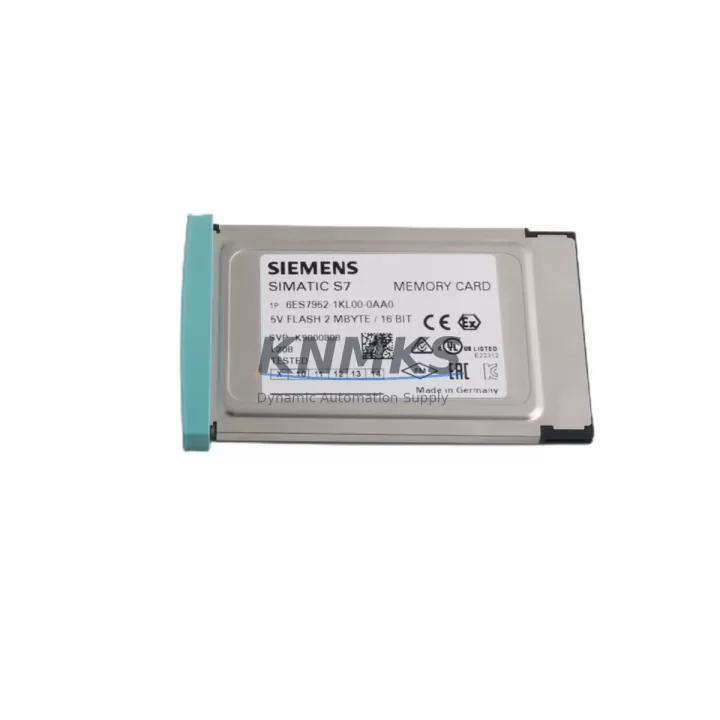
The Siemens 6ES7952-1KL00-0AA0 is a 2MB Flash Memory Card designed for SIMATIC S7-400 programmable logic controllers. As legacy S7-400 installations approach end-of-life and spare parts become increasingly scarce, this memory card remains a critical component for engineers managing retrofit projects, control cabinet upgrades, and production line modernization. Whether you are replacing a failed memory card in an existing rack or planning a phased migration from an older S7-300 platform to a current S7-400 or S7-1500 architecture, the 6ES7952-1KL00-0AA0 provides a verified, drop-in compatible solution that preserves your existing program logic and minimizes unplanned downtime.
In retrofit and replacement scenarios, engineers must confirm several critical parameters before swapping memory cards in a live or recently shut-down system. The 6ES7952-1KL00-0AA0 slots directly into the CPU module card slot — typically found on S7-400 CPUs such as the CPU 412, CPU 414, and CPU 416 families — without requiring backplane modifications or additional mounting hardware. Before installation, verify that the target CPU firmware version supports 2MB Flash capacity, as earlier firmware revisions on certain CPU 41x variants may require an update via the SIMATIC S7 programming cable (e.g., PC Adapter USB or CP 5611 communication processor) before the new card is recognized correctly.
Program compatibility is a primary concern during any memory card replacement. The user program, data blocks, and system data stored on the original card must be backed up to a PG/PC using STEP 7 or TIA Portal (in S7-400 compatibility mode) prior to removal. Once the 6ES7952-1KL00-0AA0 is installed, the program can be downloaded directly to the card. Engineers should also confirm that any linked HMI panels — such as SIMATIC TP or MP series operator panels communicating via MPI or PROFIBUS DP — retain their configured connection parameters, as a CPU memory reset may clear communication addresses that need to be re-established during commissioning.
For control cabinets integrating the S7-400 rack alongside power supply modules such as the PS 407 10A, signal modules, and FM function modules, installation space is generally not a constraint since the memory card occupies only the dedicated CPU slot. However, in dense rack configurations using UR2 or UR1 universal racks with multiple I/O modules and communication processors like the CP 443-1 Ethernet module, it is advisable to power down the rack fully before card insertion to avoid ESD damage and ensure a clean initialization sequence on restart.
Communication protocol continuity is another key consideration. Systems relying on PROFIBUS DP for distributed I/O — including ET 200M remote I/O stations or third-party field devices — should have their GSD files and hardware configuration archived before the retrofit. After the 6ES7952-1KL00-0AA0 is loaded with the restored program, a full online comparison between the loaded configuration and the physical hardware should be performed in STEP 7 HW Config to confirm that all DP slaves, module addresses, and I/O assignments are correctly recognized. Any discrepancies in module slot addressing must be resolved before returning the system to automatic mode.
For facilities managing a broader spare parts lifecycle strategy, the 6ES7952-1KL00-0AA0 is frequently sourced alongside other S7-400 consumables and replacement components. Engineers commonly pair this memory card with replacement CPU modules, IM 460/461 interface modules for multi-rack expansion, and SM 321/322 digital I/O modules when undertaking a full control system refresh. Signal isolators and terminal block assemblies are also typically reviewed during the same retrofit window to ensure wiring integrity across the updated rack.
On-site commissioning after memory card replacement should follow a structured sequence: power-on self-test confirmation, CPU RUN/STOP LED status check, program block integrity verification via STEP 7 online diagnostics, I/O force test on critical output channels, and HMI screen navigation validation. Documenting the commissioning steps and archiving the final program version to a secure backup location — separate from the installed memory card — is strongly recommended as part of the site’s change management procedure.
All units supplied are pre-shipment tested for read/write integrity and format compatibility with S7-400 CPU families. Stock is maintained for immediate dispatch, supporting both emergency breakdown replacements and planned maintenance schedules. A support terms confirmed by quotation is included with every unit, covering manufacturing defects and functional failures under normal operating conditions.
Migration Compatibility Table
| Parameter | Specification / Recommendation |
|---|---|
| Part Number | 6ES7952-1KL00-0AA0 |
| Memory Capacity | 2 MB Flash |
| Compatible CPU Families | SIMATIC S7-400: CPU 412, CPU 414, CPU 416, CPU 417 |
| Installation Interface | CPU front panel memory card slot (no backplane modification required) |
| Communication Protocols Supported | MPI, PROFIBUS DP, Industrial Ethernet (via CP modules) |
| Firmware Compatibility | Verify CPU firmware supports 2MB capacity; update via PC Adapter USB if required |
| Program Transfer Tool | STEP 7 v5.x / TIA Portal (S7-400 compatibility mode) |
| Replacement Recommendation | Direct replacement for failed or end-of-life 6ES7952-1KL00-0AA0 units |
| Commissioning Check | CPU LED status, online diagnostics, I/O force test, HMI screen validation |
| Country of Origin | Germany |
| Support terms | 12 Months — manufacturing defects and functional failures under normal use |
Retrofit Planning for Existing Automation Systems
A successful retrofit begins well before the maintenance window opens. When the 6ES7952-1KL00-0AA0 is identified as the replacement target, the broader system audit should cover the full S7-400 rack population. This typically includes reviewing the PS 407 power supply module load capacity to confirm it can support any additional modules added during the upgrade, checking the IM 460-0 or IM 460-4 interface modules if the installation uses a multi-rack configuration, and auditing the SM 331 analog input modules for calibration records that may need to be re-entered after a CPU restart.
Communication infrastructure should also be mapped. If the system uses a CP 443-1 Advanced Ethernet communication processor for SCADA connectivity or OPC server integration, the IP address configuration and connection table stored in the CP must be backed up independently of the CPU memory card, as these parameters reside in the CP’s own flash memory. Similarly, any PROFIBUS DP network segments connecting ET 200S or ET 200M distributed I/O stations should have their bus parameters and slave addresses documented before the retrofit window begins.
For facilities transitioning from older S7-300 platforms to S7-400 as an intermediate modernization step before a full S7-1500 migration, the 6ES7952-1KL00-0AA0 provides a stable, well-understood memory architecture that supports this phased approach. Engineers can maintain the existing STEP 7 programming environment and avoid the cost and risk of a full TIA Portal migration until the broader project budget and timeline allow.
Downtime Control During System Migration
Minimizing production downtime during a memory card replacement requires a structured pre-outage preparation protocol. Before the planned maintenance window, the complete user program — including all OBs, FBs, FCs, DBs, and system data — must be archived from the running CPU to a PG/PC. A second backup copy should be stored on a separate storage medium as a contingency. The hardware configuration, including all rack and slot assignments, should be exported from STEP 7 HW Config and saved alongside the program archive.
During the outage, the sequence should follow: controlled CPU STOP command (avoid hard power removal where possible), memory card extraction, 6ES7952-1KL00-0AA0 insertion, CPU power cycle, program download, online diagnostics check, and controlled return to RUN mode. For systems with safety-critical outputs, a manual override or bypass procedure should be in place before the CPU is taken offline, and field personnel should be stationed at critical process points to monitor equipment status during the transition.
Post-restart, the priority is confirming that all PROFIBUS DP slaves have re-established communication, all analog input channels are reading within expected ranges, and all HMI operator panels have reconnected and are displaying current process values. A structured commissioning checklist — signed off by the responsible engineer — should be completed before the system is returned to full automatic operation. This approach consistently reduces total retrofit downtime to under two hours for standard S7-400 single-rack installations.
Retrofit Support FAQ
Q1: Is the 6ES7952-1KL00-0AA0 a direct replacement for the original Siemens memory card in my S7-400 CPU?
Yes. The 6ES7952-1KL00-0AA0 is the original Siemens part number for the 2MB Flash Memory Card compatible with S7-400 CPU families. Units supplied are sourced from authorized channels and are functionally identical to factory-installed cards. No hardware modification is required for installation.
Q2: What pre-shipment testing is performed on each unit?
Each 6ES7952-1KL00-0AA0 unit undergoes read/write integrity testing and format compatibility verification before dispatch. Units that do not pass functional testing are not shipped. A support terms confirmed by quotation covering manufacturing defects and functional failures under normal operating conditions is included with every order.
Q3: Can I transfer my existing S7-400 program directly to the replacement memory card?
Yes, provided the program was archived from the original CPU using STEP 7 v5.x or TIA Portal in S7-400 compatibility mode. The archived program is downloaded to the new card via the CPU’s programming interface using a PC Adapter USB or equivalent SIMATIC programming cable. Confirm that the CPU firmware version supports the 2MB card capacity before initiating the download.
Q4: What is the typical lead time and do you maintain stock for emergency replacements?
Stock is maintained for immediate dispatch to support both planned maintenance and emergency breakdown scenarios. Standard orders are processed and shipped within 1–2 business days. For urgent requirements, contact admin@knmks.com or call +86 18359268345 to confirm real-time availability and expedited shipping options.
© 2026 KNMKS. All rights reserved.
Original Source: https://knmks.com
Contact: admin@knmks.com | +86 18359268345
Product Identification
- Brand / Ecosystem
-
Siemens
Siemens - Model / Series
-
6ES7952-1KL00-0AA0
SIMATIC Series - Product Family
- PLCs & Controllers
- Availability Status
- Available on request after model and quantity confirmation
- Inquiry Type
- B2B RFQ, replacement inquiry and project spare-part request
- Pre-Quote Check
- Exact SKU, brand, series, quantity, nameplate photos and destination country are checked before quotation
System Path
Where this product fits in the KNMKS automation structure.
Specification & Inquiry Focus
- Control platform
- PLC, PAC and modular controllers
- Common needs
- CPU, rack, power and I/O expansion
- Project support
- Replacement, cabinet build and maintenance
Buyer Confirmation
Information KNMKS checks before replying.
- Exact model
- 6ES7952-1KL00-0AA0
- Brand / ecosystem
- Siemens
- Product family
- PLCs & Controllers
- Application note
- Replacement, maintenance, project build or spare-part list
- Useful photos
- Nameplate, installed unit, cabinet layout or connector side
- Delivery details
- Quantity, destination country and target schedule
Document Support
Files and notes can be confirmed during quotation.
- Product photos or nameplate confirmation when available
- Packing and delivery notes before quotation confirmation
- Support scope and delivery terms confirmed per inquiry
- Export document coordination for qualified B2B requests
Inquiry Support
- Model cross-checking before quotation
- CPU, power, rack and expansion module matching
- Support for replacement and project inquiry
What to Send Us
- Brand and exact model number: Siemens 6ES7952-1KL00-0AA0
- Quantity and required delivery time
- Application, replacement requirement or nameplate photo
- Destination country and shipping preference
RFQ Preparation
This is a product inquiry page built for RFQ communication.
Fast Model Check
Send this model to KNMKS for confirmation.
Include quantity, destination country and photos if this is a maintenance replacement. The inquiry will be saved with a reference number after submission.
Brand & Compatibility Note
KNMKS displays automation product information for well-known industrial brand ecosystems and compatible replacement references. Brand names are used for product identification and compatibility reference only; final availability and commercial terms are confirmed per quotation.
 Manufacturing
 Machine Tools
 Packaging
 Energy & Power



 HMI & Displays
 Servo Systems
 Variable Frequency Drives
 Sensors