
Overview
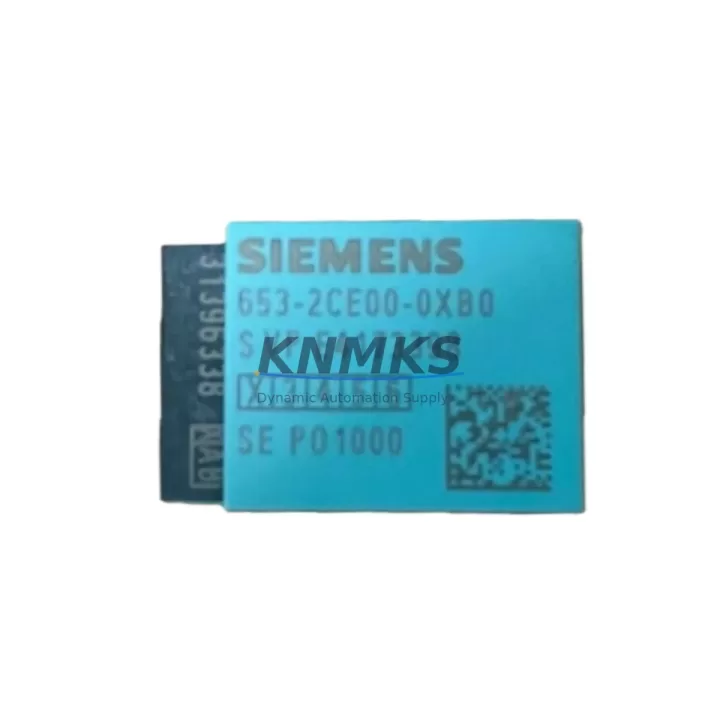
Siemens 6ES7653-2CE00-0XB0 Migration-Ready TIM for Legacy Control Systems
The Siemens 6ES7653-2CE00-0XB0 is a Telecontrol Interface Module (TIM) designed for the SINAUT ST7 telecontrol system, widely deployed in energy distribution, water treatment, pipeline monitoring, and remote infrastructure automation. As legacy SINAUT ST7 installations approach end-of-life and original Siemens supply channels discontinue active production, the 6ES7653-2CE00-0XB0 has become a critical spare part for engineers managing brownfield system continuity, unplanned outages, and phased migration projects.
KNMKS maintains verified stock of the 6ES7653-2CE00-0XB0, fully tested prior to shipment, with a support terms confirmed by quotation covering hardware defects under normal operating conditions. Each unit is inspected for firmware integrity, connector condition, and backplane interface compatibility before dispatch.
Migration Compatibility Table
| Parameter | Details |
|---|---|
| SKU / Part Number | 6ES7653-2CE00-0XB0 |
| Module Type | TIM (Telecontrol Interface Module) |
| Compatible System | SINAUT ST7 Telecontrol System |
| Compatible Racks | S7-300 standard rail; compatible with UR1, UR2 universal racks |
| Backplane Interface | S7-300 backplane bus (P-bus / K-bus) |
| Communication Protocol | SINAUT ST7 protocol; serial WAN / ISDN / leased line interfaces |
| Power Supply Requirement | DC 24V via backplane; verify PS 307 or PS 305 capacity before installation |
| Slot Position | Slots 4–11 on S7-300 rack; confirm slot addressing in STEP 7 HW Config |
| Firmware Compatibility | Verify SINAUT ST7 software version compatibility before firmware update |
| Replacement Scope | Direct drop-in replacement for same SKU; verify module address assignment |
| Installation Space | Standard S7-300 single-slot width; confirm cabinet DIN rail clearance |
| Commissioning Requirement | STEP 7 HW Config re-download required after module swap |
| Support terms | 12 months from shipment date — hardware defects under normal use |
Retrofit Planning for Existing Automation Systems
Replacing the 6ES7653-2CE00-0XB0 in an active SINAUT ST7 installation requires a structured pre-replacement audit. Before removing the failed or aging TIM, engineers should document the existing STEP 7 project file, export the current HW Config, and record all module addresses, slot assignments, and communication link parameters configured in the SINAUT ST7 master station software.
Power budget verification is a mandatory first step. The S7-300 rack’s power supply module — typically a Siemens PS 307 5A or PS 307 10A — must have sufficient headroom to support the TIM alongside co-installed modules such as digital I/O modules (SM 321 / SM 322), analog input modules (SM 331), and any CP 341 or CP 343 communication processors sharing the same rack. Overloaded power rails are a common root cause of intermittent TIM faults in aging control cabinets.
Terminal wiring for the 6ES7653-2CE00-0XB0’s external communication interfaces — including serial line connectors and any modem or ISDN terminal adapter connections — must be photographed and labeled before disconnection. In many legacy installations, wiring documentation has not been updated since original commissioning, making physical labeling essential for accurate reconnection. Signal isolators or surge protection devices installed on the communication lines should be inspected and replaced if degraded, as these components are frequently overlooked during module-level replacements.
For sites running SINAUT ST7 alongside Siemens S7-400 controllers or IM 153 distributed I/O via PROFIBUS DP, the migration scope expands. The TIM’s role in the telecontrol hierarchy — whether operating as a master station TIM, a substation TIM, or a repeater node — determines the reconfiguration sequence. Substation TIMs must be re-addressed and re-parameterized in the SINAUT ST7 project database after replacement to restore polling cycles and alarm transmission paths.
HMI screens connected to the SINAUT ST7 system via WinCC or SIMATIC HMI panels should be validated after TIM replacement. Tag connections referencing the TIM’s data blocks may require re-linking if the module address changes. In installations using Siemens OP 277 or TP 277 operator panels, screen navigation and alarm displays tied to telecontrol data points should be tested under simulated conditions before returning the system to live operation.
Where the retrofit scope includes upgrading from older SINAUT ST7 hardware to a more current telecontrol architecture, the 6ES7653-2CE00-0XB0 serves as a bridging component — maintaining existing field communication links while upstream system components are progressively modernized. This phased approach minimizes the risk of simultaneous multi-point failures and allows individual subsystems to be validated independently before full cutover.
Downtime Control During System Migration
Minimizing unplanned downtime during a TIM module replacement begins with pre-staging. The replacement 6ES7653-2CE00-0XB0 should be bench-tested and firmware-verified before the maintenance window opens. Where possible, a parallel STEP 7 project with the updated HW Config should be prepared offline and validated in simulation mode, so that the re-download to the CPU — typically a Siemens CPU 315-2 DP or CPU 317-2 DP in SINAUT ST7 substations — can be executed without delay during the live swap.
The original PLC program logic stored in the CPU is not affected by a TIM module replacement, provided the CPU remains powered and the program is retained in load memory. Engineers should confirm that the CPU is in STOP mode only for the duration of the HW Config download, and that all field devices connected via PROFIBUS DP or MPI remain in a safe state during this interval. For critical process applications, a manual control fallback procedure should be documented and communicated to operations staff before the maintenance window begins.
After the new TIM is installed and the HW Config is downloaded, the SINAUT ST7 communication link should be verified by monitoring the master station’s polling status for all configured substation addresses. Alarm transmission, data point updates, and time synchronization should all be confirmed before the system is returned to automatic operation. A post-replacement test report documenting link quality, response times, and any configuration changes provides a baseline for future maintenance cycles and supports support terms claim documentation if required.
For sites where continuous operation is mandatory, a hot-standby or redundant TIM configuration — where supported by the installed SINAUT ST7 version — should be evaluated as part of the long-term reliability strategy. KNMKS can advise on compatible redundancy configurations and supply matched module pairs for simultaneous deployment.
Retrofit Support FAQ
Q: Is the 6ES7653-2CE00-0XB0 a direct replacement for the same SKU currently installed?
A: Yes. The 6ES7653-2CE00-0XB0 is a direct hardware replacement for the same part number. After physical installation, a STEP 7 HW Config re-download is required to re-establish the module’s slot assignment and communication parameters. No program logic changes are needed if the slot position and module address remain unchanged.
Q: What commissioning steps are required after replacing the TIM?
A: After installing the replacement module, connect the programming cable (PC Adapter USB or CP 5611), open the existing STEP 7 project, compile and download the HW Config to the CPU, and verify the TIM’s operational status in the SINAUT ST7 master station software. Confirm that all configured substation polling cycles resume and that data point transmission is restored before closing the maintenance window.
Q: How do I verify wiring compatibility before installation?
A: Compare the terminal assignments on the existing TIM’s external communication connectors against the 6ES7653-2CE00-0XB0 hardware manual. For serial line interfaces, verify baud rate, parity, and stop bit settings match the connected modem or line equipment. Surge protection devices and signal isolators on the communication lines should be inspected and replaced if their protection ratings have degraded.
Q: What does the support terms confirmed by quotation cover, and how does KNMKS handle support requests?
A: The support terms confirmed by quotation cover hardware defects under normal operating conditions from the shipment date. Each unit is tested prior to dispatch. In the event of a support terms claim, contact KNMKS at admin@knmks.com with the order reference and a description of the fault. KNMKS will arrange return logistics and replacement dispatch to minimize system downtime.
© 2026 KNMKS. All rights reserved.
Original Source: https://knmks.com
Contact: admin@knmks.com | +86 18359268345
Product Identification
- Brand / Ecosystem
-
Siemens
Siemens - Model / Series
-
6ES7653-2CE00-0XB0
SIMATIC Series - Product Family
- PLCs & Controllers
- Availability Status
- Available on request after model and quantity confirmation
- Inquiry Type
- B2B RFQ, replacement inquiry and project spare-part request
- Pre-Quote Check
- Exact SKU, brand, series, quantity, nameplate photos and destination country are checked before quotation
System Path
Where this product fits in the KNMKS automation structure.
Specification & Inquiry Focus
- Control platform
- PLC, PAC and modular controllers
- Common needs
- CPU, rack, power and I/O expansion
- Project support
- Replacement, cabinet build and maintenance
Buyer Confirmation
Information KNMKS checks before replying.
- Exact model
- 6ES7653-2CE00-0XB0
- Brand / ecosystem
- Siemens
- Product family
- PLCs & Controllers
- Application note
- Replacement, maintenance, project build or spare-part list
- Useful photos
- Nameplate, installed unit, cabinet layout or connector side
- Delivery details
- Quantity, destination country and target schedule
Document Support
Files and notes can be confirmed during quotation.
- Product photos or nameplate confirmation when available
- Packing and delivery notes before quotation confirmation
- Support scope and delivery terms confirmed per inquiry
- Export document coordination for qualified B2B requests
Inquiry Support
- Model cross-checking before quotation
- CPU, power, rack and expansion module matching
- Support for replacement and project inquiry
What to Send Us
- Brand and exact model number: Siemens 6ES7653-2CE00-0XB0
- Quantity and required delivery time
- Application, replacement requirement or nameplate photo
- Destination country and shipping preference
RFQ Preparation
This is a product inquiry page built for RFQ communication.
Fast Model Check
Send this model to KNMKS for confirmation.
Include quantity, destination country and photos if this is a maintenance replacement. The inquiry will be saved with a reference number after submission.
Brand & Compatibility Note
KNMKS displays automation product information for well-known industrial brand ecosystems and compatible replacement references. Brand names are used for product identification and compatibility reference only; final availability and commercial terms are confirmed per quotation.
 Manufacturing
 Machine Tools
 Packaging
 Energy & Power



 HMI & Displays
 Servo Systems
 Variable Frequency Drives
 Sensors