
Overview
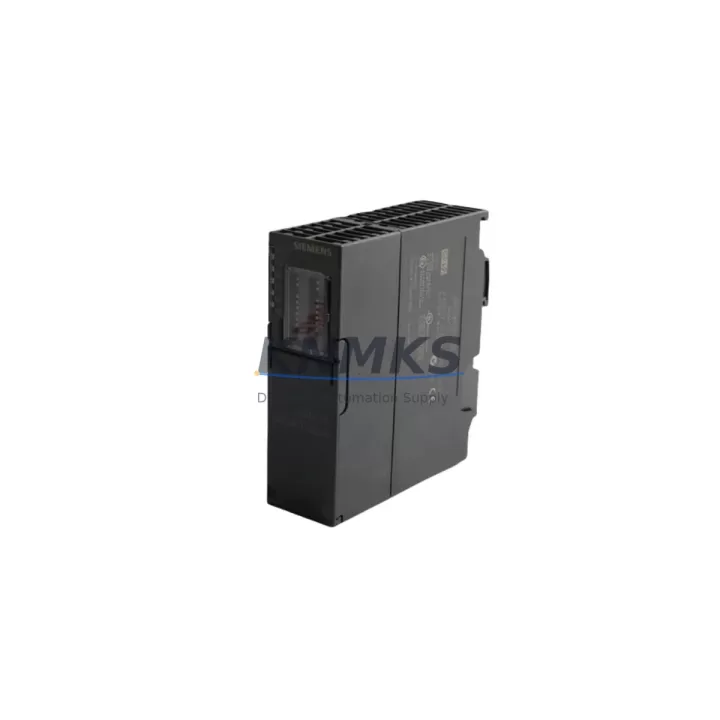
Siemens 6ES7650-8EK80-1AA0 Maintenance-Proven Spare Part for Factory Uptime
The Siemens 6ES7650-8EK80-1AA0 is an interface module designed for the ET 200SP distributed I/O system, a cornerstone of SIMATIC-based automation architectures across discrete manufacturing, process control, and infrastructure applications. For maintenance engineers managing aging control cabinets or executing planned overhauls, sourcing a verified, pre-tested replacement for this module is critical to minimizing unplanned downtime and sustaining production continuity. KNMKS stocks this module as an original spare, subject to pre-shipment functional verification and backed by a support terms confirmed by quotation — providing procurement teams with the confidence needed for long-term spare parts planning.
The ET 200SP platform is widely deployed in automotive assembly lines, food and beverage processing, pharmaceutical batch control, and utility automation. The 6ES7650-8EK80-1AA0 interface module serves as the communication backbone between the ET 200SP station and the PROFINET or PROFIBUS network, making it a high-criticality component in any control cabinet audit. When this module fails or degrades, the entire I/O station loses network visibility — triggering fault codes in the S7-1500 or S7-300 CPU and halting the associated process segment. Rapid replacement with a tested spare is the only path to fast recovery.
Spare Maintenance Table
| Parameter | Specification |
|---|---|
| SKU / Part Number | 6ES7650-8EK80-1AA0 |
| Brand | Siemens |
| Series | ET 200SP / SIMATIC |
| Product Type | Interface Module |
| Communication Interface | PROFINET / PROFIBUS (series-dependent) |
| Compatible CPU Families | S7-1500, S7-300, ET 200SP IM variants |
| Supply Voltage | 24 V DC (nominal) |
| Mounting | DIN rail, ET 200SP baseplate |
| Operating Temperature | 0 °C to +60 °C |
| Protection Class | IP20 |
| Origin | Germany (DE) |
| Pre-Shipment Testing | Yes — functional verification before dispatch |
| Support terms | 12 Months |
| Condition | Original Spare / Surplus Stock |
| Maintenance Recommendation | Inspect every 12–24 months; replace on first sign of communication fault or LED error |
Maintenance Planning for Continuous Operation
When replacing the 6ES7650-8EK80-1AA0 interface module during a scheduled or emergency maintenance event, a disciplined inspection of the surrounding electrical environment is essential to prevent repeat failures and ensure stable recommissioning. Begin with the 24 V DC power supply feeding the ET 200SP station — verify output voltage stability and check for ripple or transient spikes that may have contributed to the original module failure. A degraded SITOP PSU100S or equivalent 24 V rail power supply is a common root cause of interface module faults and should be tested or replaced concurrently.
Next, inspect the PROFINET patch cables and RJ45 connectors at the interface module ports. Damaged or corroded connectors introduce intermittent communication errors that can be misdiagnosed as module failure. Replace any cables showing physical wear, and verify network topology continuity with a cable tester before powering up the new module. If the station uses PROFIBUS, inspect the DP connector (6ES7972-0BB52-0XA0 or equivalent) for pin damage and termination resistor status.
For the I/O layer, audit the ET 200SP I/O modules seated on the baseplate — particularly digital input modules (e.g., 6ES7131-6BF01-0BA0) and digital output modules (e.g., 6ES7132-6BF01-0BA0). A failed interface module can mask underlying I/O faults; once the IM is restored, latent I/O errors may surface. Check each module’s LED status indicators and run a diagnostic read from the TIA Portal project to confirm channel-level health.
Inspect the terminal blocks and potential distribution modules on the ET 200SP baseplate for loose connections, oxidation, or thermal discoloration — signs of sustained overcurrent or poor contact. Verify that the load voltage supply module (e.g., 6ES7138-4CB11-0AB0) is correctly configured and supplying the rated voltage to the output modules. A misconfigured or failing supply module will cause output faults even after a successful IM replacement.
For stations integrated into larger SIMATIC architectures, confirm that the S7-1500 CPU firmware and the GSD/GSDML device description file for the ET 200SP station are compatible with the replacement module’s hardware revision. Firmware mismatches can prevent the station from coming online after replacement. Finally, review the cabinet-level fuse protection — check miniature circuit breakers (MCBs) and fuse holders on the 24 V distribution rail to ensure no upstream protection device has been weakened by the fault event.
Site Replacement Workflow
Step 1 — Pre-Replacement Preparation: Download the current TIA Portal project and note the ET 200SP station address, slot assignments, and any module-specific parameters. Export the hardware configuration for reference. Confirm the replacement 6ES7650-8EK80-1AA0 hardware revision matches or is backward-compatible with the existing project configuration.
Step 2 — Safe Isolation: Follow LOTO (Lockout/Tagout) procedures. De-energize the ET 200SP station by switching off the 24 V DC supply. Disconnect the PROFINET or PROFIBUS cable from the interface module. Label all connections before removal.
Step 3 — Module Removal and Inspection: Remove the faulty 6ES7650-8EK80-1AA0 by releasing the DIN rail latch and sliding the module off the baseplate. Inspect the baseplate connector for bent pins or debris. Clean with compressed air if necessary.
Step 4 — Installation of Replacement Module: Seat the new interface module onto the baseplate, ensuring full connector engagement. Reconnect the PROFINET/PROFIBUS cable. Restore 24 V DC power and observe the module’s LED indicators — RUN (green) should illuminate within the startup sequence.
Step 5 — Recommissioning and Verification: From TIA Portal, perform an online connection to the CPU and run a hardware scan to confirm the ET 200SP station is recognized. Execute a diagnostic read to verify all I/O modules report no faults. Run a controlled test cycle of the associated process segment before returning to full production.
Step 6 — Documentation: Record the replacement date, module serial number, and any observations in the maintenance log. Update the spare parts inventory and reorder a replacement unit to maintain buffer stock for future events.
Spare Parts Support FAQ
Q1: What is the recommended spare parts holding strategy for the 6ES7650-8EK80-1AA0?
For production lines with multiple ET 200SP stations, maintaining a minimum of one interface module per five stations is a practical baseline. Given that Siemens has announced end-of-life timelines for certain SIMATIC ET 200SP variants, procurement teams should consider securing 12–36 month buffer stock now. KNMKS supports long-term supply agreements to lock in availability and pricing for critical spare parts.
Q2: How is the 6ES7650-8EK80-1AA0 tested before shipment?
Every unit dispatched by KNMKS undergoes pre-shipment functional verification, including power-on testing and communication interface checks where applicable. Units that do not pass testing are not shipped. A support terms confirmed by quotation is provided on all dispatched modules, covering defects in materials and workmanship under normal operating conditions.
Q3: Can this module replace older ET 200SP interface module variants?
Compatibility depends on the hardware revision and the GSD/GSDML file version used in the TIA Portal project. In most cases, newer hardware revisions are backward-compatible, but it is essential to verify the firmware version supported by your CPU and confirm the device description file is updated accordingly. KNMKS technical support can assist with compatibility verification prior to purchase.
Q4: What is the lead time and long-term supply availability?
KNMKS maintains stock of the 6ES7650-8EK80-1AA0 and can typically dispatch within 1–3 business days. For customers requiring guaranteed long-term supply (12–36 months), we offer forward-purchase and consignment stock arrangements. Contact our sales team to discuss a supply agreement tailored to your maintenance schedule and production criticality.
© 2026 KNMKS. All rights reserved.
Original Source: https://knmks.com
Contact: admin@knmks.com | +86 18359268345
Product Identification
- Brand / Ecosystem
-
Siemens
Siemens - Model / Series
-
6ES7650-8EK80-1AA0
SIMATIC Series - Product Family
- PLCs & Controllers
- Availability Status
- Available on request after model and quantity confirmation
- Inquiry Type
- B2B RFQ, replacement inquiry and project spare-part request
- Pre-Quote Check
- Exact SKU, brand, series, quantity, nameplate photos and destination country are checked before quotation
System Path
Where this product fits in the KNMKS automation structure.
Specification & Inquiry Focus
- Control platform
- PLC, PAC and modular controllers
- Common needs
- CPU, rack, power and I/O expansion
- Project support
- Replacement, cabinet build and maintenance
Buyer Confirmation
Information KNMKS checks before replying.
- Exact model
- 6ES7650-8EK80-1AA0
- Brand / ecosystem
- Siemens
- Product family
- PLCs & Controllers
- Application note
- Replacement, maintenance, project build or spare-part list
- Useful photos
- Nameplate, installed unit, cabinet layout or connector side
- Delivery details
- Quantity, destination country and target schedule
Document Support
Files and notes can be confirmed during quotation.
- Product photos or nameplate confirmation when available
- Packing and delivery notes before quotation confirmation
- Support scope and delivery terms confirmed per inquiry
- Export document coordination for qualified B2B requests
Inquiry Support
- Model cross-checking before quotation
- CPU, power, rack and expansion module matching
- Support for replacement and project inquiry
What to Send Us
- Brand and exact model number: Siemens 6ES7650-8EK80-1AA0
- Quantity and required delivery time
- Application, replacement requirement or nameplate photo
- Destination country and shipping preference
RFQ Preparation
This is a product inquiry page built for RFQ communication.
Fast Model Check
Send this model to KNMKS for confirmation.
Include quantity, destination country and photos if this is a maintenance replacement. The inquiry will be saved with a reference number after submission.
Brand & Compatibility Note
KNMKS displays automation product information for well-known industrial brand ecosystems and compatible replacement references. Brand names are used for product identification and compatibility reference only; final availability and commercial terms are confirmed per quotation.
 Manufacturing
 Machine Tools
 Packaging
 Energy & Power



 HMI & Displays
 Servo Systems
 Variable Frequency Drives
 Sensors