
Overview
Siemens 6ES7650-8DK80-1AA0 Migration-Ready Analog Input for Legacy Control Systems
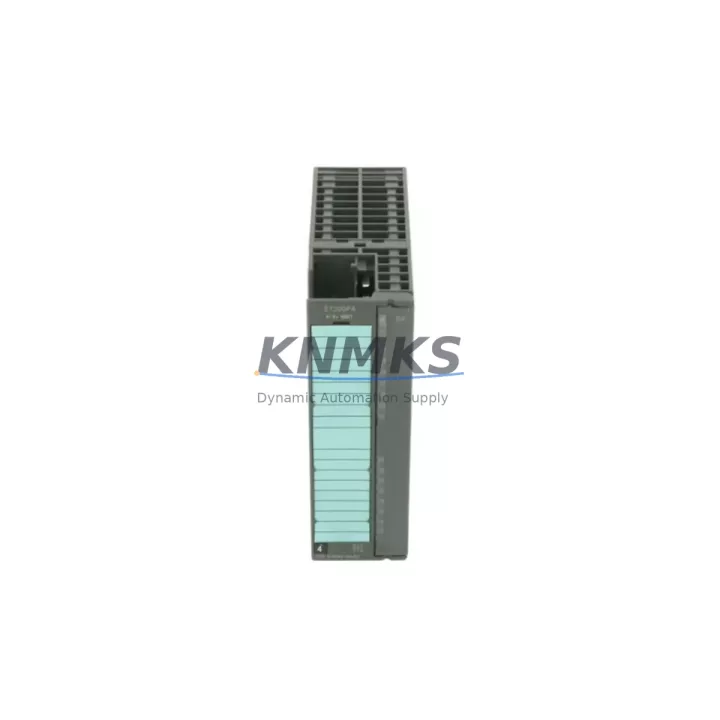
The Siemens 6ES7650-8DK80-1AA0 is a high-density analog input module designed for the ET 200 distributed I/O family within the SIMATIC automation platform. As legacy control architectures face end-of-life pressures, this module serves as a proven migration path for facilities running older S5 or early S7-300 analog signal chains that require a reliable, drop-in compatible replacement without full system redesign. Whether you are managing a phased retrofit of a process control cabinet, extending the operational life of an existing ET 200M rack, or consolidating analog signal acquisition across multiple field stations, the 6ES7650-8DK80-1AA0 delivers the channel density, resolution, and PROFIBUS DP compatibility required for seamless integration into both legacy and modernized control environments.
Engineers undertaking a replacement or upgrade project must verify several critical parameters before commissioning. Power supply capacity at the backplane level should be confirmed against the existing IM 153-x interface module’s current budget, particularly when adding channels to a populated ET 200M rack. Terminal wiring assignments must be cross-referenced against the original module’s channel mapping — especially for 4-wire transmitter loops where shield grounding and common reference configurations differ between module generations. Backplane slot addressing and module order within the hardware configuration (HW Config in STEP 7 or TIA Portal Device View) must be updated to reflect the new GSD file entry, and any existing SFC/SFB calls referencing the old module’s I/O address range will require remapping in the program blocks. HMI faceplates that display analog process values sourced from these addresses should be reviewed in WinCC or WinCC flexible to ensure tag bindings remain valid after the address shift.
Communication link integrity across the PROFIBUS DP segment should be validated with a bus diagnostic tool prior to final commissioning, confirming that baud rate, termination resistors, and cable length remain within specification after the module swap. Firmware version compatibility between the 6ES7650-8DK80-1AA0 and the active IM 153 interface module should be checked in the Siemens compatibility matrix to avoid initialization faults. Installation space within the control cabinet must accommodate the module’s physical footprint on the ET 200M rail, and torque specifications for terminal block connections should be observed to maintain signal integrity on milliamp and millivolt input channels.
Migration Compatibility Table
| Parameter | Details |
|---|---|
| SKU / Part Number | 6ES7650-8DK80-1AA0 |
| Brand / Manufacturer | Siemens |
| Series / Platform | SIMATIC ET 200M / ET 200 Distributed I/O |
| Module Type | Analog Input Module |
| Communication Interface | PROFIBUS DP via IM 153-x Interface Module |
| Backplane Compatibility | ET 200M Rail (compatible with IM 153-1, IM 153-2, IM 153-4) |
| Replacement / Upgrade Path | Direct replacement for legacy ET 200M analog input modules; compatible migration from S5 analog I/O via signal adapter |
| Installation Requirements | DIN rail mount; confirm slot position in HW Config; update GSD file |
| Commissioning Focus | Address remapping, terminal wiring verification, PROFIBUS segment diagnostic, HMI tag rebinding |
| Firmware Compatibility | Verify IM 153 firmware version against Siemens compatibility matrix prior to installation |
| Origin | Germany (DE) |
| Support terms | support terms confirmed by quotation — all units pre-tested before shipment |
Retrofit Planning for Existing Automation Systems
A successful retrofit centered on the 6ES7650-8DK80-1AA0 typically involves coordinating several interdependent components within the same control cabinet or field station. The IM 153-2 interface module is the most common backplane host for this analog input module in active PROFIBUS DP topologies, and its firmware should be confirmed as current before the new analog module is inserted. Where power budgets are tight, the PS 307 24V DC power supply module may require capacity verification or replacement to support the additional current draw of a higher-channel-count analog input configuration.
For facilities migrating from older S7-300 analog modules such as the SM 331 AI 8×13Bit, the 6ES7650-8DK80-1AA0 provides a compatible signal range and channel structure that minimizes program-level changes, though hardware configuration updates in STEP 7 or TIA Portal remain mandatory. In distributed cabinet layouts where multiple ET 200M stations share a single PROFIBUS segment, the PROFIBUS DP repeater RS 485 may be required to maintain signal quality across extended cable runs following the retrofit. I/O expansion using SM 321 digital input modules or SM 322 digital output modules on the same ET 200M rack should be re-validated in the hardware configuration after the analog module replacement to confirm that slot assignments and process image partitioning remain consistent. Where legacy HMI systems such as TP 177B or MP 277 panels are connected via MPI or PROFIBUS, tag address updates in WinCC flexible are required to reflect the new analog input addresses following the module swap.
Downtime Control During System Migration
Minimizing production downtime during an analog input module replacement requires a structured pre-migration checklist and a clearly defined rollback plan. Before removing the existing module, export the current STEP 7 or TIA Portal project to a backup archive and document all analog channel scaling parameters, filter settings, and diagnostic interrupt configurations. Photograph or record the existing terminal wiring layout before disconnection to accelerate rewiring during the replacement window.
Where process continuity is critical, consider staging the replacement during a planned maintenance window and pre-configuring the 6ES7650-8DK80-1AA0 in an offline hardware configuration before the cutover. Load the updated program to the CPU in STOP mode, insert the new module, and perform a controlled CPU restart to allow the PROFIBUS DP master to recognize the updated slave configuration. Run a full analog channel diagnostic immediately after restart to confirm that all input channels are reading within expected engineering unit ranges before returning the system to automatic mode. This approach typically reduces live commissioning time to under two hours for a single ET 200M station, preserving original program logic and control continuity throughout the migration.
Retrofit Support FAQ
Q: Is the 6ES7650-8DK80-1AA0 a direct drop-in replacement for older ET 200M analog input modules?
A: It is functionally compatible with the ET 200M platform and shares the same backplane interface, but a hardware configuration update in STEP 7 or TIA Portal is required. Terminal wiring and channel address mapping must be verified before commissioning.
Q: What commissioning steps are required after installation?
A: Update the hardware configuration with the correct GSD file entry, remap I/O addresses in the program if they have changed, verify PROFIBUS DP communication on the segment, and rebind any HMI tags referencing the old analog input addresses. Run a full channel diagnostic before returning to automatic mode.
Q: How is the unit tested before shipment?
A: Every 6ES7650-8DK80-1AA0 unit is powered on and functionally tested prior to dispatch. A support terms confirmed by quotation is provided from the date of shipment, covering manufacturing defects and functional failures under normal operating conditions.
Q: Is stock available for immediate shipment?
A: Yes. Units are held in inventory and available for same-day or next-business-day dispatch. Contact our team to confirm current stock levels and lead times for your project quantity.
© 2026 KNMKS. All rights reserved.
Original Source: https://knmks.com
Contact: admin@knmks.com | +86 18359268345
Product Identification
- Brand / Ecosystem
-
Siemens
Siemens - Model / Series
-
6ES7650-8DK80-1AA0
SIMATIC Series - Product Family
- PLCs & Controllers
- Availability Status
- Available on request after model and quantity confirmation
- Inquiry Type
- B2B RFQ, replacement inquiry and project spare-part request
- Pre-Quote Check
- Exact SKU, brand, series, quantity, nameplate photos and destination country are checked before quotation
System Path
Where this product fits in the KNMKS automation structure.
Specification & Inquiry Focus
- Control platform
- PLC, PAC and modular controllers
- Common needs
- CPU, rack, power and I/O expansion
- Project support
- Replacement, cabinet build and maintenance
Buyer Confirmation
Information KNMKS checks before replying.
- Exact model
- 6ES7650-8DK80-1AA0
- Brand / ecosystem
- Siemens
- Product family
- PLCs & Controllers
- Application note
- Replacement, maintenance, project build or spare-part list
- Useful photos
- Nameplate, installed unit, cabinet layout or connector side
- Delivery details
- Quantity, destination country and target schedule
Document Support
Files and notes can be confirmed during quotation.
- Product photos or nameplate confirmation when available
- Packing and delivery notes before quotation confirmation
- Support scope and delivery terms confirmed per inquiry
- Export document coordination for qualified B2B requests
Inquiry Support
- Model cross-checking before quotation
- CPU, power, rack and expansion module matching
- Support for replacement and project inquiry
What to Send Us
- Brand and exact model number: Siemens 6ES7650-8DK80-1AA0
- Quantity and required delivery time
- Application, replacement requirement or nameplate photo
- Destination country and shipping preference
RFQ Preparation
This is a product inquiry page built for RFQ communication.
Fast Model Check
Send this model to KNMKS for confirmation.
Include quantity, destination country and photos if this is a maintenance replacement. The inquiry will be saved with a reference number after submission.
Brand & Compatibility Note
KNMKS displays automation product information for well-known industrial brand ecosystems and compatible replacement references. Brand names are used for product identification and compatibility reference only; final availability and commercial terms are confirmed per quotation.
 Manufacturing
 Machine Tools
 Packaging
 Energy & Power



 HMI & Displays
 Servo Systems
 Variable Frequency Drives
 Sensors