
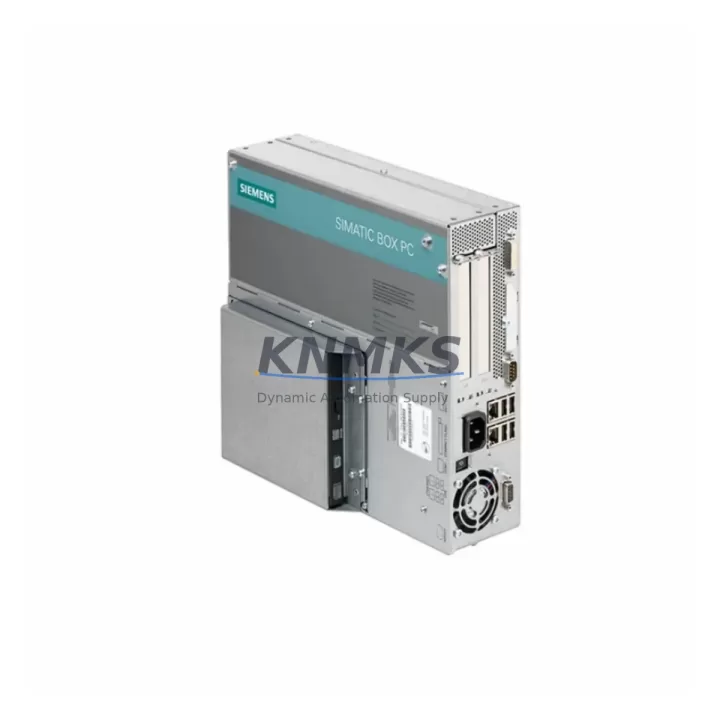
Overview
Siemens 6ES7647-6PE05-0BA0 Maintenance-Proven Spare Part for Factory Uptime
The Siemens 6ES7647-6PE05-0BA0 is an original spare part for the SIMATIC IPC477E Industrial Panel PC series — a ruggedized, high-performance HMI/SCADA platform widely deployed in process automation, discrete manufacturing, and critical infrastructure environments. When this unit fails or degrades, production lines halt, operator visibility is lost, and recovery time directly impacts output and safety compliance. Stocking a verified replacement is the single most effective measure a maintenance team can take to protect uptime.
This spare is sourced from authorized supply channels, subjected to pre-shipment functional testing, and dispatched with a support terms confirmed by quotation. Whether you are managing a planned annual overhaul, responding to an unscheduled fault, or building a strategic spare parts inventory for a multi-site SIMATIC IPC installation, the 6ES7647-6PE05-0BA0 is available for rapid global dispatch.
Maintenance engineers working on SIMATIC IPC477E systems understand that the panel PC is the nerve center of the operator station. A failure here does not only affect visualization — it can cascade into loss of alarm management, recipe control, historian connectivity, and PROFINET/PROFIBUS communication supervision. Procurement engineers should treat this SKU as a Tier-1 critical spare with a recommended on-hand quantity of at least one unit per production zone.
Spare Maintenance Table
| SKU / Part Number | 6ES7647-6PE05-0BA0 |
| Brand | Siemens |
| Series | SIMATIC IPC477E |
| Product Type | Industrial Panel PC (HMI/SCADA) |
| Country of Origin | Germany |
| Display / Interface | Touch-enabled widescreen panel, suitable for operator station integration |
| Operating System Compatibility | Windows Embedded / Windows 10 IoT (per IPC477E configuration) |
| Communication Interfaces | PROFINET, Ethernet, USB, serial (application-dependent) |
| Mounting | Panel/cabinet front-mount, VESA-compatible configurations |
| Operating Temperature | 0 °C to +50 °C (standard industrial range) |
| Protection Class | IP65 front panel (typical for IPC477E series) |
| Power Supply | 24 V DC nominal (verify against installed variant) |
| Weight (approx.) | 400 g (unit only) |
| Compatibility | SIMATIC IPC477E series; verify exact hardware revision before installation |
| Condition | Original / New or Tested Refurbished (confirmed pre-shipment) |
| Pre-Shipment Testing | Yes — functional verification completed before dispatch |
| Support terms | 12 Months |
| Dispatch | Global express shipping available; lead time confirmed at order |
Maintenance Planning for Continuous Operation
Replacing the 6ES7647-6PE05-0BA0 in a live production environment requires a structured approach that goes beyond swapping the panel PC unit. Maintenance engineers should treat this replacement as an opportunity to audit the entire operator station and associated control cabinet components.
Begin with the 24 V DC power supply feeding the IPC477E. Units such as the Siemens SITOP PSU100S or equivalent regulated DC supplies should be inspected for output voltage stability, ripple, and thermal performance. A degraded power supply is a common root cause of intermittent IPC faults and should be replaced proactively if it shows signs of aging.
Next, inspect the PROFINET switch or managed Ethernet switch in the cabinet — typically a Siemens SCALANCE X series device. Communication dropouts between the IPC477E and the S7-300/S7-400/S7-1500 PLC rack are frequently misdiagnosed as panel PC failures when the actual fault lies in the network layer. Verify port status, cable integrity, and switch firmware.
The S7-300 or S7-400 CPU module connected to this operator station should also be checked for diagnostic buffer entries, battery status (for memory-backed CPUs), and firmware currency. If the IPC477E was running WinCC or WinCC flexible, confirm that the project version is compatible with the replacement unit’s OS image.
Review the terminal blocks and signal wiring at the rear of the cabinet. Loose or corroded connections on analog input/output terminals, digital I/O marshalling, and fieldbus connectors can introduce noise that manifests as IPC instability. Tighten all connections and apply contact protection spray where appropriate.
If the installation includes signal isolators or barriers — for example, Phoenix Contact MINI Analog isolators or Pepperl+Fuchs HART barriers — verify that these are within calibration and that their output signals are within the expected range for the IPC’s analog input cards.
Finally, check the UPS module (if installed) that protects the IPC477E from power interruptions. Siemens SITOP UPS1600 or similar devices should have their battery capacity tested annually. A failed UPS will not protect the panel PC during a power event and may itself cause data corruption on shutdown.
Procurement engineers building a spare parts list for a SIMATIC IPC477E operator station should consider stocking: the 6ES7647-6PE05-0BA0 panel PC unit, a compatible SITOP power supply, a SCALANCE network switch, relevant S7 CPU or communication modules, and a UPS battery module. This kit approach minimizes diagnostic time during emergency recovery.
Site Replacement Workflow
Step 1 — Pre-replacement preparation: Back up the WinCC/WinCC flexible project, OS image, and any historian or recipe data stored on the existing IPC477E. Confirm the hardware revision of the installed unit matches the 6ES7647-6PE05-0BA0 specification. Notify the control room and obtain a maintenance window.
Step 2 — Power isolation: Follow site LOTO (Lockout/Tagout) procedures. Isolate the 24 V DC supply to the panel PC. Disconnect PROFINET cables, USB peripherals, and any serial communication lines. Label all connectors before removal.
Step 3 — Physical replacement: Remove the faulty 6ES7647-6PE05-0BA0 unit from the panel cutout or VESA mount. Install the replacement unit, ensuring all mounting screws are torqued to specification and the front panel gasket is correctly seated for IP65 integrity.
Step 4 — Reconnection and power-on: Reconnect all cables in reverse order. Restore 24 V DC power. Verify that the unit boots correctly and that the OS image is intact. If a fresh OS image is required, restore from the backup prepared in Step 1.
Step 5 — Commissioning verification: Restore the WinCC project. Verify PROFINET communication with the PLC. Confirm all process values, alarms, and historian connections are active. Conduct a 30-minute observation period before returning the system to full production.
Step 6 — Documentation: Record the replacement in the site maintenance log, including the serial number of the removed unit, the replacement unit, date, technician, and any observations. Update the spare parts inventory to trigger reorder of a replacement stock unit.
Spare Parts Support FAQ
Q1: Is the 6ES7647-6PE05-0BA0 still available as a new original part, or only as refurbished?
Both new original and tested refurbished units are available depending on current stock. All units — regardless of condition — undergo pre-shipment functional testing and are dispatched with a support terms confirmed by quotation. Condition is confirmed at the time of order.
Q2: How do I verify compatibility between the 6ES7647-6PE05-0BA0 and my installed SIMATIC IPC477E system?
Compatibility is determined by the hardware revision, display size, and OS configuration of your installed unit. Provide your existing unit’s full part number and hardware revision (found on the rating plate) when placing your order. Our technical team will confirm compatibility before shipment.
Q3: What is the lead time, and can emergency orders be expedited?
Standard lead time is confirmed at order based on current stock levels. Emergency and expedited orders are supported with express global shipping options. Contact admin@knmks.com or call +86 18359268345 to confirm availability and arrange priority dispatch.
Q4: What does the support terms confirmed by quotation cover, and what is the claims process?
The support terms confirmed by quotation cover functional failure under normal operating conditions. It does not cover physical damage caused by incorrect installation, overvoltage, or environmental exposure beyond the rated specification. To initiate a support terms claim, contact admin@knmks.com with the order reference, unit serial number, and a description of the fault. Replacement or repair will be arranged promptly.
© 2026 KNMKS. All rights reserved.
Original Source: https://knmks.com
Contact: admin@knmks.com | +86 18359268345
Product Identification
- Brand / Ecosystem
-
Siemens
Siemens - Model / Series
-
6ES7647-6PE05-0BA0
SIMATIC Series - Product Family
- PLCs & Controllers
- Availability Status
- Available on request after model and quantity confirmation
- Inquiry Type
- B2B RFQ, replacement inquiry and project spare-part request
- Pre-Quote Check
- Exact SKU, brand, series, quantity, nameplate photos and destination country are checked before quotation
System Path
Where this product fits in the KNMKS automation structure.
Specification & Inquiry Focus
- Control platform
- PLC, PAC and modular controllers
- Common needs
- CPU, rack, power and I/O expansion
- Project support
- Replacement, cabinet build and maintenance
Buyer Confirmation
Information KNMKS checks before replying.
- Exact model
- 6ES7647-6PE05-0BA0
- Brand / ecosystem
- Siemens
- Product family
- PLCs & Controllers
- Application note
- Replacement, maintenance, project build or spare-part list
- Useful photos
- Nameplate, installed unit, cabinet layout or connector side
- Delivery details
- Quantity, destination country and target schedule
Document Support
Files and notes can be confirmed during quotation.
- Product photos or nameplate confirmation when available
- Packing and delivery notes before quotation confirmation
- Support scope and delivery terms confirmed per inquiry
- Export document coordination for qualified B2B requests
Inquiry Support
- Model cross-checking before quotation
- CPU, power, rack and expansion module matching
- Support for replacement and project inquiry
What to Send Us
- Brand and exact model number: Siemens 6ES7647-6PE05-0BA0
- Quantity and required delivery time
- Application, replacement requirement or nameplate photo
- Destination country and shipping preference
RFQ Preparation
This is a product inquiry page built for RFQ communication.
Fast Model Check
Send this model to KNMKS for confirmation.
Include quantity, destination country and photos if this is a maintenance replacement. The inquiry will be saved with a reference number after submission.
Brand & Compatibility Note
KNMKS displays automation product information for well-known industrial brand ecosystems and compatible replacement references. Brand names are used for product identification and compatibility reference only; final availability and commercial terms are confirmed per quotation.
 Manufacturing
 Machine Tools
 Packaging
 Energy & Power



 HMI & Displays
 Servo Systems
 Variable Frequency Drives
 Sensors