
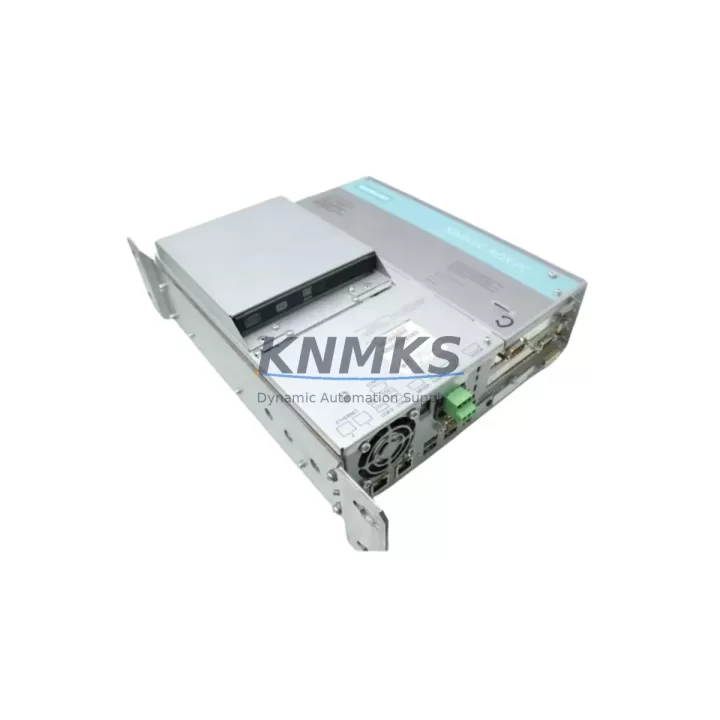
Overview
Siemens 6ES7647-6CB06-0KA0 Migration-Ready IPC for Legacy Control Systems
The Siemens 6ES7647-6CB06-0KA0 is a migration-ready Industrial PC engineered for direct integration into SIMATIC IPC647E platforms and legacy SIMATIC-based control architectures. As automation facilities face increasing pressure to modernize aging DCS and PLC infrastructure, this IPC module provides a validated, drop-in upgrade path that preserves existing control logic, minimizes engineering rework, and eliminates the risk of unplanned downtime. Designed for demanding industrial environments, the 6ES7647-6CB06-0KA0 supports the full SIMATIC software ecosystem, including STEP 7, TIA Portal, and WinCC SCADA, making it a preferred choice for engineers managing phased system migrations across multi-generation control platforms.
When replacing legacy IPCs in SIMATIC IPC647E cabinets, engineers must verify several critical parameters before commissioning: power supply capacity (typically 24 VDC with sufficient current headroom), backplane slot compatibility, PCIe and PCI expansion card retention, BIOS/firmware version alignment, and operating system image compatibility. The 6ES7647-6CB06-0KA0 is factory-configured to match the original IPC647E hardware profile, reducing the risk of driver conflicts and OS re-imaging during field replacement. Pre-shipment functional testing is performed on every unit to confirm POST completion, storage device detection, and network interface initialization before dispatch.
In retrofit projects involving SIMATIC S7-300 or S7-400 controllers, the IPC647E platform often serves as the supervisory computing layer, running OPC DA/UA servers, historian clients, or HMI runtime environments such as WinCC flexible or WinCC Runtime Professional. Replacing the IPC without disrupting these communication links requires careful attention to Ethernet port MAC address binding, OPC server license node-lock, and PROFIBUS DP or PROFINET IO adapter configuration. The 6ES7647-6CB06-0KA0 retains the same physical I/O port layout as the original IPC647E board, allowing existing cable harnesses and terminal wiring to remain undisturbed during the swap.
For facilities running mixed-generation SIMATIC hardware — including CP 343-1 or CP 443-1 communication processors, ET 200M distributed I/O racks, and IM 153-2 interface modules — the 6ES7647-6CB06-0KA0 provides a stable supervisory platform that maintains PROFINET and Industrial Ethernet connectivity without requiring network topology changes. Engineers integrating this IPC into cabinets alongside SITOP PSU300S power supply modules should confirm that the combined load does not exceed the cabinet’s rated current capacity, particularly when CP modules and additional I/O expansion cards are present.
HMI screen migration is a common challenge during IPC replacement. When the original IPC647E hosted a WinCC project with custom faceplates, alarm archives, and trend displays, the replacement IPC must be loaded with an identical WinCC version and service pack level to ensure runtime compatibility. The 6ES7647-6CB06-0KA0 supports standard WinCC project backup and restore procedures, allowing engineers to transfer the complete HMI configuration — including tag connections, script logic, and user management settings — without rebuilding screens from scratch. This significantly reduces commissioning time and the risk of operator interface errors during cutover.
Stock availability is maintained for immediate dispatch, supporting emergency replacement scenarios where production continuity depends on rapid hardware recovery. Each unit ships with a support terms confirmed by quotation covering manufacturing defects and functional failures under normal operating conditions.
Migration Compatibility Table
| Parameter | Original IPC647E | 6ES7647-6CB06-0KA0 Replacement |
|---|---|---|
| Form Factor | 19″ Rack-Mount IPC | 19″ Rack-Mount IPC (identical) |
| Power Input | 24 VDC / 110–230 VAC | 24 VDC / 110–230 VAC (verify PSU headroom) |
| Backplane Interface | PCIe / PCI | PCIe / PCI (slot-compatible) |
| Communication Ports | 2× GbE, USB, COM | 2× GbE, USB, COM (same layout) |
| PROFINET / PROFIBUS | Via CP adapter or onboard NIC | Compatible — verify CP module addressing |
| OS Compatibility | Windows 7 / Windows 10 IoT | Windows 10 IoT (confirm image version) |
| SIMATIC Software | STEP 7, TIA Portal, WinCC | Full compatibility — license transfer required |
| Installation Space | Standard 19″ cabinet bay | Identical — no mechanical modification needed |
| Firmware Version | Varies by production batch | Confirm BIOS version before OS restore |
| Support terms | — | support terms confirmed by quotation (manufacturing defects) |
Retrofit Planning for Existing Automation Systems
Successful retrofit of the 6ES7647-6CB06-0KA0 into an existing SIMATIC IPC647E installation requires a structured pre-migration checklist. Begin by documenting the current IPC’s hardware configuration: installed expansion cards (including any MPI/PROFIBUS adapters or additional GbE NICs), memory configuration, and storage device type (SSD or HDD). If the cabinet includes a SITOP PSU300S or PSU8600 power supply module, verify that the replacement IPC’s inrush current profile does not trigger overcurrent protection during startup.
For systems where the IPC647E communicates with S7-400 CPUs via Industrial Ethernet or MPI, the replacement IPC must be assigned the same IP address and MPI node address as the original unit to avoid disrupting the PLC’s communication partner table. If the system uses an S7-300 with a CP 343-1 Lean module for Ethernet connectivity, confirm that the OPC server running on the IPC references the correct CP module IP and rack/slot addressing before cutover.
In distributed I/O architectures using ET 200M racks with IM 153-2 interface modules, the IPC typically hosts the SCADA or historian application that polls I/O data via OPC DA. After replacing the IPC, verify that the OPC server re-establishes all tag connections and that the historian resumes data logging without gap. For cabinets that include SIMATIC NET CP 1616 or CP 1604 PCI cards for high-performance PROFINET IO, these cards must be re-seated in the replacement IPC and their firmware updated if required by the installed SIMATIC NET software version.
Programming cables such as the PC Adapter USB A2 or SIMATIC NET USB adapters used for MPI/PROFIBUS access should be tested on the replacement IPC before the original unit is removed, confirming driver compatibility with the installed OS image. This step prevents last-minute driver issues during the live cutover window.
Downtime Control During System Migration
Minimizing downtime during IPC replacement in a live production environment requires a parallel preparation strategy. Before removing the original IPC647E, create a full system image backup using Acronis or the SIMATIC IPC Image & Partition Creator tool. Store the backup on an external USB drive or network share accessible from the replacement IPC. This ensures that if the OS restore encounters errors, the original image can be redeployed within minutes rather than hours.
Where possible, schedule the IPC swap during a planned maintenance window aligned with the facility’s shift change or scheduled equipment downtime. Coordinate with the control room to place the affected PLC segments in manual or local control mode before disconnecting the IPC, preventing automatic sequences from triggering on loss of supervisory communication. After the replacement IPC is installed and the OS image restored, perform a staged reconnection: first verify network connectivity, then confirm OPC server tag resolution, then re-enable SCADA displays and alarm monitoring before returning the system to automatic mode.
For systems where the IPC647E hosts a WinCC Runtime project with active alarm logging, ensure that the alarm archive database is backed up and restored to the replacement IPC before cutover. This preserves alarm history continuity and prevents gaps in regulatory compliance records. Each 6ES7647-6CB06-0KA0 unit undergoes pre-shipment functional testing — including POST verification, storage device health check, and network interface validation — to eliminate hardware-related delays during field installation.
Retrofit Support FAQ
Q: Is the 6ES7647-6CB06-0KA0 a direct replacement for the original SIMATIC IPC647E board?
A: Yes. The 6ES7647-6CB06-0KA0 is designed as a form-fit-function replacement for the SIMATIC IPC647E platform, maintaining the same physical dimensions, port layout, and hardware interface compatibility. Minor firmware or OS image adjustments may be required depending on the original unit’s production batch.
Q: What commissioning steps are required after installing the replacement IPC?
A: After physical installation, restore the OS image from backup, verify IP address and MPI/PROFIBUS node address assignments, confirm OPC server tag connections, re-validate WinCC Runtime project integrity, and perform a communication link test with all connected PLC and I/O modules before returning to automatic operation.
Q: How is wiring and terminal compatibility handled during the swap?
A: The 6ES7647-6CB06-0KA0 retains the identical rear-panel port layout as the original IPC647E, allowing all existing cable harnesses — including Ethernet, USB, COM, and power connectors — to be reconnected without modification. No terminal rewiring is required under standard replacement conditions.
Q: What support terms and pre-shipment testing does this unit include?
A: Every 6ES7647-6CB06-0KA0 unit is pre-shipment tested for POST completion, storage device detection, and network interface initialization. A support terms confirmed by quotation is included, covering manufacturing defects and functional failures under normal industrial operating conditions. In-stock units are available for immediate dispatch to support emergency replacement requirements.
© 2026 KNMKS. All rights reserved.
Original Source: https://knmks.com
Contact: admin@knmks.com | +86 18359268345
Product Identification
- Brand / Ecosystem
-
Siemens
Siemens - Model / Series
-
6ES7647-6CB06-0KA0
SIMATIC Series - Product Family
- PLCs & Controllers
- Availability Status
- Available on request after model and quantity confirmation
- Inquiry Type
- B2B RFQ, replacement inquiry and project spare-part request
- Pre-Quote Check
- Exact SKU, brand, series, quantity, nameplate photos and destination country are checked before quotation
System Path
Where this product fits in the KNMKS automation structure.
Specification & Inquiry Focus
- Control platform
- PLC, PAC and modular controllers
- Common needs
- CPU, rack, power and I/O expansion
- Project support
- Replacement, cabinet build and maintenance
Buyer Confirmation
Information KNMKS checks before replying.
- Exact model
- 6ES7647-6CB06-0KA0
- Brand / ecosystem
- Siemens
- Product family
- PLCs & Controllers
- Application note
- Replacement, maintenance, project build or spare-part list
- Useful photos
- Nameplate, installed unit, cabinet layout or connector side
- Delivery details
- Quantity, destination country and target schedule
Document Support
Files and notes can be confirmed during quotation.
- Product photos or nameplate confirmation when available
- Packing and delivery notes before quotation confirmation
- Support scope and delivery terms confirmed per inquiry
- Export document coordination for qualified B2B requests
Inquiry Support
- Model cross-checking before quotation
- CPU, power, rack and expansion module matching
- Support for replacement and project inquiry
What to Send Us
- Brand and exact model number: Siemens 6ES7647-6CB06-0KA0
- Quantity and required delivery time
- Application, replacement requirement or nameplate photo
- Destination country and shipping preference
RFQ Preparation
This is a product inquiry page built for RFQ communication.
Fast Model Check
Send this model to KNMKS for confirmation.
Include quantity, destination country and photos if this is a maintenance replacement. The inquiry will be saved with a reference number after submission.
Brand & Compatibility Note
KNMKS displays automation product information for well-known industrial brand ecosystems and compatible replacement references. Brand names are used for product identification and compatibility reference only; final availability and commercial terms are confirmed per quotation.
 Manufacturing
 Machine Tools
 Packaging
 Energy & Power



 HMI & Displays
 Servo Systems
 Variable Frequency Drives
 Sensors