
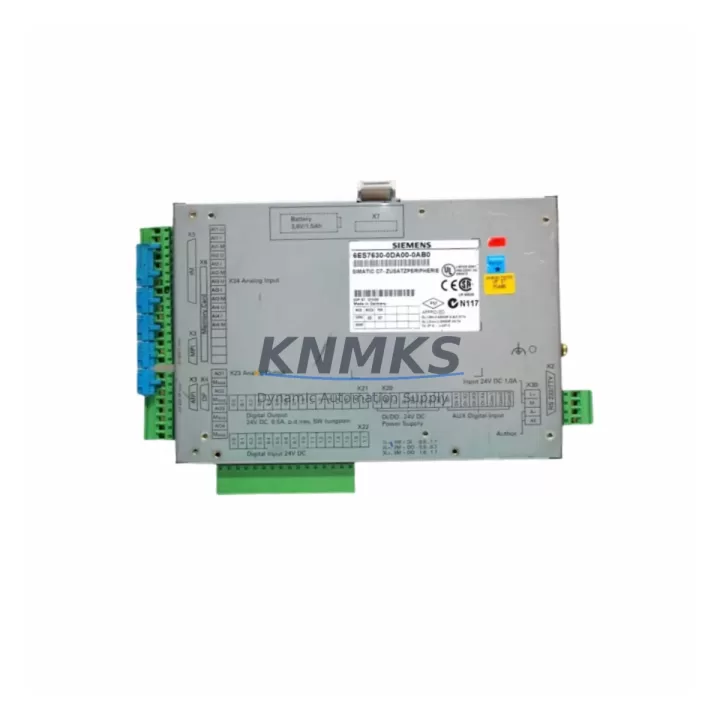
Overview
Siemens 6ES7630-0DA00-0AB0 Migration-Ready I/O Module: Legacy System Migration and Compatible Upgrade
The Siemens 6ES7630-0DA00-0AB0 is a compact I/O expansion module engineered for the SIMATIC C7 integrated controller platform. As legacy SIMATIC C7 systems approach end-of-life and OEM spare part availability narrows, the 6ES7630-0DA00-0AB0 remains a critical component for engineers managing retrofit projects, control cabinet upgrades, and production line continuity. This module supports direct replacement of discontinued I/O units within the C7 rack architecture, enabling facilities to extend operational life without committing to a full PLC platform migration.
For automation engineers tasked with maintaining aging SIMATIC C7 installations, the 6ES7630-0DA00-0AB0 addresses the most common retrofit pain points: terminal wiring compatibility, backplane slot addressing, and firmware version alignment. Before installation, engineers should verify the existing backplane interface type, confirm the module address assignment within the C7 rack, and cross-check the firmware revision against the CPU module — typically a SIMATIC C7-633 or C7-634 controller — to avoid initialization faults during commissioning. The module’s I/O channel mapping must also be validated against the existing STEP 7 program logic to ensure signal assignments remain consistent after swap-out.
In control cabinet upgrade scenarios, the 6ES7630-0DA00-0AB0 is frequently deployed alongside the SIMATIC C7 power supply module (6ES7630-0BA00-0AB0) to ensure stable DC bus voltage under expanded I/O load. Engineers should confirm total current draw across all installed modules against the power supply’s rated output before energizing the upgraded cabinet. Terminal block wiring should be documented and photographed prior to removal to preserve field wiring integrity during the changeover.
Migration Compatibility Table
| Parameter | Details |
|---|---|
| SKU / Part Number | 6ES7630-0DA00-0AB0 |
| Brand | Siemens |
| Series | SIMATIC C7 |
| Module Type | I/O Expansion Module |
| Backplane Interface | SIMATIC C7 Rack Bus |
| Communication Protocol | MPI / PROFIBUS-compatible via C7 CPU |
| Replaces / Compatible With | SIMATIC C7-633, C7-634 integrated controller platforms |
| Installation Space | Standard C7 rack slot; confirm slot width before installation |
| Firmware Compatibility | Verify CPU firmware version prior to module swap |
| Terminal Wiring | Document existing field wiring before removal; re-terminate per original diagram |
| Module Address | Set via hardware configuration in STEP 7 / SIMATIC Manager |
| Program Compatibility | Validate I/O channel mapping in existing STEP 7 OB/FB logic |
| HMI Screen Impact | Confirm SIMATIC OP/TP panel tag addresses remain valid post-swap |
| Pre-Shipment Testing | Functional test performed prior to dispatch |
| Support terms | 12 Months |
| Origin | Germany |
| Stock Status | Available — global inventory, rapid dispatch |
Retrofit Planning for Existing Automation Systems
A successful retrofit of the 6ES7630-0DA00-0AB0 into an existing SIMATIC C7 installation requires systematic pre-work across hardware, software, and communication layers. Begin by auditing the full rack configuration: identify all installed modules including the C7 CPU, power supply, and any existing I/O expansion cards. Confirm that the replacement module’s slot position does not conflict with existing hardware addresses configured in STEP 7.
Communication link integrity is a frequent concern during C7 retrofits. If the control system communicates via MPI to a SIMATIC OP270 or TP270 HMI panel, verify that the MPI node address of the CPU remains unchanged after the module swap. Any disruption to the MPI network topology — such as adding or removing a node — can cause HMI communication faults that require re-parameterization of the panel’s PG/PC interface settings.
For systems that have been extended with PROFIBUS DP I/O drops — such as ET 200S or ET 200M distributed I/O stations — confirm that the GSD file versions and DP slave addresses in the hardware configuration remain consistent. The 6ES7630-0DA00-0AB0 does not alter the DP master configuration, but any concurrent rack changes should be validated in the SIMATIC Manager hardware catalog before downloading to the CPU.
Signal isolation requirements should also be reviewed. In mixed-signal environments where analog I/O channels share a common reference with digital outputs, a signal isolator or barrier module may be required to prevent ground loop interference after the retrofit. This is particularly relevant in older C7 installations where the original wiring did not account for expanded I/O channel density.
Finally, if the retrofit involves replacing a SIMATIC C7 programming cable (PC Adapter USB or MPI/DP adapter) to re-establish a programming connection after years of dormancy, ensure the adapter driver is compatible with the STEP 7 version in use. Older C7 CPUs may require STEP 7 V5.x rather than TIA Portal for program upload and download.
Downtime Control During System Migration
Minimizing unplanned downtime during a SIMATIC C7 I/O module replacement requires a structured changeover plan. Prior to any hardware removal, perform a full program upload from the CPU to a programming device and archive the project in SIMATIC Manager. This preserves the existing logic, hardware configuration, and symbol table as a recovery baseline in the event of an unexpected fault during commissioning.
Where production schedules permit, schedule the physical module swap during a planned maintenance window. Power down the control cabinet following the site’s lockout/tagout (LOTO) procedure, remove the defective or end-of-life 6ES7630-0DA00-0AB0, and install the replacement unit in the same rack slot. Re-terminate field wiring according to the documented wiring diagram, then restore power and perform a cold restart of the CPU.
After restart, monitor the CPU diagnostic buffer in STEP 7 for any module fault entries. If the replacement module generates a configuration mismatch alarm, re-download the hardware configuration from SIMATIC Manager to synchronize the CPU’s expected module parameters with the physical installation. Confirm that all I/O channel status indicators on the module front panel reflect the expected signal states before releasing the system to production.
For critical processes where even a brief interruption is unacceptable, consider staging a pre-configured and pre-tested replacement module — with firmware verified and address settings confirmed — so that the physical swap can be completed within a single shift. KNMKS pre-shipment functional testing supports this approach by ensuring the 6ES7630-0DA00-0AB0 arrives ready for installation without requiring bench validation on-site.
Retrofit Support FAQ
Q1: Is the 6ES7630-0DA00-0AB0 a direct drop-in replacement for the original SIMATIC C7 I/O module?
A: Yes, the 6ES7630-0DA00-0AB0 is designed for direct slot replacement within the SIMATIC C7 rack. No mechanical modification is required. However, engineers should verify the hardware configuration in STEP 7 and confirm the module address assignment matches the original installation before downloading and restarting the CPU.
Q2: What commissioning steps are required after installing the replacement module?
A: After physical installation and field wiring re-termination, perform a CPU cold restart and monitor the STEP 7 diagnostic buffer for configuration faults. If a mismatch is detected, re-download the hardware configuration. Validate all I/O channel signal states against the process P&ID before returning the system to automatic mode. HMI tag addresses should also be confirmed if any rack configuration changes were made concurrently.
Q3: Does KNMKS provide pre-shipment testing for the 6ES7630-0DA00-0AB0?
A: Yes. Each unit undergoes functional testing prior to dispatch to verify I/O channel integrity and module initialization. This reduces on-site commissioning risk and supports rapid changeover during planned maintenance windows.
Q4: What is the support terms coverage and stock availability?
A: The 6ES7630-0DA00-0AB0 is covered by a support terms confirmed by quotation from the date of shipment. KNMKS maintains global inventory with rapid dispatch capability to support urgent retrofit and breakdown replacement requirements. Contact our team for lead time confirmation and volume pricing.
© 2026 KNMKS. All rights reserved.
Original Source: https://knmks.com
Contact: admin@knmks.com | +86 18359268345
Product Identification
- Brand / Ecosystem
-
Siemens
Siemens - Model / Series
-
6ES7630-0DA00-0AB0
SIMATIC Series - Product Family
- PLCs & Controllers
- Availability Status
- Available on request after model and quantity confirmation
- Inquiry Type
- B2B RFQ, replacement inquiry and project spare-part request
- Pre-Quote Check
- Exact SKU, brand, series, quantity, nameplate photos and destination country are checked before quotation
System Path
Where this product fits in the KNMKS automation structure.
Specification & Inquiry Focus
- Control platform
- PLC, PAC and modular controllers
- Common needs
- CPU, rack, power and I/O expansion
- Project support
- Replacement, cabinet build and maintenance
Buyer Confirmation
Information KNMKS checks before replying.
- Exact model
- 6ES7630-0DA00-0AB0
- Brand / ecosystem
- Siemens
- Product family
- PLCs & Controllers
- Application note
- Replacement, maintenance, project build or spare-part list
- Useful photos
- Nameplate, installed unit, cabinet layout or connector side
- Delivery details
- Quantity, destination country and target schedule
Document Support
Files and notes can be confirmed during quotation.
- Product photos or nameplate confirmation when available
- Packing and delivery notes before quotation confirmation
- Support scope and delivery terms confirmed per inquiry
- Export document coordination for qualified B2B requests
Inquiry Support
- Model cross-checking before quotation
- CPU, power, rack and expansion module matching
- Support for replacement and project inquiry
What to Send Us
- Brand and exact model number: Siemens 6ES7630-0DA00-0AB0
- Quantity and required delivery time
- Application, replacement requirement or nameplate photo
- Destination country and shipping preference
RFQ Preparation
This is a product inquiry page built for RFQ communication.
Fast Model Check
Send this model to KNMKS for confirmation.
Include quantity, destination country and photos if this is a maintenance replacement. The inquiry will be saved with a reference number after submission.
Brand & Compatibility Note
KNMKS displays automation product information for well-known industrial brand ecosystems and compatible replacement references. Brand names are used for product identification and compatibility reference only; final availability and commercial terms are confirmed per quotation.
 Manufacturing
 Machine Tools
 Packaging
 Energy & Power



 HMI & Displays
 Servo Systems
 Variable Frequency Drives
 Sensors