
Overview
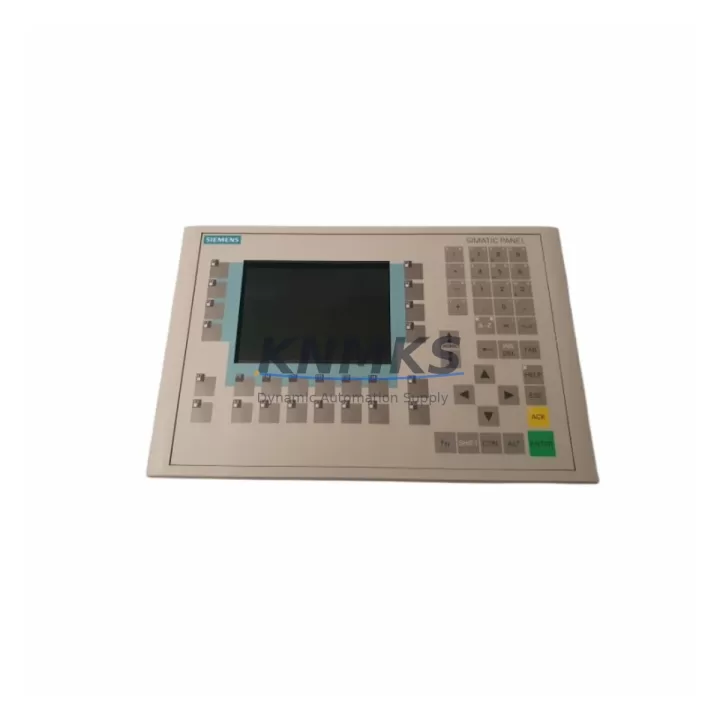
Siemens 6ES7621-1AD02-0AE3 Migration-Ready C7-621 Controller for Legacy Control Systems
The Siemens 6ES7621-1AD02-0AE3 is a SIMATIC C7-621 compact controller integrating a CPU and operator panel into a single unit, originally designed for embedded HMI and control tasks within S7-300 platform environments. As production lines age and OEM support for legacy SIMATIC C7 series units is discontinued, the 6ES7621-1AD02-0AE3 has become a critical spare part for maintenance teams managing long-cycle industrial assets. This unit is stocked, pre-shipment tested, and supplied with a support terms confirmed by quotation to support retrofit projects, emergency replacements, and planned system upgrades.
Whether you are replacing a failed unit in a running production cell, planning a phased migration from an older C7-600 series platform, or consolidating control cabinet space during a retrofit, the 6ES7621-1AD02-0AE3 provides a verified drop-in path with minimal re-engineering. Compatibility with existing STEP 7 project files, MPI communication wiring, and standard S7-300 backplane mounting makes this unit a preferred choice for maintenance engineers who need to minimize downtime and protect existing program logic.
Migration Compatibility Table
| Parameter | Detail |
|---|---|
| SKU / Order Number | 6ES7621-1AD02-0AE3 |
| Series | SIMATIC C7-621 |
| Platform Compatibility | S7-300 / C7-600 series environments |
| Communication Interface | MPI (Multi-Point Interface) |
| Backplane / Rack Interface | Standard S7-300 rail mounting; integrated CPU + OP panel |
| Programming Software | STEP 7 V5.x (compatible); SIMATIC Manager |
| HMI Integration | Integrated operator panel — no separate OP unit required |
| Power Supply Requirement | Verify existing PS 307 or equivalent S7-300 power supply capacity before installation |
| Terminal / Wiring Compatibility | Confirm front connector pinout against existing I/O wiring before swap |
| Firmware Compatibility | Verify firmware version against existing STEP 7 project before loading |
| Module Address | Re-confirm slot addressing in hardware configuration after replacement |
| Installation Space | Standard DIN rail; confirm panel cutout dimensions for integrated display |
| Replacement Recommendation | Direct replacement for failed or end-of-life C7-621 units in S7-300 environments |
| Pre-Shipment Testing | Yes — functional verification before dispatch |
| Support terms | 12 months from date of shipment |
| Country of Origin | Germany |
Retrofit Planning for Existing Automation Systems
Replacing the 6ES7621-1AD02-0AE3 in an operational control cabinet requires a structured approach to avoid configuration errors and unplanned downtime. Before removing the existing unit, maintenance engineers should back up the current STEP 7 project using SIMATIC Manager and document all MPI node addresses assigned to the C7-621 and any connected peripherals. If the control system includes additional S7-300 signal modules — such as SM 321 digital input modules or SM 331 analog input modules — their slot assignments and front connector wiring must be recorded and verified against the hardware configuration before the replacement unit is powered on.
Power supply capacity is a common oversight in C7 series replacements. The existing PS 307 power supply in the control cabinet should be checked to confirm it can sustain the combined load of the C7-621 CPU, integrated display, and all connected I/O modules. If the cabinet also houses a CP 342-5 PROFIBUS communication processor or an ET 200 distributed I/O station connected via PROFIBUS DP, the network topology and DP master configuration should be reviewed to ensure the replacement unit is correctly addressed and recognized on the bus after startup.
For systems where the C7-621 interfaces with a separate SIMATIC Panel PC or a standalone OP 77B operator panel via MPI, the communication link parameters — baud rate, MPI address, and network segment — must be re-confirmed after the swap. HMI screen configurations stored in the operator panel are typically independent of the CPU replacement, but any variable tags linked to internal CPU data blocks should be validated during commissioning. If the retrofit also involves upgrading communication from MPI to PROFINET, a CP 343-1 communication module may be required alongside the C7-621 replacement to bridge the protocol gap without rewriting the core control logic.
Installation space confirmation is particularly important for the C7-621 due to its integrated display. Panel cutout dimensions and DIN rail depth must match the replacement unit’s physical envelope. In retrofit scenarios where the original panel was custom-fabricated, a dimensional check against the 6ES7621-1AD02-0AE3 datasheet is recommended before ordering to avoid on-site fitting issues.
Downtime Control During System Migration
Minimizing production downtime during a C7-621 replacement depends on preparation quality before the maintenance window begins. The most effective approach is to pre-load the verified STEP 7 project onto the replacement 6ES7621-1AD02-0AE3 unit in a staging environment before bringing it to the production floor. This allows firmware version verification, hardware configuration download, and a basic I/O simulation check to be completed offline, reducing the live swap to a physical installation and communication verification task.
During the swap, the original front connectors should be transferred carefully to preserve existing field wiring. If the terminal block layout differs between the old and replacement unit — which can occur when replacing across minor hardware revisions — a wiring adapter or re-termination may be required. This step should be planned in advance to avoid extending the maintenance window.
After power-on, the priority sequence is: confirm MPI communication link, verify CPU operating mode (RUN/STOP), check I/O module status in STEP 7 online diagnostics, and validate HMI display functionality. If the system includes a data logging function or recipe management stored on a memory card (MMC), the card should be transferred from the original unit and confirmed readable by the replacement CPU before returning the line to production. With adequate pre-staging, total live downtime for a C7-621 swap can typically be contained within a planned two-to-four hour maintenance window.
Retrofit Support FAQ
Q1: Is the 6ES7621-1AD02-0AE3 a direct replacement for other C7-621 variants?
The 6ES7621-1AD02-0AE3 is a specific hardware revision of the SIMATIC C7-621. Compatibility with other C7-621 order numbers depends on firmware version and hardware revision level. We recommend confirming the existing unit’s order number and firmware version before ordering to ensure a verified match. Our technical team can assist with cross-reference confirmation prior to shipment.
Q2: What pre-shipment testing is performed on this unit?
Each 6ES7621-1AD02-0AE3 unit is functionally tested before dispatch to verify power-on operation, display functionality, and communication interface integrity. A test report is available upon request. Units are shipped with a support terms confirmed by quotation covering manufacturing defects and functional failures under normal operating conditions.
Q3: Can the existing STEP 7 program be loaded directly onto the replacement unit?
In most cases, yes — provided the firmware version of the replacement unit is compatible with the STEP 7 project’s hardware configuration. If the project was created for a specific C7-621 hardware revision, a hardware configuration update in SIMATIC Manager may be required before downloading. We recommend a staging test before live deployment.
Q4: What is the lead time and inventory availability?
The 6ES7621-1AD02-0AE3 is held availability confirmed by RFQ for immediate dispatch. Standard international shipping lead time is 3–7 business days depending on destination. For urgent maintenance requirements, expedited shipping options are available. Contact our sales team to confirm current stock levels and delivery schedule before placing your order.
© 2026 KNMKS. All rights reserved.
Original Source: https://knmks.com
Contact: admin@knmks.com | +86 18359268345
Product Identification
- Brand / Ecosystem
-
Siemens
Siemens - Model / Series
-
6ES7621-1AD02-0AE3
SIMATIC Series - Product Family
- PLCs & Controllers
- Availability Status
- Available on request after model and quantity confirmation
- Inquiry Type
- B2B RFQ, replacement inquiry and project spare-part request
- Pre-Quote Check
- Exact SKU, brand, series, quantity, nameplate photos and destination country are checked before quotation
System Path
Where this product fits in the KNMKS automation structure.
Specification & Inquiry Focus
- Control platform
- PLC, PAC and modular controllers
- Common needs
- CPU, rack, power and I/O expansion
- Project support
- Replacement, cabinet build and maintenance
Buyer Confirmation
Information KNMKS checks before replying.
- Exact model
- 6ES7621-1AD02-0AE3
- Brand / ecosystem
- Siemens
- Product family
- PLCs & Controllers
- Application note
- Replacement, maintenance, project build or spare-part list
- Useful photos
- Nameplate, installed unit, cabinet layout or connector side
- Delivery details
- Quantity, destination country and target schedule
Document Support
Files and notes can be confirmed during quotation.
- Product photos or nameplate confirmation when available
- Packing and delivery notes before quotation confirmation
- Support scope and delivery terms confirmed per inquiry
- Export document coordination for qualified B2B requests
Inquiry Support
- Model cross-checking before quotation
- CPU, power, rack and expansion module matching
- Support for replacement and project inquiry
What to Send Us
- Brand and exact model number: Siemens 6ES7621-1AD02-0AE3
- Quantity and required delivery time
- Application, replacement requirement or nameplate photo
- Destination country and shipping preference
RFQ Preparation
This is a product inquiry page built for RFQ communication.
Fast Model Check
Send this model to KNMKS for confirmation.
Include quantity, destination country and photos if this is a maintenance replacement. The inquiry will be saved with a reference number after submission.
Brand & Compatibility Note
KNMKS displays automation product information for well-known industrial brand ecosystems and compatible replacement references. Brand names are used for product identification and compatibility reference only; final availability and commercial terms are confirmed per quotation.
 Manufacturing
 Machine Tools
 Packaging
 Energy & Power



 HMI & Displays
 Servo Systems
 Variable Frequency Drives
 Sensors