
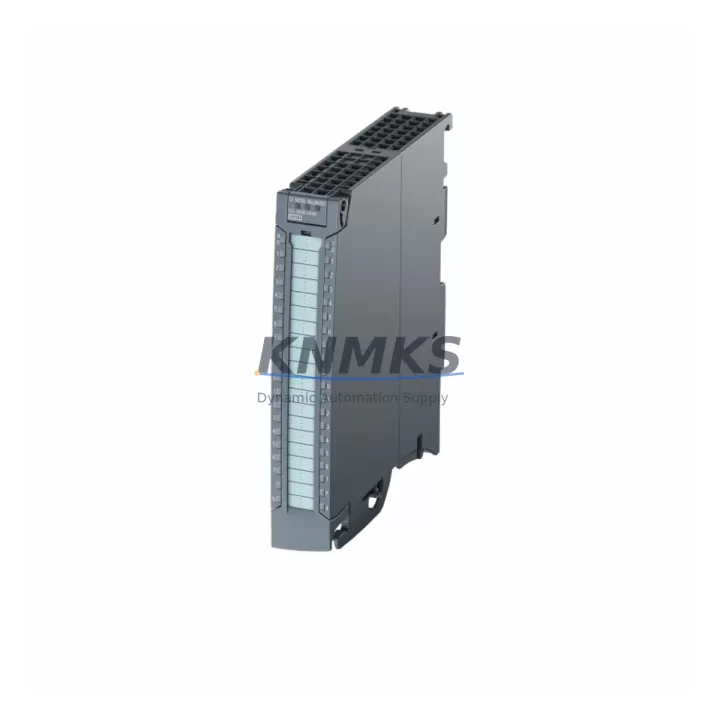
Overview
Siemens 6ES7523-1BL00-0AA0 Spare Part for Factory Uptime
The Siemens 6ES7523-1BL00-0AA0 is the SM 523 digital combination module for the SIMATIC S7-1500 controller series, integrating 16 digital inputs (24 VDC) and 16 digital outputs (24 VDC / 0.5 A) in a single compact housing. As a maintenance-proven spare part, it is a critical component for sustaining continuous production in discrete manufacturing, process automation, and machine control environments. Holding a verified replacement unit in your spare parts inventory eliminates the risk of extended downtime caused by OEM lead times, which for S7-1500 I/O modules can range from several weeks to months during supply disruptions.
Maintenance engineers and procurement teams managing SIMATIC S7-1500 control cabinets rely on the 6ES7523-1BL00-0AA0 to maintain I/O channel density without requiring additional backplane slots. Its integrated diagnostic functions — including channel-level fault detection and wire-break monitoring — allow rapid fault isolation during scheduled inspections or emergency callouts. Every unit dispatched from our warehouse undergoes pre-shipment functional testing to confirm input response times, output switching integrity, and backplane communication before it reaches your site.
Spare Maintenance Table
| SKU / Part Number | 6ES7523-1BL00-0AA0 |
| Brand | Siemens |
| Series | SIMATIC S7-1500 |
| Module Type | SM 523 Digital Combination Module (DI/DQ) |
| Digital Inputs | 16 × 24 VDC (IEC Type 1 / Type 3) |
| Digital Outputs | 16 × 24 VDC, 0.5 A per channel |
| Input Voltage Range | 20.4 – 28.8 VDC |
| Output Current (per channel) | 0.5 A |
| Backplane Interface | S7-1500 U-connector (direct rack mount) |
| Dimensions (W × H × D) | 35 mm × 147 mm × 129 mm |
| Weight | approx. 360 g |
| Operating Temperature | 0 °C to +60 °C (horizontal), 0 °C to +40 °C (vertical) |
| Storage Temperature | −40 °C to +70 °C |
| Protection Class | IP20 |
| Certifications | CE, UL, cULus, ATEX (Zone 2) |
| Country of Origin | Germany |
| Compatibility | SIMATIC S7-1500 (all CPU variants), ET 200MP distributed I/O |
| Firmware Requirement | TIA Portal V13 SP1 or later |
| Diagnostic Functions | Channel-level fault, wire-break, short-circuit detection |
| Support terms | 12 Months from shipment date |
| Pre-Shipment Test | Functional I/O verification, backplane communication check |
| Typical Application | Discrete manufacturing, process control, machine automation |
Maintenance Planning for Continuous Operation
When replacing the 6ES7523-1BL00-0AA0 during a planned or emergency maintenance event, a thorough inspection of the surrounding control cabinet components is essential to prevent repeat failures and ensure system stability. Begin by verifying the 24 VDC supply rail feeding the module’s load group — a degraded or undersized power supply module such as the Siemens 6EP1333-4BA00 SITOP PSU100S can cause intermittent output faults that are misdiagnosed as module failure. Check supply voltage under load and confirm ripple is within specification.
Inspect the S7-1500 backplane bus connector and the U-connector interface for oxidation, mechanical damage, or contamination. A faulty backplane segment can cause the replacement module to report communication errors immediately after installation. If the cabinet includes an ET 200MP IM 155-5 PN interface module for distributed I/O expansion, verify its firmware version is compatible with the replacement SM 523 to avoid configuration mismatches in TIA Portal.
Review the field wiring terminations on the 40-pin front connector. Loose or corroded terminals on high-cycle digital input circuits — particularly those connected to proximity sensors, limit switches, or solenoid valve feedback — are a common source of nuisance faults. While the module is removed, test each field circuit for continuity and insulation resistance. Also inspect any signal isolators or relay output modules in the same I/O loop; a failed relay coil or a degraded optocoupler in an interposing relay can mask the true fault source.
For cabinets with mixed I/O architectures, cross-check the Siemens 6ES7521-1BH00-0AA0 SM 521 digital input module and 6ES7522-1BH00-0AA0 SM 522 digital output module installed in adjacent slots — these modules share the same backplane power budget and a fault in one can affect neighboring modules. Additionally, confirm that any 24 VDC fuse protection (typically 2 A fast-blow per output group) is intact and correctly rated for the connected load. Replacing a blown fuse without identifying the root cause will result in repeat failure of the new module’s output transistors.
For facilities operating legacy S7-300 or S7-400 systems alongside S7-1500 infrastructure, maintaining a parallel spare inventory that includes the Siemens 6ES7323-1BL00-0AA0 SM 323 (the S7-300 equivalent combination module) ensures cross-generation maintenance coverage and reduces the number of emergency procurement events per year.
Site Replacement Workflow
Step 1 — Safety Isolation: De-energize the load group supply for the affected module slot. Do not power down the entire CPU rack unless required by site safety procedures — the S7-1500 supports hot-swap of I/O modules when configured in TIA Portal with the “Module replacement without PG” option enabled.
Step 2 — Configuration Backup: Before removal, export the current hardware configuration from TIA Portal and save the project to a versioned backup location. Confirm the module’s slot address and I/O mapping in the device configuration view.
Step 3 — Physical Replacement: Disconnect the 40-pin front connector, release the module locking mechanism, and slide the 6ES7523-1BL00-0AA0 out of the backplane slot. Insert the replacement unit, reconnect the front connector, and restore load group power.
Step 4 — Firmware and Configuration Validation: In TIA Portal, perform a “Download to device” to push the hardware configuration to the CPU. Verify that the replacement module is recognized without hardware faults in the diagnostics buffer. Confirm all 16 input channels and 16 output channels respond correctly using the “Monitor/Modify” function before returning the system to production.
Step 5 — Documentation: Record the replacement date, module serial number, and test results in the site maintenance log. Update the spare parts inventory to trigger a replenishment order, maintaining a minimum buffer of one unit per control cabinet for this module type.
Spare Parts Support FAQ
Q1: Is the 6ES7523-1BL00-0AA0 compatible with all S7-1500 CPU variants?
Yes. The SM 523 is compatible with all standard S7-1500 CPUs (CPU 1511 through CPU 1518) and with the ET 200MP distributed I/O system when used with an IM 155-5 interface module. TIA Portal V13 SP1 or later is required for configuration. Confirm your TIA Portal version before installation to avoid firmware conflicts.
Q2: What does the support terms confirmed by quotation cover?
The support terms confirmed by quotation cover manufacturing defects, functional failures under normal operating conditions, and DOA (dead-on-arrival) units. It does not cover damage caused by incorrect installation, overvoltage, reverse polarity, or environmental conditions outside the specified operating range. Support requests are processed from the shipment date confirmed on the dispatch documentation.
Q3: How is each unit tested before shipment?
Every 6ES7523-1BL00-0AA0 unit undergoes a pre-shipment functional test that includes: (a) verification of all 16 digital input channels for correct signal response at 24 VDC, (b) switching test of all 16 digital output channels under resistive load, and (c) backplane communication integrity check. Test records are retained and available upon request for quality audit purposes.
Q4: Can you support long-term supply agreements for this module?
Yes. For facilities with multiple S7-1500 control cabinets or high-cycle production environments, we offer long-term supply agreements with reserved stock allocation, priority dispatch, and fixed pricing for 12-month contract periods. Contact our sales team to discuss volume requirements and lead-time guarantees tailored to your annual maintenance schedule.
© 2026 KNMKS. All rights reserved.
Original Source: https://knmks.com
Contact: admin@knmks.com | +86 18359268345
Product Identification
- Brand / Ecosystem
-
Siemens
Siemens - Model / Series
-
6ES7523-1BL00-0AA0
SIMATIC Series - Product Family
- PLCs & Controllers
- Availability Status
- Available on request after model and quantity confirmation
- Inquiry Type
- B2B RFQ, replacement inquiry and project spare-part request
- Pre-Quote Check
- Exact SKU, brand, series, quantity, nameplate photos and destination country are checked before quotation
System Path
Where this product fits in the KNMKS automation structure.
Specification & Inquiry Focus
- Control platform
- PLC, PAC and modular controllers
- Common needs
- CPU, rack, power and I/O expansion
- Project support
- Replacement, cabinet build and maintenance
Buyer Confirmation
Information KNMKS checks before replying.
- Exact model
- 6ES7523-1BL00-0AA0
- Brand / ecosystem
- Siemens
- Product family
- PLCs & Controllers
- Application note
- Replacement, maintenance, project build or spare-part list
- Useful photos
- Nameplate, installed unit, cabinet layout or connector side
- Delivery details
- Quantity, destination country and target schedule
Document Support
Files and notes can be confirmed during quotation.
- Product photos or nameplate confirmation when available
- Packing and delivery notes before quotation confirmation
- Support scope and delivery terms confirmed per inquiry
- Export document coordination for qualified B2B requests
Inquiry Support
- Model cross-checking before quotation
- CPU, power, rack and expansion module matching
- Support for replacement and project inquiry
What to Send Us
- Brand and exact model number: Siemens 6ES7523-1BL00-0AA0
- Quantity and required delivery time
- Application, replacement requirement or nameplate photo
- Destination country and shipping preference
RFQ Preparation
This is a product inquiry page built for RFQ communication.
Fast Model Check
Send this model to KNMKS for confirmation.
Include quantity, destination country and photos if this is a maintenance replacement. The inquiry will be saved with a reference number after submission.
Brand & Compatibility Note
KNMKS displays automation product information for well-known industrial brand ecosystems and compatible replacement references. Brand names are used for product identification and compatibility reference only; final availability and commercial terms are confirmed per quotation.
 Manufacturing
 Machine Tools
 Packaging
 Energy & Power



 HMI & Displays
 Servo Systems
 Variable Frequency Drives
 Sensors