
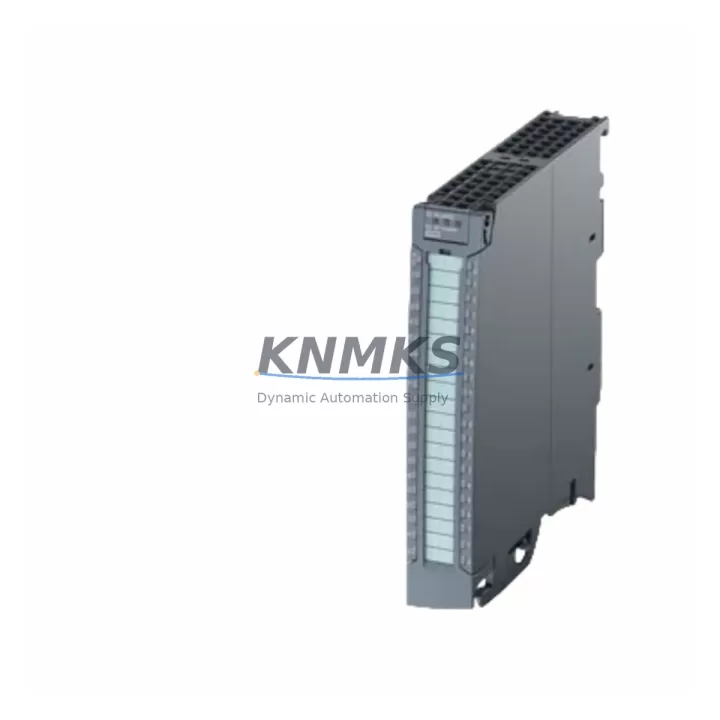
Overview
Siemens 6ES7522-1BL01-0AB0 Maintenance-Proven Spare Part for Factory Uptime
The Siemens 6ES7522-1BL01-0AB0 is a 32-channel digital output module designed for the SIMATIC S7-1500 PLC platform, delivering 24VDC/0.5A per channel output with integrated diagnostics and high-density I/O capability. As a maintenance-proven spare part, this module is essential for production lines, process automation cells, and control cabinet installations where continuous uptime and rapid fault recovery are non-negotiable. Whether you are managing a scheduled annual overhaul, responding to an unplanned output channel failure, or building a strategic spare parts inventory for your S7-1500 system, the 6ES7522-1BL01-0AB0 is a direct, original-specification replacement that eliminates compatibility risk and minimizes mean time to repair.
Industrial maintenance engineers and procurement teams operating SIMATIC S7-1500 installations recognize that digital output modules are among the highest-wear components in any control cabinet. Repeated switching cycles, inductive load transients, and thermal stress accumulate over time, making proactive spare holding a standard practice in ISO 55000-aligned maintenance programs. Stocking the 6ES7522-1BL01-0AB0 as an on-shelf spare ensures that when a channel fault or module failure is detected during routine point inspection or predictive diagnostics, the replacement workflow can be completed within a single maintenance window — without waiting on lead times that can stretch from weeks to months for legacy or high-demand modules.
Every unit is dispatched after pre-shipment functional testing, verifying output channel integrity, backplane communication, and diagnostic response. A support terms confirmed by quotation is included as standard, covering manufacturing defects and providing procurement teams with the documentation required for asset management and audit compliance. Global dispatch capability supports emergency replacement scenarios across Asia-Pacific, Europe, and the Americas, with multi-region stock availability reducing exposure to single-source supply risk.
Spare Maintenance Table
| SKU / Part Number | 6ES7522-1BL01-0AB0 |
| Brand | Siemens |
| Series | SIMATIC S7-1500 |
| Module Type | Digital Output Module (DQ 32×24VDC/0.5A) |
| Output Channels | 32 channels |
| Output Voltage | 24VDC |
| Output Current per Channel | 0.5A |
| Total Current per Module | Up to 4A (group load) |
| Backplane Interface | S7-1500 U-connector / backplane bus |
| Diagnostics | Channel-level diagnostics, short-circuit and overload detection |
| Protection Class | IP20 |
| Operating Temperature | 0°C to +60°C |
| Mounting | DIN rail via S7-1500 mounting rail |
| Origin | Germany |
| Compatibility | SIMATIC S7-1500 standard and F-series CPUs; ET 200MP distributed I/O |
| Replacement For | 6ES7522-1BL00-0AB0 (predecessor revision) |
| Pre-Shipment Testing | Yes — functional output channel and bus communication verification |
| Support terms | 12 Months |
| Dispatch | Global, multi-region stock |
Maintenance Planning for Continuous Operation
Effective maintenance planning for an S7-1500 installation extends well beyond the digital output module itself. When the 6ES7522-1BL01-0AB0 is flagged for replacement — whether through TIA Portal diagnostic alarms, channel-level fault codes, or physical inspection during a control cabinet walkdown — maintenance engineers should treat the event as a trigger for a broader system health check across the associated electrical circuit.
Begin by verifying the 24VDC load power supply feeding the output module’s load group terminals. A degraded or undersized power supply unit, such as the Siemens SITOP PSU8200 series or equivalent 24VDC industrial rail supply, can cause intermittent output faults that mimic module failure. Inspect the supply voltage under load and confirm ripple is within specification before condemning the module.
Next, review the front connector wiring and terminal block integrity. The 40-pin front connector used with the 6ES7522-1BL01-0AB0 should be inspected for oxidation, loose crimps, and correct torque on screw terminals. If the installation has been in service for more than five years, consider replacing the front connector assembly as a preventive measure alongside the module swap.
For installations using the S7-1500 with distributed I/O via PROFINET, also inspect the CP 1543-1 or CM 1542-5 communication modules for firmware currency and port integrity. A communication module fault can mask or amplify output module diagnostics, leading to misdiagnosis. Similarly, if the control cabinet includes signal isolators between the PLC output channels and field devices — particularly for long cable runs or mixed-voltage environments — verify isolator output integrity using a calibrated loop tester.
Relay output modules such as the 6ES7522-5FF00-0AB0 (DQ 8×Relay) are often installed in the same cabinet for high-current or AC switching duties. These should be inspected for contact wear during the same maintenance window, as relay modules in adjacent slots share the same backplane and power distribution. Fuse protection on output load circuits — typically 0.5A to 2A fast-blow fuses per output group — should be checked and replaced on a scheduled basis regardless of apparent fault status.
Finally, if the S7-1500 system includes an HMI panel such as the SIMATIC TP700 Comfort or KTP900 Basic, confirm that the HMI project reflects current I/O tag assignments after the module replacement. Mismatched tag addresses following a module swap are a common source of post-maintenance production delays that are entirely avoidable with a pre-return-to-service checklist.
Site Replacement Workflow
Replacing the 6ES7522-1BL01-0AB0 on-site is a structured process that, when executed correctly, can be completed within a single shift without requiring a full system restart or CPU stop in most S7-1500 configurations that support hot-swapping of standard I/O modules.
Step 1 — Fault Isolation: Confirm the fault is isolated to the 6ES7522-1BL01-0AB0 using TIA Portal online diagnostics. Check the module status LED (red DIAG indicator) and review the diagnostic buffer for channel-specific fault codes. Document the fault code and affected channel numbers before proceeding.
Step 2 — Safe De-energization: De-energize the load power supply for the affected output group. Do not de-energize the backplane supply unless the module does not support hot-swap in your specific rack configuration. Verify zero voltage on load terminals using a calibrated multimeter before touching wiring.
Step 3 — Front Connector Removal: Unlock and remove the 40-pin front connector. The connector retains wiring, so no re-termination is required if the connector is in good condition. If the connector shows signs of damage or oxidation, replace it with a new 6ES7592-1BM00-0XA0 front connector.
Step 4 — Module Extraction and Insertion: Release the module locking mechanism and slide the 6ES7522-1BL01-0AB0 out of the mounting rail slot. Insert the replacement module, ensuring the U-connector engages fully with the backplane bus. Secure the locking mechanism.
Step 5 — Re-energization and Verification: Re-attach the front connector and restore load power. The S7-1500 CPU will automatically detect the new module and load the stored configuration. Verify all 32 output channels are operational via TIA Portal online monitoring or the HMI system overview screen. Confirm no residual fault codes remain in the diagnostic buffer.
Step 6 — Documentation: Record the replacement in the maintenance log, including the date, fault code, replaced module serial number, and technician ID. Update the spare parts inventory to trigger reorder of a replacement stock unit.
Spare Parts Support FAQ
Q1: Is the 6ES7522-1BL01-0AB0 a direct replacement for the 6ES7522-1BL00-0AB0?
Yes. The -1BL01- revision supersedes the -1BL00- revision and is fully backward compatible within the S7-1500 platform. No hardware or software reconfiguration is required when substituting the newer revision. TIA Portal will recognize the module automatically using the existing hardware configuration.
Q2: What pre-shipment testing is performed before dispatch?
Each unit undergoes functional output channel verification, backplane bus communication testing, and diagnostic response confirmation prior to shipment. Test records are available upon request for quality assurance and incoming inspection purposes. All units are dispatched with a support terms confirmed by quotation covering manufacturing defects.
Q3: How should I manage long-term spare parts inventory for S7-1500 digital output modules?
For production-critical S7-1500 installations, industry best practice recommends holding a minimum of one spare DQ module per four installed units, with a reorder trigger set at the point of consumption. Given that the S7-1500 platform has an extended product lifecycle commitment from Siemens, multi-year supply continuity is supported. However, procurement teams should review spare holding levels annually against production criticality and lead time exposure, particularly for high-channel-count modules like the 6ES7522-1BL01-0AB0.
Q4: Can this module be used in ET 200MP distributed I/O configurations?
Yes. The 6ES7522-1BL01-0AB0 is compatible with the ET 200MP distributed I/O system, which uses the same S7-1500 module form factor and backplane interface. This makes it a dual-purpose spare that can serve both centralized S7-1500 racks and remote ET 200MP stations, reducing the number of unique spare part numbers required in your inventory and simplifying procurement.
© 2026 KNMKS. All rights reserved.
Original Source: https://knmks.com
Contact: admin@knmks.com | +86 18359268345
Product Identification
- Brand / Ecosystem
-
Siemens
Siemens - Model / Series
-
6ES7522-1BL01-0AB0
SIMATIC Series - Product Family
- PLCs & Controllers
- Availability Status
- Available on request after model and quantity confirmation
- Inquiry Type
- B2B RFQ, replacement inquiry and project spare-part request
- Pre-Quote Check
- Exact SKU, brand, series, quantity, nameplate photos and destination country are checked before quotation
System Path
Where this product fits in the KNMKS automation structure.
Specification & Inquiry Focus
- Control platform
- PLC, PAC and modular controllers
- Common needs
- CPU, rack, power and I/O expansion
- Project support
- Replacement, cabinet build and maintenance
Buyer Confirmation
Information KNMKS checks before replying.
- Exact model
- 6ES7522-1BL01-0AB0
- Brand / ecosystem
- Siemens
- Product family
- PLCs & Controllers
- Application note
- Replacement, maintenance, project build or spare-part list
- Useful photos
- Nameplate, installed unit, cabinet layout or connector side
- Delivery details
- Quantity, destination country and target schedule
Document Support
Files and notes can be confirmed during quotation.
- Product photos or nameplate confirmation when available
- Packing and delivery notes before quotation confirmation
- Support scope and delivery terms confirmed per inquiry
- Export document coordination for qualified B2B requests
Inquiry Support
- Model cross-checking before quotation
- CPU, power, rack and expansion module matching
- Support for replacement and project inquiry
What to Send Us
- Brand and exact model number: Siemens 6ES7522-1BL01-0AB0
- Quantity and required delivery time
- Application, replacement requirement or nameplate photo
- Destination country and shipping preference
RFQ Preparation
This is a product inquiry page built for RFQ communication.
Fast Model Check
Send this model to KNMKS for confirmation.
Include quantity, destination country and photos if this is a maintenance replacement. The inquiry will be saved with a reference number after submission.
Brand & Compatibility Note
KNMKS displays automation product information for well-known industrial brand ecosystems and compatible replacement references. Brand names are used for product identification and compatibility reference only; final availability and commercial terms are confirmed per quotation.
 Manufacturing
 Machine Tools
 Packaging
 Energy & Power



 HMI & Displays
 Servo Systems
 Variable Frequency Drives
 Sensors