
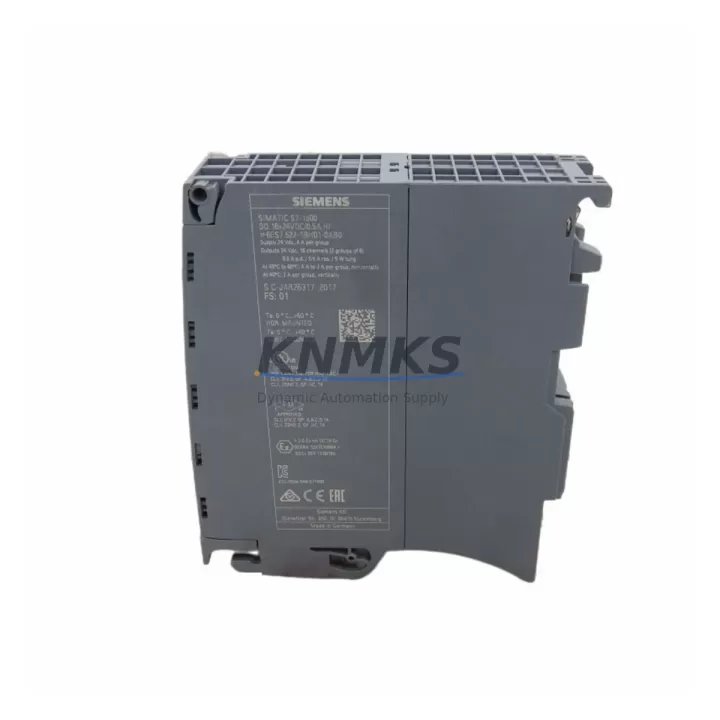
Overview
Siemens 6ES7522-1BH01-0AB0 Maintenance-Proven Spare for Factory Uptime
The Siemens 6ES7522-1BH01-0AB0 is a high-feature (HF) digital output module for the SIMATIC S7-1500 series, rated at 16 channels × 24 VDC / 0.5 A per channel. As a factory-stocked original spare, it is engineered to restore control cabinet output capacity with zero configuration drift, making it the preferred choice for maintenance engineers managing continuous production lines, automated assembly cells, and process control systems where unplanned downtime carries significant operational cost.
Sourced directly from authorized supply chains and shipped after full functional verification, this module supports rapid slot-for-slot replacement in any S7-1500 rack without firmware re-flashing or hardware reconfiguration. Every unit is dispatched with a support terms confirmed by quotation and full pre-shipment testing documentation, giving procurement engineers the confidence to hold it as a critical-path spare in their MRO inventory.
Spare Maintenance Table
| Parameter | Specification |
|---|---|
| Part Number | 6ES7522-1BH01-0AB0 |
| Series | SIMATIC S7-1500 |
| Module Type | Digital Output (DQ), High Feature (HF) |
| Output Channels | 16 × 24 VDC / 0.5 A |
| Output Voltage Range | 20.4 – 28.8 VDC |
| Short-Circuit Protection | Electronic, per channel |
| Diagnostics | Wire-break, short-circuit, overtemperature per channel |
| Backplane Bus | S7-1500 U-connector (direct plug-in) |
| Mounting | DIN rail via S7-1500 mounting rail |
| Dimensions (W×H×D) | 35 × 147 × 129 mm |
| Weight | Approx. 300 g |
| Operating Temperature | 0 °C to +60 °C |
| Protection Class | IP20 |
| Country of Origin | Germany |
| Compatibility | All S7-1500 CPUs (CPU 1511 to CPU 1518 series) |
| Replaces | 6ES7522-1BH00-0AB0 (predecessor revision) |
| Support terms | 12 Months from shipment date |
| Pre-Shipment Test | Full functional verification, channel-by-channel output check |
Maintenance Planning for Continuous Operation
When a 6ES7522-1BH01-0AB0 digital output module is flagged during a control cabinet inspection or triggers a diagnostic alarm on the S7-1500 CPU, the fault rarely exists in isolation. Experienced maintenance engineers treat the DQ module replacement as the starting point of a broader cabinet health review, not the end point.
Begin by verifying the 24 VDC load power supply feeding the output channels — a degraded Siemens SITOP PSU8200 or equivalent 24 VDC regulated supply can cause intermittent channel faults that mimic module failure. Check output voltage under full load and confirm ripple is within specification before installing the replacement module.
Inspect the S7-1500 backplane rail and U-connector bus for oxidation or mechanical damage. A compromised bus connector will cause the new module to report the same diagnostic errors as the failed unit. If the rack has been in service for more than five years, consider scheduling a full rack inspection alongside the module swap.
Review the front connector wiring (40-pin push-in terminal block, 6ES7592-1BM00-0XA0 or equivalent) for loose terminations, insulation degradation, or conductor cross-section mismatches. Output channel wiring that has been subject to vibration or thermal cycling is a common secondary failure point. Re-torque all terminals and verify continuity to field devices — actuators, solenoid valves, motor contactors, and indicator lamps — before powering up.
For systems with mixed I/O, cross-check adjacent digital input modules (e.g., 6ES7521-1BH00-0AB0 DI 16×24VDC HF) and analog output modules (e.g., 6ES7532-5HD00-0AB0 AQ 4×U/I ST) for shared ground faults or common-mode noise that may have contributed to the output module failure. Signal isolation barriers or Phoenix Contact MACX MCR signal conditioners should be inspected if the cabinet serves mixed-voltage field devices.
Check output-side protection fuses and miniature circuit breakers on the load distribution board. A blown fuse on a high-current actuator circuit can back-feed voltage transients into the DQ module output stage. Replace any fuse that shows signs of thermal stress and verify that fuse ratings match the connected load profiles documented in the electrical schematic.
If the S7-1500 system includes a CM 1542-1 or CP 1543-1 communications module for PROFINET or Industrial Ethernet connectivity, confirm that the module’s diagnostic buffer does not contain unacknowledged hardware faults that could mask the root cause of the output failure. A clean diagnostic buffer after module replacement confirms successful restoration.
For facilities running annual shutdown maintenance, the 6ES7522-1BH01-0AB0 should be included in the critical-path spare parts list alongside the CPU battery (6ES7971-0BA00), the memory card (6ES7954-8LF03-0AA0), and at least one digital input module of the same series. Holding two units of the DQ HF module in bonded MRO stock eliminates the risk of extended lead times during peak demand periods.
Site Replacement Workflow
Step 1 — Isolate and document. Place the S7-1500 CPU in STOP mode via the TIA Portal online connection or the physical mode selector. Export the current hardware configuration and save the project backup before touching any hardware. Record the slot position, firmware version, and I/O address assignment of the module to be replaced.
Step 2 — De-energize safely. Switch off the 24 VDC load power supply for the output channels. Verify absence of voltage on the front connector terminals using a calibrated multimeter. Do not rely solely on the CPU STOP state — field devices may retain stored energy.
Step 3 — Remove the front connector. Unlock and remove the 40-pin front connector, keeping the wiring harness intact. Label the connector with the slot number before removal to prevent cross-installation errors in multi-rack cabinets.
Step 4 — Extract the module. Release the module locking mechanism and slide the 6ES7522-1BH01-0AB0 out of the mounting rail slot. Inspect the U-connector bus contacts on both the module and the rail for damage.
Step 5 — Install the replacement. Slide the new 6ES7522-1BH01-0AB0 into the same slot until the locking mechanism engages. Re-attach the front connector. The HF module supports hot-swap in systems configured for it, but cold replacement is recommended for first-time installers.
Step 6 — Restore and verify. Re-energize the load power supply. Switch the CPU to RUN mode. Confirm that all 16 output channels report no diagnostic faults in TIA Portal. Perform a functional test of connected field devices before releasing the line to production.
This workflow replaces the predecessor revision 6ES7522-1BH00-0AB0 without any hardware configuration change in TIA Portal, as both revisions share the same GSD/GSDML device profile. Downtime from fault detection to production restoration is typically under 30 minutes for a prepared maintenance team with the spare on hand.
Spare Parts Support FAQ
Q1: Is the 6ES7522-1BH01-0AB0 a direct replacement for the -1BH00- revision?
Yes. The -0AB0 hardware revision suffix indicates a product improvement update. Both revisions use the same TIA Portal hardware catalog entry and the same 40-pin front connector. No software or configuration changes are required when substituting one revision for the other in an existing S7-1500 rack.
Q2: What pre-shipment testing is performed before dispatch?
Every unit undergoes a channel-by-channel functional output test, backplane bus communication verification, and visual inspection for physical damage. A test report is available upon request. Units that do not pass all checks are not dispatched.
Q3: How should this module be stored as a long-term MRO spare?
Store in the original anti-static packaging in a dry environment at 0 °C to +40 °C with relative humidity below 75% non-condensing. Avoid proximity to strong magnetic fields or high-vibration equipment. Inspect the module annually and confirm firmware compatibility with your current TIA Portal project version before committing it to a live replacement.
Q4: What is the support terms coverage and what does it include?
All units carry a support terms confirmed by quotation from the shipment date. The support terms covers manufacturing defects and functional failures under normal operating conditions. It does not cover damage caused by incorrect installation, overvoltage events, or operation outside the specified environmental range. Support requests are processed via admin@knmks.com with the original order reference and a fault description.
© 2026 KNMKS. All rights reserved.
Original Source: https://knmks.com
Contact: admin@knmks.com | +86 18359268345
Product Identification
- Brand / Ecosystem
-
Siemens
Siemens - Model / Series
-
6ES7522-1BH01-0AB0
SIMATIC Series - Product Family
- PLCs & Controllers
- Availability Status
- Available on request after model and quantity confirmation
- Inquiry Type
- B2B RFQ, replacement inquiry and project spare-part request
- Pre-Quote Check
- Exact SKU, brand, series, quantity, nameplate photos and destination country are checked before quotation
System Path
Where this product fits in the KNMKS automation structure.
Specification & Inquiry Focus
- Control platform
- PLC, PAC and modular controllers
- Common needs
- CPU, rack, power and I/O expansion
- Project support
- Replacement, cabinet build and maintenance
Buyer Confirmation
Information KNMKS checks before replying.
- Exact model
- 6ES7522-1BH01-0AB0
- Brand / ecosystem
- Siemens
- Product family
- PLCs & Controllers
- Application note
- Replacement, maintenance, project build or spare-part list
- Useful photos
- Nameplate, installed unit, cabinet layout or connector side
- Delivery details
- Quantity, destination country and target schedule
Document Support
Files and notes can be confirmed during quotation.
- Product photos or nameplate confirmation when available
- Packing and delivery notes before quotation confirmation
- Support scope and delivery terms confirmed per inquiry
- Export document coordination for qualified B2B requests
Inquiry Support
- Model cross-checking before quotation
- CPU, power, rack and expansion module matching
- Support for replacement and project inquiry
What to Send Us
- Brand and exact model number: Siemens 6ES7522-1BH01-0AB0
- Quantity and required delivery time
- Application, replacement requirement or nameplate photo
- Destination country and shipping preference
RFQ Preparation
This is a product inquiry page built for RFQ communication.
Fast Model Check
Send this model to KNMKS for confirmation.
Include quantity, destination country and photos if this is a maintenance replacement. The inquiry will be saved with a reference number after submission.
Brand & Compatibility Note
KNMKS displays automation product information for well-known industrial brand ecosystems and compatible replacement references. Brand names are used for product identification and compatibility reference only; final availability and commercial terms are confirmed per quotation.
 Manufacturing
 Machine Tools
 Packaging
 Energy & Power



 HMI & Displays
 Servo Systems
 Variable Frequency Drives
 Sensors