
Overview
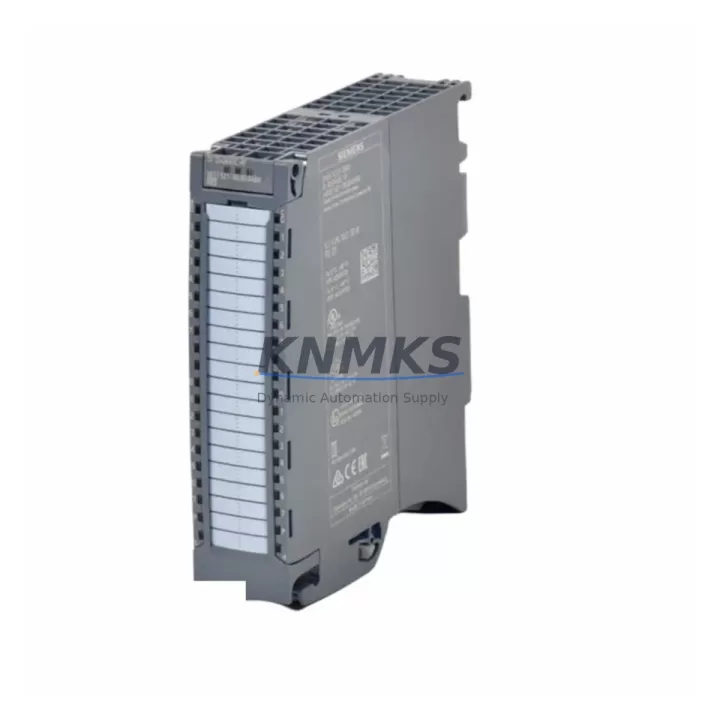
Siemens 6ES7521-1BL00-0AB0 Maintenance-Proven Spare Part for Factory Uptime
The Siemens 6ES7521-1BL00-0AB0 is the SM 521 DI 32×24VDC HF digital input module engineered for the SIMATIC S7-1500 controller platform. In high-availability production environments — automotive assembly, chemical processing, food and beverage lines, and discrete manufacturing — this module serves as the primary interface between field-level sensors, proximity switches, and pushbuttons and the S7-1500 CPU. When a single channel fails or the module reaches end-of-service life, the entire I/O rack segment can go dark, halting production. Holding a verified, pre-tested 6ES7521-1BL00-0AB0 in your maintenance stockroom is the single most effective measure to contain unplanned downtime to under 30 minutes.
This listing supplies an original Siemens 6ES7521-1BL00-0AB0 sourced through authorized industrial channels, individually inspected, function-tested under 24 VDC load conditions, and dispatched with a support terms confirmed by quotation covering manufacturing defects and operational failure. Every unit ships with full documentation support and is traceable to its production batch.
Spare Maintenance Table
| SKU / Part Number | 6ES7521-1BL00-0AB0 |
| Product Series | SIMATIC S7-1500 SM 521 |
| Module Type | Digital Input (DI), High Feature (HF) |
| Number of Channels | 32 × DI, 24 VDC |
| Input Voltage | 24 VDC (NAMUR compatible) |
| Input Current per Channel | Typ. 7.5 mA at 24 VDC |
| Isolation | Galvanic isolation, channel groups of 16 |
| Diagnostics | Wire-break, short-circuit, overflow detection per channel |
| Backplane Interface | S7-1500 U-connector (direct rack mount) |
| Compatible CPUs | S7-1500 CPU 1511, 1513, 1515, 1516, 1517, 1518 series |
| Compatible Racks | S7-1500 mounting rail (standard and active) |
| Operating Temperature | 0 °C to +60 °C (horizontal), 0 °C to +40 °C (vertical) |
| Storage Temperature | −40 °C to +70 °C |
| Degree of Protection | IP20 |
| Dimensions (W×H×D) | 35 mm × 147 mm × 129 mm |
| Weight | Approx. 800 g (with front connector) |
| Origin | Germany |
| Firmware | Updateable via TIA Portal V13 SP1 and above |
| Certifications | CE, UL, cULus, ATEX Zone 2 (with barrier) |
| Support terms | 12 Months — covers manufacturing defects and operational failure from date of shipment |
| Pre-Shipment Test | Function-tested under 24 VDC load; all 32 channels verified |
| Dispatch | availability confirmed by RFQ — typically ships within 1–3 business days |
Maintenance Planning for Continuous Operation
Replacing the 6ES7521-1BL00-0AB0 in the field is rarely an isolated task. Maintenance engineers and procurement teams working on S7-1500 control cabinets should treat this module replacement as a trigger for a broader inspection of the surrounding electrical circuit. Before powering down the rack, verify that the 24 VDC supply rail feeding the I/O tier — typically sourced from a SITOP PSU8600 or equivalent 24 VDC power supply module — is within tolerance. A degraded power supply is a common root cause of intermittent DI faults that are misdiagnosed as module failure.
Once the module is removed, inspect the 40-pin front connector (6ES7592-1AM00-0XB0 or equivalent) for oxidation, bent pins, or heat discoloration. Front connectors are consumable items and should be replaced as a matter of course during any module swap. Check the associated terminal block wiring for correct torque — loose field wiring at the 0.5 Nm specification is a leading cause of sporadic input faults on high-density DI modules.
At the rack level, confirm that the S7-1500 backplane bus connector between adjacent modules is fully seated. A partially engaged U-connector can cause the CPU to report the new module as faulted immediately after insertion. If the cabinet includes a CP 1543-1 or CM 1542-5 communications module on the same rack, verify that the PROFINET or PROFIBUS configuration in TIA Portal still matches the physical slot assignment after the module swap — slot renumbering is a common commissioning error following emergency replacements.
For cabinets with mixed I/O, also inspect the SM 522 DO 32×24VDC/0.5A HF output module (6ES7522-1BL01-0AB0) installed in adjacent slots. Output modules in the same circuit often share the same 24 VDC load group and are subject to the same thermal and electrical stress as the input module. Similarly, if the system uses analog signal conditioning, check any SM 531 or SM 534 analog input modules and their associated signal isolators for drift or calibration flags in the CPU diagnostics buffer.
Fuse protection for the 24 VDC field supply should be verified at the terminal strip level. A blown miniature circuit breaker or fuse protecting the sensor supply group will cause all 32 channels to read logic-0 simultaneously — a symptom that is often misread as total module failure. Replacing the 6ES7521-1BL00-0AB0 without checking upstream fuse integrity will result in a repeat fault within minutes of restart.
For sites running SIMATIC HMI panels (TP700, TP1200, or KTP900 series) connected to the same S7-1500 CPU, confirm that the HMI project is not in alarm state due to the I/O fault before clearing the CPU diagnostic buffer. Unacknowledged HMI alarms tied to the replaced module’s tag addresses can mask new faults after the repair is complete.
Site Replacement Workflow
Step 1 — Identify and isolate. In TIA Portal online mode, navigate to the device diagnostics view and confirm the faulted slot number. Note the module order number displayed in the hardware catalog to ensure the replacement 6ES7521-1BL00-0AB0 matches exactly — do not substitute with the standard feature (SF) variant 6ES7521-1BL00-0AA0, which lacks the per-channel diagnostics required by most HF-configured programs.
Step 2 — De-energize safely. Switch the 24 VDC field supply for the affected I/O group to OFF at the circuit breaker. Do not rely solely on the CPU STOP mode to de-energize field wiring. Verify zero voltage at the front connector terminals with a calibrated multimeter before proceeding.
Step 3 — Remove and replace. Unlock the front connector, disconnect field wiring (the front connector retains wiring for re-insertion), remove the module by releasing the top and bottom locking clips, and slide in the replacement 6ES7521-1BL00-0AB0. Re-engage the U-connector firmly until the locking tab clicks. Re-attach the front connector with field wiring intact.
Step 4 — Restore and verify. Re-energize the 24 VDC supply. In TIA Portal, perform a hardware detection or confirm the module is recognized in the online device view. Clear the CPU diagnostic buffer. Verify all 32 input channels reflect correct field states in the process image. Run a functional test by actuating each sensor group and confirming corresponding PLC tag transitions.
Step 5 — Document. Record the replacement date, serial number of the removed module, and the new module’s batch code in the cabinet maintenance log. Update the spare parts inventory to trigger reorder of a replacement buffer unit. A minimum of one 6ES7521-1BL00-0AB0 per active S7-1500 rack is the recommended buffer stock level for sites with OEM lead times exceeding 8 weeks.
Spare Parts Support FAQ
Q1: Is this 6ES7521-1BL00-0AB0 compatible with all S7-1500 CPU generations?
Yes. The SM 521 DI 32×24VDC HF module is compatible with all S7-1500 CPUs from the original 1511-1 PN through the current 1518-4 PN/DP/MFP generation, provided the TIA Portal project is at V13 SP1 or higher. No hardware revision changes affect backward compatibility within the S7-1500 platform.
Q2: What does the support terms confirmed by quotation cover, and how is a claim initiated?
The support terms confirmed by quotation cover manufacturing defects and operational failure under normal industrial operating conditions from the date of shipment. It does not cover physical damage from incorrect installation, overvoltage events, or unauthorized modification. To initiate a support terms claim, contact admin@knmks.com with the order reference, module serial number, and a brief fault description. Replacement or repair is processed within 5 business days of claim confirmation.
Q3: How should I verify the module is genuine before installation?
Each unit supplied through KNMKS is sourced from authorized industrial channels and includes the Siemens product label with order number, serial number, and production date code. Cross-reference the serial number format against Siemens’ standard labeling convention (format: S C-XXXXXXXX). If the label is missing, damaged, or inconsistent, do not install the module and contact us immediately for a replacement.
Q4: Can KNMKS support long-term supply agreements for this module?
Yes. For maintenance teams managing multiple S7-1500 installations or planning annual shutdown spares procurement, KNMKS offers forward stock reservation and long-term supply agreements. Contact admin@knmks.com or call +86 18359268345 to discuss volume pricing, buffer stock programs, and scheduled dispatch arrangements aligned to your planned maintenance calendar.
© 2026 KNMKS. All rights reserved.
Original Source: https://knmks.com
Contact: admin@knmks.com | +86 18359268345
Product Identification
- Brand / Ecosystem
-
Siemens
Siemens - Model / Series
-
6ES7521-1BL00-0AB0
SIMATIC Series - Product Family
- PLCs & Controllers
- Availability Status
- Available on request after model and quantity confirmation
- Inquiry Type
- B2B RFQ, replacement inquiry and project spare-part request
- Pre-Quote Check
- Exact SKU, brand, series, quantity, nameplate photos and destination country are checked before quotation
System Path
Where this product fits in the KNMKS automation structure.
Specification & Inquiry Focus
- Control platform
- PLC, PAC and modular controllers
- Common needs
- CPU, rack, power and I/O expansion
- Project support
- Replacement, cabinet build and maintenance
Buyer Confirmation
Information KNMKS checks before replying.
- Exact model
- 6ES7521-1BL00-0AB0
- Brand / ecosystem
- Siemens
- Product family
- PLCs & Controllers
- Application note
- Replacement, maintenance, project build or spare-part list
- Useful photos
- Nameplate, installed unit, cabinet layout or connector side
- Delivery details
- Quantity, destination country and target schedule
Document Support
Files and notes can be confirmed during quotation.
- Product photos or nameplate confirmation when available
- Packing and delivery notes before quotation confirmation
- Support scope and delivery terms confirmed per inquiry
- Export document coordination for qualified B2B requests
Inquiry Support
- Model cross-checking before quotation
- CPU, power, rack and expansion module matching
- Support for replacement and project inquiry
What to Send Us
- Brand and exact model number: Siemens 6ES7521-1BL00-0AB0
- Quantity and required delivery time
- Application, replacement requirement or nameplate photo
- Destination country and shipping preference
RFQ Preparation
This is a product inquiry page built for RFQ communication.
Fast Model Check
Send this model to KNMKS for confirmation.
Include quantity, destination country and photos if this is a maintenance replacement. The inquiry will be saved with a reference number after submission.
Brand & Compatibility Note
KNMKS displays automation product information for well-known industrial brand ecosystems and compatible replacement references. Brand names are used for product identification and compatibility reference only; final availability and commercial terms are confirmed per quotation.
 Manufacturing
 Machine Tools
 Packaging
 Energy & Power



 HMI & Displays
 Servo Systems
 Variable Frequency Drives
 Sensors