
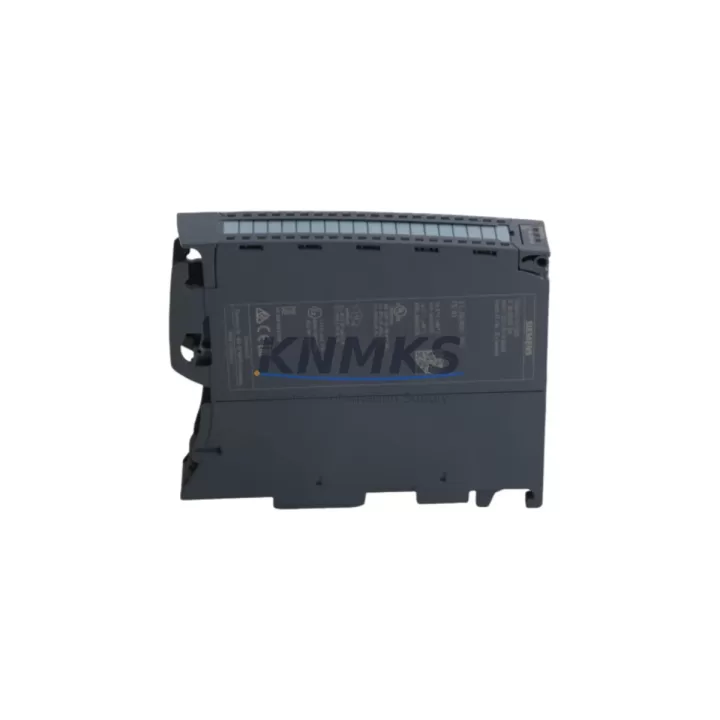
Overview
Siemens 6ES7521-1BH10-0AA0 SM521 DI 16x24VDC HF Module: Migration-Ready Digital Input for Legacy Control Systems
The Siemens 6ES7521-1BH10-0AA0 is a high-feature (HF) 16-channel digital input module from the SIMATIC S7-1500 series, rated for 24 VDC signals. Designed for demanding industrial environments, this SM521 module delivers fast signal acquisition, integrated diagnostics, and hardware interrupt capability — making it the preferred choice for engineers modernizing aging S7-300 or S7-400 control architectures. Whether you are replacing a discontinued ET 200M IM153 sub-rack assembly, upgrading a legacy S7-315 CPU rack, or consolidating I/O into a new S7-1500 backplane, the 6ES7521-1BH10-0AA0 provides a verified migration path with minimal program rework.
KNMKS maintains ready stock of the 6ES7521-1BH10-0AA0 with pre-shipment functional testing, full support terms confirmed by quotation coverage, and documented compatibility records for common S7-300 to S7-1500 migration scenarios. Each unit is inspected against Siemens factory specifications before dispatch to ensure reliable field performance from day one.
Migration Compatibility Table
| Parameter | Legacy Reference (S7-300 / S7-400) | 6ES7521-1BH10-0AA0 (S7-1500) | Migration Note |
|---|---|---|---|
| Input Channels | 16 x 24 VDC (SM321 / 6ES7321-1BH02-0AA0) | 16 x 24 VDC HF | Channel count identical; direct I/O mapping applies |
| Backplane Interface | S7-300 U-connector rail | S7-1500 system bus connector | New backplane required; verify rack slot count |
| Terminal Wiring | 40-pin front connector (screw or spring) | 40-pin front connector (screw or spring) | Existing field wiring can be reused with same connector type |
| Communication Protocol | MPI / PROFIBUS DP | PROFINET IO (via CPU 1511/1513/1515/1517) | Protocol migration required; update HMI communication driver |
| Module Address | Slot-based fixed addressing | Logical address assigned in TIA Portal hardware config | Re-address in TIA Portal; update symbol table and OB references |
| Diagnostics | Basic channel fault (SM321) | Per-channel diagnostics, hardware interrupt, process alarm | Enhanced diagnostics available; configure in TIA Portal module properties |
| Installation Space | S7-300 DIN rail, 40 mm slot width | S7-1500 mounting rail, 35 mm slot width | Confirm cabinet DIN rail space; S7-1500 rail sold separately |
| Firmware Compatibility | STEP 7 Classic V5.x | TIA Portal V15.1 or higher recommended | Program migration via TIA Portal migration tool; test in offline simulation first |
| Replacement Recommendation | SM321 6ES7321-1BH02-0AA0 (discontinued) | SM521 6ES7521-1BH10-0AA0 (current) | Verified drop-in upgrade path for 16-channel 24 VDC DI applications |
| Support terms | — | support terms confirmed by quotation (KNMKS) | Covers manufacturing defects; pre-shipment tested |
Retrofit Planning for Existing Automation Systems
A successful migration from an S7-300 or S7-400 platform to S7-1500 requires careful coordination across multiple hardware layers. The 6ES7521-1BH10-0AA0 is typically installed alongside a new S7-1500 CPU — such as the CPU 1511-1 PN or CPU 1515-2 PN — mounted on a dedicated S7-1500 mounting rail within the existing control cabinet. Before ordering, engineers should confirm available DIN rail space and cabinet depth, as the S7-1500 system bus connectors add lateral clearance requirements compared to the older U-connector rail used by S7-300 racks.
Power supply sizing is a critical pre-migration step. The S7-1500 system requires a dedicated SIMATIC PM or PS power supply module — for example, the PM 190W 120/230VAC (6EP1333-4BA00) — rather than the PS 307 units common in S7-300 cabinets. Verify that the total current draw of all planned S7-1500 modules, including the 6ES7521-1BH10-0AA0 and any analog or communication modules, does not exceed the rated output of the selected power supply.
For systems that previously used PROFIBUS DP for distributed I/O, the migration to PROFINET IO requires updating the communication infrastructure. If the existing HMI — such as a SIMATIC TP700 Comfort or TP1200 Comfort panel — was connected via MPI or PROFIBUS, the HMI project must be updated in TIA Portal to use a PROFINET connection, and the IP address scheme for the new S7-1500 CPU and any ET 200SP or ET 200MP remote I/O stations must be planned in advance.
Signal isolation requirements should also be reviewed during retrofit planning. In mixed-voltage environments or where long cable runs introduce noise, a signal isolator or barrier module may be needed between field devices and the 6ES7521-1BH10-0AA0 input channels. Additionally, if the legacy system used a programming cable such as the PC Adapter USB A2 (6ES7972-0CB20-0XA0) for STEP 7 Classic, note that TIA Portal programming is performed via standard Ethernet — no dedicated programming cable is required for the S7-1500 CPU.
Downtime Control During System Migration
Minimizing production downtime during a control system migration requires a structured cutover plan. The recommended approach for replacing an S7-300 rack with an S7-1500 system incorporating the 6ES7521-1BH10-0AA0 involves three phases: offline preparation, parallel testing, and live cutover.
During offline preparation, the existing STEP 7 Classic program is migrated to TIA Portal using the built-in migration wizard. The hardware configuration is rebuilt to reflect the new S7-1500 CPU and SM521 module layout, with logical addresses reassigned to match the original symbol table wherever possible. All OB, FB, and FC blocks are reviewed for compatibility, and any instructions that are not supported in S7-1500 are replaced with equivalent TIA Portal instructions. This phase should be completed and validated in simulation before any physical work begins on the cabinet.
For parallel testing, the new S7-1500 rack — including the 6ES7521-1BH10-0AA0 and associated power supply — is assembled and powered outside the live cabinet. The migrated program is downloaded and tested against a signal simulator or a temporary I/O test bench to verify that all input channels respond correctly and that diagnostic alarms are configured as expected. HMI screen updates are validated in offline simulation to confirm that all process values display correctly after the communication driver change from PROFIBUS to PROFINET.
Live cutover is performed during a planned maintenance window. Field wiring is transferred from the legacy S7-300 front connectors to the new SM521 front connectors — a process that is simplified by the identical 40-pin connector format. The new S7-1500 CPU is brought online, the program is set to RUN mode, and each input channel is verified against the live process before the legacy rack is powered down. This structured approach consistently achieves cutover windows of four to eight hours for single-rack S7-300 systems, significantly reducing the risk of extended unplanned downtime.
Retrofit Support FAQ
Q1: Is the 6ES7521-1BH10-0AA0 a direct replacement for the SM321 6ES7321-1BH02-0AA0?
The 6ES7521-1BH10-0AA0 is the functional successor for 16-channel 24 VDC digital input applications. The channel count, input voltage, and front connector wiring are compatible, but the backplane interface and communication protocol differ — the SM521 uses the S7-1500 system bus and PROFINET, while the SM321 uses the S7-300 U-connector and MPI/PROFIBUS. A new S7-1500 CPU and mounting rail are required as part of the upgrade.
Q2: What firmware version is required for the 6ES7521-1BH10-0AA0?
The module is supported from TIA Portal V14 onwards, with V15.1 or higher recommended for full diagnostic and hardware interrupt functionality. Firmware updates for the module itself are managed through TIA Portal’s online firmware update function. KNMKS ships units with current factory firmware; confirm the target TIA Portal version before installation.
Q3: Can existing field wiring be reused when migrating from SM321 to SM521?
Yes, in most cases. Both modules use a 40-pin front connector with the same screw-terminal or spring-terminal options. If the existing SM321 front connector is in good condition, the wiring harness can be unplugged from the old module and plugged directly into the new SM521 front connector, provided the terminal assignment matches. Always verify the wiring diagram against the SM521 module manual before reconnecting.
Q4: What does the support terms confirmed by quotation from KNMKS cover?
All units supplied by KNMKS are covered by a support terms confirmed by quotation against manufacturing defects and functional failure under normal operating conditions. Each 6ES7521-1BH10-0AA0 is pre-shipment tested to verify channel functionality, diagnostic response, and system bus communication before dispatch. Support requests are processed directly through KNMKS; contact admin@knmks.com with the order reference and fault description.
© 2026 KNMKS. All rights reserved.
Original Source: https://knmks.com
Contact: admin@knmks.com | +86 18359268345
Product Identification
- Brand / Ecosystem
-
Siemens
Siemens - Model / Series
-
6ES7521-1BH10-0AA0
SIMATIC Series - Product Family
- PLCs & Controllers
- Availability Status
- Available on request after model and quantity confirmation
- Inquiry Type
- B2B RFQ, replacement inquiry and project spare-part request
- Pre-Quote Check
- Exact SKU, brand, series, quantity, nameplate photos and destination country are checked before quotation
System Path
Where this product fits in the KNMKS automation structure.
Specification & Inquiry Focus
- Control platform
- PLC, PAC and modular controllers
- Common needs
- CPU, rack, power and I/O expansion
- Project support
- Replacement, cabinet build and maintenance
Buyer Confirmation
Information KNMKS checks before replying.
- Exact model
- 6ES7521-1BH10-0AA0
- Brand / ecosystem
- Siemens
- Product family
- PLCs & Controllers
- Application note
- Replacement, maintenance, project build or spare-part list
- Useful photos
- Nameplate, installed unit, cabinet layout or connector side
- Delivery details
- Quantity, destination country and target schedule
Document Support
Files and notes can be confirmed during quotation.
- Product photos or nameplate confirmation when available
- Packing and delivery notes before quotation confirmation
- Support scope and delivery terms confirmed per inquiry
- Export document coordination for qualified B2B requests
Inquiry Support
- Model cross-checking before quotation
- CPU, power, rack and expansion module matching
- Support for replacement and project inquiry
What to Send Us
- Brand and exact model number: Siemens 6ES7521-1BH10-0AA0
- Quantity and required delivery time
- Application, replacement requirement or nameplate photo
- Destination country and shipping preference
RFQ Preparation
This is a product inquiry page built for RFQ communication.
Fast Model Check
Send this model to KNMKS for confirmation.
Include quantity, destination country and photos if this is a maintenance replacement. The inquiry will be saved with a reference number after submission.
Brand & Compatibility Note
KNMKS displays automation product information for well-known industrial brand ecosystems and compatible replacement references. Brand names are used for product identification and compatibility reference only; final availability and commercial terms are confirmed per quotation.
 Manufacturing
 Machine Tools
 Packaging
 Energy & Power



 HMI & Displays
 Servo Systems
 Variable Frequency Drives
 Sensors