
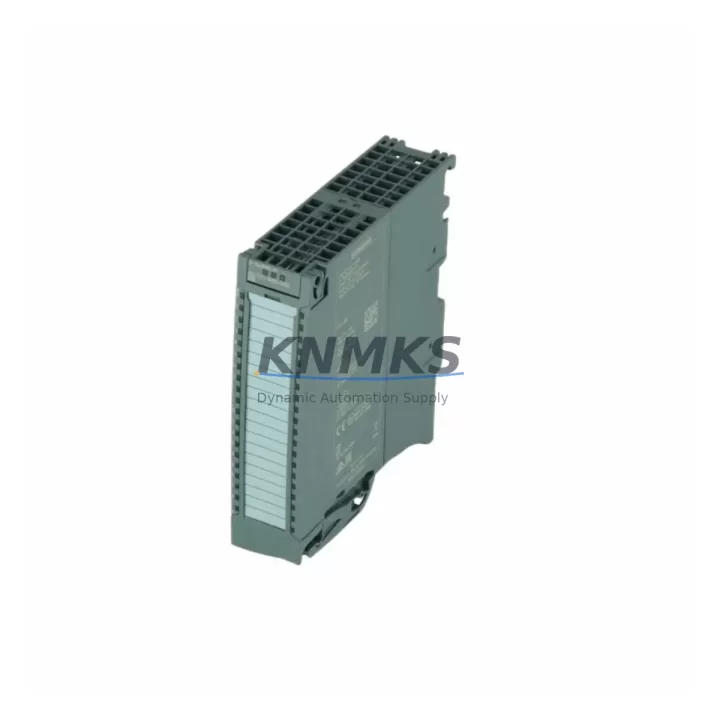
Overview
Siemens 6ES7521-1BH00-0AB0 16DI S7-1500 Migration-Ready: Legacy System Retrofit & Compatibility Upgrade
The Siemens 6ES7521-1BH00-0AB0 is a high-feature digital input module (DI 16×24VDC HF) designed for the SIMATIC S7-1500 and ET 200MP distributed I/O platforms. As legacy S7-300 and S7-400 control systems reach end-of-life, this module serves as a critical migration component for engineers executing planned or emergency retrofits of existing automation lines. With 16 channels of 24 VDC digital input, diagnostic interrupt capability, and hardware interrupt support, the 6ES7521-1BH00-0AB0 delivers the signal integrity and system transparency required for modern industrial control environments.
Our stock is sourced, pre-tested, and shipped with a support terms confirmed by quotation. Each unit undergoes outgoing functional verification before dispatch to minimize commissioning risk on your production floor.
Migration Compatibility Table
| Parameter | 6ES7521-1BH00-0AB0 (S7-1500) | Legacy Reference (S7-300 SM321) |
|---|---|---|
| Input Channels | 16 × 24 VDC | 16 × 24 VDC |
| Module Type | DI 16×24VDC HF (High Feature) | SM 321 DI 16×24VDC |
| Backplane Interface | S7-1500 / ET 200MP U-connector | S7-300 bus connector |
| Diagnostic Interrupt | Yes (channel-level) | Limited / model-dependent |
| Hardware Interrupt | Yes | Selected models only |
| Communication Protocol | PROFINET (via CPU/IM) | PROFIBUS / MPI |
| Module Address Assignment | Automatic via TIA Portal V15+ | Manual DIP switch / HW Config |
| Terminal Wiring | 40-pin front connector (6ES7592-1AM00-0XB0) | 40-pin S7-300 front connector |
| Installation Space | 35 mm DIN rail, S7-1500 rack | 35 mm DIN rail, S7-300 rack |
| Firmware Compatibility | TIA Portal V15 and above | STEP 7 Classic V5.x |
| Replacement Recommendation | Direct upgrade path from SM 321 | Requires rack and CPU migration |
| Commissioning Focus | I/O address mapping, diagnostic OB, HMI tag update | HW Config, symbol table |
| Support terms | 12 months from shipment date — all units | |
Retrofit Planning for Existing Automation Systems
When migrating a legacy S7-300 or S7-400 line to the S7-1500 platform, the 6ES7521-1BH00-0AB0 is typically one of the first modules specified in the I/O migration plan. However, a successful retrofit requires coordinated replacement of several interdependent components across the control cabinet.
The CPU 1515-2 PN or CPU 1516-3 PN/DP serves as the new controller backbone, replacing the legacy CPU 315 or CPU 414. Alongside the CPU, the PS 60W 24/48/60VDC HF (6ES7505-0RA00-0AB0) system power supply must be sized to support the expanded I/O load of the new rack. Engineers should verify total current draw across all installed modules — including any SM 522 digital output modules and SM 531 analog input modules — before finalizing the power budget.
For distributed I/O applications, the ET 200MP IM 155-5 PN ST (6ES7155-5AA00-0AB0) interface module enables the 6ES7521-1BH00-0AB0 to operate as a remote I/O station over PROFINET, preserving the physical cabinet layout while upgrading the communication backbone from PROFIBUS to PROFINET. This is particularly valuable in brownfield installations where cable routing cannot be easily modified.
Terminal wiring compatibility is a common concern during retrofit. The 6ES7521-1BH00-0AB0 uses a 40-pin front connector (6ES7592-1AM00-0XB0), which accepts the same 0.14–1.5 mm² field wiring used in most S7-300 installations. In most cases, existing field cables can be re-terminated directly to the new front connector without rewiring the field side, significantly reducing installation time and the risk of wiring errors.
HMI screen updates are a frequently underestimated step. If the existing system uses a SIMATIC TP700 Comfort or KTP900 Basic panel, tag addresses linked to the legacy I/O must be remapped to the new S7-1500 I/O addresses in TIA Portal. Failure to update HMI tags is one of the most common causes of post-migration alarm faults and operator confusion. Plan for a dedicated HMI validation session as part of the commissioning schedule.
For sites requiring protocol migration from PROFIBUS to PROFINET, a PROFIBUS/PROFINET gateway (e.g., IE/PB Link PN IO) can bridge legacy PROFIBUS field devices during a phased migration, allowing the new S7-1500 CPU to communicate with existing PROFIBUS slaves while the I/O infrastructure is progressively upgraded. This approach minimizes the scope of any single maintenance window and reduces overall project risk.
Downtime Control During System Migration
Minimizing production downtime is the primary constraint in any brownfield control system retrofit. For the 6ES7521-1BH00-0AB0 migration, the following approach is recommended to protect existing program logic and maintain field control continuity:
Pre-migration preparation is the most critical phase. Before any hardware is removed, export and archive the complete STEP 7 or TIA Portal project, including all symbol tables, hardware configurations, and HMI projects. Use the TIA Portal migration tool to convert the legacy S7-300 program to S7-1500 format, resolving any instruction incompatibilities offline before the maintenance window begins. Validate the converted program in simulation (S7-PLCSIM Advanced) to confirm logic integrity.
Staged hardware replacement reduces risk by limiting the scope of each maintenance window. Replace the CPU and power supply first, validate communication with existing I/O, then migrate I/O modules rack by rack. The 6ES7521-1BH00-0AB0 supports online module replacement in ET 200MP configurations, allowing I/O substitution without a full system shutdown in some topologies.
I/O address mapping must be completed and verified in TIA Portal before the new module is powered. The S7-1500 assigns I/O addresses automatically based on slot position, which differs from the manual address assignment used in S7-300 HW Config. Confirm that all process image assignments, OB interrupt routings, and diagnostic block calls reference the correct new addresses.
Post-migration commissioning should include a channel-by-channel I/O verification using the TIA Portal online diagnostics view, confirming that each of the 16 input channels on the 6ES7521-1BH00-0AB0 reads correctly against the physical field signal. Document the commissioning results and retain them as part of the site modification record. All units supplied by us are pre-tested prior to shipment, reducing the probability of DOA hardware during this critical phase.
With proper preparation, most S7-300 to S7-1500 digital input module migrations can be completed within a single 4–8 hour planned maintenance window, with the 6ES7521-1BH00-0AB0 contributing to a net improvement in diagnostic transparency and system availability post-migration.
Retrofit Support FAQ
Q1: Is the 6ES7521-1BH00-0AB0 a direct replacement for the Siemens SM 321 DI 16×24VDC?
The 6ES7521-1BH00-0AB0 is the functional successor for 16-channel 24 VDC digital input applications, but it is not a plug-in replacement — it requires migration to the S7-1500 rack and CPU platform. The module’s channel count, voltage range, and wiring pitch are compatible with most SM 321 field wiring, but the backplane connector, I/O address structure, and programming environment (TIA Portal vs. STEP 7 Classic) differ. A full hardware and software migration plan is required.
Q2: What firmware and TIA Portal version is required for commissioning?
The 6ES7521-1BH00-0AB0 requires TIA Portal V15 or higher for hardware configuration and program download. Firmware updates can be performed via TIA Portal or the Siemens Automation Tool. Always verify that the CPU firmware version is compatible with the module firmware version before commissioning. Our team can advise on version compatibility for your specific CPU and module combination.
Q3: Does the unit ship tested, and what does the support terms confirmed by quotation cover?
Yes. Every 6ES7521-1BH00-0AB0 unit is functionally tested prior to shipment. The support terms confirmed by quotation cover hardware defects and functional failures under normal operating conditions from the date of shipment. It does not cover damage resulting from incorrect installation, overvoltage, or unauthorized modification. Support requests are processed via our sales team at admin@knmks.com.
Q4: Can this module be used in an ET 200MP distributed I/O station instead of a local S7-1500 rack?
Yes. The 6ES7521-1BH00-0AB0 is fully compatible with the ET 200MP distributed I/O system when used with a compatible interface module such as the IM 155-5 PN ST or IM 155-5 PN HF. This configuration is commonly used in retrofit projects where the control cabinet is remote from the S7-1500 CPU rack, or where PROFINET-based distributed I/O is being introduced to replace legacy PROFIBUS remote I/O stations.
© 2026 KNMKS. All rights reserved.
Original Source: https://knmks.com
Contact: admin@knmks.com | +86 18359268345
Product Identification
- Brand / Ecosystem
-
Siemens
Siemens - Model / Series
-
6ES7521-1BH00-0AB0
SIMATIC Series - Product Family
- PLCs & Controllers
- Availability Status
- Available on request after model and quantity confirmation
- Inquiry Type
- B2B RFQ, replacement inquiry and project spare-part request
- Pre-Quote Check
- Exact SKU, brand, series, quantity, nameplate photos and destination country are checked before quotation
System Path
Where this product fits in the KNMKS automation structure.
Specification & Inquiry Focus
- Control platform
- PLC, PAC and modular controllers
- Common needs
- CPU, rack, power and I/O expansion
- Project support
- Replacement, cabinet build and maintenance
Buyer Confirmation
Information KNMKS checks before replying.
- Exact model
- 6ES7521-1BH00-0AB0
- Brand / ecosystem
- Siemens
- Product family
- PLCs & Controllers
- Application note
- Replacement, maintenance, project build or spare-part list
- Useful photos
- Nameplate, installed unit, cabinet layout or connector side
- Delivery details
- Quantity, destination country and target schedule
Document Support
Files and notes can be confirmed during quotation.
- Product photos or nameplate confirmation when available
- Packing and delivery notes before quotation confirmation
- Support scope and delivery terms confirmed per inquiry
- Export document coordination for qualified B2B requests
Inquiry Support
- Model cross-checking before quotation
- CPU, power, rack and expansion module matching
- Support for replacement and project inquiry
What to Send Us
- Brand and exact model number: Siemens 6ES7521-1BH00-0AB0
- Quantity and required delivery time
- Application, replacement requirement or nameplate photo
- Destination country and shipping preference
RFQ Preparation
This is a product inquiry page built for RFQ communication.
Fast Model Check
Send this model to KNMKS for confirmation.
Include quantity, destination country and photos if this is a maintenance replacement. The inquiry will be saved with a reference number after submission.
Brand & Compatibility Note
KNMKS displays automation product information for well-known industrial brand ecosystems and compatible replacement references. Brand names are used for product identification and compatibility reference only; final availability and commercial terms are confirmed per quotation.
 Manufacturing
 Machine Tools
 Packaging
 Energy & Power



 HMI & Displays
 Servo Systems
 Variable Frequency Drives
 Sensors