
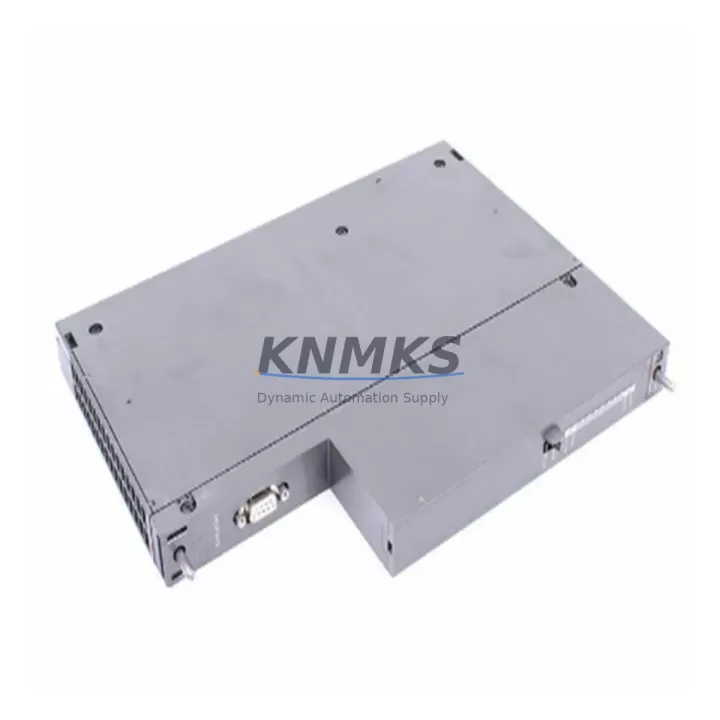
Overview
Siemens 6ES7467-5GJ02-0AB0 Maintenance-Proven Spare Part for Factory Uptime
The Siemens 6ES7467-5GJ02-0AB0 is a PROFIBUS DP master interface module designed for the SIMATIC S7-400 programmable logic controller platform. In industrial environments spanning petrochemical processing, power generation, automotive assembly, and discrete manufacturing, this module serves as the critical communication bridge between the S7-400 CPU rack and field-level PROFIBUS DP devices — including distributed I/O stations, variable frequency drives, intelligent sensors, and remote terminal units. Maintaining a verified replacement unit in your spare parts inventory is a fundamental strategy for minimizing unplanned downtime and protecting production continuity.
When a PROFIBUS DP communication fault is detected during routine control cabinet inspection or triggered by a CPU diagnostic alarm, the 6ES7467-5GJ02-0AB0 is typically the first module to be isolated and tested. Its failure mode often manifests as loss of DP slave communication, BF (Bus Fault) LED activation, or intermittent SF (System Fault) indications on the S7-400 CPU. Maintenance engineers familiar with SIMATIC S7-400 architecture understand that rapid module swap — supported by a pre-tested, shelf-ready spare — is the most reliable path to restoring full system operation within a single maintenance window.
This listing provides an original Siemens 6ES7467-5GJ02-0AB0 spare module, sourced through verified industrial supply channels, pre-shipment tested, and backed by a support terms confirmed by quotation. Each unit is inspected for firmware integrity, connector condition, and communication functionality before dispatch.
Spare Maintenance Table
| Part Number | 6ES7467-5GJ02-0AB0 |
| Brand | Siemens |
| Series | SIMATIC S7-400 |
| Module Type | PROFIBUS DP Master Interface Module (IM) |
| Communication Protocol | PROFIBUS DP (EN 50170) |
| Max DP Slaves | Up to 125 DP slaves per segment |
| Baud Rate | 9.6 kbps – 12 Mbps (auto-negotiated) |
| Supply Voltage | 5 VDC via S7-400 backplane bus |
| Operating Temperature | 0 °C to +60 °C |
| Storage Temperature | -40 °C to +70 °C |
| Mounting | S7-400 rack slot (UR1, UR2, ER1, ER2) |
| Dimensions (W×H×D) | 25 mm × 290 mm × 210 mm (approx.) |
| Weight | 680 g |
| Origin | Germany |
| Compatibility | SIMATIC S7-400 CPU 412, 414, 416, 417 series |
| Condition | Original, pre-shipment tested |
| Support terms | 12 Months |
Maintenance Planning for Continuous Operation
Effective maintenance planning for an S7-400 system equipped with the 6ES7467-5GJ02-0AB0 requires a holistic view of the entire communication and power infrastructure. When scheduling a replacement of this PROFIBUS DP interface module, maintenance engineers should simultaneously inspect and verify the condition of several interdependent components to prevent secondary failures and ensure a clean system restart.
The PS 407 or PS 405 power supply module feeding the S7-400 rack should be checked for output voltage stability and capacitor aging — a marginal power supply is a common root cause of intermittent DP communication errors that are incorrectly attributed to the interface module itself. Alongside the power supply, the S7-400 backplane bus connector and rack slot contacts should be inspected for oxidation or mechanical damage, as poor backplane contact can cause the 6ES7467-5GJ02-0AB0 to report spurious faults even when the module is fully functional.
At the field level, the PROFIBUS DP cable termination resistors at both ends of the bus segment must be verified — incorrect termination is one of the most frequent causes of DP bus instability following a module replacement. The PROFIBUS connector plugs (e.g., 6ES7972-0BA52-0XA0) attached to the module’s DB9 port should be inspected for pin damage and cable strain relief integrity. If the installation includes PROFIBUS repeaters or optical link modules (OLMs) for long-distance or electrically isolated segments, these should be tested for signal integrity before the replacement module is commissioned.
For systems where the S7-400 communicates with ET 200M or ET 200S distributed I/O stations via PROFIBUS DP, the IM 153 or IM 151 interface modules at those remote stations should be included in the inspection checklist. A failed remote IM can prevent the new 6ES7467-5GJ02-0AB0 from establishing DP communication even after a successful module swap. Additionally, if the control cabinet houses signal isolators or PROFIBUS signal conditioners, their power supply rails and isolation barriers should be verified as part of the commissioning process.
Finally, the S7-400 CPU module (such as the CPU 414-3 or CPU 416-3) should be checked for current firmware version and any pending diagnostic buffer entries that may indicate pre-existing communication issues unrelated to the interface module. Clearing the CPU diagnostic buffer and performing a cold restart after module replacement is standard practice to ensure a clean initialization of the PROFIBUS DP master stack.
Site Replacement Workflow
Replacing the 6ES7467-5GJ02-0AB0 in an active S7-400 system follows a structured procedure designed to minimize downtime and eliminate configuration errors. Before beginning, confirm that the replacement module carries the same order number and hardware revision as the installed unit, or verify compatibility with the current STEP 7 or TIA Portal project configuration. Hardware revision mismatches between DP master modules and the GSD (General Station Description) files configured in the project can cause slave parameterization failures on first startup.
Begin by placing the S7-400 CPU in STOP mode via the mode selector switch or through STEP 7 / TIA Portal online access. Power down the rack using the PS 407/405 power supply switch — do not attempt a hot-swap of the interface module without confirming that the specific rack and CPU variant supports this operation. Remove the existing 6ES7467-5GJ02-0AB0 by releasing the front panel locking mechanism and sliding the module out of the rack slot. Inspect the backplane connector on the replacement module for bent pins before insertion.
Insert the new module, secure the locking mechanism, and reconnect the PROFIBUS DP cable. Power up the rack and observe the module’s LED indicators: the green RUN LED should illuminate within 30 seconds of power-on as the module initializes and the CPU transitions to RUN mode. If the BF LED remains active, use STEP 7 or TIA Portal diagnostics to identify which DP slave is failing to respond — this is typically a termination or addressing issue rather than a module fault. Document the replacement in the maintenance log with the module serial number, installation date, and technician ID to support future support requests and lifecycle tracking.
Spare Parts Support FAQ
Q1: Is the 6ES7467-5GJ02-0AB0 compatible with all S7-400 CPU variants?
The 6ES7467-5GJ02-0AB0 is compatible with the SIMATIC S7-400 rack family including UR1, UR2, ER1, and ER2 racks, and operates with CPU 412, 414, 416, and 417 series processors. Compatibility with specific CPU firmware versions should be verified against the Siemens compatibility matrix in your STEP 7 or TIA Portal project. We recommend providing your CPU order number when placing an order so our technical team can confirm hardware revision compatibility before shipment.
Q2: What pre-shipment testing is performed on each unit?
Every 6ES7467-5GJ02-0AB0 unit is powered up and tested for PROFIBUS DP communication initialization, backplane bus interface integrity, and LED diagnostic response before dispatch. Units that fail any test parameter are quarantined and not shipped. A test report is available upon request for critical infrastructure procurement. All units are shipped in anti-static packaging with physical protection for the DB9 PROFIBUS connector.
Q3: Can you support long-term supply commitments for MRO inventory programs?
Yes. We support blanket order arrangements and scheduled delivery programs for maintenance, repair, and operations (MRO) inventory. For facilities managing multiple S7-400 systems or planning multi-year maintenance contracts, we can provide price-locked supply agreements with defined lead times. Contact admin@knmks.com to discuss volume pricing and long-term supply terms for the 6ES7467-5GJ02-0AB0 and related S7-400 spare modules.
Q4: What does the support terms confirmed by quotation cover?
The support terms confirmed by quotation cover manufacturing defects, communication initialization failures, and backplane interface faults under normal operating conditions as specified in the Siemens product datasheet. Support requests are processed with a replacement-first policy — a verified replacement unit is dispatched before the faulty module is returned, minimizing your system downtime. Support terms is void for damage caused by incorrect installation, overvoltage events, or operation outside specified environmental parameters.
© 2026 KNMKS. All rights reserved.
Original Source: https://knmks.com
Contact: admin@knmks.com | +86 18359268345
Product Identification
- Brand / Ecosystem
-
Siemens
Siemens - Model / Series
-
6ES7467-5GJ02-0AB0
SIMATIC Series - Product Family
- PLCs & Controllers
- Availability Status
- Available on request after model and quantity confirmation
- Inquiry Type
- B2B RFQ, replacement inquiry and project spare-part request
- Pre-Quote Check
- Exact SKU, brand, series, quantity, nameplate photos and destination country are checked before quotation
System Path
Where this product fits in the KNMKS automation structure.
Specification & Inquiry Focus
- Control platform
- PLC, PAC and modular controllers
- Common needs
- CPU, rack, power and I/O expansion
- Project support
- Replacement, cabinet build and maintenance
Buyer Confirmation
Information KNMKS checks before replying.
- Exact model
- 6ES7467-5GJ02-0AB0
- Brand / ecosystem
- Siemens
- Product family
- PLCs & Controllers
- Application note
- Replacement, maintenance, project build or spare-part list
- Useful photos
- Nameplate, installed unit, cabinet layout or connector side
- Delivery details
- Quantity, destination country and target schedule
Document Support
Files and notes can be confirmed during quotation.
- Product photos or nameplate confirmation when available
- Packing and delivery notes before quotation confirmation
- Support scope and delivery terms confirmed per inquiry
- Export document coordination for qualified B2B requests
Inquiry Support
- Model cross-checking before quotation
- CPU, power, rack and expansion module matching
- Support for replacement and project inquiry
What to Send Us
- Brand and exact model number: Siemens 6ES7467-5GJ02-0AB0
- Quantity and required delivery time
- Application, replacement requirement or nameplate photo
- Destination country and shipping preference
RFQ Preparation
This is a product inquiry page built for RFQ communication.
Fast Model Check
Send this model to KNMKS for confirmation.
Include quantity, destination country and photos if this is a maintenance replacement. The inquiry will be saved with a reference number after submission.
Brand & Compatibility Note
KNMKS displays automation product information for well-known industrial brand ecosystems and compatible replacement references. Brand names are used for product identification and compatibility reference only; final availability and commercial terms are confirmed per quotation.
 Manufacturing
 Machine Tools
 Packaging
 Energy & Power



 HMI & Displays
 Servo Systems
 Variable Frequency Drives
 Sensors