
Overview
Siemens 6ES7461-1BA01-0AA0 Migration-Ready Interface Module for Legacy S7-400 Control Systems
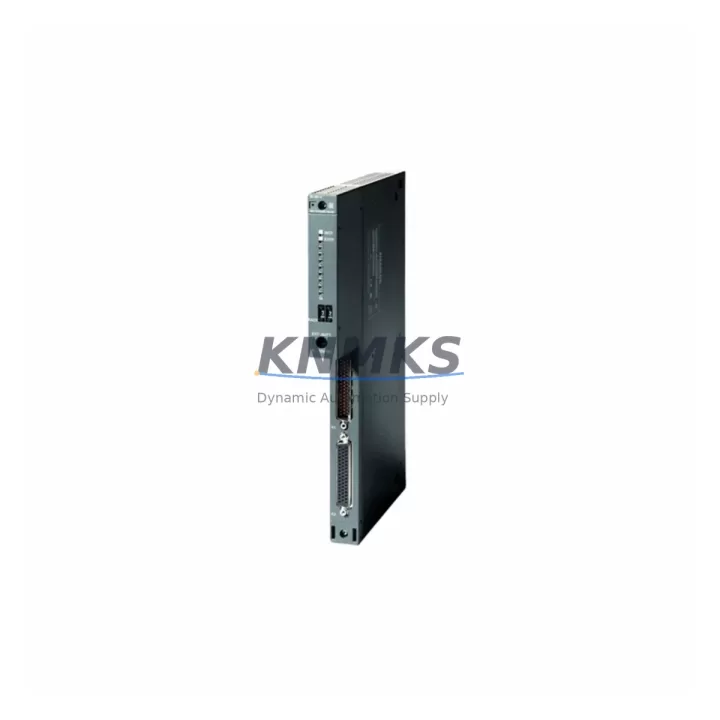
The Siemens 6ES7461-1BA01-0AA0 is the IM461-1 send interface module designed for SIMATIC S7-400 rack expansion architectures. As a migration-ready replacement unit, it supports direct drop-in substitution for end-of-life and discontinued IM461-1 modules in multi-rack S7-400 configurations. Whether you are managing a scheduled outage, an emergency spare replacement, or a phased control system modernization, this module is pre-tested, warehouse-stocked, and ships globally with a support terms confirmed by quotation.
In legacy S7-400 installations, the IM461-1 operates as the send-side interface module, paired with a corresponding receive IM — typically the 6ES7460-1BA01-0AA0 (IM460-1) — to extend the S7-400 backplane across multiple expansion racks. When this module fails or reaches end-of-support, the entire rack segment loses communication with the central CPU rack, causing full process interruption. Having a verified replacement unit on hand is critical to minimizing unplanned downtime in continuous process environments.
This unit is compatible with the standard S7-400 rack family, including UR1, UR2, and CR2 rack types. It occupies a dedicated IM slot and does not consume standard I/O slot capacity. Before installation, engineers should confirm the rack slot assignment, the physical backplane connector condition, and the firmware revision of the active CPU — such as the 6ES7412-2XK07-0AB0 (CPU 412-2) or 6ES7414-3XM07-0AB0 (CPU 414-3 DP) — to ensure compatibility with the expansion link protocol used by the IM461-1.
Migration Compatibility Table
| Parameter | Details |
|---|---|
| SKU / Part Number | 6ES7461-1BA01-0AA0 |
| Module Designation | IM461-1 (Send Interface Module) |
| Compatible Platform | SIMATIC S7-400 (UR1, UR2, CR2 racks) |
| Paired Receive Module | 6ES7460-1BA01-0AA0 (IM460-1) |
| Communication Interface | S7-400 backplane expansion link (not PROFIBUS field bus) |
| Installation Slot | Dedicated IM slot (left side of rack) |
| Power Supply Requirement | Supplied via rack backplane; confirm PS407 or PS405 capacity |
| Replacement Scope | Direct drop-in for failed or end-of-life IM461-1 units |
| Commissioning Note | No re-programming required; hardware address set by slot position |
| Pre-Shipment Testing | Yes — functional verification before dispatch |
| Support terms | 12 Months |
| Country of Origin | Germany |
| Stock Status | availability confirmed by RFQ — Multi-Region Dispatch Available |
Retrofit Planning for Existing Automation Systems
Replacing the 6ES7461-1BA01-0AA0 in an operating S7-400 system requires a structured retrofit plan that accounts for the full rack topology. In a typical multi-rack S7-400 installation, the central rack houses the CPU, a power supply module such as the 6ES7405-0DA02-0AA0 (PS405 4A), and the send IM. Expansion racks are powered independently and receive the backplane signal via the paired 6ES7460-1BA01-0AA0 receive module. Engineers must verify that the expansion rack power supply — often a 6ES7407-0DA02-0AA0 (PS407 4A) — is delivering stable voltage before inserting the replacement IM461-1, as power instability can cause the module to fail initialization.
In systems where the S7-400 CPU communicates with field devices over PROFIBUS DP, the CP443-1 or CP443-5 communication processor modules handle the protocol layer independently of the IM461-1. The IM461-1 is strictly a rack-to-rack backplane extension device and does not affect PROFIBUS addressing or DP slave configuration. However, during the replacement window, engineers should document the current I/O module slot assignments in the expansion rack — including any SM421 digital input modules, SM422 digital output modules, or SM431 analog input modules — to verify that the hardware configuration in STEP 7 or TIA Portal matches the physical slot layout after the IM is reseated.
For sites running WinCC or SIMATIC HMI panels connected to the S7-400 CPU, the HMI communication link operates through the MPI or PROFIBUS interface on the CPU itself and is not interrupted by IM461-1 replacement, provided the CPU remains powered during a hot-swap procedure where rack architecture permits. In cases where a full rack power-down is required, HMI screens should be placed in manual override or maintenance mode before the outage window begins to prevent false alarms or uncontrolled actuator states during the transition.
Sites that use SIMATIC S7-400H redundant CPU configurations should consult the system redundancy documentation before replacing the IM461-1, as the expansion rack I/O modules may be shared between the primary and standby CPU paths. In these architectures, the replacement sequence must follow the H-system switchover procedure to maintain process continuity on the active CPU path while the expansion rack is temporarily isolated.
Downtime Control During System Migration
Minimizing downtime during IM461-1 replacement begins with pre-staging the replacement unit and verifying its firmware and hardware revision against the existing module before the maintenance window opens. The 6ES7461-1BA01-0AA0 does not require firmware flashing in the field — it is a hardware-configured module whose operational parameters are determined by the rack slot position and the CPU’s hardware configuration file. This means that once the physical swap is complete and the rack is powered on, the CPU will automatically recognize the module without requiring a STEP 7 or TIA Portal download, provided the hardware configuration has not been changed.
To protect the original program logic, engineers should perform a full CPU backup — including the program blocks, hardware configuration, and symbol table — before beginning any physical work. This backup should be stored on a PG/PC running STEP 7 v5.x or TIA Portal, as well as on a memory card inserted in the CPU (such as the 6ES7952-1KK00-0AA0 SIMATIC Micro Memory Card) to enable rapid recovery if the CPU requires a restart during the replacement procedure.
Field commissioning after IM461-1 replacement should include a structured I/O check: verify that all digital and analog signals in the expansion rack are reading correctly in the CPU’s process image, confirm that no SF (system fault) or BF (bus fault) LEDs are active on the replacement module or the paired receive IM, and validate that the HMI process values match field instrument readings before returning the system to automatic control. This structured commissioning sequence typically takes 30–60 minutes for a single expansion rack and can be completed within a standard planned maintenance window.
Retrofit Support FAQ
Q1: Is the 6ES7461-1BA01-0AA0 a direct replacement for all IM461-1 variants in the S7-400 family?
A: The 6ES7461-1BA01-0AA0 is the standard IM461-1 send module for S7-400 rack expansion. It is compatible with UR1, UR2, and CR2 racks. Confirm the rack type and the paired receive module (6ES7460-1BA01-0AA0) before ordering to ensure the send/receive pair matches your existing installation.
Q2: Does replacing the IM461-1 require a new hardware configuration download to the CPU?
A: No. The IM461-1 is a hardware-addressed module. If the replacement unit is installed in the same slot and the hardware configuration in STEP 7 or TIA Portal is unchanged, the CPU will recognize the module automatically on power-up without requiring a new configuration download.
Q3: What pre-shipment testing is performed on this unit?
A: Each 6ES7461-1BA01-0AA0 unit undergoes functional verification testing before dispatch, including backplane interface continuity checks and power-on initialization validation. Units are shipped with test documentation and are covered by a support terms confirmed by quotation from the date of delivery.
Q4: What is the lead time and can emergency orders be fulfilled?
A: This SKU is maintained in multi-region stock to support both scheduled maintenance and emergency replacement scenarios. Standard orders are dispatched within 1–2 business days. Emergency dispatch with expedited freight is available — contact admin@knmks.com or call +86 18359268345 to confirm availability and arrange priority shipment.
© 2026 KNMKS. All rights reserved.
Original Source: https://knmks.com
Contact: admin@knmks.com | +86 18359268345
Product Identification
- Brand / Ecosystem
-
Siemens
Siemens - Model / Series
-
6ES7461-1BA01-0AA0
SIMATIC Series - Product Family
- PLCs & Controllers
- Availability Status
- Available on request after model and quantity confirmation
- Inquiry Type
- B2B RFQ, replacement inquiry and project spare-part request
- Pre-Quote Check
- Exact SKU, brand, series, quantity, nameplate photos and destination country are checked before quotation
System Path
Where this product fits in the KNMKS automation structure.
Specification & Inquiry Focus
- Control platform
- PLC, PAC and modular controllers
- Common needs
- CPU, rack, power and I/O expansion
- Project support
- Replacement, cabinet build and maintenance
Buyer Confirmation
Information KNMKS checks before replying.
- Exact model
- 6ES7461-1BA01-0AA0
- Brand / ecosystem
- Siemens
- Product family
- PLCs & Controllers
- Application note
- Replacement, maintenance, project build or spare-part list
- Useful photos
- Nameplate, installed unit, cabinet layout or connector side
- Delivery details
- Quantity, destination country and target schedule
Document Support
Files and notes can be confirmed during quotation.
- Product photos or nameplate confirmation when available
- Packing and delivery notes before quotation confirmation
- Support scope and delivery terms confirmed per inquiry
- Export document coordination for qualified B2B requests
Inquiry Support
- Model cross-checking before quotation
- CPU, power, rack and expansion module matching
- Support for replacement and project inquiry
What to Send Us
- Brand and exact model number: Siemens 6ES7461-1BA01-0AA0
- Quantity and required delivery time
- Application, replacement requirement or nameplate photo
- Destination country and shipping preference
RFQ Preparation
This is a product inquiry page built for RFQ communication.
Fast Model Check
Send this model to KNMKS for confirmation.
Include quantity, destination country and photos if this is a maintenance replacement. The inquiry will be saved with a reference number after submission.
Brand & Compatibility Note
KNMKS displays automation product information for well-known industrial brand ecosystems and compatible replacement references. Brand names are used for product identification and compatibility reference only; final availability and commercial terms are confirmed per quotation.
 Manufacturing
 Machine Tools
 Packaging
 Energy & Power



 HMI & Displays
 Servo Systems
 Variable Frequency Drives
 Sensors