
Overview
Siemens 6ES7460-0AA01-0AB0 Migration-Ready Send IM for Legacy S7-400 Systems
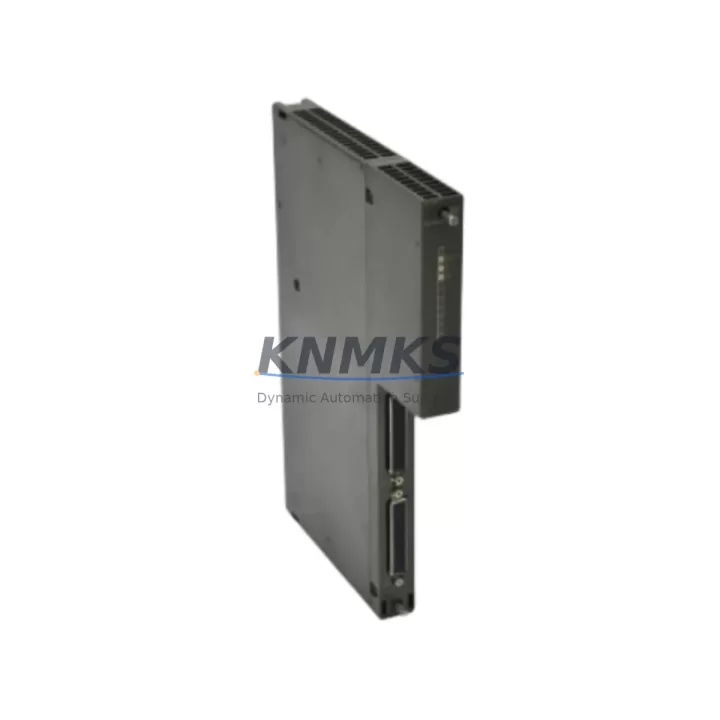
The Siemens 6ES7460-0AA01-0AB0 is the IM 460-0 Send Interface Module designed for the SIMATIC S7-400 programmable logic controller platform. This module enables multi-rack expansion by establishing the send-side communication link between the central rack and up to four expansion racks, making it a critical component in large-scale distributed control architectures. As legacy S7-400 installations approach end-of-life and spare part availability tightens, the 6ES7460-0AA01-0AB0 has become one of the most sought-after retrofit and replacement modules for engineers tasked with sustaining or modernizing existing automation infrastructure.
Whether you are maintaining an aging production line, executing a phased control cabinet upgrade, or performing an emergency replacement of a failed interface module, the 6ES7460-0AA01-0AB0 provides a direct, drop-in compatible solution that preserves your existing rack topology, backplane wiring, and CPU program logic without requiring a full system redesign.
Migration Compatibility Table
| Parameter | Specification / Retrofit Note |
|---|---|
| Module Type | IM 460-0 Send Interface Module |
| Compatible Platform | SIMATIC S7-400 (all CPU variants) |
| Rack Interface | S7-400 backplane bus connector (direct slot insertion, no adapter required) |
| Expansion Racks Supported | Up to 4 expansion racks via IM 461-0 Receive IM pairing |
| Communication Protocol | SIMATIC S7-400 internal bus (K-bus / P-bus compatible) |
| Power Supply Requirement | Powered via backplane; verify PS 407 or PS 405 power budget before installation |
| Installation Space | Single slot in S7-400 central rack (UR1 or UR2 rack) |
| Firmware Compatibility | Compatible with all S7-400 CPU firmware versions; no firmware update required on module |
| Replacement Pairing | Must be paired with 6ES7461-0AA01-0AA0 (IM 461-0) on the expansion rack side |
| Commissioning Requirement | Hardware configuration reload via STEP 7 or TIA Portal required after replacement |
| Discontinued Status | Siemens legacy product; available as new-old-stock and tested surplus |
| Support terms | support terms confirmed by quotation included with every unit shipped |
Retrofit Planning for Existing Automation Systems
Successful replacement of the 6ES7460-0AA01-0AB0 in a live or recently shut-down S7-400 system requires careful pre-installation planning across several dimensions. The first step is always a power budget audit. The S7-400 power supply module — typically a PS 407 10A or PS 405 4A — must have sufficient reserve capacity to support the interface module alongside all installed I/O modules, communication processors, and CPU cards in the same rack. Insufficient power headroom is a common cause of intermittent faults after module replacement and must be ruled out before commissioning.
Terminal and backplane wiring on the S7-400 platform is handled entirely through the rack’s internal bus, so there are no field-side terminal connections on the IM 460-0 itself. However, the expansion cable connecting the send IM to the receive IM — the 6ES7468-1BB50-0AA0 expansion cable or equivalent — must be inspected for continuity and connector integrity. Damaged expansion cables are frequently the root cause of rack communication faults that are misdiagnosed as interface module failures.
On the expansion rack side, the paired 6ES7461-0AA01-0AA0 IM 461-0 Receive Interface Module must also be verified. If the send IM is being replaced due to a communication fault, the receive IM should be tested independently before assuming the send side is the sole failure point. In multi-rack configurations with UR2 expansion racks, each rack’s slot assignment and module addressing must be confirmed in the STEP 7 hardware configuration (HW Config) before downloading to the CPU.
For sites running SIMATIC WinCC or a third-party HMI connected to the S7-400 via PROFIBUS DP or MPI, the HMI communication link should be verified post-replacement. While the IM 460-0 does not directly handle PROFIBUS traffic — that function belongs to dedicated CP 443-5 communication processors — a rack reconfiguration can affect the overall network topology if the CPU address or rack slot assignments change. Engineers should confirm that HMI tag addresses and OPC server connections remain valid after the hardware configuration is reloaded.
In systems where the S7-400 controls distributed I/O through ET 200M or ET 200S remote I/O stations on PROFIBUS, the IM 460-0 replacement does not affect the PROFIBUS segment directly. However, if the retrofit is part of a broader control cabinet upgrade that includes replacing SM 321 digital input modules, SM 322 digital output modules, or SM 331 analog input modules in the expansion racks, all module slot positions must be re-verified in the hardware configuration to prevent I/O address conflicts after the CPU program is restarted.
For projects involving migration from S7-400 to S7-1500 or a TIA Portal-based platform, the 6ES7460-0AA01-0AB0 serves as a critical bridging component during the transition period. Keeping the existing S7-400 rack infrastructure operational while new S7-1500 controllers are commissioned in parallel allows engineering teams to validate the new program logic against live process data before cutting over, significantly reducing migration risk and unplanned downtime.
Downtime Control During System Migration
Minimizing downtime during interface module replacement on an S7-400 system begins with a complete backup of the CPU program, hardware configuration, and any associated STEP 7 project files before any physical work begins. The CPU’s memory card should be read and the project archived to an offline engineering station. This ensures that if the replacement module triggers an unexpected hardware fault or configuration mismatch, the original program state can be restored without relying on online diagnostics.
The physical replacement of the 6ES7460-0AA01-0AB0 is straightforward: the S7-400 rack must be powered down, the module extracted from its slot, and the replacement inserted and secured. The rack should then be powered up in isolation — without the expansion cable connected — to confirm that the central rack initializes cleanly before re-establishing the expansion link. This staged power-up procedure isolates any residual faults in the expansion rack from the central rack startup sequence.
Once the expansion cable is reconnected and the full rack configuration is powered, the hardware configuration must be downloaded from STEP 7 or TIA Portal to the CPU. The CPU will perform an automatic rack scan and validate the installed modules against the stored configuration. Any slot mismatches will be flagged in the diagnostic buffer and must be resolved before the CPU transitions to RUN mode. Engineers should monitor the CPU’s SF (system fault) and BF (bus fault) LEDs during this phase to confirm clean initialization.
For critical production environments where even a brief unplanned outage carries significant cost, pre-staging the replacement module with a bench test using a spare S7-400 rack and a known-good IM 461-0 receive module is strongly recommended. This confirms module functionality before the scheduled maintenance window and eliminates the risk of receiving a defective unit during a live replacement. All units shipped from our inventory undergo functional testing and are covered by a support terms confirmed by quotation, providing additional assurance for time-sensitive retrofit projects.
Retrofit Support FAQ
Q: Is the 6ES7460-0AA01-0AB0 a direct replacement for earlier IM 460 variants used in S7-400 systems?
A: The 6ES7460-0AA01-0AB0 (IM 460-0) is the standard send interface module for S7-400 rack expansion and is compatible with all S7-400 CPU generations. It must be paired with the corresponding 6ES7461-0AA01-0AA0 IM 461-0 on the expansion rack. Earlier IM 460 variants from the same series are functionally equivalent in most configurations, but the hardware configuration in STEP 7 must reflect the exact module order number to avoid diagnostic errors.
Q: What commissioning steps are required after replacing the IM 460-0 in a live S7-400 system?
A: After physical installation, the hardware configuration must be downloaded to the CPU via STEP 7 or TIA Portal. The CPU will perform a rack scan and validate all installed modules. Verify that the CPU enters RUN mode without SF or BF faults, confirm that all expansion rack I/O modules are recognized, and check the diagnostic buffer for any residual fault entries. HMI communication links and PROFIBUS segment integrity should also be verified before returning the system to production.
Q: Can the 6ES7460-0AA01-0AB0 be used in a mixed S7-400H (high-availability) configuration?
A: The IM 460-0 is designed for standard S7-400 rack expansion and is not used in S7-400H redundant CPU configurations, which use dedicated synchronization modules. However, it can be used in expansion racks connected to an S7-400H central rack for non-redundant I/O expansion. Consult the S7-400H system manual to confirm rack topology compatibility for your specific high-availability architecture.
Q: What support terms and supply assurance does KNMKS provide for this module?
A: Every 6ES7460-0AA01-0AB0 shipped by KNMKS is covered by a support terms confirmed by quotation against manufacturing defects and functional failures. Units are sourced from verified supply channels, inspected upon receipt, and functionally tested before dispatch. We maintain inventory stock to support urgent retrofit and emergency replacement requirements, with expedited shipping available for time-critical projects.
© 2026 KNMKS. All rights reserved.
Original Source: https://knmks.com
Contact: admin@knmks.com | +86 18359268345
Product Identification
- Brand / Ecosystem
-
Siemens
Siemens - Model / Series
-
6ES7460-0AA01-0AB0
SIMATIC Series - Product Family
- PLCs & Controllers
- Availability Status
- Available on request after model and quantity confirmation
- Inquiry Type
- B2B RFQ, replacement inquiry and project spare-part request
- Pre-Quote Check
- Exact SKU, brand, series, quantity, nameplate photos and destination country are checked before quotation
System Path
Where this product fits in the KNMKS automation structure.
Specification & Inquiry Focus
- Control platform
- PLC, PAC and modular controllers
- Common needs
- CPU, rack, power and I/O expansion
- Project support
- Replacement, cabinet build and maintenance
Buyer Confirmation
Information KNMKS checks before replying.
- Exact model
- 6ES7460-0AA01-0AB0
- Brand / ecosystem
- Siemens
- Product family
- PLCs & Controllers
- Application note
- Replacement, maintenance, project build or spare-part list
- Useful photos
- Nameplate, installed unit, cabinet layout or connector side
- Delivery details
- Quantity, destination country and target schedule
Document Support
Files and notes can be confirmed during quotation.
- Product photos or nameplate confirmation when available
- Packing and delivery notes before quotation confirmation
- Support scope and delivery terms confirmed per inquiry
- Export document coordination for qualified B2B requests
Inquiry Support
- Model cross-checking before quotation
- CPU, power, rack and expansion module matching
- Support for replacement and project inquiry
What to Send Us
- Brand and exact model number: Siemens 6ES7460-0AA01-0AB0
- Quantity and required delivery time
- Application, replacement requirement or nameplate photo
- Destination country and shipping preference
RFQ Preparation
This is a product inquiry page built for RFQ communication.
Fast Model Check
Send this model to KNMKS for confirmation.
Include quantity, destination country and photos if this is a maintenance replacement. The inquiry will be saved with a reference number after submission.
Brand & Compatibility Note
KNMKS displays automation product information for well-known industrial brand ecosystems and compatible replacement references. Brand names are used for product identification and compatibility reference only; final availability and commercial terms are confirmed per quotation.
 Manufacturing
 Machine Tools
 Packaging
 Energy & Power



 HMI & Displays
 Servo Systems
 Variable Frequency Drives
 Sensors