
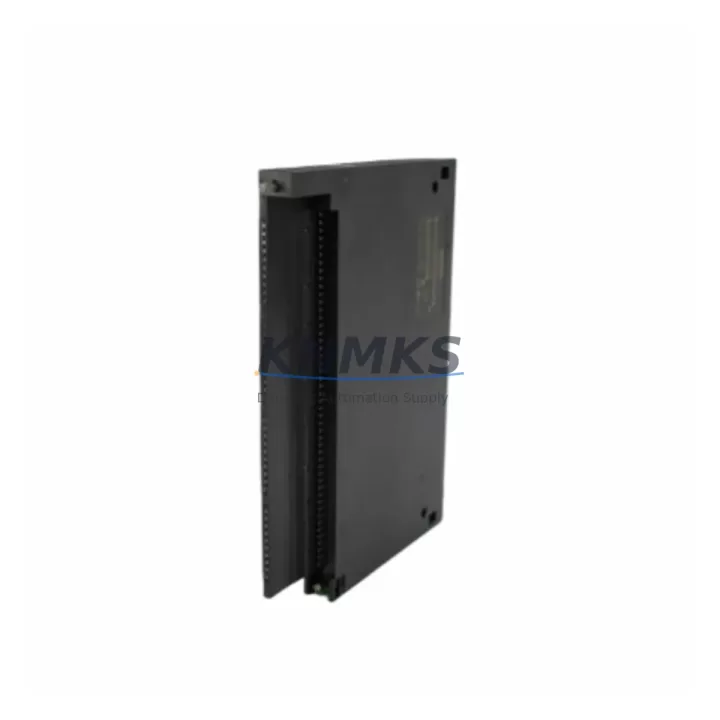
Overview
Siemens 6ES7432-1HF00-0AB0 Migration-Ready Analog Output for Legacy Control Systems
The Siemens 6ES7432-1HF00-0AB0 is an SM 432 series 8-channel analog output module designed for the SIMATIC S7-400 programmable logic controller platform. As legacy S7-400 systems approach end-of-life and original spare parts become increasingly scarce, this module serves as a verified drop-in replacement that preserves existing wiring, backplane slot assignments, and program logic without requiring a full control system overhaul. Engineers managing aging production lines, process control cabinets, or distributed automation networks will find this module critical for sustaining operational continuity while planning a phased migration to current-generation platforms.
Each unit is sourced, inspected, and dispatch-tested prior to shipment. Output signal ranges, terminal block pinouts, and module addressing are verified against the original Siemens hardware specification. A support terms confirmed by quotation is included with every unit, covering functional defects under normal industrial operating conditions. Stock is maintained to support both emergency breakdown replacements and planned retrofit schedules.
Migration Compatibility Table
| Parameter | Specification / Retrofit Guidance |
|---|---|
| SKU / Part Number | 6ES7432-1HF00-0AB0 |
| Module Series | SM 432 — SIMATIC S7-400 Analog Output |
| Output Channels | 8 channels, configurable ±10 V / 0–20 mA / 4–20 mA |
| Backplane Interface | S7-400 P-bus / K-bus compatible; direct slot replacement |
| Installation Requirement | UR1 / UR2 / ER1 / ER2 rack; no mechanical modification required |
| Terminal Wiring | 20-pin front connector; existing field wiring reusable |
| Module Address | Configured via hardware configuration in STEP 7 or TIA Portal (S7-400 mode) |
| Communication Compatibility | MPI, PROFIBUS DP via CPU; no dedicated comms port on module |
| Firmware Compatibility | Compatible with STEP 7 V5.x and TIA Portal V13+ in S7-400 project mode |
| Replacement Scope | Direct replacement for 6ES7432-1HF00-0AB0; verify firmware revision if mixing with existing SM 432 modules |
| Commissioning Note | Re-download hardware configuration after slot insertion; verify analog output scaling in OB1/FC blocks |
| Support terms | 12 months from shipment date, functional defect coverage |
Retrofit Planning for Existing Automation Systems
Replacing the 6ES7432-1HF00-0AB0 within an operating S7-400 system requires a structured pre-installation audit. Begin by confirming the rack type — UR1, UR2, ER1, or ER2 — and verifying that the target slot is physically and electrically compatible with the SM 432 module footprint. The 20-pin front connector should be removed from the existing module and transferred directly to the replacement unit, preserving all field wiring connections to actuators, control valves, variable frequency drives, and positioners.
Power budget verification is essential before insertion. The S7-400 power supply module — commonly a PS 407 10A or PS 405 4A — must have sufficient 5 VDC backplane current headroom to support the SM 432 alongside other installed modules such as digital input/output cards (SM 421, SM 422) and communication processors (CP 443-1, CP 443-5). Overloading the backplane bus is a common cause of intermittent faults during retrofit projects and must be ruled out before commissioning.
In systems where the S7-400 CPU communicates over PROFIBUS DP to remote I/O stations or drives, the analog output module’s channel configuration must be re-validated in the hardware configuration tool. Any changes to the module’s slot position will shift the process image address, requiring corresponding updates in the STEP 7 symbol table or TIA Portal tag table. Engineers should cross-reference all FC and FB blocks that reference the affected output addresses before downloading the updated configuration.
For control cabinets that also house an OP 7, OP 17, or TP 177B HMI panel, screen tags linked to analog output setpoints must be reviewed after the hardware configuration download. Tag address mismatches between the HMI project and the updated PLC configuration are a frequent source of post-retrofit alarms. Where the HMI communicates via MPI, verify that the MPI address and baud rate settings remain unchanged after the CPU restart.
In multi-rack configurations using IM 460 / IM 461 interface modules for rack expansion, confirm that the expansion rack’s slot addressing is not affected by the module swap. Signal isolators installed between the SM 432 outputs and field devices should also be inspected for output range compatibility, particularly where 4–20 mA loops feed into third-party controllers or safety instrumented systems. Programming cables such as the PC Adapter USB A2 or CP 5611 card may be required for on-site STEP 7 access during commissioning if the engineering station is not permanently connected.
Downtime Control During System Migration
Minimizing unplanned downtime during an SM 432 module replacement requires preparation that begins well before the maintenance window. A full backup of the S7-400 CPU program — including all data blocks, system function blocks, and hardware configuration — must be saved to the programming device and verified readable before any hardware is disturbed. Where the process allows, place the affected analog output channels in a safe fallback state (e.g., hold last value or output zero) using the CPU’s substitution value settings in the hardware configuration.
Physical replacement of the 6ES7432-1HF00-0AB0 can typically be completed in under 15 minutes when the front connector is pre-labeled and the replacement module is pre-staged. After insertion, the hardware configuration download should be performed with the CPU in STOP mode to prevent uncontrolled output transitions. Following the download, a controlled STOP-to-RUN transition allows the process engineer to verify each analog output channel against the expected setpoint before returning the loop to automatic control.
For systems where a cold restart is not acceptable — such as continuous chemical processes or critical utility control — a hot-swap strategy using a redundant S7-400H configuration with FM 458-1 DP or a parallel standby rack may be considered. In non-redundant systems, coordinating the replacement during a scheduled production break and pre-testing the replacement module on a bench setup using a SIMATIC S7-400 test rack significantly reduces the risk of extended downtime. All commissioning steps, output verification readings, and firmware revision numbers should be recorded in the site maintenance log for future reference.
Retrofit Support FAQ
Q1: Is the 6ES7432-1HF00-0AB0 a direct drop-in replacement for an existing SM 432 module in my S7-400 rack?
Yes. The 6ES7432-1HF00-0AB0 uses the same backplane connector, front connector pinout, and slot dimensions as other SM 432 variants. Transfer the existing 20-pin front connector to the replacement module and re-download the hardware configuration. Verify output channel scaling in your STEP 7 or TIA Portal project before returning to automatic mode.
Q2: What pre-shipment testing is performed on each unit?
Each 6ES7432-1HF00-0AB0 is powered up and functionally tested across all 8 analog output channels prior to dispatch. Output signal accuracy, channel isolation, and backplane communication are verified. A support terms confirmed by quotation is provided from the shipment date, covering functional defects under standard industrial operating conditions.
Q3: Can this module be used in a TIA Portal project targeting an S7-400 CPU?
Yes. The SM 432 module is supported in TIA Portal V13 and later when the project is configured in S7-400 mode. The module GSD and hardware catalog entry are included in the standard TIA Portal hardware library. Ensure the firmware revision of the replacement module matches or is compatible with the revision recorded in your existing hardware configuration to avoid configuration mismatch errors.
Q4: What is the typical lead time and do you maintain stock for emergency breakdown orders?
Stock is maintained for the 6ES7432-1HF00-0AB0 to support both planned retrofit schedules and emergency breakdown replacements. Contact admin@knmks.com or call +86 18359268345 to confirm current availability and arrange expedited dispatch. Orders are processed and shipped promptly to minimize control system downtime.
© 2026 KNMKS. All rights reserved.
Original Source: https://knmks.com
Contact: admin@knmks.com | +86 18359268345
Product Identification
- Brand / Ecosystem
-
Siemens
Siemens - Model / Series
-
6ES7432-1HF00-0AB0
SIMATIC Series - Product Family
- PLCs & Controllers
- Availability Status
- Available on request after model and quantity confirmation
- Inquiry Type
- B2B RFQ, replacement inquiry and project spare-part request
- Pre-Quote Check
- Exact SKU, brand, series, quantity, nameplate photos and destination country are checked before quotation
System Path
Where this product fits in the KNMKS automation structure.
Specification & Inquiry Focus
- Control platform
- PLC, PAC and modular controllers
- Common needs
- CPU, rack, power and I/O expansion
- Project support
- Replacement, cabinet build and maintenance
Buyer Confirmation
Information KNMKS checks before replying.
- Exact model
- 6ES7432-1HF00-0AB0
- Brand / ecosystem
- Siemens
- Product family
- PLCs & Controllers
- Application note
- Replacement, maintenance, project build or spare-part list
- Useful photos
- Nameplate, installed unit, cabinet layout or connector side
- Delivery details
- Quantity, destination country and target schedule
Document Support
Files and notes can be confirmed during quotation.
- Product photos or nameplate confirmation when available
- Packing and delivery notes before quotation confirmation
- Support scope and delivery terms confirmed per inquiry
- Export document coordination for qualified B2B requests
Inquiry Support
- Model cross-checking before quotation
- CPU, power, rack and expansion module matching
- Support for replacement and project inquiry
What to Send Us
- Brand and exact model number: Siemens 6ES7432-1HF00-0AB0
- Quantity and required delivery time
- Application, replacement requirement or nameplate photo
- Destination country and shipping preference
RFQ Preparation
This is a product inquiry page built for RFQ communication.
Fast Model Check
Send this model to KNMKS for confirmation.
Include quantity, destination country and photos if this is a maintenance replacement. The inquiry will be saved with a reference number after submission.
Brand & Compatibility Note
KNMKS displays automation product information for well-known industrial brand ecosystems and compatible replacement references. Brand names are used for product identification and compatibility reference only; final availability and commercial terms are confirmed per quotation.
 Manufacturing
 Machine Tools
 Packaging
 Energy & Power



 HMI & Displays
 Servo Systems
 Variable Frequency Drives
 Sensors