
Overview
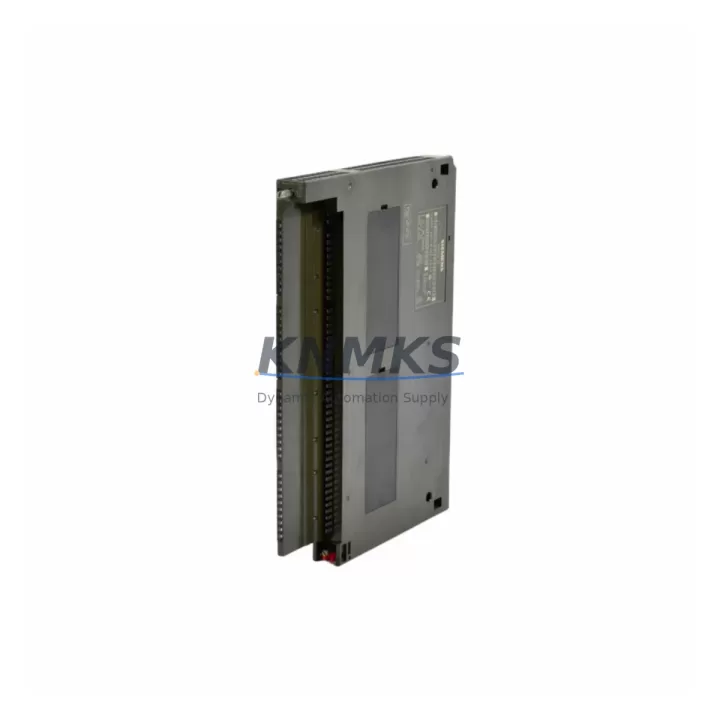
Siemens 6ES7422-1FH00-0AA0 Maintenance-Proven Spare Part for Factory Uptime
The Siemens 6ES7422-1FH00-0AA0 is a 16-channel 24 VDC digital output module designed for the SIMATIC S7-400 programmable logic controller platform — one of the most widely deployed process automation architectures in heavy industry, automotive manufacturing, chemical processing, and power generation. When this module fails or reaches end-of-service life, the downstream impact is immediate: actuators go dark, conveyor drives lose command signals, and safety interlocks may trip the entire line. Stocking a verified replacement unit is the single most effective measure a maintenance team can take to contain unplanned downtime to under two hours.
Each 6ES7422-1FH00-0AA0 unit supplied by KNMKS is sourced from authorized distribution channels, subjected to pre-shipment functional verification under load conditions, and dispatched with a support terms confirmed by quotation covering manufacturing defects and operational failure. Our global inventory position allows same-week dispatch to North America, Europe, and Asia-Pacific, supporting both emergency breakdown orders and planned annual-overhaul procurement cycles.
Spare Maintenance Table
| SKU / Part Number | 6ES7422-1FH00-0AA0 |
| Brand | Siemens |
| Series | SIMATIC S7-400 |
| Module Type | Digital Output (DO) Module |
| Output Channels | 16 channels |
| Output Voltage | 24 VDC |
| Output Current per Channel | 0.5 A (typical) |
| Total Current Load | Up to 4 A aggregate |
| Backplane Interface | S7-400 rack bus (UR1 / UR2 / ER1 / ER2) |
| Country of Origin | Germany |
| Operating Temperature | 0 °C to +60 °C |
| Protection Class | IP20 |
| Compatibility | SIMATIC S7-400 UR1, UR2, ER1, ER2 racks; compatible with CPU 41x series |
| Installation | Slot-in module; no tools required for rack insertion |
| Diagnostics | Group fault LED; channel-level short-circuit and overload detection |
| Maintenance Interval | Inspect annually; replace on fault LED or output signal loss |
| Support terms | 12 months from dispatch date — manufacturing defects and operational failure |
| Pre-Shipment Test | Functional load test performed on every unit before dispatch |
| Typical Lead Time | In-stock: same-week dispatch; ex-stock air freight available |
Maintenance Planning for Continuous Operation
Replacing the 6ES7422-1FH00-0AA0 in a live S7-400 control cabinet is rarely an isolated task. Maintenance engineers who have worked through S7-400 DO module failures consistently report that the root cause extends beyond the module itself. Before returning the line to service, the following associated components should be inspected or tested as part of the same work order:
24 VDC field power supply: The PS 407 or equivalent 24 VDC rack power supply feeds both the module logic and the field-side output load. A degraded power supply with marginal output voltage is a common upstream cause of DO module stress and premature failure. Verify output voltage under full load before inserting the replacement module.
Output wiring and terminal blocks: S7-400 DO modules connect to field devices through front connector assemblies. Inspect the 40-pin front connector (6ES7492-1AL00-0AA0 or equivalent) for burnt contacts, loose terminations, or insulation breakdown — particularly on channels driving inductive loads such as solenoid valves or motor contactors.
Intermediate relay or solid-state relay bank: Many S7-400 installations route DO channels through an intermediate relay panel to protect the module from inductive kickback. If the DO module has failed due to overcurrent, the relay coils and flyback diodes in the relay bank should be tested before the new module is energized.
Backplane and rack integrity: The UR2 or ER2 rack backplane carries both power and data bus signals to every installed module. A cracked backplane connector or corroded bus segment can cause intermittent DO faults that are misdiagnosed as module failure. Inspect the rack bus contacts and verify seating of adjacent modules such as the SM 421 digital input module and any CP 443 communications processor installed in the same rack.
Fusing and surge protection: Field circuits on 24 VDC DO modules should be individually fused. Verify that miniature circuit breakers or fuse terminals protecting each output group have not tripped or degraded. Replace any fuse that shows signs of thermal stress.
HMI and SCADA signal validation: After module replacement and rack power-up, confirm that the SIMATIC HMI panel (TP or MP series) and any connected SCADA system correctly reflect the restored DO channel states. A mismatch between the PLC output image and the HMI display may indicate a configuration download is required following the hardware swap.
Site Replacement Workflow
Step 1 — Isolate and document: Place the S7-400 CPU in STOP mode via the mode selector switch or STEP 7 / TIA Portal online interface. Record the current module slot address, configured I/O address range, and any module-specific parameters stored in the hardware configuration. Take a photograph of the front connector wiring before disconnection.
Step 2 — Remove the failed module: Unlock and remove the 40-pin front connector. Release the module locking lever and slide the 6ES7422-1FH00-0AA0 out of the rack slot. Do not apply force; the module should disengage cleanly from the backplane bus connector.
Step 3 — Inspect and prepare the replacement: Confirm the replacement unit part number matches exactly: 6ES7422-1FH00-0AA0. Verify firmware version compatibility if the site runs a specific STEP 7 hardware catalog version. Insert the replacement module into the same rack slot and engage the locking lever.
Step 4 — Reconnect and verify: Reattach the front connector. Power up the rack and observe the module status LED. A steady green RUN LED with no group fault indication confirms successful initialization. Download the hardware configuration if the CPU reports a configuration mismatch.
Step 5 — Functional test before line restart: Force individual DO channels from the STEP 7 or TIA Portal variable table and confirm field device response (actuator movement, contactor energization, valve position). Document the test results in the site maintenance log before returning the CPU to RUN mode and resuming production.
This workflow is compatible with hot-standby S7-400H redundant configurations where the standby CPU can maintain process control during the module swap on the active rack — consult the site-specific redundancy switchover procedure before proceeding in H-system installations.
Spare Parts Support FAQ
Q1: Is the 6ES7422-1FH00-0AA0 still available as a new original part, or only as refurbished stock?
KNMKS maintains inventory of original Siemens 6ES7422-1FH00-0AA0 units sourced through authorized distribution. Each unit is supplied as original hardware, not refurbished or remanufactured. Condition and provenance documentation is available on request for regulated industries.
Q2: What does the support terms confirmed by quotation cover, and how is a support terms claim processed?
The support terms confirmed by quotation cover manufacturing defects and operational failure under normal industrial operating conditions. It does not cover damage caused by incorrect installation, overvoltage events, or physical impact. To initiate a support terms claim, contact admin@knmks.com with the order reference, a description of the failure mode, and photographic evidence. Replacement units are dispatched after fault confirmation, with return freight covered by KNMKS for valid claims.
Q3: How many units should a maintenance team stock for an S7-400 installation?
Industry practice for critical process lines recommends a minimum of one spare DO module per rack for high-availability installations, and two units for lines running continuous 24/7 operations. For multi-rack S7-400 systems with more than four racks, a pooled spare of three to four 6ES7422-1FH00-0AA0 units provides adequate coverage for both emergency replacement and planned annual overhaul cycles without excessive carrying cost.
Q4: Can KNMKS support long-term supply agreements for this part number?
Yes. KNMKS offers blanket purchase order arrangements and forward-stocking agreements for customers with recurring demand for S7-400 spare parts. Long-term supply contracts include price protection, priority allocation from in-stock inventory, and dedicated account support. Contact admin@knmks.com to discuss volume requirements and lead-time commitments.
© 2026 KNMKS. All rights reserved.
Original Source: https://knmks.com
Contact: admin@knmks.com | +86 18359268345
Product Identification
- Brand / Ecosystem
-
Siemens
Siemens - Model / Series
-
6ES7422-1FH00-0AA0
SIMATIC Series - Product Family
- PLCs & Controllers
- Availability Status
- Available on request after model and quantity confirmation
- Inquiry Type
- B2B RFQ, replacement inquiry and project spare-part request
- Pre-Quote Check
- Exact SKU, brand, series, quantity, nameplate photos and destination country are checked before quotation
System Path
Where this product fits in the KNMKS automation structure.
Specification & Inquiry Focus
- Control platform
- PLC, PAC and modular controllers
- Common needs
- CPU, rack, power and I/O expansion
- Project support
- Replacement, cabinet build and maintenance
Buyer Confirmation
Information KNMKS checks before replying.
- Exact model
- 6ES7422-1FH00-0AA0
- Brand / ecosystem
- Siemens
- Product family
- PLCs & Controllers
- Application note
- Replacement, maintenance, project build or spare-part list
- Useful photos
- Nameplate, installed unit, cabinet layout or connector side
- Delivery details
- Quantity, destination country and target schedule
Document Support
Files and notes can be confirmed during quotation.
- Product photos or nameplate confirmation when available
- Packing and delivery notes before quotation confirmation
- Support scope and delivery terms confirmed per inquiry
- Export document coordination for qualified B2B requests
Inquiry Support
- Model cross-checking before quotation
- CPU, power, rack and expansion module matching
- Support for replacement and project inquiry
What to Send Us
- Brand and exact model number: Siemens 6ES7422-1FH00-0AA0
- Quantity and required delivery time
- Application, replacement requirement or nameplate photo
- Destination country and shipping preference
RFQ Preparation
This is a product inquiry page built for RFQ communication.
Fast Model Check
Send this model to KNMKS for confirmation.
Include quantity, destination country and photos if this is a maintenance replacement. The inquiry will be saved with a reference number after submission.
Brand & Compatibility Note
KNMKS displays automation product information for well-known industrial brand ecosystems and compatible replacement references. Brand names are used for product identification and compatibility reference only; final availability and commercial terms are confirmed per quotation.
 Manufacturing
 Machine Tools
 Packaging
 Energy & Power



 HMI & Displays
 Servo Systems
 Variable Frequency Drives
 Sensors