
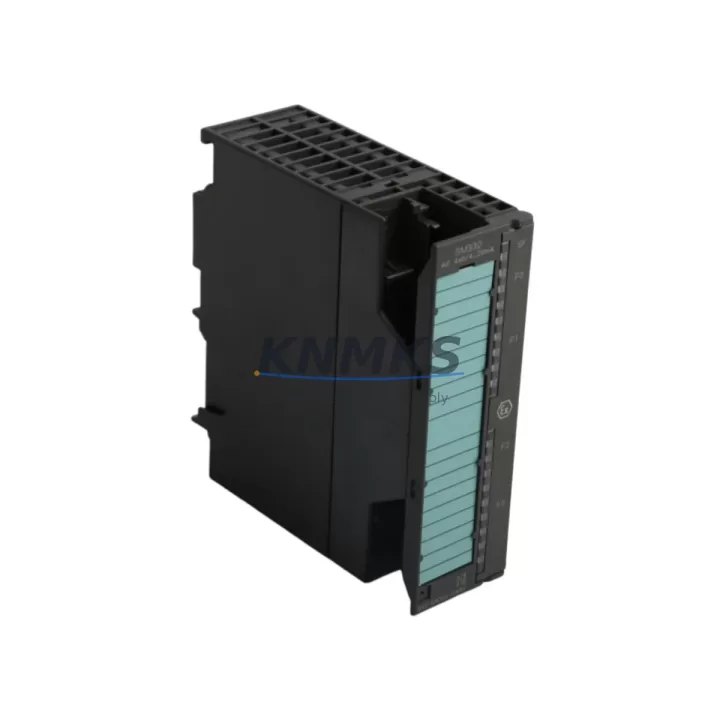
Overview
Siemens 6ES7422-1BH11-0AA0 Maintenance-Proven Spare Part for Factory Uptime
The Siemens 6ES7422-1BH11-0AA0 is an SM422 32-channel digital output module engineered for the SIMATIC S7-400 PLC platform — one of the most widely deployed process automation controllers in heavy industry, power generation, chemical processing, and automotive manufacturing. Maintaining an available stock of this module is a proven strategy for reducing unplanned downtime, accelerating fault recovery, and sustaining production continuity across aging S7-400 control architectures.
For maintenance engineers managing large-scale control cabinets, the 6ES7422-1BH11-0AA0 represents a critical output interface between the PLC CPU and field actuators including solenoid valves, motor contactors, indicator lamps, and relay coils. When this module fails — whether due to output channel burnout, surge damage, or age-related degradation — the entire associated output group goes offline. Having a verified replacement on the shelf eliminates the multi-day lead time that typically accompanies emergency procurement from OEM channels.
Procurement engineers sourcing this module should confirm compatibility with the S7-400 backplane slot configuration, verify the 24 VDC output voltage rating, and cross-reference the firmware revision of the installed CPU module (such as the 6ES7414 or 6ES7416 series) to ensure seamless integration. All units dispatched from our inventory undergo pre-shipment functional testing and are covered by a support terms confirmed by quotation from the date of delivery.
Spare Maintenance Table
| SKU / Part Number | 6ES7422-1BH11-0AA0 |
| Brand | Siemens |
| Series | SIMATIC S7-400 / SM422 |
| Module Type | Digital Output (DO) Module |
| Number of Outputs | 32 channels |
| Output Voltage | 24 VDC |
| Output Current per Channel | 0.5 A |
| Total Current Load | Max. 4 A per group (8 channels) |
| Isolation | Optocoupler-isolated outputs |
| Backplane Interface | S7-400 UR1 / UR2 / UR2-H rack compatible |
| Dimensions (W×H×D) | 25 mm × 290 mm × 210 mm (approx.) |
| Weight | 620 g |
| Operating Temperature | 0 °C to +60 °C |
| Storage Temperature | -40 °C to +70 °C |
| Country of Origin | Germany |
| Compatibility | SIMATIC S7-400 CPU 41x series; UR1, UR2, UR2-H racks |
| Application Environment | Industrial automation, process control, power distribution, automotive assembly |
| Maintenance Recommendation | Inspect output channels annually; replace fuse groups on surge events; verify wiring continuity at terminal blocks |
| Support terms | 12 Months from date of delivery |
| Pre-Shipment Testing | Yes — functional output channel verification performed before dispatch |
Maintenance Planning for Continuous Operation
A structured maintenance plan for any S7-400 control cabinet housing the 6ES7422-1BH11-0AA0 should extend beyond the output module itself. During scheduled annual inspections or reactive fault-isolation events, maintenance engineers should simultaneously assess the condition of adjacent components that share the same electrical circuit and backplane environment.
The 6ES7421-1BL01-0AA0 (SM421 32-channel digital input module) is the logical counterpart to this output module and is frequently installed in the same rack. Input channel faults can mask output-side problems during diagnostics, so both modules should be verified together during any I/O troubleshooting sequence. Similarly, the 6ES7431-1KF20-0AB0 analog input module, if present in the same rack, should be checked for signal drift or ground loop interference that can corrupt process feedback loops.
Power supply integrity is foundational to output module reliability. The 6ES7407-0KA02-0AA0 PS407 power supply module provides the 24 VDC rail that feeds the SM422 output channels. A degraded or undersized power supply is a common root cause of intermittent output channel failures. Inspect the PS407 for output voltage ripple, thermal discoloration, and capacitor bulging during every cabinet inspection cycle.
Terminal block condition at the front connector of the 6ES7422-1BH11-0AA0 is another critical maintenance checkpoint. Loose or corroded screw terminals on the 6ES7492-1AL00-0AA0 front connector can cause intermittent output faults that are difficult to reproduce under bench testing. Torque verification and contact cleaning should be part of every planned maintenance visit.
For cabinets operating in environments with significant electrical noise — such as those adjacent to variable frequency drives or large motor starters — the addition of signal isolation relays or surge protection modules on high-current output channels is strongly recommended. This protects the SM422 output transistors from inductive kickback and extends module service life significantly. Where communication modules such as the 6GK7443-1EX30-0XE0 CP443-1 Ethernet module are installed in the same rack, verify that the backplane bus connector seating is secure, as vibration-induced connector loosening is a known failure mode in high-cycle production environments.
Site Replacement Workflow
Replacing the 6ES7422-1BH11-0AA0 in a live S7-400 system requires a structured approach to minimize downtime and avoid configuration errors. Begin by placing the CPU in STOP mode via the mode selector switch or through STEP 7 / TIA Portal online diagnostics. Document the current slot assignment and module address configuration before removal — the SM422 module address is determined by its physical rack and slot position, and must be preserved in the replacement unit.
Power down the affected rack segment before disconnecting the front connector wiring harness. Label all field wiring connections if the front connector is not of the plug-and-play type. Insert the replacement 6ES7422-1BH11-0AA0 into the same slot, reconnect the front connector, and restore power. The S7-400 CPU will automatically recognize the module during the next startup cycle if the hardware configuration in the project matches the physical installation.
After restart, perform a channel-by-channel output verification using the STEP 7 variable table or TIA Portal watch table to confirm all 32 output channels are responding correctly to commanded states. This step is essential before returning the system to automatic operation. For legacy systems where the original STEP 7 project is unavailable, the module can be operated in standard mode using the default parameterization, with diagnostic interrupt functions enabled to capture any future channel faults in the CPU diagnostic buffer.
This replacement workflow is compatible with all S7-400 rack configurations including UR1, UR2, and UR2-H, and does not require CPU firmware updates when replacing a like-for-like SM422 module of the same order number.
Spare Parts Support FAQ
Q1: Is the 6ES7422-1BH11-0AA0 compatible with all S7-400 CPU variants?
The SM422 digital output module is compatible with all SIMATIC S7-400 CPU 41x series processors including the CPU 412, 414, 416, and 417 families. It is installed in any standard UR1, UR2, or UR2-H rack and addressed automatically by the CPU based on slot position. Compatibility with the project hardware configuration in STEP 7 or TIA Portal should always be verified before installation.
Q2: What is the recommended inventory strategy for this module?
For production facilities with three or more S7-400 racks in service, maintaining a minimum of one spare 6ES7422-1BH11-0AA0 per site is recommended. High-criticality lines — such as those in continuous process or automotive body shop environments — should carry two units on-site. Given the support terms confirmed by quotation coverage from delivery, annual replenishment cycles align well with standard maintenance budget planning.
Q3: How is the module tested before shipment?
Every 6ES7422-1BH11-0AA0 unit undergoes pre-shipment functional testing to verify output channel switching, isolation integrity, and backplane connector condition. Units that do not pass channel verification are not dispatched. A test report is available upon request for quality-controlled procurement processes.
Q4: Can long-term supply agreements be arranged for this module?
Yes. For customers requiring scheduled deliveries, buffer stock programs, or annual supply contracts for the 6ES7422-1BH11-0AA0 and related S7-400 spare parts, long-term supply arrangements can be structured to lock in pricing and ensure availability. Contact our sales team to discuss volume commitments and delivery scheduling aligned with your maintenance calendar.
© 2026 KNMKS. All rights reserved.
Original Source: https://knmks.com
Contact: admin@knmks.com | +86 18359268345
Product Identification
- Brand / Ecosystem
-
Siemens
Siemens - Model / Series
-
6ES7422-1BH11-0AA0
SIMATIC Series - Product Family
- PLCs & Controllers
- Availability Status
- Available on request after model and quantity confirmation
- Inquiry Type
- B2B RFQ, replacement inquiry and project spare-part request
- Pre-Quote Check
- Exact SKU, brand, series, quantity, nameplate photos and destination country are checked before quotation
System Path
Where this product fits in the KNMKS automation structure.
Specification & Inquiry Focus
- Control platform
- PLC, PAC and modular controllers
- Common needs
- CPU, rack, power and I/O expansion
- Project support
- Replacement, cabinet build and maintenance
Buyer Confirmation
Information KNMKS checks before replying.
- Exact model
- 6ES7422-1BH11-0AA0
- Brand / ecosystem
- Siemens
- Product family
- PLCs & Controllers
- Application note
- Replacement, maintenance, project build or spare-part list
- Useful photos
- Nameplate, installed unit, cabinet layout or connector side
- Delivery details
- Quantity, destination country and target schedule
Document Support
Files and notes can be confirmed during quotation.
- Product photos or nameplate confirmation when available
- Packing and delivery notes before quotation confirmation
- Support scope and delivery terms confirmed per inquiry
- Export document coordination for qualified B2B requests
Inquiry Support
- Model cross-checking before quotation
- CPU, power, rack and expansion module matching
- Support for replacement and project inquiry
What to Send Us
- Brand and exact model number: Siemens 6ES7422-1BH11-0AA0
- Quantity and required delivery time
- Application, replacement requirement or nameplate photo
- Destination country and shipping preference
RFQ Preparation
This is a product inquiry page built for RFQ communication.
Fast Model Check
Send this model to KNMKS for confirmation.
Include quantity, destination country and photos if this is a maintenance replacement. The inquiry will be saved with a reference number after submission.
Brand & Compatibility Note
KNMKS displays automation product information for well-known industrial brand ecosystems and compatible replacement references. Brand names are used for product identification and compatibility reference only; final availability and commercial terms are confirmed per quotation.
 Manufacturing
 Machine Tools
 Packaging
 Energy & Power



 HMI & Displays
 Servo Systems
 Variable Frequency Drives
 Sensors