
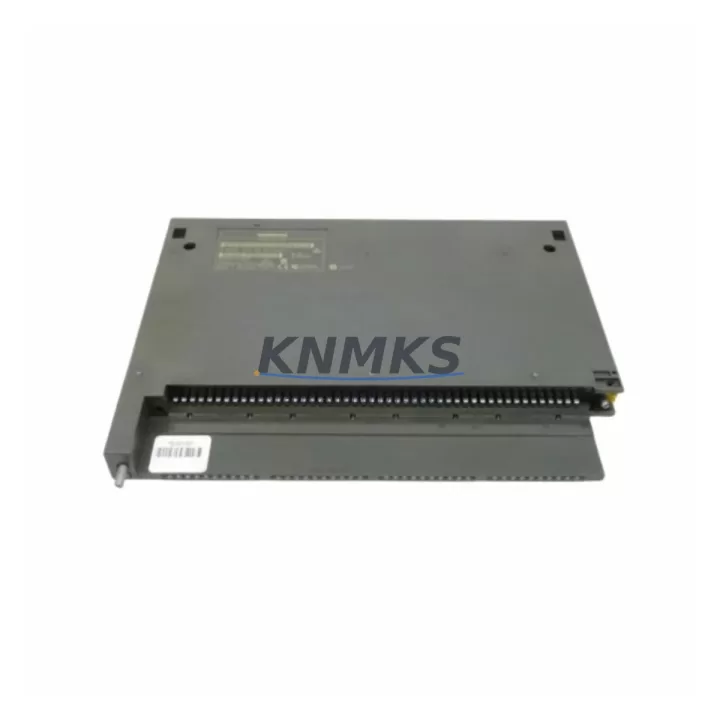
Overview
Siemens 6ES7421-1BL00-0AA0 Maintenance-Proven Spare Part for Factory Uptime
The Siemens 6ES7421-1BL00-0AA0 is the SM421 32-channel digital input module designed for the SIMATIC S7-400 programmable logic controller platform — one of the most widely deployed DCS/PLC architectures in heavy industry, process automation, and critical manufacturing environments. When this module fails or degrades, the consequences are immediate: loss of field signal acquisition, blind control loops, and unplanned production downtime. Sourcing a verified, pre-tested replacement is not optional — it is a core element of any credible maintenance strategy.
This spare is stocked as an original Siemens component, fully compatible with the S7-400 backplane and CPU families including the CPU 412, CPU 414, CPU 416, and CPU 417 series. It supports 32 discrete 24 VDC input channels, organized in groups of 8, with individual channel diagnostics and configurable input delay times. The module slots directly into any S7-400 rack without firmware reconfiguration, making it the preferred choice for emergency replacement scenarios where minimizing mean time to repair (MTTR) is critical.
Maintenance engineers managing aging S7-400 installations understand that digital input modules are among the highest-turnover spare components in the control cabinet. Signal degradation, connector wear, surge damage from field wiring, and firmware incompatibilities in counterfeit parts all contribute to repeat failures. Sourcing the 6ES7421-1BL00-0AA0 from a verified supplier with pre-shipment electrical testing eliminates the risk of installing a non-functional or marginal spare during a live recovery event.
Spare Maintenance Table
| Parameter | Specification |
|---|---|
| SKU / Part Number | 6ES7421-1BL00-0AA0 |
| Module Type | SM421 Digital Input Module |
| Compatible Platform | SIMATIC S7-400 (all rack variants) |
| Number of Input Channels | 32 x 24 VDC |
| Channel Grouping | 8 channels per group (4 groups) |
| Input Voltage Range | 24 VDC (15–30 V operational) |
| Input Current per Channel | Approx. 7 mA at 24 VDC |
| Input Delay (configurable) | 0.1 ms / 0.5 ms / 3 ms / 15 ms |
| Diagnostic Capability | Wire break, short circuit per group |
| Backplane Interface | S7-400 P-bus / K-bus |
| Mounting | S7-400 rack (UR1, UR2, ER1, ER2) |
| Operating Temperature | 0°C to +60°C |
| Dimensions (W x H x D) | 25 mm x 290 mm x 210 mm |
| Weight | Approx. 600 g |
| Country of Origin | Germany |
| Support terms | 12 Months |
| Pre-Shipment Testing | Yes — electrical function verified |
| Condition | Original / New-equivalent |
Maintenance Planning for Continuous Operation
Replacing the 6ES7421-1BL00-0AA0 in a live S7-400 system is rarely an isolated task. Experienced maintenance engineers treat every module swap as an opportunity to audit the surrounding electrical environment and reduce the risk of repeat failures. Before or during replacement, the following components and subsystems should be inspected or verified:
The PS407 or PS405 power supply module feeding the S7-400 rack should be checked for output voltage stability and ripple — an undersupplied rack is a common root cause of intermittent DI module faults. The IM460/IM461 interface modules connecting expansion racks should be verified for backplane communication integrity, particularly if the failed 6ES7421-1BL00-0AA0 was installed in a remote expansion rack. Field wiring connected to the module’s front connector (6ES7492-1AL00-0AA0 or equivalent 40-pin front connector) should be inspected for insulation damage, loose terminations, and correct cable shielding — unshielded signal cables in high-EMI environments are a leading cause of premature DI module degradation.
The 6ES7421-1FH20-0AA0 (SM421 120/230 VAC variant) is a common co-stocked spare for facilities running mixed-voltage field devices on the same S7-400 platform. If the control cabinet includes relay output modules such as the 6ES7422-1BL00-0AA0 SM422, these should be inspected for contact wear and coil voltage integrity during the same maintenance window. For installations using CP443-1 or CP443-5 communication processors, verify that the backplane slot configuration and module addressing remain consistent after the DI module replacement to avoid PROFIBUS or Industrial Ethernet communication faults.
Signal isolators and surge protection devices installed between field transmitters and the DI module inputs — particularly in petrochemical or high-voltage environments — should be tested for correct pass-through voltage levels. Fuse elements in the field terminal distribution panels should be checked and replaced as part of the corrective maintenance cycle. Maintaining a minimum stock of two 6ES7421-1BL00-0AA0 units per S7-400 installation is recommended for facilities with 24/7 production requirements.
Site Replacement Workflow
The 6ES7421-1BL00-0AA0 is a hot-swap-capable module on S7-400 racks equipped with active bus modules (IM153 or equivalent), but most standard rack configurations require a controlled CPU stop before module extraction. The recommended replacement sequence is as follows:
First, archive the current hardware configuration in STEP 7 or TIA Portal and export the module parameter assignment for the slot being replaced. This ensures that input delay settings, diagnostic enable flags, and channel grouping parameters can be restored identically on the new module. Second, disconnect the 40-pin front connector from the failed module — the connector retains all field wiring and can be transferred directly to the replacement unit without rewiring. Third, extract the failed module using the module release lever and insert the replacement 6ES7421-1BL00-0AA0, ensuring the module coding key matches the slot configuration. Fourth, reattach the front connector, restore CPU operation, and verify all 32 input channels in the diagnostic buffer using STEP 7 online monitoring or the S7-400 CPU’s integrated diagnostic display.
This workflow eliminates the need for field rewiring, reduces replacement time to under 15 minutes for trained technicians, and ensures parameter consistency across the replacement event. For legacy installations running STEP 7 v5.x, the hardware configuration does not require re-download if the replacement module is the same order number — the CPU will recognize the module automatically on restart.
Spare Parts Support FAQ
Q: Is the 6ES7421-1BL00-0AA0 compatible with all S7-400 CPU variants?
A: Yes. The SM421 DI module is compatible with all S7-400 CPU families including CPU 412, 414, 416, and 417, as well as fault-tolerant H-system configurations. It operates on both the P-bus and K-bus backplane interfaces standard to all S7-400 rack variants (UR1, UR2, ER1, ER2).
Q: What pre-shipment testing is performed on this spare?
A: Each unit undergoes electrical function verification prior to dispatch, including input channel continuity, backplane interface integrity, and power consumption validation. Units that do not meet original Siemens specification thresholds are not shipped. A support terms confirmed by quotation is included from the date of dispatch.
Q: How many units should be held in a site spare parts inventory?
A: For S7-400 installations with continuous production requirements, a minimum of two SM421 DI modules per installed rack is recommended. Facilities with multiple S7-400 racks or extended lead-time constraints should consider a consolidated spare holding of four to six units to cover emergency replacement and scheduled annual maintenance windows.
Q: Can this module replace earlier SM421 variants such as the 6ES7421-1BL01-0AA0?
A: The 6ES7421-1BL00-0AA0 is the baseline SM421 32-channel DI variant. Compatibility with later revision suffixes (e.g., -1BL01) should be verified against the installed hardware configuration in STEP 7, as minor firmware and diagnostic feature differences may exist. Contact our technical team for compatibility confirmation before ordering for cross-revision replacement.
© 2026 KNMKS. All rights reserved.
Original Source: https://knmks.com
Contact: admin@knmks.com | +86 18359268345
Product Identification
- Brand / Ecosystem
-
Siemens
Siemens - Model / Series
-
6ES7421-1BL00-0AA0
SIMATIC Series - Product Family
- PLCs & Controllers
- Availability Status
- Available on request after model and quantity confirmation
- Inquiry Type
- B2B RFQ, replacement inquiry and project spare-part request
- Pre-Quote Check
- Exact SKU, brand, series, quantity, nameplate photos and destination country are checked before quotation
System Path
Where this product fits in the KNMKS automation structure.
Specification & Inquiry Focus
- Control platform
- PLC, PAC and modular controllers
- Common needs
- CPU, rack, power and I/O expansion
- Project support
- Replacement, cabinet build and maintenance
Buyer Confirmation
Information KNMKS checks before replying.
- Exact model
- 6ES7421-1BL00-0AA0
- Brand / ecosystem
- Siemens
- Product family
- PLCs & Controllers
- Application note
- Replacement, maintenance, project build or spare-part list
- Useful photos
- Nameplate, installed unit, cabinet layout or connector side
- Delivery details
- Quantity, destination country and target schedule
Document Support
Files and notes can be confirmed during quotation.
- Product photos or nameplate confirmation when available
- Packing and delivery notes before quotation confirmation
- Support scope and delivery terms confirmed per inquiry
- Export document coordination for qualified B2B requests
Inquiry Support
- Model cross-checking before quotation
- CPU, power, rack and expansion module matching
- Support for replacement and project inquiry
What to Send Us
- Brand and exact model number: Siemens 6ES7421-1BL00-0AA0
- Quantity and required delivery time
- Application, replacement requirement or nameplate photo
- Destination country and shipping preference
RFQ Preparation
This is a product inquiry page built for RFQ communication.
Fast Model Check
Send this model to KNMKS for confirmation.
Include quantity, destination country and photos if this is a maintenance replacement. The inquiry will be saved with a reference number after submission.
Brand & Compatibility Note
KNMKS displays automation product information for well-known industrial brand ecosystems and compatible replacement references. Brand names are used for product identification and compatibility reference only; final availability and commercial terms are confirmed per quotation.
 Manufacturing
 Machine Tools
 Packaging
 Energy & Power



 HMI & Displays
 Servo Systems
 Variable Frequency Drives
 Sensors