
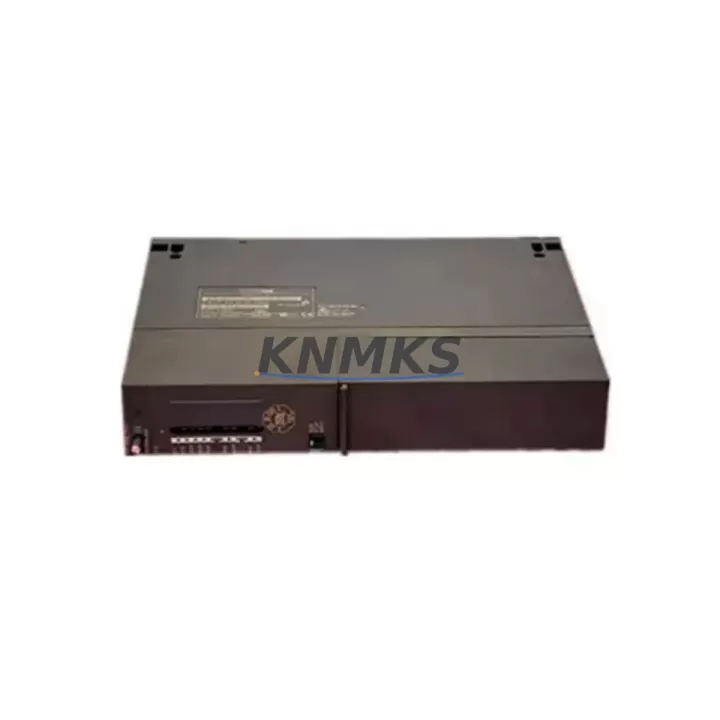
Overview
Siemens 6ES7416-3FR05-0AB0 Migration-Ready CPU for Legacy S7-400 Systems
The Siemens 6ES7416-3FR05-0AB0 is a high-performance CPU 416-3 PN/DP module designed for the SIMATIC S7-400 platform. As legacy S7-400 installations approach end-of-life and spare parts become increasingly scarce, this unit serves as a direct drop-in replacement for discontinued CPU variants including the 6ES7416-3ER05-0AB0 and earlier 6ES7416-2XN05-0AB0 revisions. It is particularly well-suited for facilities managing aging control cabinets, distributed I/O architectures, and multi-rack PROFIBUS/PROFINET hybrid networks where minimizing retrofit risk is a primary concern.
Each unit is sourced from verified supply channels, subjected to pre-shipment functional testing under simulated load conditions, and backed by a support terms confirmed by quotation. Stock is maintained to support both emergency replacement and planned lifecycle upgrade projects, with typical lead times suitable for scheduled maintenance windows.
When integrating this CPU into an existing S7-400 rack, engineers should verify the UR2 or UR1 backplane slot assignment, confirm that the existing PS 407 power supply module provides sufficient current headroom for the 416-3 PN/DP’s combined CPU and interface load, and review the MPI/DP address configuration stored in the existing project. The onboard PROFINET interface supports IRT and RT communication modes, making it compatible with ET 200M distributed I/O stations and IM 153-4 PN interface modules already deployed in the field.
Migration Compatibility Table
| Parameter | Details |
|---|---|
| SKU / Order Number | 6ES7416-3FR05-0AB0 |
| Series | SIMATIC S7-400 |
| CPU Type | CPU 416-3 PN/DP |
| Communication Interfaces | 1× PROFINET (2-port switch), 2× MPI/PROFIBUS DP |
| Replaces / Compatible With | 6ES7416-3ER05-0AB0, 6ES7416-2XN05-0AB0, 6ES7416-3XR05-0AB0 |
| Rack Compatibility | S7-400 UR1, UR2, UR2-H central racks |
| Power Supply Requirement | PS 407 (4A or 10A) — verify current budget before installation |
| Firmware Compatibility | Compatible with STEP 7 V5.x and TIA Portal V13 SP2 and above |
| Program Memory | 2 MB work memory (expandable via MC memory card) |
| Installation Space | Double-width slot (2 slots required in rack) |
| Commissioning Notes | MPI address, DP master system ID, and PROFINET device name must be reconfigured post-swap |
| Pre-Shipment Testing | Yes — functional test performed before dispatch |
| Support terms | 12 months from date of shipment |
| Origin | Germany |
Retrofit Planning for Existing Automation Systems
A successful retrofit of the 6ES7416-3FR05-0AB0 into an operational S7-400 system requires a structured pre-migration audit. Begin by documenting the existing hardware configuration in STEP 7 HW Config or TIA Portal, paying particular attention to the slot assignments of any SM 421 digital input modules, SM 422 digital output modules, and SM 431 analog input modules installed in the same rack. These modules retain their configured I/O addresses and do not require re-parameterization when only the CPU is replaced, provided the rack structure remains unchanged.
For systems using CP 443-1 Ethernet communication processors or CP 443-5 PROFIBUS communication processors, verify that the existing network topology and connection resources are within the new CPU’s supported limits. The 416-3 PN/DP supports up to 64 S7 connections and 32 PG/OP connections simultaneously, which is typically sufficient for mid-to-large distributed architectures. If the legacy system relied on a separate IM 460-0 send interface module for multi-rack expansion, confirm that the inter-rack communication timing is preserved after the CPU swap.
HMI panels connected via PROFIBUS DP — including WinCC flexible runtime stations and TP 177B or MP 377 operator panels — should be tested for screen navigation continuity and tag communication integrity after the CPU replacement. In most cases, the HMI project does not require modification if the CPU’s MPI/DP address is restored to its original value. For PROFINET-connected HMI devices, the PROFINET device name assigned to the CPU must match the value stored in the HMI project’s connection manager.
Signal isolators and marshalling panels connected to the existing terminal blocks do not require rewiring during a CPU-only swap. However, if the retrofit is part of a broader control cabinet upgrade that includes replacing the PS 407 power supply or adding new SM 400-series I/O modules, a full terminal assignment review against the original wiring diagram is recommended before energizing the updated rack.
Downtime Control During System Migration
Minimizing unplanned downtime during a CPU replacement on a live S7-400 system begins with a complete offline backup of the existing program. Use STEP 7 or TIA Portal to upload the current OB, FB, FC, and DB blocks from the running CPU to a project archive before any hardware is disturbed. Store the memory card contents separately as a secondary backup, since the 6ES7416-3FR05-0AB0 uses a standard MC memory card that can be transferred directly to the replacement unit in many cases, allowing the program to be restored without a full download cycle.
For systems where a cold swap is not feasible — such as continuous process lines or safety-instrumented systems with SIL requirements — plan the replacement during a scheduled maintenance window and coordinate with the site’s safety officer to confirm that all interlocks and emergency stop circuits remain active throughout the procedure. After installing the new CPU, perform a controlled STOP-to-RUN transition and monitor the diagnostic buffer for any configuration mismatches before releasing the system to automatic operation.
PROFIBUS DP network continuity should be verified using a bus diagnostic tool after the CPU is restarted, confirming that all slave stations — including ET 200S and ET 200M distributed I/O nodes — have re-established communication within the expected watchdog timeout. PROFINET IRT topologies may require a brief re-synchronization period of up to 30 seconds before all devices report “Good” status in the network diagnostics view.
Keeping a tested spare unit on-site as part of a planned inventory strategy significantly reduces mean time to repair (MTTR) for future failures. Given the support terms confirmed by quotation coverage and the availability of stock for this SKU, procurement teams can establish a consignment or buffer stock arrangement to ensure continuity across multi-site operations.
Retrofit Support FAQ
Q: Is the 6ES7416-3FR05-0AB0 a direct replacement for the 6ES7416-3ER05-0AB0?
A: Yes. The FR05 revision is the current production successor to the ER05 variant. The hardware footprint, slot width, backplane connector pinout, and firmware base are compatible. After swapping the CPU, restore the MPI address and PROFINET device name to match the original configuration, then perform a full download of the backed-up program to confirm operational equivalence.
Q: What commissioning steps are required after installation?
A: At minimum: (1) set the MPI/DP address via PG connection, (2) assign the PROFINET device name using TIA Portal or STEP 7 with the “Assign device name” function, (3) download the hardware configuration and program blocks, (4) verify I/O communication with all connected SM modules and distributed stations, and (5) confirm HMI tag communication is active before returning the system to automatic mode.
Q: Has this unit been tested before shipment?
A: Yes. Every 6ES7416-3FR05-0AB0 unit undergoes a pre-shipment functional test that includes power-on verification, memory self-test, and interface communication checks. A test report is available upon request. The unit is covered by a support terms confirmed by quotation from the date of shipment.
Q: What is the typical stock availability and lead time?
A: This SKU is maintained availability confirmed by RFQ to support both emergency replacement and planned procurement cycles. Standard orders are processed within 1–2 business days. For bulk orders or long-term supply agreements covering 12–36 months of planned consumption, contact our sales team to discuss reserved inventory arrangements.
© 2026 KNMKS. All rights reserved.
Original Source: https://knmks.com
Contact: admin@knmks.com | +86 18359268345
Product Identification
- Brand / Ecosystem
-
Siemens
Siemens - Model / Series
-
6ES7416-3FR05-0AB0
SIMATIC Series - Product Family
- PLCs & Controllers
- Availability Status
- Available on request after model and quantity confirmation
- Inquiry Type
- B2B RFQ, replacement inquiry and project spare-part request
- Pre-Quote Check
- Exact SKU, brand, series, quantity, nameplate photos and destination country are checked before quotation
System Path
Where this product fits in the KNMKS automation structure.
Specification & Inquiry Focus
- Control platform
- PLC, PAC and modular controllers
- Common needs
- CPU, rack, power and I/O expansion
- Project support
- Replacement, cabinet build and maintenance
Buyer Confirmation
Information KNMKS checks before replying.
- Exact model
- 6ES7416-3FR05-0AB0
- Brand / ecosystem
- Siemens
- Product family
- PLCs & Controllers
- Application note
- Replacement, maintenance, project build or spare-part list
- Useful photos
- Nameplate, installed unit, cabinet layout or connector side
- Delivery details
- Quantity, destination country and target schedule
Document Support
Files and notes can be confirmed during quotation.
- Product photos or nameplate confirmation when available
- Packing and delivery notes before quotation confirmation
- Support scope and delivery terms confirmed per inquiry
- Export document coordination for qualified B2B requests
Inquiry Support
- Model cross-checking before quotation
- CPU, power, rack and expansion module matching
- Support for replacement and project inquiry
What to Send Us
- Brand and exact model number: Siemens 6ES7416-3FR05-0AB0
- Quantity and required delivery time
- Application, replacement requirement or nameplate photo
- Destination country and shipping preference
RFQ Preparation
This is a product inquiry page built for RFQ communication.
Fast Model Check
Send this model to KNMKS for confirmation.
Include quantity, destination country and photos if this is a maintenance replacement. The inquiry will be saved with a reference number after submission.
Brand & Compatibility Note
KNMKS displays automation product information for well-known industrial brand ecosystems and compatible replacement references. Brand names are used for product identification and compatibility reference only; final availability and commercial terms are confirmed per quotation.
 Manufacturing
 Machine Tools
 Packaging
 Energy & Power



 HMI & Displays
 Servo Systems
 Variable Frequency Drives
 Sensors