
Overview
Siemens 6ES7416-3ES06-0AB0 Maintenance-Proven Spare Part for Factory Uptime
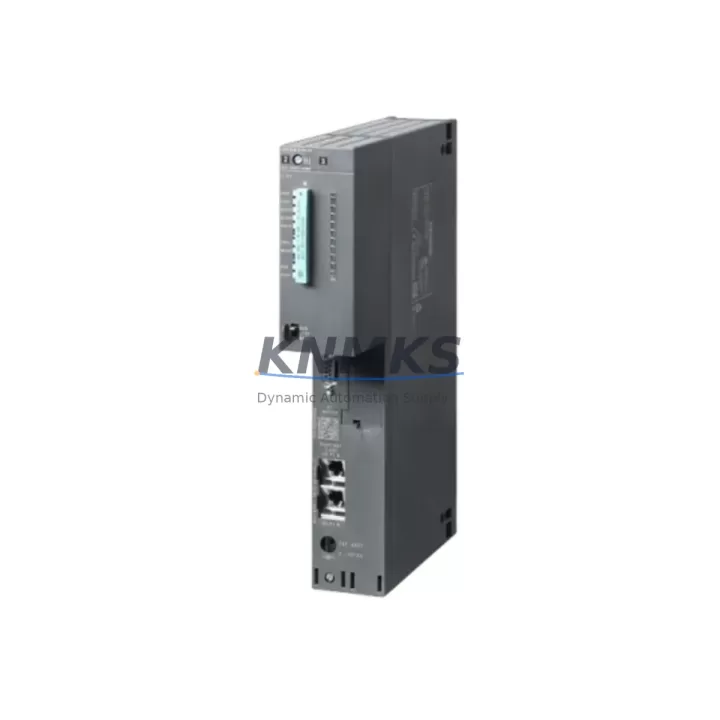
The Siemens 6ES7416-3ES06-0AB0 is a high-performance CPU 416-3 DP/PN module designed for the SIMATIC S7-400 programmable logic controller platform — one of the most widely deployed process automation architectures in petrochemical, power generation, metallurgy, water treatment, and port logistics industries. As a central processing unit governing program execution, communication, and I/O coordination across the entire S7-400 rack, this CPU is a mission-critical component whose failure directly translates to unplanned production downtime. Maintaining a verified, pre-tested spare unit on-site or in regional inventory is a fundamental requirement for any maintenance engineering team operating S7-400-based control systems.
KNMKS supplies the 6ES7416-3ES06-0AB0 as an original-grade spare part, fully tested prior to shipment, backed by a support terms confirmed by quotation, and available for fast global dispatch to support emergency replacement, scheduled overhaul, and long-term spare parts inventory programs.
Spare Maintenance Table
| Part Number | 6ES7416-3ES06-0AB0 |
| Brand | Siemens |
| Series | SIMATIC S7-400 |
| Module Type | CPU 416-3 DP/PN |
| Communication Interfaces | MPI/DP (PROFIBUS), PROFINET (PN), integrated Ethernet |
| Work Memory | 16 MB (expandable) |
| Processing Speed | 0.04 µs per binary instruction |
| Supply Voltage | DC 5 V via S7-400 backplane (PS 407 / PS 405 power supply) |
| Operating Temperature | 0 °C to +60 °C |
| Mounting | S7-400 UR1 / UR2 / UR2-H rack, slot 2 or 3 |
| Country of Origin | Germany |
| Weight | 1,070 g |
| Compatibility | SIMATIC S7-400 UR1, UR2, UR2-H racks; STEP 7 V5.x / TIA Portal |
| Replacement Scope | Direct replacement for 6ES7416-3ES06-0AB0; cross-compatible with earlier 416-3 variants (verify firmware) |
| Pre-Shipment Testing | Power-on functional verification, communication port check |
| Support terms | 12 Months |
Maintenance Planning for Continuous Operation
When a 6ES7416-3ES06-0AB0 CPU failure is identified — whether through a watchdog fault, communication dropout, or rack diagnostic alarm — the replacement workflow must extend beyond the CPU module itself. A disciplined maintenance engineer will treat the CPU fault as a trigger for a broader cabinet inspection to prevent secondary failures and ensure the restored system operates reliably through the next planned maintenance window.
Begin with the PS 407 or PS 405 power supply module in the same rack. A degraded power supply is a common root cause of CPU instability and memory corruption; if the CPU has failed prematurely, the power supply rails should be verified under load before the replacement CPU is installed. Similarly, inspect the IM 460 / IM 461 interface modules if the S7-400 system uses expansion racks — a faulty interface module can cause the new CPU to report I/O access errors immediately after startup, masking the true restoration of the system.
On the communication side, verify the CP 443-1 or CP 443-5 communication processor if the plant network relies on dedicated Ethernet or PROFIBUS gateways beyond the CPU’s integrated ports. A communication processor that has been operating under sustained load alongside a failing CPU may have accumulated buffer errors or firmware faults that will only surface after the CPU is replaced and traffic resumes. For systems using FM 455 or FM 458 function modules for closed-loop control or high-speed positioning, confirm that these modules have retained their parameterization and are responding correctly on the backplane after CPU swap.
At the field interface level, inspect SM 421 digital input modules and SM 422 digital output modules for blown fuses, damaged terminal blocks, or degraded optocouplers — particularly in high-cycle applications such as conveyor control, valve actuation, or motor starter interlocking. Signal integrity at the I/O level is often compromised in the same fault event that takes down the CPU, especially in environments with poor grounding or transient-heavy power distribution. Where analog signals are involved, SM 431 analog input modules should be checked for drift or calibration loss, as these are sensitive to power interruptions and may require re-zeroing after a CPU replacement.
Finally, confirm that the SIMATIC HMI panel (TP or MP series) connected to the CPU via MPI or PROFINET re-establishes communication cleanly after the replacement CPU is loaded with the backed-up project. An HMI that fails to reconnect is a common post-replacement issue caused by mismatched MPI addresses or PROFINET device names, and resolving it before handing the system back to operations prevents unnecessary alarm escalation.
Site Replacement Workflow
Step 1 — Backup and Documentation: Before removing the failed CPU, retrieve the current project from the STEP 7 or TIA Portal archive. If the CPU is partially functional, use the online upload function to capture the current program state. Document the MPI address, PROFINET device name, and IP configuration from the CPU properties.
Step 2 — Safe Isolation: Place the S7-400 system in STOP mode via the mode selector switch. Notify the control room and lock out the rack power supply per site LOTO procedures. Do not remove the CPU while the rack is energized.
Step 3 — Module Exchange: Remove the failed 6ES7416-3ES06-0AB0 by releasing the front panel locking screws and sliding the module out of the rack slot. Insert the replacement unit — supplied by KNMKS, pre-tested and verified — into the same slot. Secure the locking screws and confirm the module is fully seated on the backplane connector.
Step 4 — Configuration Restore: Power on the rack and allow the CPU to complete its self-test sequence. Download the backed-up project using STEP 7 or TIA Portal. Restore the MPI address and PROFINET device name to match the original configuration. Verify that all I/O modules are recognized and that no rack diagnostic errors are present.
Step 5 — Communication Verification: Confirm PROFIBUS DP and PROFINET connectivity to all slave devices and remote I/O stations. Check HMI communication and confirm that all process values are displaying correctly before switching the CPU to RUN mode.
Step 6 — Handover: Run the system through one complete process cycle under supervision. Document the replacement in the maintenance log, record the new module serial number, and update the spare parts inventory to trigger reorder of a replacement unit for future use.
Spare Parts Support FAQ
Q1: Is the 6ES7416-3ES06-0AB0 a direct drop-in replacement for earlier CPU 416-3 variants?
The 6ES7416-3ES06-0AB0 is generally compatible with earlier CPU 416-3 hardware revisions within the S7-400 platform, but firmware version alignment is required. Before installation, verify that the replacement CPU firmware is compatible with the STEP 7 or TIA Portal project version in use. KNMKS can advise on firmware compatibility based on your project version prior to shipment.
Q2: How does KNMKS verify the 6ES7416-3ES06-0AB0 before shipment?
Each unit undergoes a power-on functional test, communication port verification, and visual inspection for physical damage or connector wear. Units that do not pass all checks are not dispatched. A test report is available upon request for critical applications.
Q3: What is the recommended spare parts holding strategy for S7-400 CPU modules?
For production-critical systems, maintaining at least one verified spare CPU on-site is strongly recommended. For multi-site operations or systems with long lead times from the OEM, a regional buffer stock of two to three units — combined with a 12-month rolling inspection cycle — provides adequate coverage against both emergency failures and planned overhaul schedules.
Q4: Can KNMKS support long-term supply of the 6ES7416-3ES06-0AB0 for multi-year maintenance contracts?
Yes. KNMKS maintains ongoing sourcing capability for S7-400 platform components including CPU modules, power supplies, I/O modules, and communication processors. Long-term supply agreements with defined lead times and pricing can be arranged for maintenance contractors and end-user procurement teams managing multi-year asset life extension programs.
© 2026 KNMKS. All rights reserved.
Original Source: https://knmks.com
Contact: admin@knmks.com | +86 18359268345
Product Identification
- Brand / Ecosystem
-
Siemens
Siemens - Model / Series
-
6ES7416-3ES06-0AB0
SIMATIC Series - Product Family
- PLCs & Controllers
- Availability Status
- Available on request after model and quantity confirmation
- Inquiry Type
- B2B RFQ, replacement inquiry and project spare-part request
- Pre-Quote Check
- Exact SKU, brand, series, quantity, nameplate photos and destination country are checked before quotation
System Path
Where this product fits in the KNMKS automation structure.
Specification & Inquiry Focus
- Control platform
- PLC, PAC and modular controllers
- Common needs
- CPU, rack, power and I/O expansion
- Project support
- Replacement, cabinet build and maintenance
Buyer Confirmation
Information KNMKS checks before replying.
- Exact model
- 6ES7416-3ES06-0AB0
- Brand / ecosystem
- Siemens
- Product family
- PLCs & Controllers
- Application note
- Replacement, maintenance, project build or spare-part list
- Useful photos
- Nameplate, installed unit, cabinet layout or connector side
- Delivery details
- Quantity, destination country and target schedule
Document Support
Files and notes can be confirmed during quotation.
- Product photos or nameplate confirmation when available
- Packing and delivery notes before quotation confirmation
- Support scope and delivery terms confirmed per inquiry
- Export document coordination for qualified B2B requests
Inquiry Support
- Model cross-checking before quotation
- CPU, power, rack and expansion module matching
- Support for replacement and project inquiry
What to Send Us
- Brand and exact model number: Siemens 6ES7416-3ES06-0AB0
- Quantity and required delivery time
- Application, replacement requirement or nameplate photo
- Destination country and shipping preference
RFQ Preparation
This is a product inquiry page built for RFQ communication.
Fast Model Check
Send this model to KNMKS for confirmation.
Include quantity, destination country and photos if this is a maintenance replacement. The inquiry will be saved with a reference number after submission.
Brand & Compatibility Note
KNMKS displays automation product information for well-known industrial brand ecosystems and compatible replacement references. Brand names are used for product identification and compatibility reference only; final availability and commercial terms are confirmed per quotation.
 Manufacturing
 Machine Tools
 Packaging
 Energy & Power



 HMI & Displays
 Servo Systems
 Variable Frequency Drives
 Sensors