
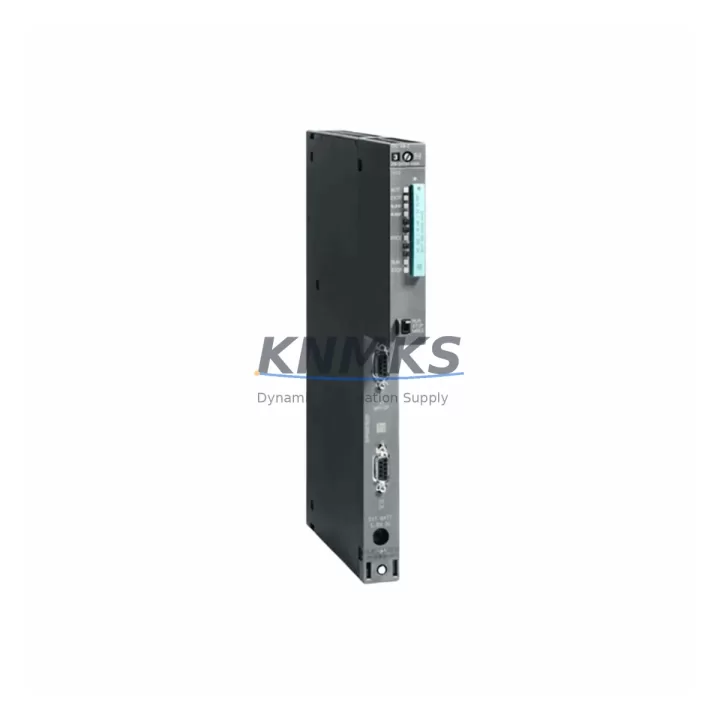
Overview
Siemens 6ES7416-2XK04-0AB0 Maintenance-Proven Spare Part for Factory Uptime
The Siemens 6ES7416-2XK04-0AB0 is a high-performance CPU 416-2 module designed for the SIMATIC S7-400 programmable logic controller platform — one of the most widely deployed process automation architectures in heavy industry, chemical processing, power generation, and automotive manufacturing. As a central processing unit within the S7-400 rack, this module governs program execution, I/O coordination, communication management, and real-time diagnostics across the entire control system. When this CPU fails or degrades, the consequences extend far beyond a single cabinet: entire production lines, safety interlocks, and SCADA data pipelines can be disrupted simultaneously.
Sourcing a verified original 6ES7416-2XK04-0AB0 spare is not simply a procurement task — it is a maintenance strategy decision. Facilities that maintain at least one pre-tested CPU spare on-site consistently achieve faster mean-time-to-repair (MTTR) and avoid the extended lead times that accompany emergency procurement from distribution channels. This module is stocked, pre-shipment tested, and backed by a support terms confirmed by quotation, making it a reliable foundation for both emergency replacement and planned annual maintenance cycles.
Spare Maintenance Table
| Parameter | Specification |
|---|---|
| Part Number | 6ES7416-2XK04-0AB0 |
| Module Type | CPU 416-2, Central Processing Unit |
| Platform | SIMATIC S7-400 |
| Rack Compatibility | UR1 (9-slot), UR2 (18-slot), UR2-H redundancy rack |
| Working Memory | 8 MB (code + data) |
| Load Memory | Up to 64 MB via memory card (6ES7952 series) |
| Communication Interfaces | MPI/DP (integrated), 2nd DP interface via CP modules |
| Supply Voltage | DC 5V via backplane (PS 407 or PS 405 power supply) |
| Operating Temperature | 0 °C to +60 °C |
| Dimensions (W×H×D) | 25 mm × 290 mm × 219 mm (double-width slot) |
| Weight | Approx. 0.85 kg |
| Origin | Germany |
| Support terms | 12 Months — Pre-shipment functional test included |
| Condition | Original / Migration-Ready Spare |
| Delivery | Global dispatch, ESD-safe packaging |
Maintenance Planning for Continuous Operation
Replacing the 6ES7416-2XK04-0AB0 in a live S7-400 system requires a structured approach that accounts for the interdependencies between the CPU and surrounding rack components. Maintenance engineers should treat a CPU replacement event as an opportunity to inspect and validate the entire control cabinet — not just the failed module.
Begin with the PS 407 or PS 405 power supply module (e.g., 6ES7407-0KA02-0AA0 or 6ES7405-0KA02-0AA0). A degraded power supply is a leading cause of CPU instability and intermittent faults. Verify output voltage stability under load before inserting the replacement CPU. Next, inspect the S7-400 backplane bus connector and rack slot contacts for oxidation or mechanical damage — poor backplane contact can cause the new CPU to report bus errors immediately after installation.
For systems using PROFIBUS DP communication, validate the DP network termination resistors and cable shielding continuity. A common post-replacement issue is DP bus timeout caused by unterminated segments or damaged 6ES7972-0BB52-0XA0 PROFIBUS connectors. If the system uses CP 443-1 or CP 443-5 communication processors for Ethernet or PROFIBUS extension, confirm that their configuration files are consistent with the new CPU’s MPI address and subnet settings.
Signal integrity should be verified at the SM 421 digital input modules and SM 422 digital output modules connected to the CPU’s I/O bus. After CPU swap, perform a full I/O force test to confirm that all field signals are correctly mapped. For analog-intensive applications, check SM 431 or SM 432 analog I/O modules for calibration drift — a CPU replacement is an ideal time to recalibrate analog channels against known reference signals.
Finally, review the 6ES7952-1KK00-0AA0 memory card (or equivalent) that holds the CPU’s load memory program. Confirm the firmware version on the replacement CPU is compatible with the existing program structure. If the facility uses a SIMATIC HMI TP or MP panel connected via MPI, re-establish the MPI connection after CPU restart and verify that all HMI tags are polling correctly before returning the system to production.
Site Replacement Workflow
Step 1 — Pre-Replacement Preparation: Back up the current CPU program using SIMATIC Manager or TIA Portal via MPI/DP or memory card extraction. Document the current MPI address, subnet ID, and DP master configuration. Notify the operations team and confirm a maintenance window.
Step 2 — Power Down and Module Extraction: Switch the PS 407/PS 405 power supply to OFF. Wait for the DC bus to discharge (minimum 10 seconds). Remove the 6ES7416-2XK04-0AB0 by releasing the front panel locking screws and sliding the module out of the rack slot. Handle with ESD precautions.
Step 3 — Replacement Module Preparation: Transfer the memory card from the old CPU to the replacement unit (if the card is intact and program-valid). Set the MPI address switch on the new CPU to match the original configuration. Inspect the backplane connector pins before insertion.
Step 4 — Installation and Power-Up: Slide the replacement 6ES7416-2XK04-0AB0 into the rack slot and secure the locking screws. Power up the PS module and observe the CPU’s RUN/STOP/SF LEDs. A clean startup should show RUN (green) with no SF (system fault) indication.
Step 5 — Program Restore and Validation: If the memory card was not transferred, download the backed-up program via MPI. Perform a full I/O test, verify PROFIBUS DP slave status, and confirm HMI communication. Log the replacement event in the facility’s maintenance management system (CMMS) and update the spare parts inventory record.
This workflow minimizes downtime to under 60 minutes for experienced maintenance teams and ensures system compatibility is maintained without requiring hardware reconfiguration of downstream I/O or communication modules.
Spare Parts Support FAQ
Q1: Is the 6ES7416-2XK04-0AB0 compatible with all S7-400 rack configurations?
The CPU 416-2 is compatible with UR1 (9-slot) and UR2 (18-slot) universal racks, as well as the UR2-H redundancy rack used in high-availability configurations. It occupies a double-width slot. Confirm rack slot availability and power budget from the installed PS module before ordering.
Q2: What pre-shipment testing is performed on this spare?
Each 6ES7416-2XK04-0AB0 unit undergoes functional power-on verification, LED status confirmation, and communication interface check prior to dispatch. Units are shipped in ESD-safe anti-static packaging with protective foam inserts to prevent transit damage.
Q3: How should this spare be stored in a long-term inventory program?
Store in a climate-controlled environment at 15–25 °C with relative humidity below 75% (non-condensing). Keep in original ESD packaging. Perform a power-on functional check every 18–24 months if the spare remains unused. Record the storage date and last test date in your CMMS for audit traceability.
Q4: What is the support terms coverage and what does it include?
This spare is covered by a support terms confirmed by quotation from the date of shipment. The support terms covers functional failure under normal operating conditions and includes technical support for installation and compatibility verification. Support requests are processed via admin@knmks.com with a fault description and photographic evidence of the installation environment.
© 2026 KNMKS. All rights reserved.
Original Source: https://knmks.com
Contact: admin@knmks.com | +86 18359268345
Product Identification
- Brand / Ecosystem
-
Siemens
Siemens - Model / Series
-
6ES7416-2XK04-0AB0
SIMATIC Series - Product Family
- PLCs & Controllers
- Availability Status
- Available on request after model and quantity confirmation
- Inquiry Type
- B2B RFQ, replacement inquiry and project spare-part request
- Pre-Quote Check
- Exact SKU, brand, series, quantity, nameplate photos and destination country are checked before quotation
System Path
Where this product fits in the KNMKS automation structure.
Specification & Inquiry Focus
- Control platform
- PLC, PAC and modular controllers
- Common needs
- CPU, rack, power and I/O expansion
- Project support
- Replacement, cabinet build and maintenance
Buyer Confirmation
Information KNMKS checks before replying.
- Exact model
- 6ES7416-2XK04-0AB0
- Brand / ecosystem
- Siemens
- Product family
- PLCs & Controllers
- Application note
- Replacement, maintenance, project build or spare-part list
- Useful photos
- Nameplate, installed unit, cabinet layout or connector side
- Delivery details
- Quantity, destination country and target schedule
Document Support
Files and notes can be confirmed during quotation.
- Product photos or nameplate confirmation when available
- Packing and delivery notes before quotation confirmation
- Support scope and delivery terms confirmed per inquiry
- Export document coordination for qualified B2B requests
Inquiry Support
- Model cross-checking before quotation
- CPU, power, rack and expansion module matching
- Support for replacement and project inquiry
What to Send Us
- Brand and exact model number: Siemens 6ES7416-2XK04-0AB0
- Quantity and required delivery time
- Application, replacement requirement or nameplate photo
- Destination country and shipping preference
RFQ Preparation
This is a product inquiry page built for RFQ communication.
Fast Model Check
Send this model to KNMKS for confirmation.
Include quantity, destination country and photos if this is a maintenance replacement. The inquiry will be saved with a reference number after submission.
Brand & Compatibility Note
KNMKS displays automation product information for well-known industrial brand ecosystems and compatible replacement references. Brand names are used for product identification and compatibility reference only; final availability and commercial terms are confirmed per quotation.
 Manufacturing
 Machine Tools
 Packaging
 Energy & Power



 HMI & Displays
 Servo Systems
 Variable Frequency Drives
 Sensors