
Overview
Siemens 6ES7414-3XJ00-0AB0 Migration-Ready CPU for Legacy S7-400 Control Systems
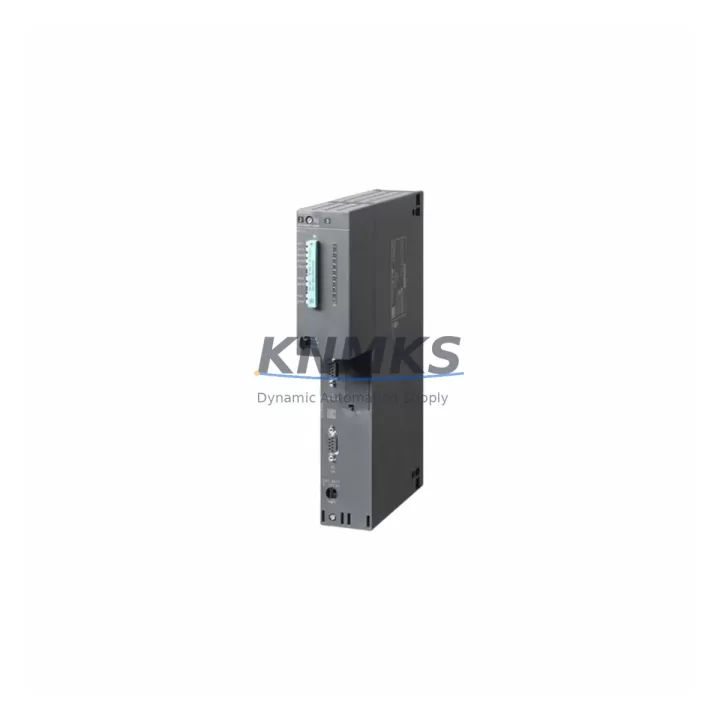
The Siemens 6ES7414-3XJ00-0AB0 is a SIMATIC S7-400 CPU 414-3 module designed for high-availability process automation environments. As legacy S7-400 racks approach end-of-support, engineering teams managing DCS migration, control cabinet upgrades, and production line modernization projects increasingly rely on verified, migration-ready replacements to maintain operational continuity. This unit is pre-tested, firmware-verified, and ships with a support terms confirmed by quotation — making it a dependable drop-in solution for both emergency replacements and scheduled outage windows.
The 6ES7414-3XJ00-0AB0 supports PROFIBUS-DP and MPI communication interfaces, enabling direct integration into existing S7-400 backplane configurations without requiring changes to the communication topology. Engineers replacing a failed or end-of-life CPU in an active production environment can retain the original program logic, HMI screen assignments, and network node addresses, significantly reducing commissioning time and downtime exposure.
Migration Compatibility Table
| Parameter | Specification / Retrofit Note |
|---|---|
| SKU / Part Number | 6ES7414-3XJ00-0AB0 |
| Series | SIMATIC S7-400, CPU 414-3 |
| Communication Interfaces | MPI, PROFIBUS-DP (2× DP master/slave); compatible with existing DP network topology |
| Backplane / Rack Compatibility | S7-400 UR1, UR2, ER1, ER2 racks; standard S7-400 slot assignment retained |
| Power Supply Requirement | Powered via S7-400 PS module (PS 405 / PS 407 series); verify rail capacity before swap |
| Program Memory | 512 KB RAM work memory; supports MMC (Micro Memory Card) for program backup and restore |
| Installation Footprint | Standard S7-400 single-slot CPU; no mechanical modification required |
| Firmware Compatibility | Verify STEP 7 project firmware version prior to MMC restore; align with existing HW Config |
| Replacement Recommendation | Direct replacement for 6ES7414-3XJ00-0AB0; cross-check with 6ES7414-3EM05-0AB0 for upgraded variant |
| Commissioning Focus | MPI node address, DP master system ID, I/O module addressing, OB1/OB35 cycle time validation |
| Pre-Shipment Testing | Power-on, memory self-test, and communication interface verification completed before dispatch |
| Support terms | 12 months from date of shipment |
Retrofit Planning for Existing Automation Systems
A successful S7-400 CPU retrofit begins well before the maintenance window opens. The first step is a full audit of the existing rack configuration — identifying the PS 407 10A power supply rail load, the number of populated I/O slots, and whether any ET 200M distributed I/O stations are connected via PROFIBUS-DP. In systems where the 6ES7414-3XJ00-0AB0 serves as the DP master, the DP master system configuration stored in the STEP 7 HW Config must be exported and preserved before the CPU is removed.
Terminal wiring on the CPU itself is minimal — the MPI/DP port connections use standard Sub-D9 connectors — but the surrounding I/O modules, such as SM 321 digital input modules and SM 331 analog input modules, must be confirmed as correctly addressed in the hardware configuration. If the rack also hosts a CP 443-1 Ethernet communication processor for SCADA or historian connectivity, the IP address and connection table settings should be documented separately, as these are stored on the CP module itself and are not affected by the CPU swap.
For systems using a SIMATIC Panel (TP or OP series HMI) connected via MPI, the HMI project’s MPI station address and baud rate settings must match the replacement CPU’s MPI configuration. This is a common source of post-swap communication failure that can be avoided with a pre-outage configuration review. Similarly, if the plant uses a SIMATIC NET OPC server or S7-PLCSIM for offline testing, the connection parameters should be validated against the replacement unit before the live cutover.
Where the control cabinet also houses a SITOP power supply module feeding 24 VDC to field devices, engineers should verify that the total current draw — including the new CPU’s internal consumption — remains within the SITOP unit’s rated output. This is particularly relevant in dense rack configurations where multiple FM 355 function modules or CP communication modules are installed alongside the CPU.
Downtime Control During System Migration
Minimizing unplanned downtime during a CPU replacement requires a structured pre-outage checklist and a clear rollback plan. Before initiating the swap, upload the current program from the existing 6ES7414-3XJ00-0AB0 to the programming device using STEP 7 and save a timestamped backup of the MMC image. This ensures that if the replacement unit encounters an unexpected firmware incompatibility, the original program can be restored to a spare CPU without delay.
During the physical swap, the S7-400 rack should be powered down at the PS module rather than at the main breaker, allowing the CP 443-1 and any IM 460 interface modules to discharge cleanly. The replacement CPU should be inserted into the same slot position, and the MMC transferred directly from the original unit if the card is confirmed compatible with the replacement firmware version. After power-up, the CPU will perform a memory self-test and attempt to enter RUN mode automatically if the MMC contains a valid program and the startup OB (OB 100 or OB 102) is configured correctly.
Field control continuity is maintained by ensuring that all PROFIBUS-DP slaves — including remote I/O stations and variable-speed drives on the DP network — remain powered during the CPU swap. DP slaves with local parameter storage will retain their last valid output state during the CPU-off interval, provided the DP network watchdog timeout is set appropriately. Once the replacement CPU enters RUN mode, a full I/O force table check and analog signal verification should be completed before releasing the process back to automatic control.
Retrofit Support FAQ
Q1: Is the 6ES7414-3XJ00-0AB0 a direct drop-in replacement for the same part number?
Yes. Units with the same order number are hardware-compatible and use the same slot position, backplane connector, and MMC interface. Firmware version differences between production batches are typically minor and do not affect program execution, but it is recommended to verify the STEP 7 HW Config firmware entry matches the replacement unit’s firmware stamp before restoring the MMC.
Q2: Can the original program be transferred directly via MMC without re-downloading from STEP 7?
In most cases, yes. If the MMC from the original CPU is physically intact and the replacement unit accepts the same MMC format, the program, data blocks, and system configuration will load automatically on first power-up. If the MMC is damaged or unavailable, the program can be downloaded from the STEP 7 project archive via MPI or PROFIBUS-DP using a PC adapter or CP 5611 communication card.
Q3: What pre-shipment testing is performed on this unit?
Each 6ES7414-3XJ00-0AB0 unit undergoes power-on self-test, memory integrity verification, and MPI/DP interface communication checks before dispatch. Units that fail any test stage are quarantined and not shipped. A test report is available upon request for critical infrastructure projects.
Q4: What does the support terms confirmed by quotation cover, and what is the lead time for in-stock units?
The support terms confirmed by quotation cover hardware defects under normal operating conditions, including CPU module failure, memory errors, and communication interface faults. It does not cover damage from incorrect installation, overvoltage, or environmental exposure beyond rated specifications. In-stock units are dispatched within 1–3 business days. Emergency same-day dispatch is available for critical plant outage situations — contact the sales team directly to confirm availability and shipping options.
© 2026 KNMKS. All rights reserved.
Original Source: https://knmks.com
Contact: admin@knmks.com | +86 18359268345
Product Identification
- Brand / Ecosystem
-
Siemens
Siemens - Model / Series
-
6ES7414-3XJ00-0AB0
SIMATIC Series - Product Family
- PLCs & Controllers
- Availability Status
- Available on request after model and quantity confirmation
- Inquiry Type
- B2B RFQ, replacement inquiry and project spare-part request
- Pre-Quote Check
- Exact SKU, brand, series, quantity, nameplate photos and destination country are checked before quotation
System Path
Where this product fits in the KNMKS automation structure.
Specification & Inquiry Focus
- Control platform
- PLC, PAC and modular controllers
- Common needs
- CPU, rack, power and I/O expansion
- Project support
- Replacement, cabinet build and maintenance
Buyer Confirmation
Information KNMKS checks before replying.
- Exact model
- 6ES7414-3XJ00-0AB0
- Brand / ecosystem
- Siemens
- Product family
- PLCs & Controllers
- Application note
- Replacement, maintenance, project build or spare-part list
- Useful photos
- Nameplate, installed unit, cabinet layout or connector side
- Delivery details
- Quantity, destination country and target schedule
Document Support
Files and notes can be confirmed during quotation.
- Product photos or nameplate confirmation when available
- Packing and delivery notes before quotation confirmation
- Support scope and delivery terms confirmed per inquiry
- Export document coordination for qualified B2B requests
Inquiry Support
- Model cross-checking before quotation
- CPU, power, rack and expansion module matching
- Support for replacement and project inquiry
What to Send Us
- Brand and exact model number: Siemens 6ES7414-3XJ00-0AB0
- Quantity and required delivery time
- Application, replacement requirement or nameplate photo
- Destination country and shipping preference
RFQ Preparation
This is a product inquiry page built for RFQ communication.
Fast Model Check
Send this model to KNMKS for confirmation.
Include quantity, destination country and photos if this is a maintenance replacement. The inquiry will be saved with a reference number after submission.
Brand & Compatibility Note
KNMKS displays automation product information for well-known industrial brand ecosystems and compatible replacement references. Brand names are used for product identification and compatibility reference only; final availability and commercial terms are confirmed per quotation.
 Manufacturing
 Machine Tools
 Packaging
 Energy & Power



 HMI & Displays
 Servo Systems
 Variable Frequency Drives
 Sensors