
Overview
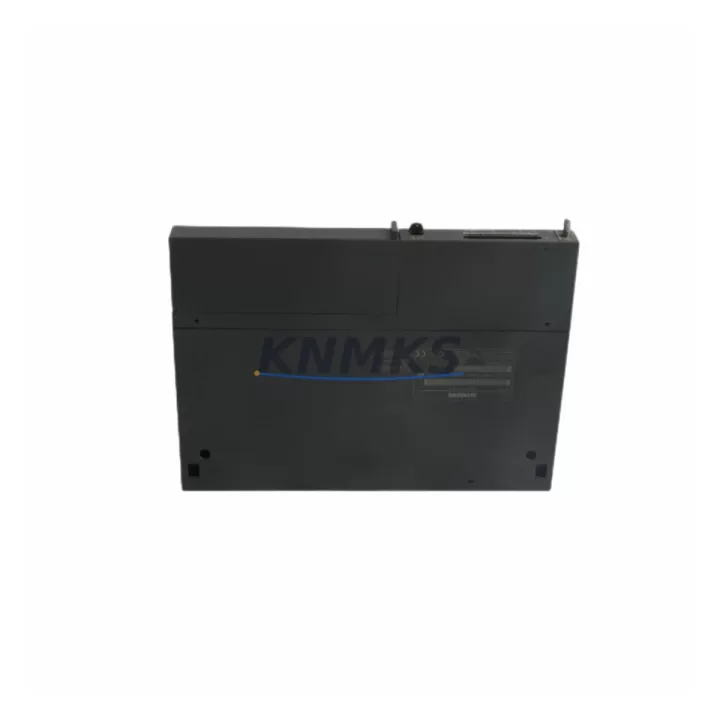
Siemens 6ES7414-2XG04-0AB0 Maintenance Spare for Factory Uptime
The Siemens 6ES7414-2XG04-0AB0 is a CPU 414-2 central processing unit designed for the SIMATIC S7-400 programmable logic controller platform — one of the most widely deployed process automation architectures in heavy industry, chemical processing, automotive manufacturing, and power generation. As a maintenance-proven spare part, this module is sourced to support facilities that depend on continuous production and cannot afford unplanned downtime caused by CPU failure or end-of-life hardware obsolescence.
Stocking the 6ES7414-2XG04-0AB0 as a ready spare is a recognized best practice among maintenance engineers managing aging S7-400 control systems. With Siemens progressively transitioning its S7-400 portfolio toward the S7-1500 series, securing original CPU modules from verified B2B suppliers ensures your facility retains the ability to restore operations quickly — without committing to a full system migration under emergency conditions.
Spare Maintenance Table
| Parameter | Specification |
|---|---|
| Part Number | 6ES7414-2XG04-0AB0 |
| Product Series | SIMATIC S7-400 |
| Module Type | CPU 414-2 (Central Processing Unit) |
| Manufacturer | Siemens AG, Germany |
| Working Memory | 4 MB (expandable via memory card) |
| Communication Interfaces | MPI / DP (PROFIBUS-DP integrated) |
| Backplane Bus | S7-400 standard backplane compatible |
| Power Supply Voltage | DC 5V via backplane (PS 405 / PS 407 compatible) |
| Operating Temperature | 0°C to +60°C |
| Mounting | S7-400 rack (UR1, UR2, ER1, ER2) |
| Compatibility | SIMATIC S7-400 standard and redundant configurations |
| Programming Software | STEP 7 V5.x (SIMATIC Manager) |
| Origin | Germany |
| Weight | Approx. 720 g |
| Support terms | 12 Months from shipment date |
| Condition | Original spare, tested before dispatch |
Maintenance Planning for Continuous Operation
When a CPU 414-2 module fails or approaches end-of-service life, the replacement process extends well beyond swapping the CPU itself. Experienced maintenance engineers treat a CPU replacement as a full control-cabinet audit opportunity. Before commissioning the 6ES7414-2XG04-0AB0, the following associated components should be inspected and verified:
Power Supply Module (PS 407 / PS 405): The S7-400 CPU draws regulated DC 5V and DC 24V from the rack power supply. A degraded PS 407 10A or PS 405 4A can cause intermittent CPU resets that mimic CPU faults. Always measure output voltage stability under load before inserting the replacement CPU.
PROFIBUS-DP Communication Cable and Connectors: The 6ES7414-2XG04-0AB0 integrates a PROFIBUS-DP port. Inspect the DP bus cable termination resistors, 9-pin Sub-D connectors, and bus segment continuity. A faulty DP segment can prevent the CPU from entering RUN mode after replacement, causing unnecessary diagnostic delays.
Digital and Analog I/O Modules (SM 321 / SM 331 series): During a CPU outage, I/O modules may accumulate latent faults. After restoring the CPU, perform a full I/O diagnostic scan. Signal modules such as the SM 321 DI 32×DC24V or SM 331 AI 8×12Bit should be verified for channel integrity before resuming production.
Interface Module (IM 460 / IM 461): For multi-rack S7-400 configurations, the interface modules connecting expansion racks must be checked for firmware compatibility and physical connector condition. A mismatched or damaged IM module can prevent the CPU from recognizing remote I/O racks.
SIMATIC Memory Card (MMC): The 6ES7414-2XG04-0AB0 uses a SIMATIC Micro Memory Card to store the user program and CPU parameters. Ensure the MMC is correctly seated, undamaged, and contains the current validated program version before powering up the replacement CPU.
Relay Output Modules and Fuse Protection: Downstream relay modules (SM 322 DO series) and associated fuse holders in the control cabinet should be inspected for contact wear, blown fuses, and thermal discoloration — all indicators of overcurrent events that may have contributed to the original CPU fault.
Maintaining a coordinated spare parts inventory that includes the CPU module alongside these associated components significantly reduces mean time to repair (MTTR) and supports a structured preventive maintenance schedule aligned with annual plant shutdowns.
Site Replacement Workflow
Step 1 — Pre-Replacement Backup: Before removing the existing CPU, use SIMATIC Manager (STEP 7) to upload and archive the current program, hardware configuration, and data blocks to an engineering workstation. Confirm the MMC backup is readable.
Step 2 — Safe Isolation: Switch the CPU to STOP mode. Confirm all controlled outputs are in a safe state. Isolate the rack power supply using the cabinet main disconnect. Follow site LOTO (Lockout/Tagout) procedures.
Step 3 — Module Removal: Release the CPU module locking mechanism and slide it out of the rack slot. Note the slot position — the CPU 414-2 must be reinstalled in the same designated CPU slot of the S7-400 rack.
Step 4 — MMC Transfer: Transfer the validated SIMATIC Memory Card from the old CPU to the 6ES7414-2XG04-0AB0 replacement unit. Verify the card is fully seated.
Step 5 — Module Installation: Insert the replacement CPU into the rack slot. Reconnect the MPI/DP interface cable. Restore power supply and observe the CPU status LEDs (SF, BF, DC5V, FRCE, RUN, STOP).
Step 6 — Commissioning Verification: Switch the CPU to RUN mode. Confirm PROFIBUS-DP network integrity via diagnostic buffer. Verify all I/O modules report healthy status. Conduct a controlled process restart and monitor for the first 30 minutes of operation.
Step 7 — Documentation: Record the replacement date, module serial number, firmware version, and post-commissioning test results in the plant maintenance log. Update the spare parts inventory accordingly.
This workflow supports a target replacement time of under 2 hours for trained maintenance personnel, minimizing production loss and ensuring system compatibility is maintained without requiring a full engineering reconfiguration.
Spare Parts Support FAQ
Q1: Is the 6ES7414-2XG04-0AB0 still available as a new original spare?
A: Yes. While Siemens has announced the S7-400 series as a mature product line, original spare modules including the CPU 414-2 remain available through authorized industrial spare parts suppliers. We maintain stock specifically to support facilities that are not yet ready to migrate to the S7-1500 platform. Each unit is tested before shipment and covered by a support terms confirmed by quotation.
Q2: Can the 6ES7414-2XG04-0AB0 replace earlier CPU 414-2 variants without reprogramming?
A: In most cases, yes — provided the hardware configuration in STEP 7 is updated to reflect the exact order number and firmware version of the replacement unit. Minor firmware differences between production batches may require a hardware configuration download. We recommend verifying the firmware version upon receipt and consulting your STEP 7 hardware catalog before installation.
Q3: What is your lead time and shipping process for this CPU module?
A: In-stock units are dispatched within 1–3 business days. Each module undergoes functional testing and is packaged in anti-static ESD-safe materials with a detailed inspection report. Express international shipping is available for urgent downtime recovery situations. Contact admin@knmks.com or +86 18359268345 for real-time stock confirmation.
Q4: Do you support long-term supply agreements for S7-400 spare parts?
A: Yes. We work with maintenance and procurement engineers to establish annual supply agreements covering CPU modules, power supplies, I/O signal modules, and communication components for SIMATIC S7-400 systems. Long-term agreements include reserved stock allocation, priority dispatch, and fixed pricing to protect against market volatility for discontinued or hard-to-source industrial components.
© 2026 KNMKS. All rights reserved.
Original Source: https://knmks.com
Contact: admin@knmks.com | +86 18359268345
Product Identification
- Brand / Ecosystem
-
Siemens
Siemens - Model / Series
-
6ES7414-2XG04-0AB0
SIMATIC Series - Product Family
- PLCs & Controllers
- Availability Status
- Available on request after model and quantity confirmation
- Inquiry Type
- B2B RFQ, replacement inquiry and project spare-part request
- Pre-Quote Check
- Exact SKU, brand, series, quantity, nameplate photos and destination country are checked before quotation
System Path
Where this product fits in the KNMKS automation structure.
Specification & Inquiry Focus
- Control platform
- PLC, PAC and modular controllers
- Common needs
- CPU, rack, power and I/O expansion
- Project support
- Replacement, cabinet build and maintenance
Buyer Confirmation
Information KNMKS checks before replying.
- Exact model
- 6ES7414-2XG04-0AB0
- Brand / ecosystem
- Siemens
- Product family
- PLCs & Controllers
- Application note
- Replacement, maintenance, project build or spare-part list
- Useful photos
- Nameplate, installed unit, cabinet layout or connector side
- Delivery details
- Quantity, destination country and target schedule
Document Support
Files and notes can be confirmed during quotation.
- Product photos or nameplate confirmation when available
- Packing and delivery notes before quotation confirmation
- Support scope and delivery terms confirmed per inquiry
- Export document coordination for qualified B2B requests
Inquiry Support
- Model cross-checking before quotation
- CPU, power, rack and expansion module matching
- Support for replacement and project inquiry
What to Send Us
- Brand and exact model number: Siemens 6ES7414-2XG04-0AB0
- Quantity and required delivery time
- Application, replacement requirement or nameplate photo
- Destination country and shipping preference
RFQ Preparation
This is a product inquiry page built for RFQ communication.
Fast Model Check
Send this model to KNMKS for confirmation.
Include quantity, destination country and photos if this is a maintenance replacement. The inquiry will be saved with a reference number after submission.
Brand & Compatibility Note
KNMKS displays automation product information for well-known industrial brand ecosystems and compatible replacement references. Brand names are used for product identification and compatibility reference only; final availability and commercial terms are confirmed per quotation.
 Manufacturing
 Machine Tools
 Packaging
 Energy & Power



 HMI & Displays
 Servo Systems
 Variable Frequency Drives
 Sensors