
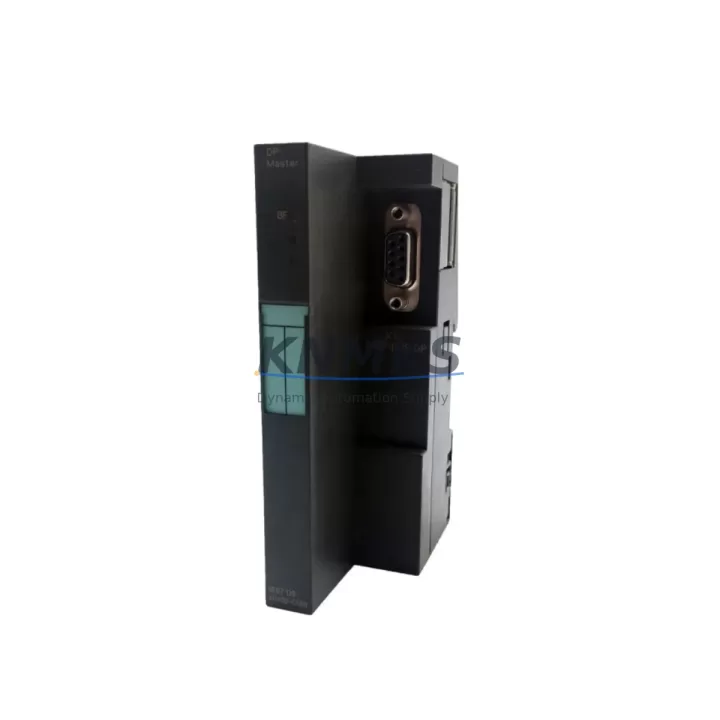
Overview
Siemens 6ES7412-2EK07-0AB0 Migration-Ready CPU for Legacy S7-400 Control Systems
The Siemens 6ES7412-2EK07-0AB0 (CPU412-2 PN) is a high-performance central processing unit designed for the SIMATIC S7-400 programmable logic controller platform. As legacy S7-400 installations approach end-of-life and original CPU modules become increasingly difficult to source, the 6ES7412-2EK07-0AB0 serves as a proven migration-ready replacement that preserves existing rack infrastructure, backplane wiring, and STEP 7 program logic while introducing integrated PROFINET communication capability. For automation engineers managing aging control cabinets in process industries, automotive assembly lines, or utility substations, this CPU module offers a reliable path to extend system service life without committing to a full platform migration.
When planning a retrofit around the 6ES7412-2EK07-0AB0, engineers must verify several critical compatibility parameters before committing to installation. The CPU requires a UR1 or UR2 universal rack — confirm that the existing rack is not a CR2 or ER1 expansion rack, which cannot host a CPU. Power supply compatibility is equally important: the PS407 10A (6ES7407-0KA02-0AA0) is the standard companion power supply for this CPU in most S7-400 configurations, and its output capacity must be validated against the total current draw of all installed I/O and communication modules. If the existing PS407 is an earlier revision, firmware alignment between the power supply and the new CPU should be confirmed using SIMATIC Manager or TIA Portal’s hardware catalog.
Terminal wiring on existing signal modules — including SM421 digital input and SM422 digital output modules — does not require modification when replacing only the CPU, as these modules communicate via the S7-400 backplane bus rather than direct CPU wiring. However, engineers should document all existing module slot assignments and I/O addresses before removal, since the 6ES7412-2EK07-0AB0 must be configured with matching module addresses in the hardware configuration to avoid address conflicts after restart. Any CP443-1 Ethernet communication processor modules installed in the rack will continue to operate normally, though their configuration should be reviewed if the new CPU’s PROFINET interface is being activated simultaneously to avoid IP address conflicts on the plant network.
Program compatibility is a primary concern in any CPU swap. The 6ES7412-2EK07-0AB0 supports all standard STEP 7 organization blocks, function blocks, and data blocks created for earlier CPU412 variants. Before the swap, the complete project — including symbol tables, hardware configuration, and all program blocks — should be archived from the online CPU using SIMATIC Manager. After installing the replacement module, the hardware configuration must be updated to reflect the new CPU order number, then downloaded to the CPU along with the program. HMI screens connected via WinCC or SIMATIC Panel (TP/OP series) communicate through the MPI/PROFIBUS interface or PROFINET, and their connection parameters should be verified post-swap to ensure tag addressing remains intact.
For installations that include IM460/IM461 interface modules for expansion rack connectivity, the 6ES7412-2EK07-0AB0 maintains full compatibility with the S7-400 distributed I/O architecture. Signal isolators installed between field devices and SM modules are unaffected by the CPU replacement. If the system includes a FM458-1 DP function module for closed-loop control or drive coordination, its parameterization should be re-downloaded after the CPU swap to confirm correct operation. Installation space within the control cabinet should be measured before ordering: the 6ES7412-2EK07-0AB0 occupies a standard double-width slot in the UR rack and does not require additional clearance beyond the standard S7-400 mounting specification.
Migration Compatibility Table
| Parameter | Detail |
|---|---|
| SKU / Order Number | 6ES7412-2EK07-0AB0 |
| Series | SIMATIC S7-400 |
| Module Type | CPU412-2 PN (Central Processing Unit with PROFINET) |
| Compatible Racks | UR1, UR2 (Universal Rack); not compatible with CR2 or ER1 |
| Power Supply Compatibility | PS407 10A (6ES7407-0KA02-0AA0) recommended |
| Communication Interfaces | 1× MPI/PROFIBUS DP, 1× PROFINET IO (integrated) |
| Backplane Bus | S7-400 P-bus and K-bus compatible |
| Programming Software | SIMATIC Manager (STEP 7 V5.x), TIA Portal (via migration tool) |
| Replaces / Upgrades From | 6ES7412-2EK06-0AB0, 6ES7412-1XJ05-0AB0 and earlier CPU412 variants |
| Installation Slot Width | Double-width (standard S7-400 UR slot) |
| Firmware Compatibility | Verify firmware version alignment with existing SM/CP modules |
| Commissioning Requirement | Hardware config re-download + program restore required after swap |
| Support terms | support terms confirmed by quotation — tested and verified before shipment |
Retrofit Planning for Existing Automation Systems
A successful retrofit begins with a thorough audit of the existing control cabinet. Before ordering the 6ES7412-2EK07-0AB0, document the current rack layout, recording the slot position and order number of every installed module. In a typical S7-400 cabinet, this will include the PS407 power supply in slot 1, the CPU in slot 2, and a combination of SM421/SM422 digital I/O modules, SM431/SM432 analog I/O modules, and one or more CP443-1 communication processors in the remaining slots. If the system uses PROFIBUS DP for distributed I/O — connecting remote ET 200M or ET 200S stations — the DP master configuration stored in the existing CPU must be exported before the swap and re-imported into the replacement module’s hardware configuration.
For cabinets that include a FM458-1 DP application module handling drive control or PID loops, coordinate the CPU swap with the drive commissioning engineer to ensure the function module’s parameters are re-applied correctly after restart. If the cabinet houses a SIMATIC Panel PC or TP1500 HMI connected via PROFINET, update the HMI project’s PLC connection settings to reflect any IP address changes introduced by the new CPU’s PROFINET interface. Signal isolators and marshalling terminals between field instruments and the SM modules remain untouched throughout the CPU replacement process, which significantly reduces retrofit risk and wiring verification time.
Where the existing installation uses an IM460-0 send interface module to connect expansion racks, verify that the expansion rack’s IM461-0 receive module firmware is compatible with the replacement CPU. In most cases, existing IM460/461 pairs operate transparently after a CPU swap, but this should be confirmed during the pre-commissioning checklist. Programming cables — typically a PC Adapter USB (6ES7972-0CB20-0XA0) or MPI/PROFIBUS PG cable — should be prepared in advance to allow immediate program download after the CPU is seated and powered.
Downtime Control During System Migration
Minimizing production downtime during a CPU swap requires preparation that begins days before the scheduled maintenance window. The first step is to perform a full online backup of the existing CPU: use SIMATIC Manager to upload all program blocks, hardware configuration, and data block contents to the programming station, then archive the complete project to a secure location. This backup serves as both the restore image for the new CPU and the rollback reference if the swap encounters unexpected issues.
During the maintenance window, power down the rack using the PS407’s mode selector switch rather than cutting cabinet power abruptly, which protects retentive data in the existing CPU’s memory. After removing the old CPU and seating the 6ES7412-2EK07-0AB0, perform a cold restart before downloading the hardware configuration. Download the hardware configuration first, then the program blocks, to ensure the CPU’s I/O address map is established before program execution begins. Once the CPU transitions to RUN mode, verify all SM module status LEDs are green and confirm that PROFIBUS DP slaves — if present — have re-established communication by checking the diagnostic buffer in SIMATIC Manager.
For systems where continuous process control is critical, consider staging the replacement during a planned production break rather than an emergency repair scenario. Having the 6ES7412-2EK07-0AB0 pre-configured and tested on a bench setup — with the hardware configuration loaded and program verified in simulation — reduces the in-cabinet commissioning time to under 30 minutes in most cases. All units supplied by KNMKS are pre-tested and verified before shipment, with a support terms confirmed by quotation covering functional defects, which further reduces the risk of a failed swap extending the downtime window.
Retrofit Support FAQ
Q: Is the 6ES7412-2EK07-0AB0 a direct drop-in replacement for the 6ES7412-2EK06-0AB0?
A: Yes, in most installations. Both modules occupy the same double-width UR rack slot and share the same backplane bus interface. The -0EK07 revision introduces an integrated PROFINET port not present on the -0EK06, which requires a hardware configuration update in SIMATIC Manager or TIA Portal. All existing PROFIBUS DP and MPI connections remain compatible without wiring changes.
Q: Do I need to re-wire any terminal blocks or SM modules when replacing the CPU?
A: No field wiring changes are required. SM421, SM422, SM431, and SM432 modules communicate with the CPU exclusively through the S7-400 backplane bus. Terminal blocks connected to field devices are unaffected. Only the hardware configuration file needs to be updated to reference the new CPU order number before downloading.
Q: How do I verify firmware compatibility before installation?
A: Check the firmware version of the 6ES7412-2EK07-0AB0 using SIMATIC Manager’s accessible nodes function after connecting via MPI or PROFINET. Cross-reference this version against the firmware requirements listed in the module’s product information sheet (available from Siemens Industry Online Support). If CP443-1 or FM458-1 modules are installed in the same rack, confirm their minimum CPU firmware requirements are met.
Q: What does the support terms confirmed by quotation cover, and how does KNMKS verify units before shipment?
A: Every 6ES7412-2EK07-0AB0 supplied by KNMKS undergoes functional testing prior to dispatch, including power-on verification, communication interface checks, and firmware version confirmation. The support terms confirmed by quotation cover all functional defects arising under normal operating conditions. Units are shipped with anti-static packaging and include a test report on request. Contact admin@knmks.com or +86 18359268345 for support requests or pre-shipment test documentation.
© 2026 KNMKS. All rights reserved. Original Source: https://knmks.com | Contact: admin@knmks.com | +86 18359268345
Product Identification
- Brand / Ecosystem
-
Siemens
Siemens - Model / Series
-
6ES7412-2EK07-0AB0
SIMATIC Series - Product Family
- PLCs & Controllers
- Availability Status
- Available on request after model and quantity confirmation
- Inquiry Type
- B2B RFQ, replacement inquiry and project spare-part request
- Pre-Quote Check
- Exact SKU, brand, series, quantity, nameplate photos and destination country are checked before quotation
System Path
Where this product fits in the KNMKS automation structure.
Specification & Inquiry Focus
- Control platform
- PLC, PAC and modular controllers
- Common needs
- CPU, rack, power and I/O expansion
- Project support
- Replacement, cabinet build and maintenance
Buyer Confirmation
Information KNMKS checks before replying.
- Exact model
- 6ES7412-2EK07-0AB0
- Brand / ecosystem
- Siemens
- Product family
- PLCs & Controllers
- Application note
- Replacement, maintenance, project build or spare-part list
- Useful photos
- Nameplate, installed unit, cabinet layout or connector side
- Delivery details
- Quantity, destination country and target schedule
Document Support
Files and notes can be confirmed during quotation.
- Product photos or nameplate confirmation when available
- Packing and delivery notes before quotation confirmation
- Support scope and delivery terms confirmed per inquiry
- Export document coordination for qualified B2B requests
Inquiry Support
- Model cross-checking before quotation
- CPU, power, rack and expansion module matching
- Support for replacement and project inquiry
What to Send Us
- Brand and exact model number: Siemens 6ES7412-2EK07-0AB0
- Quantity and required delivery time
- Application, replacement requirement or nameplate photo
- Destination country and shipping preference
RFQ Preparation
This is a product inquiry page built for RFQ communication.
Fast Model Check
Send this model to KNMKS for confirmation.
Include quantity, destination country and photos if this is a maintenance replacement. The inquiry will be saved with a reference number after submission.
Brand & Compatibility Note
KNMKS displays automation product information for well-known industrial brand ecosystems and compatible replacement references. Brand names are used for product identification and compatibility reference only; final availability and commercial terms are confirmed per quotation.
 Manufacturing
 Machine Tools
 Packaging
 Energy & Power



 HMI & Displays
 Servo Systems
 Variable Frequency Drives
 Sensors