
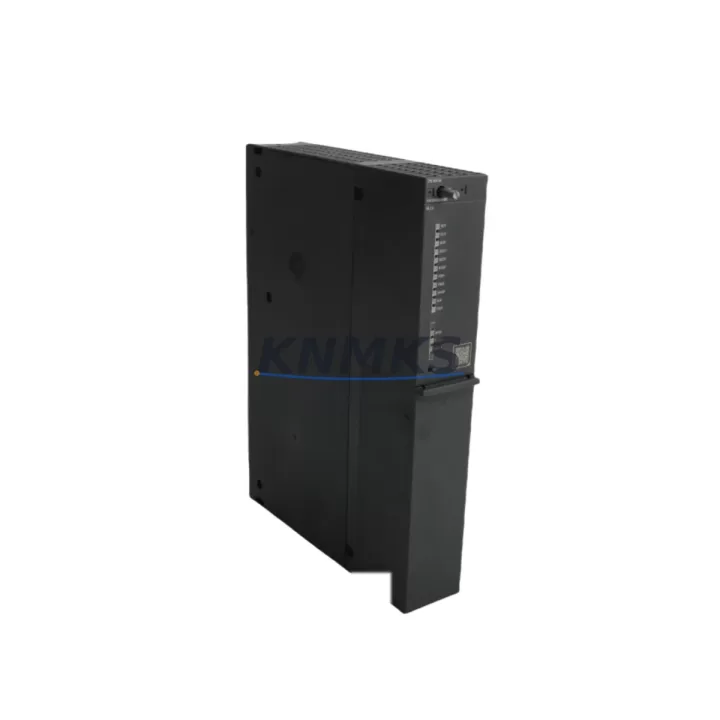
Overview
Siemens 6ES7410-5HX08-0AB0 Migration-Ready CPU for Legacy Control Systems
The Siemens 6ES7410-5HX08-0AB0 (CPU 410-5H) is a high-availability, redundant central processing unit designed for the SIMATIC S7-400H fault-tolerant automation platform. As legacy S7-400H installations approach end-of-life and spare parts become increasingly difficult to source, the 6ES7410-5HX08-0AB0 serves as the definitive migration-ready replacement for earlier CPU 410 variants — including the 6ES7410-5HX04-0AB0 and 6ES7410-5HX06-0AB0 — without requiring a full rack redesign or control logic rewrite.
This CPU module is engineered for continuous process environments where unplanned downtime is not an option: oil and gas separation trains, chemical batch reactors, power generation switchgear, and water treatment SCADA nodes. Its dual-channel redundancy architecture, synchronization via fiber-optic sync modules, and seamless bumpless switchover make it the preferred upgrade path for plant engineers managing aging S7-400H cabinets.
Before initiating a retrofit, engineers must verify several critical compatibility parameters. Power supply capacity is the first checkpoint: the CR2 or UR2-H rack must deliver sufficient 5 VDC and 24 VDC bus current to support the 6ES7410-5HX08-0AB0 alongside co-installed signal modules such as SM 421 digital input cards and SM 431 analog input modules. Terminal wiring on existing I/O front connectors is generally preserved, but backplane slot addressing must be re-confirmed in STEP 7 or TIA Portal after the CPU swap, particularly if the previous firmware revision used a different memory map for process image partitions.
Communication link continuity is equally important. The 6ES7410-5HX08-0AB0 supports PROFIBUS-DP and MPI natively, allowing existing field device networks — including ET 200M distributed I/O stations and PROFIBUS PA segment couplers — to remain online during the transition. If the legacy installation uses a CP 443-1 Ethernet communication processor for SCADA connectivity, its configuration remains valid and does not require re-parameterization after the CPU replacement. Engineers should, however, confirm that the HMI screens (typically WinCC or SIMATIC Panel-based) reference the correct DB block addresses, as minor firmware differences between CPU generations can shift symbolic address offsets.
Installation space confirmation is straightforward: the 6ES7410-5HX08-0AB0 occupies a standard double-width slot in the S7-400 rack and is mechanically interchangeable with all prior CPU 410-5H revisions. No rail modification or cabinet re-drilling is required. Firmware version compatibility should be validated against the existing STEP 7 project version; projects compiled under STEP 7 V5.5 SP4 or later are fully compatible, and TIA Portal V15.1 or higher supports online migration of the project archive.
Field commissioning follows a structured sequence: load the existing program from the memory card or PG/PC, perform a CPU memory reset, download the configuration, and execute a synchronization test between the two redundant CPUs before releasing the system to automatic mode. Commissioning engineers should document the switchover time (typically <100 ms) and verify that the process historian and DCS gateway continue logging without gap during the bumpless transfer test.
Migration Compatibility Table
| Parameter | Legacy CPU (6ES7410-5HX04/06-0AB0) | 6ES7410-5HX08-0AB0 (This Unit) | Action Required |
|---|---|---|---|
| Rack Compatibility | CR2, UR2-H, UR1 | CR2, UR2-H, UR1 | No change — direct slot replacement |
| Communication Interfaces | PROFIBUS-DP, MPI | PROFIBUS-DP, MPI | Retain existing network topology |
| Sync Module Interface | Fiber-optic sync (IM 460/461) | Fiber-optic sync (IM 460/461) | Verify fiber cable integrity before swap |
| Program Memory | Up to 16 MB (FW-dependent) | Up to 30 MB work memory | Re-download project; validate DB sizes |
| Firmware Compatibility | STEP 7 V5.4+ | STEP 7 V5.5 SP4+ / TIA Portal V15.1+ | Upgrade STEP 7 if below SP4 |
| HMI Address Mapping | WinCC / SIMATIC Panels | WinCC / SIMATIC Panels | Verify DB block addresses post-download |
| Redundancy Switchover | <100 ms bumpless | <100 ms bumpless | Test switchover before releasing to auto |
| Installation Footprint | Double-width slot | Double-width slot | No cabinet modification required |
| Support terms | — | 12 Months | Covered from date of shipment |
Retrofit Planning for Existing Automation Systems
A successful retrofit of the 6ES7410-5HX08-0AB0 into an operating S7-400H system requires coordinated planning across hardware, software, and field instrumentation layers. The CPU does not operate in isolation: it depends on a healthy power supply module (PS 407 10A or PS 405 10A) delivering stable 5 VDC and 24 VDC rails to the backplane. Engineers should measure bus current draw before the swap, particularly in racks populated with high-density SM 421 32-channel digital input modules or SM 431 8-channel analog input modules, which can push bus loading close to rated limits in older installations.
The synchronization infrastructure between the two redundant CPUs relies on IM 460-4 and IM 461-4 interface modules connected via fiber-optic cables. These sync links must be inspected for connector contamination and bend-radius violations before the new CPU is installed, as a degraded sync link will prevent the redundant pair from achieving H-system ready status. If the plant uses ET 200M remote I/O stations connected via PROFIBUS-DP, the IM 153-2 interface modules at each station should be confirmed at a firmware revision compatible with the new CPU’s DP master stack.
For installations that include a CP 443-5 Extended PROFIBUS communication processor or a CP 443-1 Advanced Ethernet module in the same rack, no re-parameterization is required — these modules retain their configuration independently of the CPU revision. However, if the control system interfaces with a third-party DCS gateway or OPC server, the gateway’s S7 communication driver should be tested against the new CPU firmware to confirm that S7 protocol connections re-establish correctly after a CPU restart. Programming cables (PC Adapter USB or MPI/PROFIBUS adapter) used during commissioning should be confirmed compatible with the STEP 7 or TIA Portal version in use on the engineering workstation.
Downtime Control During System Migration
Minimizing production interruption during a CPU swap in an H-system is achievable through a structured hot-standby transition procedure. Because the S7-400H architecture maintains one CPU in RUN-Redundant mode and the other in SYNCUP, it is possible to replace the standby CPU while the master CPU continues controlling the process — a procedure known as a single-CPU swap. This approach eliminates the need for a full system shutdown and preserves process continuity throughout the hardware exchange.
The procedure begins by forcing the standby CPU to STOP mode via STEP 7 or the mode selector switch, physically removing it from the rack, and inserting the 6ES7410-5HX08-0AB0. The new CPU is then powered on, the project is downloaded from the memory card or PG/PC, and the synchronization sequence is initiated. The system will automatically transition from single-CPU mode back to full H-system redundancy once synchronization completes — typically within 2 to 5 minutes depending on program size and I/O volume. The master CPU and all connected field devices remain in continuous operation throughout this window.
To protect the original program logic, a full project backup should be archived to both the engineering workstation and an offline memory card before any hardware change begins. HMI screens should be monitored during the synchronization window to confirm that all process values continue updating without interruption. If the installation includes a process historian connected via OPC DA or OPC UA, the historian’s connection watchdog timeout should be extended temporarily to prevent false gap records during the CPU synchronization phase. After the H-system returns to RUN-Redundant status, a deliberate switchover test — forcing the original master to standby — confirms that the new 6ES7410-5HX08-0AB0 can assume master control cleanly before the system is released to normal automatic operation.
Retrofit Support FAQ
Q1: Is the 6ES7410-5HX08-0AB0 a direct drop-in replacement for the 6ES7410-5HX04-0AB0 and 6ES7410-5HX06-0AB0?
Yes. The 6ES7410-5HX08-0AB0 is mechanically and electrically compatible with all prior CPU 410-5H revisions. It occupies the same double-width rack slot, uses the same backplane connector, and supports the same PROFIBUS-DP and MPI network configurations. A STEP 7 project re-download is required after the swap; no hardware wiring changes are needed.
Q2: What pre-shipment testing is performed on this unit?
Each 6ES7410-5HX08-0AB0 unit undergoes functional power-on verification, communication interface continuity testing, and firmware version confirmation before dispatch. Units are shipped with original packaging and protective covers. A test report is available upon request for critical infrastructure procurement.
Q3: What is the support terms coverage and what does it include?
All units carry a support terms confirmed by quotation from the date of shipment. The support terms covers manufacturing defects, functional failures under normal operating conditions, and firmware-related non-starts. It does not cover damage resulting from incorrect installation, overvoltage events, or unauthorized modification. Support requests are processed within 5 business days of unit receipt at our facility.
Q4: Can you confirm stock availability and lead time before I place an order?
Yes. We maintain regional buffer stock across multiple warehouse locations to support urgent MRO and shutdown requirements. Contact our sales team directly to confirm current on-hand quantity, lead time for your region, and bulk pricing for multi-unit procurement programs.
© 2026 KNMKS. All rights reserved.
Original Source: https://knmks.com
Contact: admin@knmks.com | +86 18359268345
Product Identification
- Brand / Ecosystem
-
Siemens
Siemens - Model / Series
-
6ES7410-5HX08-0AB0
SIMATIC Series - Product Family
- PLCs & Controllers
- Availability Status
- Available on request after model and quantity confirmation
- Inquiry Type
- B2B RFQ, replacement inquiry and project spare-part request
- Pre-Quote Check
- Exact SKU, brand, series, quantity, nameplate photos and destination country are checked before quotation
System Path
Where this product fits in the KNMKS automation structure.
Specification & Inquiry Focus
- Control platform
- PLC, PAC and modular controllers
- Common needs
- CPU, rack, power and I/O expansion
- Project support
- Replacement, cabinet build and maintenance
Buyer Confirmation
Information KNMKS checks before replying.
- Exact model
- 6ES7410-5HX08-0AB0
- Brand / ecosystem
- Siemens
- Product family
- PLCs & Controllers
- Application note
- Replacement, maintenance, project build or spare-part list
- Useful photos
- Nameplate, installed unit, cabinet layout or connector side
- Delivery details
- Quantity, destination country and target schedule
Document Support
Files and notes can be confirmed during quotation.
- Product photos or nameplate confirmation when available
- Packing and delivery notes before quotation confirmation
- Support scope and delivery terms confirmed per inquiry
- Export document coordination for qualified B2B requests
Inquiry Support
- Model cross-checking before quotation
- CPU, power, rack and expansion module matching
- Support for replacement and project inquiry
What to Send Us
- Brand and exact model number: Siemens 6ES7410-5HX08-0AB0
- Quantity and required delivery time
- Application, replacement requirement or nameplate photo
- Destination country and shipping preference
RFQ Preparation
This is a product inquiry page built for RFQ communication.
Fast Model Check
Send this model to KNMKS for confirmation.
Include quantity, destination country and photos if this is a maintenance replacement. The inquiry will be saved with a reference number after submission.
Brand & Compatibility Note
KNMKS displays automation product information for well-known industrial brand ecosystems and compatible replacement references. Brand names are used for product identification and compatibility reference only; final availability and commercial terms are confirmed per quotation.
 Manufacturing
 Machine Tools
 Packaging
 Energy & Power



 HMI & Displays
 Servo Systems
 Variable Frequency Drives
 Sensors