
Overview
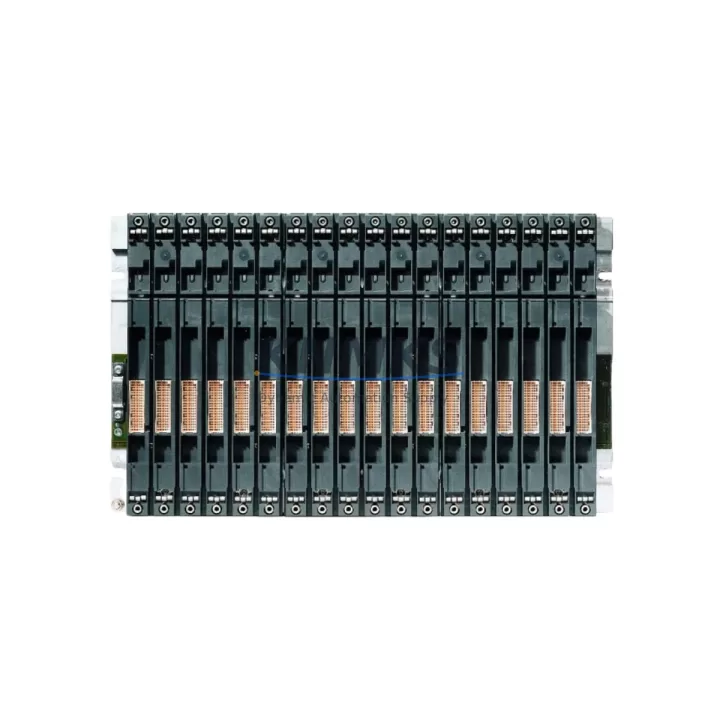
Siemens 6ES7403-1TA01-0AA0 Maintenance-Proven Spare Part for Factory Uptime
The Siemens 6ES7403-1TA01-0AA0 is the IM 461-1 interface module for the SIMATIC S7-400 programmable logic controller platform — one of the most widely deployed process automation architectures in heavy industry, chemical processing, power generation, and automotive manufacturing. As a receive interface module, it enables high-speed, deterministic communication between the central rack and expansion racks, making it a critical component in distributed I/O architectures where rack-to-rack data integrity directly governs production continuity.
For maintenance engineers managing aging S7-400 installations, the 6ES7403-1TA01-0AA0 represents a high-priority spare. Interface module failures are among the most disruptive fault categories in rack-based PLC systems: when the IM link degrades or fails, entire expansion racks — including all associated I/O, relay outputs, and field signal connections — become unreachable to the CPU. The result is an unplanned shutdown that cannot be resolved through software alone. Stocking a verified replacement unit is the single most effective mitigation strategy for this failure mode.
KNMKS supplies the 6ES7403-1TA01-0AA0 as an original Siemens spare part, sourced through established industrial distribution channels. Each unit undergoes pre-shipment functional verification and ships with a support terms confirmed by quotation covering manufacturing defects and operational failures under normal industrial service conditions.
Spare Maintenance Table
| Part Number | 6ES7403-1TA01-0AA0 |
| Description | IM 461-1 Receive Interface Module |
| Brand | Siemens SIMATIC |
| Series | S7-400 |
| Module Role | Expansion rack receive interface (IM 461-x family) |
| Compatible Send IM | 6ES7460-1BA01-0AA0 (IM 460-1), S7-400 central rack |
| Rack Compatibility | UR1, UR2, ER1, ER2 expansion racks |
| Max. Expansion Distance | Up to 1.5 m (local bus extension) |
| Supply Voltage | Via backplane bus (no external supply required) |
| Operating Temperature | 0 °C to +60 °C |
| Mounting | S7-400 rack slot (standard module form factor) |
| Origin | Germany |
| Condition | Original Siemens, new or factory-refurbished |
| Pre-shipment Test | Functional verification performed |
| Support terms | 12 months from date of shipment |
| Shipping | Global express; ESD-safe packaging |
Maintenance Planning for Continuous Operation
When replacing or inspecting the 6ES7403-1TA01-0AA0, a disciplined maintenance engineer will treat the event as a trigger for a broader rack-level inspection. The IM 461-1 operates in close dependency with several adjacent components, and a failure in any one of them can produce symptoms that mimic an interface module fault — or can accelerate wear on a newly installed replacement.
Begin with the send-side interface module in the central rack. The 6ES7460-1BA01-0AA0 (IM 460-1) is the counterpart to the 6ES7403-1TA01-0AA0; if the receive module has failed due to signal integrity issues on the inter-rack bus, the send module should be inspected and tested before the new IM 461-1 is commissioned. Stocking both modules as a matched pair is standard practice in high-availability installations.
Next, verify the S7-400 power supply modules in the expansion rack. The PS 407 series (e.g., 6ES7407-0DA02-0AA0 or 6ES7407-0KA02-0AA0) provides the 24 VDC and 5 VDC backplane rails that power all modules in the rack, including the IM 461-1. Undervoltage or ripple on these rails is a common root cause of intermittent interface module communication errors. Measure output voltages under load before declaring the IM module at fault.
Inspect the backplane bus connectors and rack slot contacts. Oxidation, mechanical damage, or contamination on the S7-400 rack bus can cause the IM 461-1 to report communication faults even when the module itself is serviceable. Clean contacts with approved contact cleaner and verify seating torque on all adjacent modules.
For installations with digital or analog I/O modules (SM 321, SM 322, SM 331, SM 332 series) in the expansion rack, confirm that all I/O modules are correctly addressed and that no address conflicts exist after the IM replacement. A rack-level hardware configuration download via STEP 7 or TIA Portal is recommended following any interface module swap.
Where the expansion rack includes CP communication modules (e.g., CP 443-1 for Ethernet or CP 441-2 for serial links), verify that communication parameters and network addresses are retained after the IM replacement. Some CP modules require a cold restart to re-establish links following a rack power cycle.
Finally, review the 24 VDC field power distribution feeding sensors and actuators connected to I/O modules in the expansion rack. Fuse blocks, terminal strips, and signal isolators in the field wiring cabinet should be inspected as part of any unplanned shutdown recovery — not because they caused the IM failure, but because the same environmental conditions (heat, vibration, moisture ingress) that degrade interface modules also affect these components.
Site Replacement Workflow
Step 1 — Isolate and document. Before removing the 6ES7403-1TA01-0AA0, record the current rack slot position, any diagnostic LEDs status (SF, BUS1F, BUS2F), and the STEP 7 / TIA Portal hardware configuration. Photograph the rack layout if the installation documentation is not current.
Step 2 — Safe power-down. Follow site lockout/tagout (LOTO) procedures. Power down the expansion rack via the PS 407 power supply module. Do not hot-swap the IM 461-1 unless the system documentation explicitly confirms hot-swap capability for this module generation.
Step 3 — Module extraction. Release the front panel locking mechanism, disconnect any bus connectors, and extract the module using the integrated handle. Place the removed module in an ESD-safe bag for return or failure analysis.
Step 4 — Install replacement. Insert the 6ES7403-1TA01-0AA0 replacement into the same slot. Ensure the module is fully seated and the locking mechanism is engaged. Reconnect bus connectors in the correct orientation.
Step 5 — Power-up and verify. Restore power to the expansion rack. Observe the IM 461-1 status LEDs: the BUS1F LED should extinguish within a few seconds of successful link establishment with the central rack IM 460-1. Monitor the CPU diagnostic buffer in STEP 7 or TIA Portal for any residual fault entries.
Step 6 — Functional test. Cycle all I/O points in the expansion rack through a controlled test sequence. Confirm that all process values are correctly reflected in the CPU data image before returning the system to production.
This workflow is applicable to both like-for-like replacements and cross-generation substitutions within the IM 461-x family. For legacy installations using earlier IM 461-0 or IM 461-3 variants, confirm backplane bus compatibility before substituting the 6ES7403-1TA01-0AA0.
Spare Parts Support FAQ
Q: Is the 6ES7403-1TA01-0AA0 still available as a new original part?
A: Yes. KNMKS maintains stock of the 6ES7403-1TA01-0AA0 as an original Siemens spare. Given the long service life of S7-400 installations, we prioritize sustained availability for this module family. Contact our sales team for current stock status and lead time confirmation.
Q: Can the 6ES7403-1TA01-0AA0 replace earlier IM 461 variants such as the 6ES7403-1TA00-0AA0?
A: In most cases, yes — the -1TA01- revision is backward-compatible with -1TA00- installations at the hardware level. However, always verify against your specific STEP 7 hardware configuration file and Siemens compatibility documentation before substituting revisions in a live system. KNMKS technical support can assist with compatibility verification prior to shipment.
Q: What pre-shipment testing does KNMKS perform on this module?
A: Each 6ES7403-1TA01-0AA0 unit is functionally verified before dispatch. Testing confirms module power-up, bus communication initialization, and LED status behavior. Units are shipped in ESD-safe packaging with a support terms confirmed by quotation covering manufacturing defects and operational failures under normal industrial service conditions.
Q: What is the recommended spare parts strategy for S7-400 expansion rack systems?
A: For installations with two or more expansion racks, we recommend stocking at minimum one 6ES7403-1TA01-0AA0 (IM 461-1) and one matched 6ES7460-1BA01-0AA0 (IM 460-1) as a send/receive pair. Complement this with a PS 407 power supply spare and a representative selection of the most critical SM I/O modules in the rack. This configuration covers the highest-impact failure modes and supports same-day recovery for most unplanned shutdowns.
© 2026 KNMKS. All rights reserved.
Original Source: https://knmks.com
Contact: admin@knmks.com | +86 18359268345
Product Identification
- Brand / Ecosystem
-
Siemens
Siemens - Model / Series
-
6ES7403-1TA01-0AA0
SIMATIC Series - Product Family
- PLCs & Controllers
- Availability Status
- Available on request after model and quantity confirmation
- Inquiry Type
- B2B RFQ, replacement inquiry and project spare-part request
- Pre-Quote Check
- Exact SKU, brand, series, quantity, nameplate photos and destination country are checked before quotation
System Path
Where this product fits in the KNMKS automation structure.
Specification & Inquiry Focus
- Control platform
- PLC, PAC and modular controllers
- Common needs
- CPU, rack, power and I/O expansion
- Project support
- Replacement, cabinet build and maintenance
Buyer Confirmation
Information KNMKS checks before replying.
- Exact model
- 6ES7403-1TA01-0AA0
- Brand / ecosystem
- Siemens
- Product family
- PLCs & Controllers
- Application note
- Replacement, maintenance, project build or spare-part list
- Useful photos
- Nameplate, installed unit, cabinet layout or connector side
- Delivery details
- Quantity, destination country and target schedule
Document Support
Files and notes can be confirmed during quotation.
- Product photos or nameplate confirmation when available
- Packing and delivery notes before quotation confirmation
- Support scope and delivery terms confirmed per inquiry
- Export document coordination for qualified B2B requests
Inquiry Support
- Model cross-checking before quotation
- CPU, power, rack and expansion module matching
- Support for replacement and project inquiry
What to Send Us
- Brand and exact model number: Siemens 6ES7403-1TA01-0AA0
- Quantity and required delivery time
- Application, replacement requirement or nameplate photo
- Destination country and shipping preference
RFQ Preparation
This is a product inquiry page built for RFQ communication.
Fast Model Check
Send this model to KNMKS for confirmation.
Include quantity, destination country and photos if this is a maintenance replacement. The inquiry will be saved with a reference number after submission.
Brand & Compatibility Note
KNMKS displays automation product information for well-known industrial brand ecosystems and compatible replacement references. Brand names are used for product identification and compatibility reference only; final availability and commercial terms are confirmed per quotation.
 Manufacturing
 Machine Tools
 Packaging
 Energy & Power



 HMI & Displays
 Servo Systems
 Variable Frequency Drives
 Sensors